01
AI Search + Add
Discover real places with web search, tick what fits, and build your wishlist fast.
02
Attraction deep-dives
Photos, AI review summaries, typical duration, opening hours, notes, and categories.
03
Party-aware pricing
Cost estimates for your adults and kids — with add-ons and a running total to verify.
04
Day Planner
Drag wishlist stops onto days, set durations, and see arrival times chain together.
05
Travel between stops
Transit, drive, walk, or cycle legs with duration, distance, and transit step details.
06
Month View calendar
See the whole trip at a glance — drag days, swap days, then save & process travel.
07
Week View
A focused 3–7 day window for on-trip planning — same drag-and-drop, sized for “this week.”
08
Trip map
All wishlist pins or a single day’s numbered route — drop a pin to add a place.
09
AI auto-planner
Let AI place unassigned wishlist items across days — then revert or keep the plan.
10
Optimize day route
One tap reorders a day’s stops to cut zigzagging travel while respecting opening hours.
11
Print PDF + Excel
Print-ready itinerary with costs — or download a multi-sheet Excel workbook for the trip.
12
Share links — view & edit
Send a view-only link, or a live edit link so co-planners change the same trip together.
13
Thumbs up / down
Each traveller votes on wishlist places — counts show on cards and maps, with vote filters.
14
Mass assign on the map
Select multiple pins, then assign them all to a day in one step with a packedness preview.
15
Party & home base
Adults, kids with ages, default hotel/Airbnb anchor, and trip transport defaults.
16
Pace & hours warnings
Flags when a day is overloaded or a stop lands before open / after close.
17
Cloud Save
Backup trips to the cloud, restore on a new device, and refresh active share links.
18
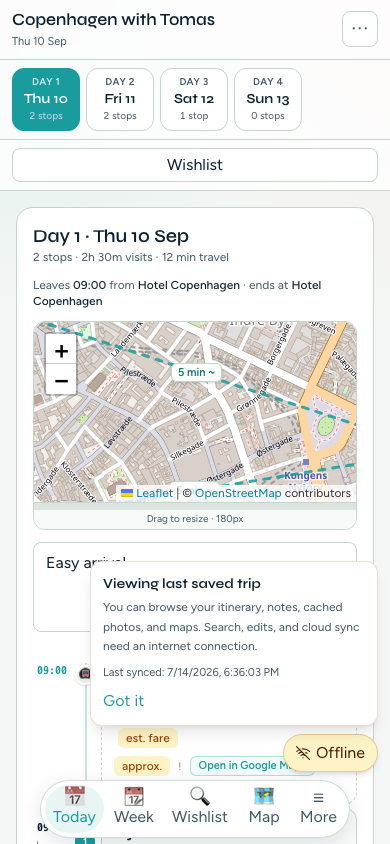
Offline on your phone
Open your last-saved trip with no signal — itinerary, notes, and maps stay readable.
19
Street View & nearby
Peek Street View from the map, or find attractions near a pin within ~5 km.
20
Email sign-in
Sign in with a one-time email code — local-first autosave and dual-currency costs.
🧳 Trips
Setup
- Create / edit / delete trips (name, destination, dates)
- Geocoded destination search with suggestion picker
- Trip list with destination, dates, party, attraction & day counts
- Mark & switch the active trip (opens Research)
- Party editor — adults & children with labels and ages
- Trip defaults: home base, transport mode, visit duration, day start time
- Date changes keep stops on surviving days; orphans go Unassigned
- Import JSON — full backup or single trip
- Create, copy, display, and revoke view & edit share links
🔍 Research & wishlist
Discover
- Search + Add — AI web search for real places; tick what to add
- Custom search prompt · Find more · select all / clear
- “Already on wishlist” indicators · near-duplicate name skip
- Manual add with optional address (auto-geocoded)
- Auto-fetch up to 2 Google photos when a place is added
- Filter by name, category, or tags · sort by name or category
- Category filter bar (All / None / per-category) — persisted
- Thumbs up / down voting with per-traveller names · filter by vote
- Assigned ✓ vs Unassigned badges · thumbnails or category emoji
- Duplicate or remove attractions from the wishlist
- Re-check all GPS (batch geocode) with progress & summary
- Mass assign — multi-select pins, then assign to a day with packedness preview
- Resizable sidebar & map height (persisted)
- Research map: wishlist pins, home-base pin, auto-fit, pan-to-selected
- Street View pick mode — click map → Google Street View popup
- Find nearby attractions from a map pin (~5 km, AI + map/list)
📍 Attraction detail
Enrich
- Tabs: Overview · Photos · Reviews · Duration · Hours · Pricing
- Editable name · address with Update map pin
- 18 categories (museum, food, park, viewpoint, hotel, and more)
- Website, tags, kid-friendly flag, notes
- Photos: fetch / fetch more from Google · paste URL · set thumbnail · remove · lightbox
- Reviews: fetch / refresh AI review summary (rating, count, source)
- Duration: fetch typical visit time (min–max) · Use as planned duration
- Hours: fetch from AI + web · manual weekday editor · seasonal notes · blank template
- Party-aware pricing with add-on toggles & running total
- “Not found” pricing with official source link · freshness / stale indicators
- Header: Assign to day…, Google search popup, Duplicate, Remove
- Assign modal with packedness bar & Light / Busy / Overloaded preview
📅 Day Planner
Schedule
- Wishlist tray with Day N badges on assigned places
- Drag to assign, reorder, or unassign stops
- Per-stop duration editor · click to open attraction detail
- Collapse / expand days (persisted) · collapse all / show all
- Day summary: stops, visit minutes, travel minutes, estimated cost
- Pace warning when a day exceeds ~10 hours
- Per-day notes field
- Day config: start time, custom start/end places, use home / clear
- Journey overview map per day (show/hide, resizable)
- Optimize route — reorder stops to cut zigzagging travel (preview before apply)
- Timeline spine with arrival & departure times chained from day start
- Travel legs: Transit / Drive / Walk / Cycle · duration · distance
- Step-by-step transit directions · estimated fare · “approx.” fallback badge
- Opening hours on stops · warnings (before open, after close, closed today)
- Refresh travel times · auto-enrich missing hours & durations
- Use AI to plan unassigned places · rationale notes · Revert / Keep
🗓️ Month & Week View
Overview
- Full-trip Month View calendar grid with today highlight
- Week View — focused 3–7 day window for on-trip planning
- Day N labels · stop lists · estimated arrival times when processed
- Wishlist tray with unassigned count
- Drag unassigned onto a day · reorder within a day · move between days
- Swap entire days by dragging one day label onto another
- Drop back on wishlist tray to unassign
- Draft edits with dirty banner · Discard or Save & process
- Save & process recomputes travel for the Day Planner
- Open Day Planner shortcut · click stop → detail modal
- Mobile tabs: Today · Week · Wishlist · Map (More for Trips, Month, Export, Settings)
🗺️ Map
Routes
- All wishlist mode — assigned vs unassigned pin styles
- Single day mode with day picker & numbered route
- Route polylines with duration tooltips
- Category filter bar (persisted separately from Research)
- Drop a pin to add an attraction (reverse geocode)
- Mass select pins and assign to a day in one step
- Pin popups: name, category, schedule, thumbs, open detail
- Overlapping-pin spiderfy on hover
- Category emoji · day badges · stop numbers · OpenStreetMap tiles
- Map view persistence (pan/zoom remembered per view)
📄 Export
Print & files
- Print / Save PDF via browser print stylesheet
- Cover: trip name, destination, dates, party, transport, generated date
- Overview: day count, wishlist count, trip total, default home
- Per-day pages: start/end anchors, leave time, day notes, page breaks
- Per-stop: travel leg, arrival–departure, duration, party cost (local + home $)
- Opening-hours warnings · attraction notes · website links
- Cost summary — trip total, per-day, per-attraction lines
- “If you have extra time” appendix for unassigned wishlist places
- Download Excel — multi-sheet workbook (days, calendar, attractions)
- Export all trips or active trip as JSON backup
🔗 Share links
Collaborate
- Public view-only links for co-travellers
- Live edit links — co-planners change the same trip together
- Browse Research, Day Planner, Week, Month, Map, Export
- Wishlist filters, category filters, and thumbs still work for browsing
- Attraction detail readable (enrich / assign / remove blocked on view links)
- Print the itinerary from share mode
- Revoked / missing link error states · clear view vs edit branding
📱 Offline
On the trip
- Open your last-saved trip with no signal
- Itinerary, notes, cached photos, and maps stay readable
- Editing pauses until you reconnect — clear offline badge
- Service-worker caching for the app shell and trip media
⚙️ Settings & data
Control
- Cloud Save upload · Restore from cloud · auto-sync on edits
- Sign out · provider capability display
- API response cache TTL (1–365 days) · clear cache
- Units: Metric or Imperial
- Home currency · fetch / refresh exchange rates
- Dual-currency display (local + ≈ home) across costs
- Export all trips as JSON · export active trip as JSON
- Reset all local data with confirmation
☁️ Auth, cloud & shell
Everywhere
- Email one-time code sign-in · resend · cross-device complete
- Local-first autosave · auto cloud restore when local trips are empty
- Sidebar: Trips, Research, Day Planner, Week, Month, Map, Settings, Export, Premium
- Collapsible sidebar (persisted)
- Mobile bottom nav: Today · Week · Wishlist · Map · More
- Trip switcher · header with name, destination, dates
- Party chip → Quick Edit (transport, day start, home, party)
- Header Cloud Save with saving / saved / failed states
- API budget / quota warning banner · live API call toast feed
- Floating post-it notes scratchpad per trip (Cloud Save syncs)
- Hash URL routing (#research, #planner, #week, …)