“Pretty map” apps win screenshots. Serious planners need more: constraints, costs for real people, movement between stops, month-level balance, and a handoff artifact someone can follow without installing your whole stack. TripPapa is built for that job — research → days → travel legs → PDF/share — with party-aware estimates, Month View, and view-only sharing. This is the case for choosing it when feasibility matters more than pin aesthetics.
For the competitive field, see the 2026 planner roundup. For a surface-by-surface walkthrough, see how TripPapa works. Serious does not mean you abandon Excel, TripIt, or Wanderlog forever — forums still show those stacks working. It means you stop asking a pretty map or a booking inbox to be a feasibility engine.
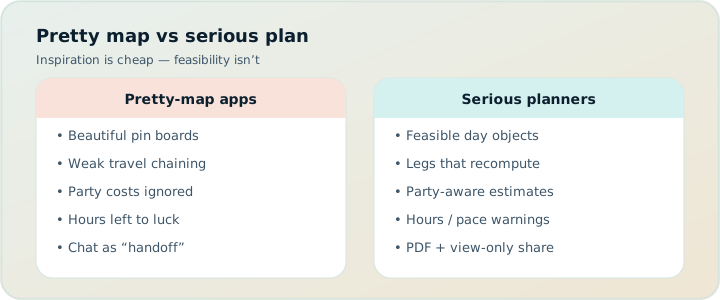
What “serious” means here
Serious does not mean joyless. It means you care whether Thursday works: open hours, travel time, energy, and money for the people actually travelling. Satisficers can wing a café crawl with a map and a vibe. Maximizers, parents, multi-generational groups, and anyone booking timed entries need a plan that survives contact with the city — including the boring work of verifying tickets before you pay.
Pretty maps help geography. They do not automatically help party ticket math, transit or cycle legs, pace warnings, or a PDF for grandparents. Those are the gaps TripPapa fills without pretending to be a booking inbox or a live multiplayer canvas.
Get excited to plan — then get excited to leave the tabs behind.
The TripPapa checklist (real product, not vapor)
- AI Search + Add into a real wishlist (or manual add with optional address)
- Detail tabs: Overview, Photos, Reviews, Duration, Hours, party-aware Pricing
- Day Planner with transit / drive / walk / cycle legs, durations, chained times
- Pace warnings and hours warnings on the timeline
- Month View for balance, day swaps, draft edits, Save & process (recomputes travel)
- Map modes: wishlist pins vs single-day numbered routes; drop pin to add
- AI auto-plan with atomic apply and Revert to pre-AI
- Print / Save as PDF via Export; view-only share links (
/share/…) - Local-first autosave; optional Cloud Save; passwordless magic-link auth
Compared with Wanderlog-style collab maps (free collab; Pro $39.99/year for offline, Pro AI place suggestions, route optimization, booking tools, Google Maps export — verify on site), TripIt-style booking organizers (Pro $49/year — verify on site), Google Travel’s free Gmail dashboard, or Notion/Sheets flexibility without a travel graph, TripPapa is the pick when the deliverable is a day that survives the city — not when the deliverable is a shared pin party or a flight alert.
Party-aware from the first screen
Create a trip with name, destination, and date range. Add the travelling party: adults and children with ages. Set home base, preferred transport mode, typical visit duration, day start time. That metadata is not decorative. Dates create day columns. Party feeds Pricing. Home base anchors start/end. Transport defaults keep Day Planner from asking the same question every morning — including cycle when that is how you move.
Serious planners already know a “from $20” adult price is fiction for a family of four. TripPapa makes that knowledge structural instead of a sticky note you forget to update. Always verify official prices before you pay; estimates are planning aids.
Research depth without tab chaos
Research is where tab chaos usually wins — until the wishlist is the home for candidates. Search + Add finds places with AI-assisted web search; tick what fits. Open a place for photos (so temples stop blurring), review summaries, duration overrides, hours that can warn later, and party-aware estimates with breakdowns and source/freshness cues where available.
Verify anything you’ll pay for on the official site. Estimates are planning aids, not invoices. The win is consolidation: one wishlist that Day Planner, Month View, Map, and Export all understand — not twelve tabs that drift. Serious planners who still keep a Notion restaurant brainstorm can leave that brainstorm in Notion; only promote survivors into the TripPapa wishlist so the day graph stays honest.
Day Planner: movement is the product
Drag stops onto days, reorder, edit durations. TripPapa inserts travel legs between stops with duration and distance. Modes include transit, drive, walk, and cycle. Transit steps and fare estimates appear when routing provides them; fallback legs are marked when approximate. Arrival and departure chain from day start through visits and travel.
Pace warnings flag overloaded days (think: more than about ten active hours of stops plus travel). Hours warnings flag arrivals that fight opening times. Serious planners want those flags before they emotionally commit to a sequence that only works on a blank spreadsheet.
AI auto-plan can draft assignments across days with party, hours, home base, rest, and durations in mind. Revert if you hate it. That is the right AI relationship: fast scaffold, reversible, still yours to edit — unlike Wanderlog’s Pro AI, which suggests places inside a manual map workflow and does not claim full-trip generation.
Month View: balance is a feature
Day Planner answers “What happens on Thursday?” Month View answers “Is the week balanced?” Drag unassigned wishlist items onto days. Move stops between days. Swap entire days when weather or energy demands it. Edits stay in draft until Discard or Save & process — committing order and recomputing travel so a reshuffle does not leave stale metro legs behind.
Pretty map apps often excel at geographic sanity for a single day. Serious multi-day trips also need week-level structure. Month View is that structure without exporting to a calendar app that does not know your wishlist — a pain point when calendar export from map-first tools is limited.
Map as check, not as the whole product
Wishlist mode shows all pins for cluster detection. Day mode shows one day’s numbered route — the visual check that “efficient” isn’t a star pattern. Drop a pin to add a place spotted on the map. Pins match the wishlist; day routes match the planner. Serious planning needs that consistency. A beautiful map that disagrees with the list is just another tab.
Handoff: PDF and view-only share
Export uses the browser Print / Save as PDF flow. Cover details (trip, destination, dates, party, transport defaults), day-by-day stops, costs where fetched, unassigned appendix. Page breaks per day. Parents on airplanes still need paper-adjacent artifacts. Group chats are not a document format.
View-only share links let co-travellers browse Research, Day Planner, Month View, Map, and Export without editing. You keep control; they stop asking for screenshots. Revoke when the trip ends. That model fits trip leads. It is intentionally not Wanderlog-style live multi-editor collab — hire Wanderlog when that is the job (free tier already includes collaborative editing).
Local-first, Cloud Save when you mean it
Plans live in the browser with autosave. Cloud Save uploads and restores on purpose — backup and multi-device without silent sync surprises. Magic-link auth: no password to forget. Serious planners who have lost a week of Notes to a crashed tab care about this more than splash screens. Offline story differs from Wanderlog Pro’s offline packs: TripPapa leans Print/PDF + local-first; pick the offline model that matches your trip. Mock pass framing (USD $35 for 6 months) is about a planning window, not about pretending Cloud Save is a flight-alert subscription.
Honest comparisons (complementary where true)
- vs Wanderlog: They win live map collab (free) and Pro extras at $39.99/year (offline, place-suggesting AI, route optimization, booking tools, Google Maps export). You win party-aware research, cycle/transit legs, Month View processing, PDF/view-only handoff. Known Wanderlog limits often cited: no full-trip AI generation; mobile can slow on large trips; lodging often pins to top of day; limited calendar export; limited/no cycling transit. Stacks can coexist.
- vs TripIt: They win after booking ($49/yr Pro alerts — verify on site); you win before — unbooked activities and day design. Use both often.
- vs Google Travel: Free Gmail dashboard for reservations; you design the open hours between them.
- vs Notion/Sheets: They win custom trackers; you win the travel graph they refuse to be. Excel + TripIt remains a common forum answer — keep Excel for money, add TripPapa for days.
Serious planners pick tools by job. Brand loyalty to a single “best app” is how you get mediocre coverage of every job. Always verify competitor pricing on their sites.
Realistic scenario: multi-gen Lisbon week
Two adults, one teen, two grandparents. Trip lead owns the plan. Wanderlog would be fun for restaurant pins with cousins, but grandparents need paper and nobody wants edit wars on museum order. In TripPapa: party with ages, Research with hours and party-aware pricing, Day Planner with transit and walk legs (cycle on the waterfront afternoon), pace warning trimmed, Month View rain swap, Save & process, PDF for grandparents, view-only share for the teen. Google Travel mirrors flights from Gmail. TripIt optional if Pro alerts matter. Cousins keep a Wanderlog board for dinners. Serious planning here meant one coherent feasibility document — not one logo.
Week-by-week serious-planner workflow
Week −6: Lock party and dates. Wishlist in Research. Fetch Pricing and Hours on expensive or timed stops. Do not book every attraction yet.
Week −4: Day Planner legs. Map zigzag check. Month View balance. AI auto-plan only as a draft you may Revert. Export PDF for vetoes. Share view-only.
Week −2: Book spine. Google Travel and/or TripIt for confirmations. Adjust days if bookings force changes; Save & process.
Travel week: Morning logistics from booking dashboard; daytime from TripPapa PDF/share; one update when delays hit.
Who should not pick TripPapa as primary
- You only need flight/hotel timelines and alerts — start with TripIt or Google Travel.
- Your group’s core need is everyone editing the same map live — start with Wanderlog.
- Your “plan” is packing + budget only — stay in Sheets.
- You want a chatbot to invent a city without verifying hours — no honest planner should sell that fantasy.
- You need TripPapa to be a booking engine or live multiplayer editor — it is neither.
Mistakes serious planners still make
- Collecting 80 pins and scheduling zero days with travel legs.
- Trusting “from” adult prices for a family party.
- Ignoring pace warnings because the map looked pretty.
- Paying for Wanderlog Pro AI expecting full-trip generation.
- Buying TripIt Pro to design unbooked sightseeing.
- Calling Google Travel “the plan” when only reservations exist.
- Skipping official-site verification for tickets and hours.
A one-hour proof for skeptics
- Create a trip with real dates and your real party.
- Add five places via Search + Add; open Pricing and Hours on two of them.
- Schedule one day in Day Planner; note the travel legs (try cycle if relevant).
- Open Map day mode; fix any zigzag.
- Glance at Month View; move one stop if the day is heavy; Save & process.
- Export a PDF; create a view-only share link for someone else.
If that loop feels closer to how you already think than pins-only or inbox-only tools, you are the audience. If it feels like overhead, you may be a satisficer on this trip — use a lighter stack and save TripPapa for the hard one. Always verify Wanderlog Pro ($39.99/year) and TripIt Pro ($49/year) on their sites if those are still in your stack after the hour.
Why this beats “another pretty map”
Screenshots do not board trains. Serious planners need constraints in the tool: party, time, distance, hours, pace, and a publishable artifact. TripPapa ships that loop without claiming to replace every adjacent product. That restraint is part of the pitch. Complementary tools for bookings and live collab still exist. The day that survives Thursday morning is the deliverable.
When to choose TripPapa (and when to walk away)
- Choose TripPapa when you need research depth, party-aware estimates, travel legs including cycle, pace/hours warnings, Month View with Save & process, Map as a consistency check, and PDF or view-only handoff.
- Choose Wanderlog when live multi-editor maps are the non-negotiable — free collab first; Pro $39.99/year if offline and place-suggesting AI matter (verify on site).
- Choose TripIt / Google Travel when bookings and alerts are the unsolved problem — Pro $49/year on TripIt for alerts (verify on site); Google Travel free for Gmail dashboards.
- Choose Sheets when packing and money are the only structured artifacts you need.
Walking away from TripPapa on a bookings-only work trip is a serious decision too. Serious planning includes knowing when not to open a day designer.
Pricing context without the hard sell
Wanderlog Pro ($39.99/year) and TripIt Pro ($49/year) are reasonable when collaboration/offline/place suggestions or flight alerts are your daily drivers — verify both on their sites. Google Travel is free for the dashboard job. TripPapa’s mock pass framing (USD $35 for 6 months) matches planning windows more than forever-subscriptions for alerts. Pay for the job you hire. Serious planners hate paying twice for the same job — and hate paying once for a job the app never ships.
FAQ
Is TripPapa only for “power users”?
It is for people who care whether a day works. That includes careful first-timers, not only spreadsheet maximizers.
Does TripPapa replace Wanderlog?
Not for live multiplayer maps. Use Wanderlog when that is the job; TripPapa when feasibility and handoff are the job.
Does TripPapa replace TripIt?
No. TripIt organizes bookings and Pro alerts ($49/year — verify on site). TripPapa designs days.
Can I use cycle legs?
Yes — transit, drive, walk, and cycle in Day Planner. Call that out when comparing to map tools with limited cycling options.
Is share multiplayer?
No. View-only /share/… links. One editor.
Does AI lock my plan?
No. AI auto-plan can be reverted to the pre-AI state.
Is TripPapa a booking engine?
No. No flight alerts, no live multiplayer editing, no Discovery Yes/No quiz.
Should I keep Excel?
For packing and money, often yes. For day graphs, move to TripPapa.
Decision checklist
- Is the deliverable a shared pin party, a booking timeline, or a feasible day document?
- Do party costs, hours, pace, and legs (including cycle) matter on this trip?
- Who consumes the plan — editors, or readers with PDF/share needs?
- Which complementary tools still own bookings or live collab?
- Have you verified competitor Pro prices on their sites this year?
Open TripPapa and run the checklist on a destination you actually care about. Then keep Wanderlog, TripIt, Google Travel, or Notion only for the jobs they still own — and stop asking a pretty map to be a feasibility engine. Verify competitor pricing on their sites before you renew anything beside TripPapa’s planning pass framing.