Notion templates and Google Sheets itineraries are popular in 2026 for a reason: infinite flexibility. That flexibility is also why so many “perfect” trackers fail on day two of the trip. You can model anything in a grid. You cannot make a grid understand a metro transfer, an opening-hours conflict, or a family ticket matrix without becoming a part-time software engineer.
TripPapa is opinionated on purpose: wishlist → days → travel legs → export/share. You trade infinite schema design for features that match how trips break — time, distance, hours, and people. This is not a dunk on spreadsheets. It is a boundary: when flexibility stops helping and starts hiding risk. Related reading: why travel time between stops matters, how TripPapa works, and the 2026 planner roundup.
Honest forum context: Rick Steves threads and similar communities still recommend Excel + TripIt, or Wanderlog, without shame. Spreadsheets are not “wrong.” They are incomplete for day graphs. Keep them where they shine.
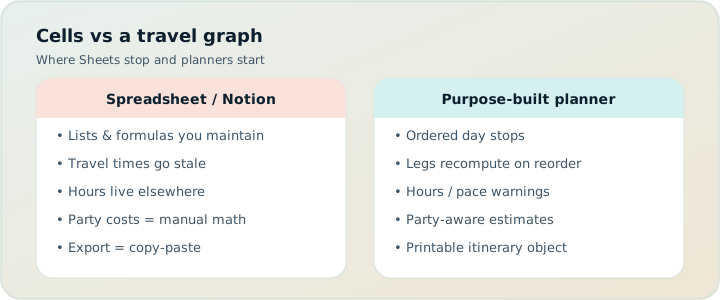
What Sheets and Notion get right
- Custom columns for anything — dietary notes, packing, gift lists, arbitrary budgets
- Familiar sharing for teams who already live in Docs/Drive or Notion workspaces
- Great for packing lists, expense ledgers, and post-trip journals
- Zero new mental model if your group already collaborates there
- Templates galore; you can copy someone else’s “ultimate itinerary” in minutes
- Live multiplayer editing that beats view-only planners when everyone must write
Those strengths are real. If your trip is a road-trip expense log plus a packing checklist, a spreadsheet may be the correct tool. If your “itinerary” is mostly a content calendar for Instagram captions, Notion will feel native. The failure mode appears when you ask a general document tool to behave like a travel graph.
If you love building systems, Notion is a playground. If you love arriving on time for the ferry, use a planner that knows what a leg is.
What they quietly refuse to do
- Travel graph. A row order is not a route. Sheets will not tell you the metro leg is 22 minutes unless you typed 22 by hand from Maps — and then typed it again when you reordered rows. Cycle hops are the same unpaid labor.
- Opening hours truth. You can type “9–17,” but nothing warns you that your chained arrival is 8:40 after the previous stop ran long.
- Party math. Adult + child ticket matrices get ugly fast; formulas break when someone adds a cousin.
- Map context. Embedding a map is not the same as pins that match the wishlist and a day route that matches the schedule.
- Handoff. A database view is not a printable itinerary for offline parents. “Can you open the Notion link?” fails at 30,000 feet.
- Pace. Nothing flags that you scheduled eleven active hours of stops plus travel unless you invent that rule yourself.
- Draft day swaps. Cut-paste entire days rarely recomputes travel; TripPapa’s Month View Save & process does.
The hidden cost of “just one more column”
Every serious spreadsheet itinerary accretes columns: Start, End, Travel, Mode, Cost adult, Cost child, Booked?, Link, Notes, Backup plan. Then someone sorts by day and breaks a formula. Then the embedded map shows last week’s pins. Then the shared link has edit access and an uncle deletes a row. Flexibility without domain constraints becomes maintenance.
Notion databases feel cleaner until relations multiply: Places ↔ Days ↔ People ↔ Costs. You have rebuilt a trip planner poorly. The UI looks like a productivity flex. The trip still does not know that stop B is 35 minutes by transit from stop A after a 90-minute museum visit starting at 10:00 — or that a cycle hop would have been faster than the drive minutes you typed last Tuesday and never refreshed.
Where TripPapa wins (concretely)
Party-aware pricing. Define adults and children with ages on the trip. Pricing estimates in Research use that party — breakdowns and optional add-ons, with sources/freshness cues where available. Estimates are planning aids; verify before you pay. The point is the planner carries the matrix so you do not.
Travel legs in Day Planner. Drag stops onto days, reorder, edit durations. TripPapa chains arrival/departure and inserts legs for transit, drive, walk, or cycle — duration and distance. Transit steps and fare estimates appear when routing provides them; fallbacks are marked when approximate. Reorder the day and the legs update with the plan, not with a manual cell edit.
Hours and pace warnings. Hours conflicts and overloaded days (think: roughly ten or more active hours) show on the timeline. Warnings do not block you; they stop the silent failure mode where the sheet looks neat and the sidewalk does not.
Month View. See the trip as a calendar grid. Drag unassigned items onto days, move stops between days, swap entire days. Draft until Discard or Save & process — which recomputes travel so a bird’s-eye reshuffle does not leave stale legs behind. Spreadsheets can color-code days. They do not recompute a travel graph on save.
Map that matches the list. Wishlist mode for clusters; day mode for a numbered route; drop pin to add. Pins and schedule stay one system.
Export and share. Print / Save as PDF with cover details, day pages, costs where fetched, unassigned appendix. View-only share links for co-travellers who should browse, not edit. Revoke when the trip ends.
AI inside the graph. Search + Add assists research; AI auto-plan drafts day assignments with Revert to pre-AI. That is different from pasting a chatbot blob into a Notion cell.
| Need | Sheets / Notion | TripPapa |
|---|---|---|
| Custom non-travel trackers | Excellent | Not the job — keep packing lists elsewhere |
| Travel times between stops | Manual copy from Maps | Native legs in Day Planner (incl. cycle) |
| Opening hours vs arrival | Typed text only | Hours warnings on the timeline |
| Party ticket estimates | DIY formulas | Party-aware Pricing tab |
| Week balance / day swap | Cut-paste rows | Month View + Save & process |
| Offline / grandparent handoff | Awkward | PDF + view-only share |
| Live multiplayer editing | Strong (esp. Sheets) | View-only share; one editor |
| Booking email import | Manual paste | Not the job — use TripIt / Google Travel |
Honest complementary use
Keep Sheets for the budget ledger and packing checklist. Keep Notion for the trip journal and shared restaurant brainstorm if your friends already live there. Move the day design — order, durations, legs, hours, party costs, handoff — into TripPapa. That split respects what each tool is good at.
What usually fails is one mega-Notion that tries to be research, map, schedule, budget, and PDF. Or a Sheet that becomes the “source of truth” while Maps lives in twelve other tabs and nobody updates travel minutes after a reorder.
Many travelers also keep TripIt ($49/year Pro for alerts — verify on site) or Google Travel’s free Gmail dashboard for bookings, and Wanderlog (Pro $39.99/year — verify on site) when friends need live map editing. Spreadsheets sit beside those tools; they do not replace them. Local-first TripPapa with optional Cloud Save and magic-link auth covers the planning workspace without forcing your packing list into the same system.
Collaboration: edit wars vs view-only
Sheets collaboration is a feature until it is not. Simultaneous editors are great for packing lists. They are risky for a day timeline when two people drag different realities into the same rows. TripPapa’s model is one planning workspace with view-only share: readers see Research, Day Planner, Month View, Map, and Export without forking the plan. If your culture requires everyone to edit the itinerary live, a map-first collab tool (Wanderlog) may fit better than either Sheets or TripPapa’s view-only stance — Wanderlog’s free tier already includes collaborative editing.
AI auto-plan vs “AI in a Notion cell”
Pasting ChatGPT output into a database feels modern. It is still paste. TripPapa’s AI auto-plan can assign unassigned wishlist items across days with party, hours, home base, rest, and typical durations in mind. Apply is atomic; Revert to pre-AI restores the prior state. That is a different relationship: scaffold inside the same graph that will compute legs, not a blob of text you reformat by hand.
Search + Add in Research is similarly grounded: find places, tick what fits, enrich with photos, reviews, duration, hours, pricing — then schedule. The AI assists the loop; it does not replace verifying hours and tickets on official sites. Wanderlog’s Pro AI suggests places on a map — also not full-trip generation, and also not a Notion paste.
Realistic scenario: the spreadsheet that looked finished
A couple builds a 14-column Kyoto sheet: times, metro minutes copied from Maps, adult prices, a “kids?” column with a half-finished formula, and a Notion page of restaurant links. Grandparents get the Sheet link. On Monday the museum is closed; Tuesday’s metro minutes are wrong because rows were sorted; the kid ticket total is a solo adult price. They recreate the days in TripPapa with party ages, hours warnings, transit legs, Month View swap, PDF export. The Sheet survives as packing + yen budget. Notion keeps restaurant notes. Nobody deletes the templates — they just stop pretending the grid was a Day Planner.
Week-by-week migration
Week −6: Freeze new columns on the Sheet. Create a TripPapa trip with dates and party. Search + Add the top twenty places from your list.
Week −4: Schedule three real days with travel legs. Glance at Map. Use Month View if one day is overweight. Export a draft PDF for the veto round. Keep Sheets for money only.
Week −2: Book flights/hotels; let Google Travel or TripIt hold confirmations. Update TripPapa if bookings force day changes; Save & process after Month View edits.
Travel week: PDF or view-only share for the day sequence; Sheet for expenses; booking dashboard for the spine.
When to stay in Sheets/Notion
- The “itinerary” is mostly logistics notes and packing, not timed sightseeing.
- Your group’s only shared skill is spreadsheets, and the trip is short and flexible.
- You need exotic custom fields TripPapa will never grow (sponsorship deliverables, film shot lists, etc.).
- You explicitly enjoy building systems more than you enjoy finishing the plan.
- Everyone must edit the same rows live and a map-first collab tool is overkill.
When to move the days into TripPapa
- Reordering stops should update travel times automatically — including cycle when you bike.
- Party size changes what attractions cost.
- You need hours/pace warnings before you commit emotionally to a broken day.
- Someone needs a PDF or view-only link who will not navigate your database views.
- Month-level balance matters (multi-week trips, weather swaps).
Mistakes to avoid
- Building a “travel OS” in Notion for six weeks instead of scheduling three days.
- Giving unrestricted edit access to the day timeline “source of truth.”
- Copying viral templates and spending the evening on schema, not destination.
- Treating embedded Maps as proof the list order is efficient.
- Expecting TripPapa to replace packing lists, expense ledgers, or flight alerts.
- Pasting AI itineraries into cells and calling the graph solved.
Migration without drama
Do not rebuild your entire life. Create a trip in TripPapa with dates and party. Add the places you already listed in the Sheet (Search + Add or manual). Schedule one day. Glance at Map. Export a one-page PDF. If that artifact is clearer than your grid, migrate the remaining days. Keep the Sheet for money and packing. Delete nothing until the trip is over — confidence first, cleanup later. If live friend editing still matters more than party-aware legs, try Wanderlog’s free collab board in parallel for restaurants only; do not force every stop into both systems.
The “template tax” nobody budgets
Copying a viral Notion itinerary template feels free. Then you spend an evening renaming properties, fixing relations, and teaching your partner which view is canonical. Sheets templates do the same with frozen panes and conditional formatting that break on mobile. TripPapa’s opinionated loop skips that tax: the surfaces already know wishlist, day, leg, month, map, and export. You spend the evening on the destination, not on schema design. Keep templates for packing and money — domains where custom columns earn their keep.
When to choose Sheets vs TripPapa vs a map app
- Stay in Sheets/Notion for packing, expenses, gift lists, and any custom field TripPapa will never grow.
- Move days to TripPapa when order, durations, transit/drive/walk/cycle legs, hours, pace, party costs, Month View, and PDF/share matter.
- Use Wanderlog instead (or also) when the group’s core need is live multiplayer map editing — free tier covers collab; Pro is $39.99/year for offline and place suggestions (verify on site).
- Keep TripIt or Google Travel for bookings: TripIt Pro $49/year for alerts (verify on site); Google Travel free for Gmail cards.
Choosing “spreadsheet forever” because a forum said Excel works is fine for light trips. Choosing spreadsheet forever for a timed-entry family week in a transit city is how neat grids become sidewalk failures. Match the tool to the failure mode you actually fear.
FAQ
Are spreadsheets bad for travel?
No. They are excellent for money, packing, and custom trackers. They are weak as travel graphs.
Can Notion replace TripPapa?
Only if you manually rebuild routing, hours warnings, party pricing, and PDF handoff — and maintain them.
Should I delete my Sheet?
No. Keep it for non-day jobs. Move day design when feasibility matters.
What about Excel + TripIt?
Still a common, honest stack. Add TripPapa when unbooked days need structure.
Does TripPapa support live editing like Sheets?
No — view-only share. Use Wanderlog or Sheets when everyone must write.
Can TripPapa import my Sheet?
There is no magic CSV-to-perfect-plan button assumed here. Re-add key places via Search + Add or manual add; it is faster than fixing broken formulas.
Is TripPapa a booking engine?
No. Use TripIt, Google Travel, or vendor sites for bookings.
Why not just Maps lists?
Lists lack chained durations, party pricing, Month View processing, and a clean multi-day PDF.
Decision checklist
- Is your unsolved problem custom fields — or travel times, hours, and party cost?
- Will reordering rows force you to re-copy Maps times?
- Who must consume the plan offline or without Notion literacy?
- Do you want AI drafts inside a reversible day graph, or paste in a cell?
- Can packing/money stay in Sheets while days move to TripPapa?
Flexibility is not the same as fitness for travel. When the deliverable is a day that survives the city, start here: Open TripPapa, define who’s going, and let travel legs replace the column you always forgot to update. Keep verifying attraction prices and hours on official sites — no planner, spreadsheet, or AI paste should skip that step.