Google Trips the old standalone app is gone. What remains is Google Travel and Google’s travel surfaces — especially useful when bookings already live in Gmail. It is a strong free dashboard: reservations surface with almost no setup if you already live in Google’s ecosystem. It is not a full day-design studio. TripPapa is the opposite shape: a workspace for research → days → travel legs → PDF/share, with party-aware estimates and Month View. Comparing them as rivals misses the point. Comparing them as tools with different jobs does not.
This piece is for people who open Google Travel, feel vaguely organized, and still cannot answer “what do we do after the museum on Thursday?” For product depth, see how TripPapa works. For the wider competitive field, see the 2026 planner roundup. Honest context from traveler forums: many people still run Excel + TripIt, or Wanderlog for pins, while Google quietly mirrors bookings — stacks beat single-logo fantasies.
What Google Travel does well
- Surfaces reservations it can detect from your Google account / Gmail
- Zero extra setup if you already live in Gmail and Google Maps
- Fine as a read-oriented sanity check beside another planner
- Free — no Pro tier required to see your own bookings
- Familiar UI for anyone who already trusts Google for search and maps
That combination is genuinely powerful. If your trip is mostly flights and hotels that emailed you, Google Travel can feel like magic: the dashboard appears because the data already existed. You did not build a second database. You did not forward anything to a third-party organizer. For light travelers, that may be enough logistics hygiene.
Use Google Travel as a free logistics mirror. Use TripPapa as the place decisions become a day plan.
Where planners still need more
Google Travel will not replace a workflow that needs: AI-assisted attraction research into a wishlist; party-specific cost estimates; drag-and-drop day balancing; transit legs between stops inside the same tool; Month View day swaps with recomputed travel; pace and hours warnings; or a print-ready itinerary for someone who does not use Google.
Maps can answer “how long is the drive?” in a separate tab. That is not the same as a Day Planner that chains visit durations and travel modes into a timeline and warns you when the day exceeds a sane pace. Gmail can hold a ticket PDF. That is not the same as party-aware pricing on a wishlist item for two adults and two kids.
| Job | Google Travel | TripPapa |
|---|---|---|
| Auto-collect bookings from Gmail | Strong | Not the focus |
| Build days from research | Limited | Core |
| Travel times between activities | Maps, separately | Inside Day Planner (transit/drive/walk/cycle) |
| Party-aware attraction pricing | No | Yes — adults & kids with ages |
| Month-level balance & day swaps | No dedicated Month View | Month View + Save & process |
| Share view-only trip snapshot | Limited / account-bound patterns | View-only share links (/share/…) |
| Print full itinerary + costs | Partial / fragmented | Export Print / Save as PDF |
| Flight alerts like TripIt Pro | Not TripIt Pro’s job | Not the product either |
| Price | Free dashboard | Mock pass framing: USD $35 / 6 months |
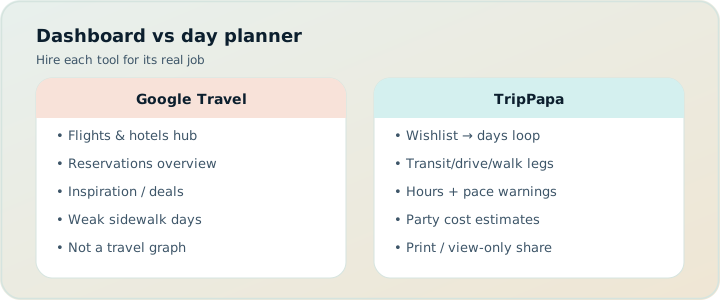
Dashboard vs day planner
A dashboard answers: what have I already committed to? A day planner answers: what should we do with the open hours between commitments? Google Travel leans dashboard. TripPapa leans planner. You can feel “organized” on a dashboard while still improvising every afternoon — which is fine for some trips and miserable for others (families, timed entries, transit-heavy cities, multi-generational groups).
TripPapa’s surfaces map to the planner job. Research builds a wishlist with enrichment tabs (Overview, Photos, Reviews, Duration, Hours, Pricing). Day Planner schedules stops and inserts travel legs. Month View shows whether the week is balanced; drafts until Save & process recomputes travel. Map checks wishlist clusters vs a single day’s numbered route; drop a pin to add. Export / Share produces the artifact other people follow. None of that requires Google to parse an email first.
Local-first autosave means your day draft survives a crashed tab even before Cloud Save. Passwordless magic-link auth appears when you want backup or another device — not as a Gmail login requirement to read your own plan. That is a different control model from an account-coupled dashboard, and serious planners should pick it on purpose.
The Gmail gravity problem (and why free still wins sometimes)
Google’s advantage is gravitational: if your life is already in Gmail, Travel is a free side effect. Switching away from that for bookings is rarely worth it. The mistake is assuming gravity equals completeness. Unbooked parks, neighborhood walks, and “maybe this café” never appear in Gmail. Opening hours conflicts do not email you a warning when your self-made schedule is wrong. Party ticket math does not live in a reservation card.
So keep Google Travel. Just stop asking it to be your research studio. Free and incomplete for day design is still a good booking mirror. If you need deeper flight alerts, TripIt Pro at $49/year (verify on TripIt’s site) is the complementary paid organzier — not a Google Travel “Pro tier,” because Google Travel is not selling that product.
Research, party, and the missing travel graph
TripPapa asks who is travelling when you create a trip. That party follows into Pricing estimates. A “from $20” adult ticket is useless for a family of four; party-aware totals are not. Duration and hours feed Day Planner warnings. Travel legs connect stops with mode, duration, and distance — transit, drive, walk, or cycle; transit steps and fare estimates when routing provides them; fallbacks marked when approximate.
Google’s ecosystem can approximate pieces of this if you manually stitch Maps, Docs, and calendar. That stitch is the old tab chaos problem. TripPapa’s point is one workspace so the map, the list, and the day timeline stop lying to each other.
Sharing with people who are not “on your Google”
Multi-generational trips expose the account problem. Grandparents may not want a Google login dance to see Thursday. Partners may not share an inbox. TripPapa’s view-only share link lets co-travellers browse the plan without editing. Print / Save as PDF covers airplane mode and relatives who want paper. Google Travel’s strength stays with the account holder who owns the Gmail trail.
If everyone on the trip is already deep in Google and the plan is mostly bookings, Travel may be enough to share verbally. If the plan is a structured sightseeing document, you need an artifact that is not your inbox.
Realistic scenario: free dashboard, empty Thursday
Jordan lives in Gmail. Flights and hotel appear in Google Travel automatically. They feel “done.” On the plane they realize Thursday after checkout is blank beyond “maybe museums.” In TripPapa they create the trip with two adults and one child, Search + Add three museums and a park, fetch hours and party-aware pricing, schedule Day Planner with transit legs, catch a pace warning, fix order on Map day mode, swap a stop in Month View, Save & process, export PDF. Google Travel still shows Sunday’s flight home. Both tabs stay open. Only one answered “what fills Thursday?”
Week-by-week workflow with Google in the stack
Week −6: Ignore Google Travel. Nothing useful is there yet. Build candidates in TripPapa Research (or Wanderlog if you need live friend pins — free tier covers collab; Pro is $39.99/year for offline and place suggestions — verify on site).
Week −4: Shape days in TripPapa. Travel legs, hours warnings, Month View balance. Draft PDF for vetoes. View-only share for the group.
Week −2: Book. Let Google Travel ingest Gmail confirmations. Optionally forward the same emails to TripIt if you want Pro alerts ($49/year — verify on site). Do not rebuild days inside the booking dashboard.
Travel week: Morning-of: Google Travel (or TripIt) for gates and check-in. Daytime: TripPapa PDF or share link for the sequence. Maps for live navigation. Update TripPapa once if a delay kills a stop.
When Google Travel is enough
- The trip is booking-heavy and light on structured sightseeing.
- You alone need the dashboard; others follow you in person.
- You are fine opening Maps separately for each hop.
- You do not need party-aware cost rollups or a printable day book.
When TripPapa is the better primary planner
- You are still deciding what belongs on each day.
- Travel times, hours, and pace must live inside the plan — including cycle legs when you bike.
- Costs must reflect adults and kids, not a solo “from” price.
- You need Month View to rebalance weeks and Save & process travel.
- Someone else needs a PDF or view-only link who will never open your Gmail.
A complementary stack that actually works
Plan days in TripPapa. Let Google Travel mirror flights and hotels from Gmail. Use Google Maps on the ground for live navigation if you want — TripPapa already used routing to shape the day; turn-by-turn can still be Maps. Export a PDF before you leave. Share a view-only link with the group. Check Google Travel the morning of a flight. That is not redundancy; it is separation of concerns.
What fails: treating Google Travel as proof the trip is “planned” when only reservations exist. Reservations are commitments. Plans are sequences. You need both for hard trips; you need only reservations for easy ones. Forum travelers who still swear by Excel + TripIt are describing the same separation with older labels: money in a sheet, bookings in an organizer, days somewhere else — or improvisation if days never mattered.
Mistakes to avoid
- Calling the trip “planned” because Google Travel shows flights and hotels.
- Pasting chatbot itineraries into Docs next to Travel and skipping travel-leg math.
- Expecting grandparents to navigate your Google account to see Thursday.
- Using Maps tabs as a substitute for a Day Planner that chains durations and warns on pace.
- Buying TripIt Pro only to duplicate Google Travel’s free booking cards (buy Pro for alerts, not for a second dashboard).
- Assuming TripPapa books tickets or replaces Gmail reservation detection — it doesn’t.
Privacy and control (brief, practical)
Google Travel’s convenience is account-coupled. TripPapa is local-first with optional Cloud Save and passwordless magic-link auth when you want backup or another device. Share links are view-only and revocable. Different trust models. Choose consciously: inbox gravity vs a dedicated planning workspace you publish on purpose.
What Google Travel is not (say it plainly)
Google Travel is not a day designer. It is not Wanderlog. It is not TripPapa. It is not TripIt Pro. It is a free Gmail-linked booking dashboard for reservations Google can detect. That sentence should be the whole category definition. Feature blogs that call every Google travel surface an “itinerary builder” blur detection with design. Detection shows what you already bought. Design decides what fills the open hours. Serious planners need both words — and they need to know which tool owns which word.
If your Thursday is full of unbooked parks, neighborhoods, and “maybe this museum,” Google Travel will stay quiet. If your Thursday is a flight and a hotel check-in, Travel will feel complete. Measure completeness against the trip you are actually taking, not against a marketing screenshot of reservation cards.
Pro pricing elsewhere (so you do not invent a Google Pro)
People sometimes hunt for a “Google Travel Pro” that adds day planning. It is not how the product is framed. Day planning lives in dedicated planners. Flight-alert depth lives in TripIt Pro at $49/year (verify on TripIt’s site). Map collab and offline packs live in Wanderlog Pro at $39.99/year (verify on Wanderlog’s site). TripPapa’s mock pass framing (USD $35 for 6 months) is for a planning workspace, not for Gmail ingestion. Paying the wrong Pro for the wrong job is the expensive version of tab chaos.
A practical spend check: if you already see bookings in Google Travel for free, do not buy TripIt Pro only to duplicate cards — buy it for alerts. If you need live friend editing, try Wanderlog free before Pro. If you need party-aware days with cycle legs and a PDF, open TripPapa before you buy another annual that does not schedule museums. Stack spend should map to jobs, not to fear of missing a logo.
AI, Maps, and the false shortcut
Asking a chatbot for a Tokyo itinerary and pasting it into a Doc next to Google Travel feels productive. You still lack chained travel times, party-aware costs, hours warnings, and a Month View that recomputes legs after a swap. TripPapa’s AI auto-plan drafts inside the same graph that will warn you and export cleanly — with Revert if the draft is wrong. Keep Google’s AI surfaces for search inspiration if you like; put the surviving decisions into a planner that knows what a leg is.
FAQ
Is Google Travel a trip planner?
It is a free booking dashboard for many users — not a day designer. Great at reservations it can detect; weak at unbooked sightseeing structure.
Did Google Trips come back?
The old standalone Google Trips app is gone. Use Google Travel / Google’s travel surfaces today.
Can Google Travel replace TripIt?
For “show my bookings,” sometimes. For Pro flight alerts and traveler tools ($49/year on TripIt — verify on site), no. Different depth.
Can Google Travel replace Wanderlog or TripPapa?
No. Wanderlog is map-first collab planning; TripPapa is research-to-day feasibility. Travel is the Gmail mirror.
Does TripPapa sync with Gmail?
No. TripPapa is not an email importer. Keep Google Travel or TripIt for that job.
How do I share a day plan with non-Google relatives?
TripPapa view-only share links or Print/Save PDF. Do not rely on your inbox as the family document.
Is Google Travel free forever?
The booking dashboard job is free as part of Google’s ecosystem today. Features change — treat “free” as a current fact, not a contract, and verify in your account.
Should I still use Excel?
For packing and money, often yes. For day graphs, move to a planner. Forum consensus still mixes Excel + TripIt; Google Travel just adds another free booking view.
Decision checklist
- Is your unsolved problem “where are my bookings?” or “what fills the days?”
- Do non-Google co-travellers need a clean handoff?
- Will you manually rebuild travel times in Maps for every day anyway?
- Does party size change what “affordable” means for attractions?
- Are you confusing a free dashboard with a finished plan?
If (1) is bookings and (2)–(4) are no, Google Travel may be enough. If (1) is days and any of (2)–(4) are yes, add TripPapa — keep Travel as the free mirror. Do not invent features TripPapa does not ship: it is not a booking engine, not a flight-alert product, and not live multiplayer editing.
Build one real day instead of another dashboard glance: Open TripPapa, create a trip with your party, add three places, and watch travel legs appear between them. Keep Google Travel open in another tab for the flights. That split is the 2026 default for serious planners who still like free logistics. Always verify any paid competitor pricing on their sites before you stack subscriptions beside a free dashboard.