Stop asking “What’s the best trip app?” Ask “What job am I hiring for?” In 2026 the field is crowded with tools that share the word “itinerary” and almost nothing else. This roundup compares Wanderlog, TripIt, Notion/Sheets, Google Travel, and TripPapa by job — with honest complementary stacks where one logo is not enough.
Deep dives if you already narrowed the field: TripPapa vs Wanderlog, TripPapa vs TripIt, TripPapa vs Google Travel, and why TripPapa beats spreadsheets.
One more honest note before the matrix: traveler forums (including Rick Steves threads) still show people answering “Excel spreadsheet” or “TripIt” or “Wanderlog” in the same breath. That is not ignorance. It is how real stacks form. This roundup respects that.
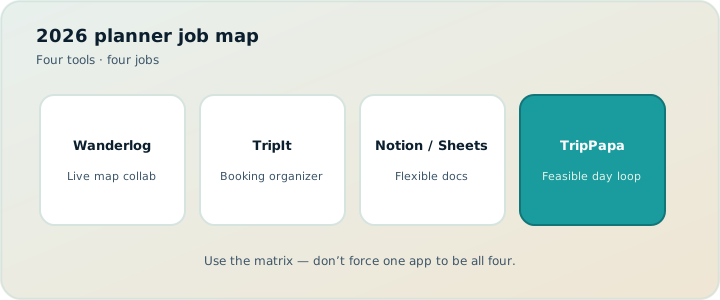
The short version
| Tool | Hire it for | Watch-outs | 2026 pricing cue (verify on site) |
|---|---|---|---|
| Wanderlog | Map-first planning & live group editing | No full-trip AI generation; mobile can slow on large trips; limited calendar export; limited/no cycling transit; lodging often pins to top of day | Free: map, manual budget, collab. Pro $39.99/year (offline, Pro AI place suggestions, route optimization, booking tools, Google Maps export) |
| TripIt | Booking timelines & flight-centric Pro alerts | Weak as a sightseeing designer | Pro $49/year |
| Notion / Sheets | Custom trackers & team docs | No native travel graph | Free–paid workspace plans |
| Google Travel | Free booking dashboard from Gmail | Read-oriented; limited day design | Free |
| TripPapa | Research → days → travel legs → PDF/share | Not a flight-alert product; share is view-only; not a booking engine | Mock pass framing: USD $35 / 6 months |
Four tools, four jobs. Forcing one app to do everything is how you get a mediocre map, a mediocre inbox, and a spreadsheet that lies about metro times.
Wanderlog: map-first collaboration
Wanderlog’s center of gravity is the shared map. Friends drop pins, shape days, and edit together — including on the free tier, which already covers map planning, manual budget, and collaborative editing. That model shines for road trips and social leisure planning where geography consensus is the hard part.
Wanderlog Pro is $39.99/year (verify current pricing on Wanderlog’s site). Pro adds offline access, a Pro AI assistant that suggests places (not full-trip AI generation), route optimization, booking tools, and export to Google Maps. Those upgrades matter if you live in the app. They do not turn Wanderlog into a party-aware research studio or a Month View that recomputes transit after day swaps.
Choose Wanderlog when live multiplayer editing matters more than party-aware ticket math, cycle legs, or a dedicated Month View. It is not “worse” than TripPapa; it optimizes a different failure mode (we can’t see the same pins) than TripPapa’s (this day doesn’t survive the clock and the kids’ tickets).
Wanderlog Pro vs free — quick nuance
- Stay free if collab + map + manual budget is enough and you are online.
- Pay Pro for offline, place-suggesting AI, route optimization, booking tools, and Google Maps export.
- Do not expect one-click full itinerary generation from Pro AI — planning stays largely manual.
TripIt: booking organizer
TripIt lives after you book. Forward confirmations or sync the inbox; get a timeline of flights, hotels, and rentals. Pro at $49/year (verify on TripIt’s site) adds flight alerts and traveler tools. Hire TripIt when scattered vouchers are the pain. Do not hire it to design unbooked sightseeing days — temples and markets rarely email you a PNR.
Free TripIt is enough for many casual travelers who only need a clean booking timeline and a share for a partner. Pro is for people who fly enough that alerts pay for themselves. TripPapa and TripIt are complementary for many people: design days in TripPapa, keep bookings tidy in TripIt. Evaluating them as substitutes creates false winners.
Notion and Sheets: flexible, graph-less
Infinite columns, familiar sharing, excellent packing lists and budget ledgers. No native travel graph: row order is not a route; typed “9–17” does not warn that you arrive at 8:40; party ticket formulas rot; embedded maps drift from the list; database views are not airplane-mode PDFs.
Keep Notion/Sheets for custom non-travel trackers. Move day design into a planner that knows legs, hours, and party — or accept that you are the routing engine. See why TripPapa beats spreadsheets for the deeper case.
Google Travel: free Gmail dashboard
Google Travel surfaces reservations it can detect from your account. Free, low friction, strong as a logistics mirror. Weak as a research-to-day studio. Unbooked activities never appear. Travel times live in Maps separately. Party-aware attraction pricing and Month View day swaps are not the product. See TripPapa vs Google Travel.
Use it beside a planner, not instead of one, when days still need designing. It does not replace TripIt Pro alerts; it overlaps on “show my bookings.”
TripPapa: research → days → legs → handoff
TripPapa’s loop: create a trip with dates and travelling party; Research into a wishlist (Search + Add, detail tabs for photos, reviews, duration, hours, party-aware pricing); Day Planner with transit/drive/walk/cycle legs, pace and hours warnings; Month View with draft edits and Save & process; Map for wishlist vs day route (drop pin to add); Export via Print/Save PDF; view-only share links; optional Cloud Save and magic-link auth. Local-first by default.
Share is view-only on purpose — one editor, many readers. Not a live multiplayer map. Not a flight-alert inbox. Not a booking engine. Hire it when feasibility is the job: who is going, what it costs them, how long you’ll stay, whether the place is open, how you get from A to B (including cycle), and how you hand the plan to someone who will not install five apps.
AI auto-plan drafts assignments inside that same graph and offers Revert to pre-AI — a different AI story from Wanderlog Pro’s place suggestions, and a different story from pasting a chatbot itinerary into Notion. Use AI as scaffold; verify hours and tickets on official sites either way.
Side-by-side decision matrix
| If your pain is… | Start with | Often add |
|---|---|---|
| Friends editing the same map live | Wanderlog | TripIt after booking |
| Lost flight/hotel confirmations | TripIt | Google Travel as free mirror |
| Custom trackers & packing | Notion / Sheets | TripPapa for actual days |
| Bookings already in Gmail | Google Travel | TripPapa if days need design |
| Party costs, legs, Month View, PDF | TripPapa | TripIt or Google Travel for bookings |
| Bike-heavy city days | TripPapa (cycle legs) | Maps for turn-by-turn |
Recommended stacks (practical)
- Leisure couple: TripPapa (or Wanderlog if you prefer map collab) + Google Travel as booking backup
- Road-trip friends who edit together: Wanderlog + TripIt after booking
- Family with grandparents: TripPapa + printed PDF (+ view-only share for digital adults)
- Road warrior: TripIt Pro ($49/year) + light planner of choice for any sightseeing blocks
- Notion-native team: Notion for notes/packing + TripPapa for the day graph (do not rebuild routing in a database)
- Classic forum stack: Excel + TripIt — add Wanderlog or TripPapa when leisure days get dense
- Maximizer planning a transit city: TripPapa first; keep Maps for turn-by-turn on the ground
- Bike-forward city break: TripPapa with cycle legs + Google Travel for trains/flights; skip drive-only assumptions
Every stack above assumes you will verify current Pro prices on vendor sites before renewing. List prices in this article — Wanderlog Pro $39.99/year, TripIt Pro $49/year — are research checkpoints, not invoices.
Pricing honesty without spreadsheet wars
Wanderlog Pro is $39.99/year — not a fuzzy “about $40.” Free already includes collab and map planning; Pro unlocks offline, Pro AI place suggestions, route optimization, booking tools, and Google Maps export. TripIt Pro is $49/year for flight-centric tools. Google Travel is free. Notion/Sheets cost whatever your workspace already costs. TripPapa’s mock pass framing (USD $35 for 6 months) is a different shape: planning-window oriented. Compare on the job you need done this trip, not on a single “cheapest annual” cell. Promotions change; always verify competitor pricing on their sites.
What “complementary” actually looks like
Example A — family Kyoto trip: Research and days in TripPapa with party-aware estimates and transit legs; Month View to balance temple-heavy days; PDF for grandparents; view-only link for partner; Google Travel for the flight/hotel cards from Gmail. No Wanderlog unless friends are co-editing pins. No TripIt unless you prefer email-forward workflows over Google’s dashboard.
Example B — friend group road trip: Wanderlog for live map planning (free tier first; Pro if offline matters); TripIt once hotels and cars are booked; optional Sheets for gas money. TripPapa only if one person later needs a stricter day timeline and PDF — or skip it if the map collab is enough.
Example C — business heavy, sightseeing light: TripIt Pro for alerts; Google Travel free mirror; skip day-design tools entirely.
Example D — bike weekend: TripPapa Day Planner with cycle legs; Google Maps for live navigation; Google Travel if a train booking exists. Wanderlog may feel awkward if cycling transit options are limited or missing.
Week-by-week choosing workflow
Week −8: Write the job in one sentence. Do not subscribe yet.
Week −6: Primary tool only — pin board (Wanderlog) or wishlist (TripPapa) or booking folder (TripIt/Google) depending on that sentence.
Week −4: Add at most one complementary tool across the booking line. Build one real day or forward one real confirmation.
Week −2: Export/share the artifact co-travellers will follow. Verify any Pro pricing you are about to renew.
Travel week: Use bookings dashboard in the morning; use day plan in the afternoon; update once when reality breaks the plan.
If you skip the one-sentence job and jump straight to “best app” listicles, you will buy Wanderlog Pro for flight alerts it does not own, or TripIt Pro for museum timelines it does not design. The week-by-week gate exists to stop that.
Common mistakes
- Buying TripIt Pro to “plan activities” that never email confirmations.
- Using only Google Travel and calling the trip planned when only reservations exist.
- Building a Notion travel OS for six weeks instead of scheduling three real days.
- Expecting TripPapa to replace flight alerts or live multiplayer map editing.
- Expecting Wanderlog Pro AI to generate a full multi-day itinerary.
- Paying Wanderlog Pro for offline on a trip that is entirely Wi‑Fi cafés and hotels.
- Ignoring cycle-mode needs in bike cities and blaming “apps” generically.
- Forcing Excel to be a routing engine after the 12th travel-minutes column.
Feature-level honesty (what each refuses to be)
Wanderlog refuses to be your flight-alert inbox and is not primarily a party-ticket calculator or full-trip AI generator. TripIt refuses to be a research studio for unbooked parks and viewpoints. Notion/Sheets refuse to own a travel graph unless you build one by hand. Google Travel refuses to be a Month View day-swap studio with recomputed transit legs. TripPapa refuses to be live multiplayer map editing and refuses to pretend it watches your gate changes.
Those refusals are features. Products that claim to do every job usually do the middle of each job badly. In 2026, the winning move is a small stack with clear ownership.
When to choose each tool (one screen)
- Choose Wanderlog when friends must edit the same map live, geography consensus is the hard part, and you are fine keeping party ticket math elsewhere. Start free; add Pro ($39.99/year — verify on site) for offline, place suggestions, route optimization, booking tools, and Google Maps export.
- Choose TripIt when confirmations are scattered and you want an email-derived timeline. Add Pro ($49/year — verify on site) when flight alerts matter.
- Choose Notion/Sheets when packing, money, or custom team fields are the deliverable — not chained transit times.
- Choose Google Travel when Gmail already holds the bookings and you only need a free dashboard mirror.
- Choose TripPapa when research must become feasible days with party-aware estimates, travel legs (including cycle), Month View processing, and PDF/view-only handoff.
If two bullets apply, you need a stack — not a compromise app that half-does both.
Signal questions before you subscribe
- Will more than one person need write access to the map at the same time? → Wanderlog leans yes; TripPapa leans view-only readers.
- Do most “stops” generate confirmation emails? → TripIt / Google Travel. If not, you need a planner.
- Does party size change attraction cost in a way you keep miscalculating? → TripPapa’s party model.
- Do you reorder days after weather forecasts? → Month View + Save & process beats cut-paste rows.
- Do you move by bike between stops? → Prefer a planner with cycle legs (TripPapa).
- Who consumes the final plan on travel morning — app natives, or PDF/offline family?
FAQ
What is the best trip planning app in 2026?
There isn’t one. Best for live maps (Wanderlog), best for bookings (TripIt / Google Travel), best for custom docs (Notion/Sheets), best for research-to-day feasibility (TripPapa).
Is Wanderlog Pro worth $39.99/year?
If you need offline, Pro AI place suggestions, route optimization, booking tools, or Google Maps export — often yes. If free collab is enough, stay free. Verify pricing on Wanderlog’s site.
Does Wanderlog have full-trip AI?
No. Pro AI suggests places; you still build the trip.
Is TripIt Pro $49/year?
That is the commonly listed Pro price — always verify on TripIt’s site before buying.
Can I use Excel + TripIt still?
Yes. Many travelers do. Add a day planner when sightseeing structure matters.
Is Google Travel free?
Yes as a Gmail booking dashboard today — not a day designer.
Does TripPapa replace Wanderlog?
Only if your job is feasibility and handoff, not live multiplayer maps. Many stacks use neither-or-both depending on the trip.
Where should I start this afternoon?
Write the job in one sentence, pick from the matrix, build one real day or forward one confirmation before you subscribe.
How to choose in one afternoon
- Write the job in one sentence (“live map with friends” / “organize bookings” / “design feasible days for a family”).
- Pick the primary tool from the matrix above.
- Add at most one complementary tool for the other side of the booking line.
- Build one real day (or forward one real confirmation) before you subscribe to anything.
- Export or share the artifact your co-travellers will actually follow.
- Verify any Pro price on the vendor’s site the day you pay.
If the sentence is “research into days with travel legs, party costs, and a PDF,” TripPapa is the primary. If it is not, do not force it — and do not force Wanderlog or TripIt into jobs they do not ship. Complementary stacks are the adult answer when Rick Steves–style forum advice still lists Excel, TripIt, and Wanderlog in the same thread.
Want the TripPapa side of the stack on a real destination? Open TripPapa, create a trip with your party, and run the loop once: Research → one day with legs → Month View glance → Export. Then keep Wanderlog, TripIt, Notion, or Google Travel only for the jobs they still own.