People compare TripPapa to TripIt because both say “itinerary.” In practice they sit on opposite sides of the booking line. TripIt is a booking organizer: forward confirmation emails (or use inbox sync) and it builds a timeline of flights, hotels, and rentals. TripIt Pro — $49/year (verify on TripIt’s site; promotions change) — adds flight alerts and traveler tools frequent flyers love. TripPapa is a pre-trip planner: research attractions, build a wishlist, assign days, compute travel between stops, then export or share the plan — including places that never generate a confirmation email.
If you force one product to do the other’s job, you will hate both. If you hire each for the pain it actually solves, they can sit peacefully in the same trip. Traveler forums still show people using Excel + TripIt, or switching leisure planning to Wanderlog while keeping TripIt for bookings — that consensus is useful, not outdated. For the broader field, see the Wanderlog / TripIt / Notion roundup. For TripPapa’s own loop, see how TripPapa works.
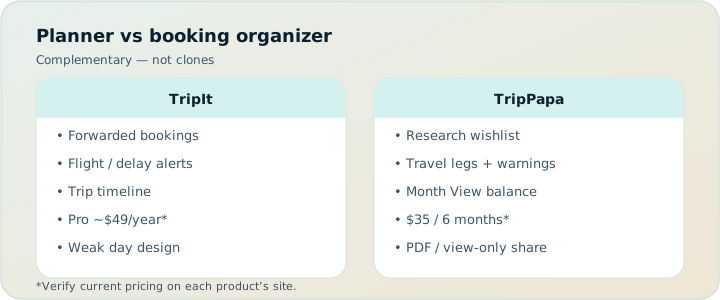
Different jobs, same word
“Itinerary” is overloaded. A flight + hotel timeline is an itinerary. A Thursday that includes a temple, lunch, a metro transfer, and a sunset viewpoint is also an itinerary. TripIt is excellent at the first. TripPapa is built for the second. Confusing them is like comparing a boarding-pass wallet to a day-design studio because both fit in a suitcase metaphor.
| TripIt | TripPapa | |
|---|---|---|
| Best when | After you book | Before / while you plan days |
| Core input | Confirmation emails / inbox sync | Search + wishlist + day assignments |
| Map & day design | Secondary | Primary |
| Non-booked activities | Awkward / manual | First-class |
| Flight alerts & traveler tools | Pro strength ($49/yr — verify on site) | Not the product |
| Party-aware attraction pricing | Not the focus | Built into Research |
| Travel legs between sightseeing stops | Not the focus | Transit / drive / walk / cycle in Day Planner |
| Handoff for non-booked days | Limited | Print/PDF + view-only share |
| Live multiplayer day editing | Share patterns around bookings | View-only share; one editor |
If your pain is “what do we do on Thursday?”, pick TripPapa. If your pain is “where is my hotel confirmation?”, pick TripIt.
What TripIt does exceptionally well
TripIt’s genius is email gravity. Once you book, the confirmation already exists. Forwarding it (or syncing the inbox) turns scattered PDFs into a single timeline. For multi-city business travel, connecting flights, and hotel chains that email endlessly, that is real relief. Pro features around flight status and traveler convenience are why frequent flyers keep paying $49/year even when free organizers exist — including Google Travel’s free Gmail booking dashboard, which overlaps on “show me my reservations” without replacing TripIt’s Pro alert depth.
TripIt is also honest about what it is not trying to be. It does not need to invent a research studio for temples and markets. Those places rarely email you a PNR. Expecting TripIt to become your sightseeing designer is a category error — and one TripIt users make when they paste activity lists into notes fields and wonder why the product feels thin.
Free TripIt already helps casual users organize forwarded bookings and share a trip view with a partner. Pro is the upgrade when alerts, seat tools, and traveler conveniences matter enough to pay annually. Always verify current Pro pricing and what’s behind the free/Pro split on TripIt’s site before you renew on autopilot.
What TripPapa does exceptionally well
TripPapa starts earlier: destination, date range, travelling party (adults and children with ages), home base, preferred transport mode, typical visit duration, day start time. Then Research: Search + Add into a wishlist, or manual add. Detail tabs cover overview, photos, reviews, duration, hours, and party-aware pricing. Day Planner turns the wishlist into a schedule with travel legs (transit, drive, walk, cycle). Month View balances the week and lets you swap days, then Save & process recomputes travel. Map checks geography (wishlist pins vs day numbered route; drop pin to add). Export prints a readable itinerary; share links give view-only browse access. Local-first autosave; optional Cloud Save; passwordless magic-link auth.
None of that replaces a boarding pass. All of it replaces the fragile stack of Maps + Notes + Sheets + “I’ll screenshot the plan” that appears when bookings are done but days are still mush.
The booking line: before vs after
Use a simple rule. Before tickets exist for activities and while days are still negotiable, you need a planner that understands wishlist → days → routes. After flights and hotels are booked, you need a reliable place those confirmations live. TripPapa owns the first zone. TripIt owns the second. Crossing the line mid-product is how people end up with a beautiful flight timeline and an empty Thursday — or a perfect day plan and a lost hotel voucher in email search.
Families feel this split acutely. Kids’ tickets, timed entries, and “is the museum open Monday?” are planning problems. Gate changes and hotel check-in times are logistics problems. Solving both with one app is a marketing fantasy more often than a product reality.
Non-booked activities are the tell
Parks, viewpoints, free walking neighborhoods, markets, picnics, “wander this alley” — these are the soul of many trips and the blind spot of booking organizers. TripIt can hold a manual note. TripPapa treats them as first-class stops with durations, hours warnings, and travel legs to the next place. If half your joy is unbooked, you need a planner that does not wait for an email to care.
Conversely, if your trip is mostly flights, hotels, and rental cars with little sightseeing structure, TripPapa is overkill. Open TripIt, forward the confirmations, and stop shopping for day-design features you will not use. Google Travel may already mirror the same bookings for free if you live in Gmail — complementary, not competitive with TripIt’s Pro alerts.
Alerts, Pro pricing, and what TripPapa will not pretend to be
TripIt Pro ($49/year — verify on site) earns its keep for people who live in airports. Flight alerts, seat tools, and traveler conveniences are a different product category from attraction research. TripPapa does not compete there and should not be evaluated as if it does. No honest comparison should claim TripPapa “beats TripIt on flight alerts.” It doesn’t try. TripPapa is also not a booking engine, not a live multiplayer editor, and not a Discovery Yes/No quiz.
What TripPapa does claim: party-aware estimates, travel modes between stops (including cycle), Month View balance, pace/hours warnings, AI auto-plan with revert, Cloud Save with magic-link auth, and a PDF/share handoff for people who never open your email inbox.
Sharing and handoff
TripIt’s share patterns are built around the booking timeline — useful when co-travellers need the same flight list. TripPapa’s view-only share is built around the day plan: Research, Day Planner, Month View, Map, Export without write access. Print / Save as PDF covers offline parents and airplane mode. Different audiences, different artifacts.
A practical pattern: TripPapa PDF for the sightseeing days; TripIt for the flight/hotel spine. Partners stop asking “which app is the source of truth?” because each app owns a clear slice.
Realistic scenario: family of four, Kyoto week
Two adults, kids ages 7 and 10. Flights and hotel booked two months out. Confirmations forwarded to TripIt; Pro alerts on for the outbound connection. Google Travel also shows the same bookings because they live in Gmail — fine, free mirror.
Thursday is still blank. In TripPapa they set the party, Search + Add Fushimi Inari, Kiyomizu-dera, a quieter temple, Nishiki Market. Pricing on paid stops for four people. Day Planner with transit and walk legs; pace warning when they try to stack too much; hours check on a Monday-closed museum moved via Month View. Save & process. Export PDF for grandparents. View-only share for the partner. TripIt never needed to know the temple order. TripPapa never needed to watch the gate.
Week-by-week handoff example
Week −6: Destination and party locked. Build the wishlist in TripPapa — Search + Add, skim photos and reviews, fetch hours and party-aware pricing on the expensive stops. Do not open TripIt yet; there is nothing to organize. Optional: a rough pin board in Wanderlog if friends are suggesting restaurants (their Pro is $39.99/year for offline and place suggestions — different job again).
Week −4: Shape days in Day Planner with travel legs. Use Month View to swap a museum cluster away from a forecast rain day, then Save & process. Export a draft PDF for the family veto round. Share a view-only link so nobody asks you to resend screenshots.
Week −2: Book flights and hotels. Forward confirmations to TripIt (or sync the inbox). Pro alerts ($49/year) start earning their keep if you care about gate changes. Google Travel may also mirror the same bookings for free — that is fine; redundancy on logistics is cheap insurance.
Travel week: TripIt (or Google Travel) for the spine — flights, check-in, hotel address. TripPapa PDF or share link for what happens between those anchors. If a delayed arrival kills Tuesday’s first stop, fix it in Day Planner or Month View once — not in three chat threads and a forgotten note.
Complementary stacks that work
- Classic forum stack: Excel for budget/packing + TripIt for bookings — still common and honest. Add TripPapa when days need design.
- Planner + organizer: TripPapa for days + TripIt for confirmations + alerts.
- Gmail-native: TripPapa for days + Google Travel as free booking dashboard (skip TripIt if you do not need Pro alerts).
- Social map + organizer: Wanderlog for live pins + TripIt after booking — use TripPapa only if one person later needs stricter timelines and PDF.
Forcing TripIt to be your sightseeing planner — or TripPapa to be your flight alert system — is how frustration starts.
Mistakes to avoid
- Buying TripIt Pro to “plan activities” that never email confirmations.
- Ignoring free TripIt when you only need a forwarded booking timeline — Pro is for alerts and traveler tools.
- Assuming Google Travel replaces TripIt Pro alerts just because both show flights.
- Expecting TripPapa to watch gate changes or import PNRs from email.
- Keeping three conflicting day lists in TripIt notes, Excel, and chat.
- Skipping official verification of attraction hours and tickets because “the itinerary app said so.”
When TripIt is the better fit
- Your pain is scattered confirmations and you already book heavily by email.
- You want Pro flight alerts and traveler tools ($49/yr — verify on site) more than day design.
- Sightseeing is light, flexible, or mostly booked tours with their own vouchers.
- You are a road warrior who needs logistics more than research depth.
When TripPapa is the better fit
- Your pain is designing days: what, when, how long, how you get there, what it costs for your party.
- Many stops will never email you a confirmation.
- You need Month View, travel legs (including cycle), and a printable plan for family handoff.
- You want one editor and view-only readers, not an inbox-derived timeline as the primary UI.
What TripPapa will never replace in TripIt
Seat maps, elite-status quirks, airline-specific alert quality, and the muscle memory of “forward to plans@…” are TripIt’s world. TripPapa will not grow into a frequent-flyer cockpit. Serious travelers who fly monthly should keep paying for the tool that watches the sky. Serious travelers who also design dense city days should not pretend the cockpit is a day planner.
Free TripIt vs Pro — nuance that saves money
Casual vacationers who fly twice a year often do fine on free TripIt: forward confirmations, see the timeline, share with a partner. Pro at $49/year earns its keep when delays and gate changes are frequent enough that alerts reduce stress or missed connections. Do not buy Pro because a comparison chart said “itinerary app” and you assumed day design was included. Conversely, do not skip Pro for years of monthly flying just to save fifty dollars while you rebuild every booking into a spreadsheet. Match the tier to flight frequency, then pick a separate planner for sightseeing. Verify the current free/Pro split on TripIt’s site — Black Friday discounts and promo emails show up often in traveler anecdotes, but list price is still the planning assumption.
Google Travel’s free dashboard can reduce the need for free TripIt if Gmail already surfaces the same cards. It does not reduce the need for TripIt Pro if alerts are why you pay. Keep those distinctions sharp and you will stop double-paying for the same booking mirror.
FAQ
Is TripPapa a TripIt alternative?
Only if you misuse both words. TripPapa is a day designer; TripIt is a booking organizer. They compete for the word “itinerary,” not for the same job.
Do I need TripIt Pro at $49/year?
If flight alerts and traveler tools matter, often yes. If you only need a clean booking timeline, free TripIt — or Google Travel’s free Gmail dashboard — may be enough. Verify current features and pricing on TripIt’s site.
Can I use TripIt and TripPapa together?
Yes. That is the recommended stack for many vacation trips: plan days in TripPapa, organize bookings in TripIt.
Does TripPapa import confirmation emails?
No. That is TripIt’s core loop. TripPapa starts from research and wishlist, not inbox sync.
Where do unbooked parks go?
TripPapa. TripIt notes are a weak substitute for durations, hours warnings, and travel legs.
What about Wanderlog?
Wanderlog is a map-first collab planner (Pro $39.99/year — verify on site). It sits closer to TripPapa’s job than TripIt’s, with different strengths (live editing vs party-aware research depth). See TripPapa vs Wanderlog.
Is Excel still reasonable?
For money and packing, yes. For chained transit times and hours warnings, it becomes unpaid software engineering. Many people still run Excel + TripIt; add a real planner when days get dense.
Does TripPapa do flight alerts?
No. Do not evaluate it as if it does.
Decision checklist
- Are you mostly organizing bookings you already made, or still deciding what belongs on each day?
- Do flight alerts matter more than transit/cycle legs between museums?
- Will grandparents follow a PDF of days, or do they only need hotel addresses?
- Is “itinerary” in your vocabulary meaning timeline of reservations, or schedule of experiences?
- Have you verified TripIt Pro pricing ($49/year as commonly listed) on their site this year?
Answer those without brand loyalty and the choice gets obvious. Many people will correctly choose both.
If Thursday’s plan is still a blank cell in your head, start where decisions become a day: Open TripPapa, add your party, and put three real stops on one day with travel legs before you buy another organizer subscription.