Spreadsheets still plan more trips than most travel apps want to admit. Excel and Google Sheets are infinite, familiar, offline-capable, and perfect for people who think in columns: packing lists, reimbursement, points balances, “who paid the Airbnb.” The problem starts when a sheet pretends to be a day planner — when walk times are frozen text, opening hours live in someone’s memory, and reordering Tuesday never updates the travel chain.
This article is honest about both sides: when spreadsheets win, when they fail, and how to migrate schedule feasibility into TripPapa without throwing away the finance grid you love. TripPapa’s loop remains Trips → Research → Day Planner / Month View → Map → Export / Share with party-aware pricing, travel legs, pace/hours warnings, AI auto-plan + Revert, Month View Save & process, Map modes, PDF export, view-only share, Cloud Save, magic link. Pass $35/6 months. Not booking, flight alerts, live multi-edit, or Discovery quiz.
Related: why TripPapa beats spreadsheets, How TripPapa Works, tab chaos.
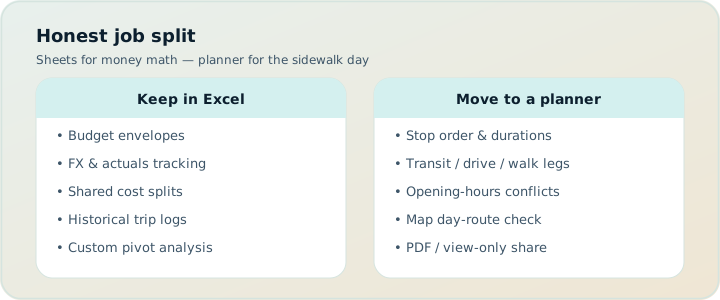
When spreadsheets win
Keep Sheets when the job is tabular truth:
- Actuals tracking — card charges, cash, splitwise-style “who owes whom.”
- Custom finance models — FX scenarios, points valuations, tax categories.
- Packing and prep checklists — checkbox cultures that do not need geo.
- Research dumps — early brainstorm tables before places are real pins.
- Offline grid editing — long-haul flights with a downloaded Sheet and no need for routing.
- Org-wide templates — clubs or families with a shared budget workbook that is not an itinerary.
In those jobs, TripPapa is not trying to replace you. Export’s cost summary is a planning estimate rollup, not a ledger. Party-aware Pricing helps before you book; your Sheet can track after you pay.
Spreadsheets are excellent ledgers and mediocre transit routers.
When spreadsheets fail as itineraries
Failure modes we see repeatedly:
- Stale travel times. You typed “18 min walk” from Maps once. You reordered stops. The cell did not notice.
- No hours engine. “Open daily” myths; Monday closures; last-entry rules.
- Party-blind prices. One price column cannot express age bands without a maze of formulas nobody trusts.
- No pace signal. A day can look balanced in rows and be eleven active hours in reality.
- Map drift. The Sheet is not the Map; pins live elsewhere; geography lies.
- Handoff pain. Relatives get a link to a editable grid or a PDF you manually built from screenshots.
- AI paste mess. ChatGPT dumps a table; you import it; nothing validates transfers.
- Version forks. “Final_v7_REAL.xlsx” in three inboxes.
Those are not user errors. They are object-model errors. A cell is not a travel leg. A row is not a chained arrival.
| Job | Sheets | TripPapa |
|---|---|---|
| Budget actuals | Excellent | Not the goal |
| Party ticket estimates on places | Manual / fragile | Pricing + party roster |
| Chained day with transit legs | Poor | Day Planner core |
| Hours / pace warnings | None native | Built-in |
| Month-level day swap + recompute | Painful | Month View Save & process |
| PDF day pages for family | DIY | Export Print/Save |
| View-only browse | Share settings messy | View-only /share links |
| Booking + flight alerts | N/A | N/A — use OTAs / TripIt |
A clean division of labor
Recommended split for serious planners:
- TripPapa — candidates, days, legs, hours, pace, party estimates, map, PDF/share.
- Sheet — paid actuals, reimbursements, points, packing.
- Google Travel / OTAs — booking dashboards (Google Travel free).
- TripIt — confirmation aggregation; Pro commonly $49/year for alerts (verify).
Wanderlog (Pro $39.99/year; verify) can be the planner if you prefer its collab model — still keep Sheets for ledger work. Comparisons: vs Wanderlog, vs Google Travel, vs TripIt.
Migration playbook: Sheet → TripPapa without losing your mind
Step 1 — Inventory columns
Label each column as: candidate research, schedule, travel time, cost estimate, actual payment, notes, packing. Only schedule/travel/estimate-on-places need migration.
Step 2 — Create the trip container
In Trips: name, destination, dates, party with ages, home base, default mode, day start. This replaces five header cells that never drove behavior in Excel.
Step 3 — Search + Add the real places
Do not paste dead text rows as truth. Use Research Search + Add so places get detail tabs (Duration, Hours, Pricing). Manual add with address when you already know the pin.
Step 4 — Rebuild one day first
Port a single day into Day Planner. Refresh travel legs. Compare to your Sheet’s walk times. The deltas teach you what was fiction.
Step 5 — Balance in Month View
Once multiple days exist, use Month View to unstack; Save & process so legs recompute. Guide: Month View.
Step 6 — Keep the Sheet as ledger
Delete schedule columns from the “source of truth” mentality. Leave payment columns. Optionally paste Export totals as planning snapshots dated in a cell — then re-verify before booking.
Step 7 — Handoff
Export PDF for offline family; share view-only for digital travellers. Stop emailing editable workbooks as itineraries. Guides: PDF families, offline PDF, view-only share.
Scenario: the 40-tab family workbook
A family has a Sheet with colors for each day, a tab per city, and a “MASTER” budget. Travel times were typed in 2024. Kids’ ages changed; prices did not. They create a TripPapa trip with the current party, Search + Add the places that still matter, schedule Rome days with transit legs, watch hours warnings on Monday museum plans, and Export a PDF for grandparents who never opened the workbook. The Sheet remains for “who paid which Airbnb deposit.” Conflict drops because the itinerary finally has an owner object model.
Scenario: solo maximizing with formulas
A solo traveler loves FX formulas and points. They keep Sheets forever for money. They move only the day structure into TripPapa after two trips where “short walk” estimates ruined dinner reservations. AI auto-plan drafts a first cut; they Revert and tune. Map day mode catches a zigzag. They do not ask TripPapa to value their credit-card points.
Scenario: corporate offsite weekend
An organizer used Sheets because IT approved Google Workspace. For a city offsite with timed museum slots, they need hours and transit honesty. TripPapa becomes the plan; a view-only share goes to attendees; PDF goes to the printed packet; the Sheet tracks department cost codes. Live multi-edit is avoided on purpose — one editor prevents chaos. Cloud Save backs up the plan; magic link for the organizer’s auth.
What not to migrate
- Packing lists that work as checkboxes.
- Historical trip archives you only read.
- Complex reimbursement workflows.
- Flight alert expectations — that is TripIt territory after booking.
- Road-corridor POI databases — consider Roadtrippers for highway trips (road vs city).
AI, Sheets, and false productivity
Pasting an AI itinerary into Sheets feels like progress. It is usually a prettier fiction. If you use AI, use it where undo exists: TripPapa’s auto-plan with Revert, then human-fix legs and hours. Read AI trip planning 2026. Decision fatigue note: more columns is not more certainty — decision fatigue.
FAQ
Can I import a CSV into TripPapa?
Work from Search + Add and manual adds for accuracy rather than expecting a fragile spreadsheet import to invent geo truth.
Should I delete my trip spreadsheet?
No — demote it to ledger/packing. Promote TripPapa for schedule feasibility.
Are Export costs for accounting?
No. Estimates for planning; verify official sites; track actuals in Sheets.
Can co-planners edit a Sheet and TripPapa?
Prefer one itinerary editor in TripPapa; use view-only for others; keep Sheet permissions for finance only.
Is Google Sheets + Maps enough?
For simple trips, sometimes. For party/hours/legs/PDF structure, the glue work becomes the trip.
Does TripPapa replace Notion?
Notion is docs/databases; TripPapa is a feasibility planner. Different objects.
Pass cost?
$35 for 6 months — confirm in-app.
When do I book relative to the Sheet?
After days are feasible in TripPapa — wishlist before you book, when to book vs plan.
Migration checklist (one evening)
- Pick the next city trip only — not your entire travel history.
- Enter party and home base in Trips.
- Add 8–12 places via Search + Add.
- Schedule two days with refreshed travel legs.
- Fix any hours/pace warnings.
- Glance at Map day mode.
- Export PDF; send view-only link.
- Strip schedule columns out of “source of truth” in Sheets.
- Optional Cloud Save.
- Book attractions only after feasibility.
If Japan-style transit is your pain, continue with Japan transit planning. If family money is the pain, see budget party costs.
Column-by-column triage worksheet
Before migrating, duplicate your trip workbook and color columns: green stay in Sheets, amber maybe, red leave the itinerary business. Green usually includes amount paid, who paid, reimbursement status, confirmation codes, packing checkboxes, loyalty points, and insurance policy numbers. Red usually includes walk minutes, metro lines as free text, opening hours paraphrases, stop order, and “day number” fields that try to be a calendar. Amber includes rough cost guesses for attractions — migrate those into TripPapa Pricing where possible, keep a dated snapshot in Sheets if you want history.
People skip triage and copy everything, which produces a zombie Sheet that still pretends to be the schedule. Be ruthless. If a column’s only job is to tell you what happens Tuesday morning, it belongs in Day Planner where travel can recompute. If a column’s job is to tell you whether Alex is owed $42, it belongs in Sheets forever.
Common formula traps that feel like planning
SUM of ticket cells without party logic; VLOOKUP of “city!” tabs that drift; conditional formatting that makes an overloaded day look calm in green; date serials that do not know local holidays; comment threads arguing in a cell nobody opens on mobile. These traps create a sensation of control. They do not create leave times with transit legs. When a formula breaks, groups debate the spreadsheet instead of the sidewalk. Migration is partly emotional: you must accept that some precision was fake.
If you love formulas, point them at actuals and FX. Let TripPapa own chained times. You can still paste Export totals into a dated row as a planning snapshot — label it “estimate only” — then overwrite with paid figures after checkout. That preserves your analytical hobby without letting it drive the itinerary object model.
Group permissioning: Sheets vs view-only share
Google Sheets sharing is easy and dangerous for itineraries. Commenter rights become editor rights become deleted rows. TripPapa’s view-only share is narrower on purpose: browse Research, days, Map, Export surfaces without mutating the plan. Use Sheets sharing for the treasurer role. Use TripPapa view-only for the “what are we doing Thursday?” role. Use PDF for offline parents. If your group insists on one link for everything, you will eventually need a human traffic controller anyway — better to make roles explicit.
When stakeholders demand an editable grid, give them an editable packing or budget grid, not an editable stop order. Redirect schedule change requests to the trip lead. This sounds strict because it is. Soft process is how Final_v7 happens.
Migration weekend plan with acceptance tests
Friday evening: triage columns. Saturday morning: create trip, party, home base; Search + Add top places. Saturday afternoon: build two days with legs; resolve warnings; Map check. Saturday evening: Export PDF and send view-only link; ask one relative to answer leave time and first stop without calling you. Sunday: strip red columns from the Sheet’s “truth” status; book one low-risk item only if feasibility is solid. Acceptance tests matter more than feelings: if the relative can execute breakfast from the PDF, migration worked. If they need you to interpret a color legend in Sheets, you are not done.
For transit-heavy destinations, add an acceptance test: reorder two stops and confirm travel refresh changes the chain. That single test teaches why cells were never enough. Deep destination note: Japan transit planning. For handoff: offline PDF guide.
What “done” looks like six months later
Done does not mean you never open Excel. Done means you never argue about Tuesday in Excel. The Sheet is boring and financial. The planner is where geography and time live. Cloud Save holds the plan backup. Magic link gets you into auth when needed. Pass at $35/6 months is evaluated against trips taken, not against nostalgia for your old template. If you travel once every two years, maybe temporary planning without a Pass mindset is enough while you test — confirm current access rules in-app. If you plan multiple city trips a year, the migration ROI is the arguments you no longer have.
Teaching a co-planner the new split
Migration fails when only one person understands the split and everyone else keeps pasting times into Sheets. Hold a fifteen-minute walkthrough: Trips party, Research wishlist, Day Planner legs, Month View Save & process, Export/Share, Sheet ledger only. Give co-planners the view-only link. Make the trip lead explicit. If someone adds a stop in chat, the lead Search + Adds it — chat is not a database.
For finance co-owners, keep Sheet edit rights as needed, but remove schedule columns so there is nowhere to “temporarily” store Tuesday. Temporary becomes permanent. If they need a printable schedule, they already have PDF. That is the whole point of leaving the itinerary business.
Copy-paste dangers from AI into Sheets
Large language models emit beautiful tables. Pasting them into Sheets creates an aura of completion that skips geo validation, hours fetches, and party pricing. If you use AI brainstorming, treat the output as names for Search + Add — not as rows of truth. Then let Day Planner assign times. If you must keep an AI table, label a column “unvalidated” and refuse to share it as the itinerary. The migration mindset applies to AI tables the same way it applies to hand-built ones: cells are not legs. See AI trip planning 2026 for a healthier AI relationship via auto-plan and Revert inside the planner.
If you remember only one migration rule, remember this: Sheets keep money and packing; TripPapa keeps places, times, travel legs, and handoff. Everything else is commentary. Follow that rule for one full trip and the old itinerary workbook will feel as strange as navigating a metro with a paper ledger of walk minutes.
Common spreadsheet itinerary mistakes
- Frozen walk-minute cells after reorder. The classic silent failure — migrate to Day Planner legs that refresh.
- Color legends as UX for elders. Parents need PDF leave times, not conditional formatting — parents and seniors.
- One price column for mixed ages. Use party-aware Pricing estimates; keep Sheet for paid actuals.
- Editable Sheet as the group itinerary. Prefer TripPapa view-only share; finance permissions stay on the ledger.
- AI table paste as “done.” Auto-plan with Revert inside a planner beats ChatGPT→Sheets fiction — AI trip planning 2026.
- Month reshuffle without recompute. Month View Save & process exists so calendar cosmetics do not leave stale metro legs.
| Sheet column example | Keep / migrate | Destination |
|---|---|---|
| Amount paid / who paid | Keep | Sheets ledger |
| Walk minutes / metro line text | Migrate | Day Planner travel legs |
| Opening hours paraphrase | Migrate | Hours tab + warnings |
| Stop order / day number | Migrate | Day Planner / Month View |
| Packing checkboxes | Keep | Sheets or checklist app |
| Attraction price guess | Migrate then verify | Pricing tab → official site |
FAQ add-ons
Can I keep a “mirror” schedule in Sheets?
You can, but it will drift. If you need a mirror, paste dated Export snapshots labeled estimate-only — never hand-maintain a second stop order.
What about Google Maps timelines pasted into cells?
Useful as a one-time research input. Useless as a living chain. Refresh legs in TripPapa after every reorder instead.
Is Wanderlog better if my group lives in Sheets comments?
If they demand live multi-edit, evaluate Wanderlog (Pro $39.99/year; verify). If they need clarity, TripPapa view-only + PDF usually reduces comment wars. Compare: vs Wanderlog.
Keep the grid, upgrade the day
You do not have to quit Excel to plan better. You have to stop asking cells to be metro segments. Build one honest day in TripPapa, keep your ledger where it belongs, and notice how much quieter the group chat becomes when the itinerary is a document and a planner — not a spreadsheet war.
Ready when you are: open TripPapa and migrate a single day before you create Final_v8.xlsx.