Multi-generational trips fail less from bad restaurant picks and more from handoff design. Parents want clarity without an app tutorial. Seniors want leave times they can read offline. Adult children want to keep editing without opening the plan to accidental deletes. Kids need a morning list, not a settings panel.
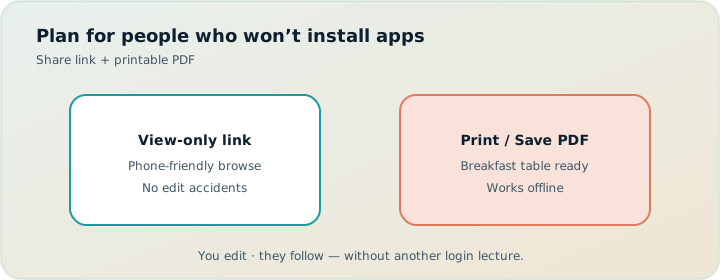
TripPapa’s answer is deliberately split: the trip lead plans in the browser loop Trips → Research → Day Planner / Month View → Map → Export / Share; relatives receive a PDF (Print / Save as PDF) and/or a view-only share link. Party-aware pricing keeps family ticket math honest. Travel legs, pace/hours warnings, Month View Save & process, Map modes, Cloud Save, and magic-link auth support the lead. Not included: booking, flight alerts, live multi-edit, Discovery quiz. Pass $35/6 months.
This guide focuses on parents and seniors as audiences — how to plan for mixed tech comfort, what to put on paper vs a link, and how to run mornings without renegotiating the whole vacation. Core docs: How TripPapa Works, print PDF for families, offline PDF guide, view-only share.
Design the audience before the itinerary
List who needs what:
- Editor — usually one adult child or planner parent; owns TripPapa, Cloud Save, bookings on official sites.
- Digital followers — partners/siblings with phones; view-only share is enough.
- Offline followers — parents/grandparents who prefer paper or a PDF on a tablet without accounts.
- Dependents — kids who need highlighted leave times and short day strips.
If you try to force everyone into editable collaboration, you get fear and forks. TripPapa share links are view-only on purpose. Compare that philosophy with collab-first tools like Wanderlog (Pro $39.99/year; verify) in TripPapa vs Wanderlog.
Clarity for elders is a feature. Edit access for elders is often a bug.
Plan with the party roster real
Under Trips, enter adults and children with ages — including seniors if you use age-based estimates where enrichment supports them. Party-aware Pricing changes museum math. Durations should also change: more buffer between stops, fewer stacked stairs-heavy temples, earlier leave times. Pace warnings (heavy active hours on the order of ten) are especially useful when energy variance is high. See party-aware pricing, budget party costs, hours and pace.
Set home base thoughtfully — elevators, transit access, walking distance to breakfast. Day Planner anchors start/end legs from home base so the PDF does not pretend you wake up inside the first museum.
Research that respects stamina
Search + Add candidates, then use Duration and Hours tabs aggressively. Prefer clusters on Map wishlist mode so parents are not crossing town twice. Tag “low walk,” “stairs,” “sit-down,” “shade” in notes if that helps your family language. AI auto-plan can draft a spread; Revert if it builds a marathon. Human judgment owns rest days.
Day Planner habits for multi-gen groups
- Start earlier than Instagram itineraries suggest; end earlier too.
- Put the hardest walk before heat or fatigue peaks.
- Keep one recovery block visible on the day — not only in your head.
- Refresh travel after reorders; seniors feel transfer tax more than apps admit.
- Believe hours warnings; prepaid tickets to closed doors hurt morale.
Transit/drive/walk/cycle modes: default to what the least mobile member can repeat safely. A “short walk” for a 28-year-old may be a no for a grandparent after two museum hours. Guide: travel times.
Month View: protect rest and weather
Use Month View to see stacked heavy days. Swap outdoor and indoor days when forecasts shift; Save & process so legs recompute. Shoulder patterns: shoulder season planning, Month View calendar.
PDF: the senior-friendly artifact
Export builds print-optimized day pages: leave times, stops, travel legs, costs as estimates, appendix for extras. Browser Print / Save as PDF. Practical tips:
- Print Day 1–3 as a pocket pack; refresh later days mid-trip if needed.
- Highlight leave times with a pen.
- Write who carries tickets in the margin.
- Keep font-friendly printing (browser defaults; avoid tiny “fit to page” shrinks).
- Include the appendix so “why didn’t we go?” has an answer: it was optional.
Re-export after material changes. A PDF is a snapshot with a generation date mindset — even if relatives do not notice the timestamp, you should.
View-only share: the digital sibling artifact
Create a /share/… link so phone-comfortable travellers browse Research, Day Planner, Month View, Map, and Export without editing. Revoke after the trip. Do not paste editable workspace access into a family chat. Details: view-only share.
| Audience | Best handoff | Avoid |
|---|---|---|
| Grandparents offline | Printed day pages / PDF | Account creation, editable links |
| Parents with phones | PDF + view-only link | Conflicting edit rights |
| Trip lead | Full TripPapa + Cloud Save | Planning only in group chat |
| Kids | Short printed morning strip | Full planner UI at breakfast |
Scenario: Lisbon with parents
Two adults + two parents in their 70s. Hills are real. Home base near a metro with elevator access. Research avoids stacking miradouros across town. Day Planner uses transit between clusters, walk only inside a neighborhood, earlier ends. Hours fetched for museums. Month View inserts a rest afternoon after a castle day. Export PDF emailed to parents before flights; view-only link to the sibling who joins Day 3. Tickets verified on official sites after days are feasible — TripPapa does not book.
Scenario: Disney-adjacent multi-gen (any big park trip)
Park days destroy pace budgets. Keep park days dedicated in Month View; do not append a downtown museum after rope drop. Party Pricing estimates help the money talk; still buy on official channels. PDF leave times matter more than fancy maps when grandparents meet you at a gate. Share link for the cousin who wants Map browse on their phone.
Scenario: cruise port day with elders
One short city day with a hard ship-back time. Day Planner leave time and travel legs are safety tools. Put the return-to-port buffer explicitly as notes on the day. Export a one-page PDF everyone carries. Do not rely on chat screenshots while roaming.
After booking: organizers vs planners
Once flights and hotels are booked, confirmation noise rises. TripIt (Pro commonly $49/year; verify) can organize emails and alerts. Google Travel remains a free dashboard. TripPapa stays the day-feasibility and handoff tool. Stack thinking: when to book vs when to plan, vs TripIt, vs Google Travel.
Cloud Save without confusing relatives
Cloud Save and magic link are for the editor’s backup and device switch — not something parents must understand. Local-first autosave protects the lead’s browser. Explain to family only the PDF and share link. Storage model: local-first Cloud Save.
FAQ
Do parents need a TripPapa account?
No. PDF and view-only share cover following the plan.
Can seniors edit a stop if plans change?
They should tell the editor. View-only prevents accidental deletes; the editor updates and re-exports.
What if Wi‑Fi fails at the hotel?
That is why PDF exists. See offline PDF guide.
How many days should I print?
At least the next 1–3; re-print after reshuffles.
Are cost numbers on the PDF final?
No — estimates. Verify official ticket sites.
Is live collaboration better for families?
Sometimes for peer groups; for parents/seniors, single editor + clear handoff usually reduces stress.
Can AI plan a gentle trip?
Auto-plan can draft; Revert and add rest. AI is not a doctor or mobility assessor.
Pass price?
$35 / 6 months — confirm in-app.
Family launch checklist
- Appoint one editor.
- Enter full party and realistic home base.
- Build days with buffers; heed pace/hours warnings.
- Map-check clusters.
- Export PDF; test that a parent can answer leave time + first stop.
- Send view-only link to digital relatives.
- Book only after feasibility.
- Optional Cloud Save for the editor.
- Revoke share after the trip.
Japan transit with elders: Japan itinerary transit planning. Buyer criteria: what makes a good trip planner 2026.
Accessibility and energy as first-class planning inputs
Multi-gen planning is accessibility planning even when nobody uses that word. Stairs, standing time in queues, distance between metro exits and attraction entrances, midday heat, and the cognitive load of transfers all belong in Day Planner judgment. TripPapa will not diagnose mobility needs — you must. Shorten durations on fortress hills. Prefer transit over walk between clusters. Place rest as a stop with a café pin if that helps the group take it seriously. Hours warnings still matter: nothing exhausts seniors faster than arriving at a closed gate after a hard approach.
Use Map wishlist mode to find clusters with benches and indoor exits. Use day mode to avoid ornamental zigzags. If a “must-see” forces a hard walk, schedule it early, alone as the day’s centerpiece, and protect the afternoon. AI auto-plan will not know whose knees complain — Revert freely and rebuild with quieter assumptions.
Communication scripts that reduce friction
Send parents a short message with two artifacts only: “PDF attached for offline days; link for optional browsing on your phone. I am the only editor — text me if something should change.” That script prevents login questions and edit accidents. For siblings: “View-only link — please do not screenshot partial days into the chat as competing plans.” For kids: show the printed leave time the night before and pack bags to that clock.
When plans change, avoid long narrative emails. Send an updated PDF with a one-line delta: “Wednesday museum moved to Thursday for rain; leave time still 09:30 from hotel.” Month View Save & process should already have recomputed legs before you speak. Credibility comes from artifacts matching words.
Medical, documents, and what not to put in the planner
Keep medication schedules, passport numbers, and insurance details out of shared itinerary surfaces when possible. Day notes can say “pharmacy stop if needed” without storing sensitive data. PDF packets for families sometimes grow a cover sheet of emergency contacts — that can live as a separate one-pager you print, not necessarily inside Export. TripPapa’s job is places, times, travel, estimates, handoff — not a medical record. Cloud Save backups should be treated with the same care you give any account that holds travel patterns; use magic link thoughtfully on shared devices.
On-the-ground rituals that make PDFs work
Night-before briefing: five minutes, tomorrow’s page only, highlight leave time, confirm who carries tickets, agree on a meetup pin if the group splits. Morning: bags by the door at leave time minus ten. Midday: if energy crashes, use the appendix rather than inventing a new plan from social media. Evening: optional re-export if the next day changed; otherwise let people rest. These rituals sound scout-like because multi-gen travel rewards scout-like clarity.
If parents resist PDFs and demand WhatsApp voice notes, still keep the PDF as the canonical reference when memory disagrees. Voice notes are ephemeral. Day pages are not. Related: offline PDF guide, print PDF families.
Choosing lodging with elders in mind
Home base selection is the highest-leverage multi-gen decision. Elevator access, distance to transit, noise, and proximity to a simple breakfast options matter more than a viral rooftop. Set home base in Trips so every day’s start/end legs tell the truth. If lodging is already booked poorly for mobility, compensate with fewer stops and more taxis/transit — reflect that in mode choices and pace expectations. Budget for that compensation explicitly using party-aware attraction savings elsewhere if needed — budget party costs.
Splitting the group without splitting the truth
Multi-gen days sometimes intentionally split: adults take teens to a longer hike while grandparents visit a ground-level museum. Plan both threads in Day Planner as clearly labeled notes or sequential stops with honest leave times for reunification. Map a meetup pin. Put the meetup on the PDF in bold pen if needed. View-only share helps the digital subgroup; printed pages help the offline subgroup. The failure mode is two incompatible truths in two chats. One editor keeps one plan even when the group temporarily divides.
Budget the split with party-aware estimates if tickets differ by subgroup. Still verify official prices. Still avoid giving elders edit access “just for their half.” They can text preferences; you can update.
When reunification travel is tight, prefer fewer stops over cleverness. Pace warnings on the combined day are a hint that the split-plus-meetup fantasy is overloaded. Believe them before someone waits alone at a station.
Airports, transfers, and the first-day gentleness rule
The first day after a long flight is where multi-gen plans go cruel. Resist filling arrival afternoons with museum masterpieces. Use Day Planner for a short neighborhood loop with easy transit from home base, early end, and food near the lodging. Put any ambitious stop on Day 2+. Export should make that gentleness visible so enthusiastic siblings do not improvise a death march “since we’re here.” Pace warnings help, but arrival-day restraint is a human policy — write it in day notes.
Airport transfers themselves may be booked outside TripPapa (trains, private cars). Note the arrival window so leave times for the first walk are realistic. TripIt can hold the flight; the PDF holds the gentle city start. That handoff is the product working across the stack without inventing flight alerts inside TripPapa.
Common multi-gen planning mistakes
- Everyone is an editor. Editable links and Sheet itineraries create fear and forks. View-only share + one TripPapa editor is the calmer default.
- Instagram pace for seventy-year-old knees. Pace warnings exist; rest blocks must be visible on the day, not only in your head.
- Verbal plans as source of truth. Voice notes fade; PDF day pages do not. Re-export after Month View Save & process.
- Party-blind museum math. Enter ages under Trips; open Pricing before promising a slate of paid stops.
- Home base as an afterthought. Elevators and transit access beat rooftop vibes when stamina variance is high.
- Teaching Cloud Save at breakfast. Relatives need leave times; the editor needs Cloud Save and magic link — different audiences.
| Failure | What seniors experience | Fix in TripPapa loop |
|---|---|---|
| Star-pattern day | Exhaustion by lunch | Map clusters; fewer wards |
| Closed Monday surprise | Morale crash | Hours warnings before booking |
| Chat screenshot itinerary | Conflicting leave times | PDF + view-only only |
| Walk between clusters | Pain / refusal | Transit/drive mode overrides |
| Park + museum same day | Meltdown | Month View dedicated blocks |
Step-by-step: 48-hour multi-gen launch
- Appoint the editor; say it out loud to the family.
- Create the trip; enter full party with ages; set mobility-honest home base.
- Search + Add candidates; tag low-walk / stairs / sit-down in notes.
- Schedule two gentle proof days with transit/walk realism; refresh legs.
- Fix hours and pace warnings; insert one visible recovery block.
- Month View: ensure heavy days are not stacked; Save & process.
- Export PDF; ask a parent to answer leave time + first stop without calling you.
- Send view-only share to digital siblings; revoke date noted on your calendar.
- Book only survivors on official sites; optional TripIt for flight confirmations later.
- Cloud Save for the editor; do not onboard parents into auth.
Acceptance test: if a parent can execute tomorrow from paper alone, you are ready. If they need you to interpret color legends in a Sheet, migrate schedule feasibility out of the grid — Excel trip planning.
Scenario: Tokyo with grandparents
Station tax and transfers are cognitive load. Home base near a useful hub. One neighborhood-deep day before any cross-town highlights. Transit default between wards; walk only inside a cluster. Kamakura-style day trips get their own day with an honest return leg. PDF shows leave times and end-of-day intent so “one more stop” debates die on the platform. Full transit guide: Japan itinerary transit planning. AI auto-plan may propose a subway marathon — Revert immediately and rebuild quieter.
Scenario: rain week with mixed mobility
Build indoor/outdoor twins; swap in Month View; Save & process; re-export PDF the same evening. Do not ask grandparents to follow a forecast thread in chat. Shoulder patterns: shoulder season planning.
Money talks without awkwardness
Use party-aware estimates early so ticket sticker shock is a planning conversation, not a sidewalk argument. Export totals are estimates — say that explicitly. Track actuals in a Sheet if needed. Google Travel remains a free booking dashboard; TripPapa stays the feasibility and handoff layer. Wanderlog collab (Pro $39.99/year; verify) is optional only if peers demand live multi-edit; it is rarely the best model for parents. TripIt Pro ($49/year commonly; verify) after flights exist. Budget deep dive: budget party costs. Pass: $35/6 months — confirm in-app.
Practice run before departure
One evening before the trip, sit with the PDF and the view-only link open. Ask a parent to find tomorrow’s leave time on paper while a sibling finds the same day on the share link. Confirm they match after your last Save & process and Export. This ten-minute drill surfaces version confusion while you can still fix it at home Wi‑Fi. Add ticket holder names in pen. Confirm Cloud Save on the editor device. Confirm magic-link access still works if you rely on it. Kindness is operational, not only tonal — it is the rehearsal that prevents platform arguments in a foreign station.
Lead with kindness, not another login
The kindest itinerary is one relatives can follow at breakfast without performing tech competence. Build feasibility in TripPapa; hand off PDF and view-only; keep editing centralized. That is multi-gen planning that respects everyone’s job.
Ready when you are: open TripPapa, schedule one gentle day, and Print / Save as PDF for the person who asked for “just the schedule.”