The trip planner market in 2026 is loud: AI chatbots that draft fantasy days, map apps that never become a schedule, collaborative boards that invite conflicting edits, booking dashboards that skip feasibility, and spreadsheets that still quietly run half the world’s vacations. A good buyer needs criteria — not vibes.
This checklist maps what serious planners should demand to what TripPapa actually ships: the browser loop Trips → Research → Day Planner / Month View → Map → Export / Share, party-aware pricing, Search + Add, detail tabs, travel legs (transit/drive/walk/cycle), pace and hours warnings, AI auto-plan with Revert, Month View Save & process, Map modes, PDF export, view-only share, Cloud Save, magic-link auth, Pass $35/6 months. Explicitly not: booking, flight alerts, live multi-edit, Discovery quiz.
Competitor price signals to verify: Wanderlog Pro $39.99/year; TripIt Pro $49/year; Google Travel free; Roadtrippers Pro ~$49.99/year for road-shaped needs; spreadsheets + Maps still common. Walkthrough: How TripPapa Works.
Criterion 1: One loop from research to handoff
Why it matters: Tab chaos is the default failure mode — Maps in one tab, Notes in another, Sheets for costs, chat for screenshots. Plans drift.
What good looks like: Wishlist, days, routes, and export live in one workspace.
TripPapa: Research feeds Day Planner; Map mirrors pins and day routes; Export/Share hand off the same plan. See trip planning tab chaos and replace five apps.
Criterion 2: Party is a first-class object
Why it matters: Family budgets and pacing depend on who is going.
What good looks like: Adults/children with ages flow into cost estimates and planning defaults.
TripPapa: Party under Trips; Pricing tabs estimate for that party. Details: party-aware pricing, budget trip planning.
Criterion 3: Travel legs between stops
Why it matters: Ordered lists without movement math are fiction.
What good looks like: Mode, duration, distance between stops; refresh after reorder; home base anchors.
TripPapa: Day Planner legs for transit/drive/walk/cycle; transit steps/fares when routing provides them; approximate flags on fallbacks. Guide: travel times.
Criterion 4: Hours and pace warnings
Why it matters: Closed Mondays and 12-hour days destroy trips silently.
What good looks like: Warnings when arrivals fight hours or days overload (heavy active hours on the order of ten).
TripPapa: Hours + pace warnings in Day Planner; fetch Hours in detail tabs. Guide: opening hours and pace warnings.
Criterion 5: Bird’s-eye editing without stale routes
Why it matters: Weather and energy require day swaps; list tools forget to recompute travel.
What good looks like: Calendar/month reshuffle that recomputes legs on commit.
TripPapa: Month View drafts; Save & process commits and recomputes. Guide: Month View, shoulder season planning.
Criterion 6: Map that matches the plan
Why it matters: A separate map tab lies when the list changes.
What good looks like: Wishlist pins and per-day routes tied to the same data.
TripPapa: Map wishlist mode vs day mode; drop pin to add.
Criterion 7: AI that scaffolds and can be undone
Why it matters: Irreversible AI overwrites destroy trust.
What good looks like: Optional auto-plan with atomic apply and revert.
TripPapa: AI auto-plan + Revert to pre-AI; AI-assisted search/summaries without a Discovery Yes/No quiz. Context: AI trip planning 2026.
Criterion 8: Handoff for non-editors
Why it matters: Multi-gen trips need followable artifacts.
What good looks like: PDF/print and/or view-only links; no forced accounts for readers.
TripPapa: Export Print/Save PDF; view-only /share/… links. Guides: PDF for families, offline PDF guide, view-only share, parents and seniors.
Criterion 9: Clear collaboration model
Why it matters: Live multi-edit feels modern until two people delete Tuesday.
What good looks like: Explicit choice — multiplayer canvas vs single editor + viewers.
TripPapa: Single editor; view-only share. If you need live collab, evaluate Wanderlog’s model instead of expecting TripPapa to fake it.
Criterion 10: Local-first with optional backup
Why it matters: Silent cloud sync surprises; lost tabs hurt.
What good looks like: Local autosave; intentional cloud upload/restore; sane auth.
TripPapa: Local-first; Cloud Save on purpose; magic-link auth. Guide: local-first Cloud Save.
Criterion 11: Honest non-features
Why it matters: Buyers waste money on tools that pretend to be everything.
What good looks like: Clear boundaries vs booking engines and alert apps.
TripPapa: Does not book; does not do flight alerts; no Discovery quiz; no live multi-edit. Stack with Google Travel (free dashboard) and TripIt (Pro $49/year commonly) after you book. See when to book vs when to plan, vs TripIt, vs Google Travel.
Criterion 12: Price vs job fit
Why it matters: Annual Pro fees add up across overlapping apps.
What good looks like: Pay for the job you need; avoid duplicate subscriptions.
TripPapa: Pass $35/6 months. Compare with Wanderlog Pro $39.99/year, TripIt Pro $49/year, Roadtrippers tiers for road trips (~$49.99/year Pro commonly). Verify all prices before purchase. Road vs city: road trip vs city trip planners.
| Buyer criterion | TripPapa mapping | If you need something else |
|---|---|---|
| Research → days → export | Full loop | — |
| Party ticket math | Party + Pricing | Sheets for actuals |
| Transit-heavy cities | Travel legs + warnings | — |
| Live multi-edit | Not supported | Wanderlog-style collab |
| Flight alerts | Not supported | TripIt Pro |
| Road corridor POIs | Not primary | Roadtrippers |
| Booking dashboard | Not supported | Google Travel / OTAs |
| Offline paper handoff | PDF export | — |
Scenario: couple maximizing a museum city
They care about hours, walking limits, and a clean PDF for parents joining two days. Checklist priorities: criteria 3, 4, 8, 11. TripPapa fits. They skip TripIt Pro until flights are booked. They skip Roadtrippers entirely.
Scenario: friend group that edits simultaneously
They want everyone dragging stops at once. Criterion 9 fails for TripPapa by design. They evaluate Wanderlog collab; or they appoint one editor in TripPapa and use view-only links — a process choice, not a feature checkbox.
Scenario: road-trip family
Corridor discovery dominates. Criterion “road POIs” points to Roadtrippers. They might still use TripPapa for a multi-day city segment mid-route. Geometry first: road vs city.
Scenario: spreadsheet loyalist
They have years of templates. Keep Sheets for finance actuals; migrate schedule feasibility to TripPapa when travel legs and hours start breaking trips. Guide: Excel trip planning.
Decision fatigue and “good enough”
Maximizers will try to score every app on every criterion and still not book lodging. Use this checklist to pick a primary planner for the trip shape you have now — then stop shopping. Related: decision fatigue, maximizers vs satisficers, choice overload, why TripPapa for serious planners.
A good trip planner reduces silent failure modes — closed doors, impossible days, party-blind prices — not just empty states with pretty gradients.
FAQ
Is AI the most important criterion in 2026?
No. Undoable scaffolding helps; feasibility objects (legs, hours, party) matter more than chat prose.
Do I need Cloud Save on day one?
No. Plan locally; enable Cloud Save when you want backup or another device.
Can one tool win every criterion?
No. Honest stacks beat fantasy all-in-ones.
Is Google Travel enough?
As a free booking/destination dashboard, often. As a day feasibility planner with party legs and PDF structure, usually not.
How do I evaluate Wanderlog vs TripPapa quickly?
Compare collab model, offline bet, and whether party/hours/legs/Month View process match your failure modes.
What is TripPapa Pass?
$35 for 6 months — confirm in-app.
Does view-only share replace PDF?
Complementary. Phones vs paper/offline.
Where should research start?
Wishlist before you book — collect and schedule before OTA rabbit holes.
How to run a 90-minute bakeoff
Criteria lists fail when they stay theoretical. Block 90 minutes with your real next destination. In TripPapa, create a trip, enter the actual party, Search + Add eight places you already care about, schedule one day with travel legs, fix one hours warning, glance at Map day mode, Export a PDF, and create a view-only share link. Note where the product felt like relief versus friction. If you also evaluate Wanderlog, repeat a smaller version of the same day and specifically test collaboration assumptions. If Roadtrippers is in play, test a drive corridor instead of forcing a city day into it.
Score only the criteria that map to your last trip’s failures. Ignore feature theater: dark mode, streak badges, and infinite AI chat do not reopen a museum on Monday. Write down subscription math with verified prices — TripPapa Pass $35/6 months, Wanderlog Pro $39.99/year, TripIt Pro $49/year, Roadtrippers Pro about $49.99/year, Google Travel free — and ask whether you are paying twice for the same job. A bakeoff that ends with two Pros overlapping on planning is a failed bakeoff even if both apps are pleasant.
Red flags in planner marketing
Be wary of copy that promises “book everything here,” “never miss a flight,” “everyone edits live,” and “AI builds your perfect trip” in the same breath. Those jobs conflict. Booking funnels optimize conversion. Alert systems optimize disruption response. Live multi-edit optimizes simultaneous input. Feasibility planners optimize whether Tuesday can exist. When one landing page claims all four, you will inherit compromises — or invented features. TripPapa’s marketing honesty is part of the product: it tells you what it refuses to be. Use that refusal as a positive signal when your pain is silent itinerary failure rather than inbox aggregation.
Also watch for Discovery-style quizzes that feel personalized while delaying real Search + Add work. If you already know you want Kyoto temples and a market day, a swipe deck is procrastination with animations. Prefer tools that let you capture known candidates quickly and then stress-test them with legs and hours.
Team and family roles as a hidden criterion
Criterion 9 (collaboration model) is really a people criterion. A couple that trusts one planner needs view-only plus conversation. A friend group that cannot defer will demand live edit or will fork the plan in chat anyway. Parents joining for three days need PDF clarity more than Map toys. Write roles down: editor, viewer, offline recipient, booker, treasurer. Then pick software. Reversing that order — picking a collaborative canvas first — often creates political debt you will pay at the ticket gate.
TripPapa assumes an editor exists. If your culture cannot appoint one, either appoint one anyway or choose a different collab model consciously. Do not half-use view-only share while also pasting editable exports into a free-for-all Sheet; you will recreate tab chaos with extra steps. Related reading on chaos and decision load: tab chaos, decision fatigue.
Feasibility quality bar: what “good” feels like
A good planner changes your body language. You stop screenshotting Maps into chat. You stop arguing about whether a day is “doable” in the abstract because the chain shows arrival times. You stop surprising grandparents with verbal plans that never existed on paper. You catch a Monday closure before payment. You notice party totals before the trip becomes awkward. Those outcomes are the quality bar — not the number of integrations on a pricing page.
If after a week of use you still maintain a parallel “real plan” in Notes, the tool failed your workflow — or you failed to commit. Commitment means Research is the wishlist, Day Planner is the schedule, Export/Share is the handoff. Secondary tools may still book and alert. They should not host a second itinerary truth.
Annual trip portfolio thinking
Some years you take one city break; some years you mix a road trip, a family city week, and a work offsite. Buy tools for the portfolio you actually have. A Roadtrippers membership year makes sense if two trips are corridor-shaped. TripPapa Pass for six months can cover a dense spring–summer planning window. TripIt Pro makes sense if you fly enough for alerts to pay for themselves in stress reduction — not because a blog said serious travelers subscribe to everything. Google Travel remains free connective tissue. Spreadsheets remain free ledgers. Portfolio thinking prevents subscription creep.
Security, ownership, and handoff hygiene
Good planners in 2026 also respect ownership. Who can edit? Who can only view? What remains after you revoke a link? TripPapa’s view-only share and single-editor model are hygiene features for families and trip leads who have been burned by collaborative deletes. Cloud Save and magic-link auth are for the owner’s continuity, not for turning every relative into an account holder. PDF handoff further reduces login surface area for seniors.
Ask vendors where your data lives and what offline artifacts you can take. If a tool cannot produce a readable PDF of days with travel context, multi-gen trips will invent their own paperwork anyway — usually worse paperwork. Handoff is not a “nice to have export.” It is criterion-level for anyone traveling with mixed tech comfort. See view-only share and PDF for families.
Finally, judge AI features by reversibility and grounding. Auto-plan with Revert is accountable. Chat that overwrites your week without a snapshot is not. Summaries that help you skim reviews are useful; invented Discovery quizzes that postpone Search + Add are not. Hold 2026 AI to the same feasibility bar as human drafts: legs, hours, party, map, handoff.
The minimum viable planner for serious trips
If you strip marketing away, the minimum viable serious planner needs: a trip container with dates and party, a wishlist of real places, a day schedule with recomputable travel, warnings for hours and overload, a map that matches the data, and a handoff for non-editors. TripPapa is organized exactly around that minimum — plus Month View processing and reversible AI scaffolding. Everything else in the market is either a specialization (road corridors, flight alerts, booking) or a distraction. Start from the minimum, then add specialists. That is how you avoid paying for three Pros that each half-solve the same Tuesday.
When you score, weight silent failures higher than missing novelty features. A planner that prevents one closed-Monday prepaid ticket can outperform a prettier app that cannot warn you. Use the twelve criteria as a scorecard once, pick a primary lane, and spend the next evening building a real day in TripPapa instead of reading another roundup.
Weighted scoring worksheet (keep it short)
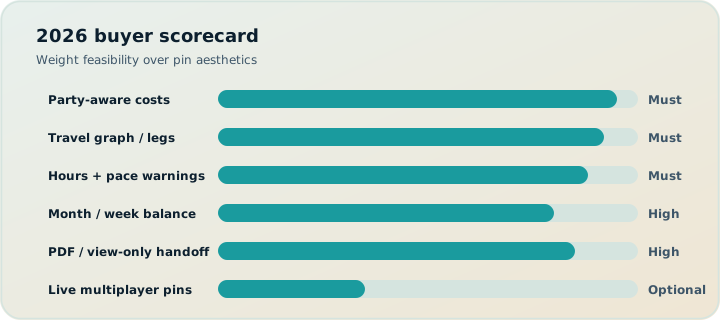
Do not score twelve criteria equally. Weight only what broke your last trip. Example weights for a family museum city: travel legs 5, hours/pace 5, party pricing 4, PDF handoff 4, single-editor clarity 3, AI undo 2, Cloud Save 2, live multi-edit 0 (you do not want it), flight alerts 0 (TripIt later), road POIs 0. A tool that wins live multi-edit and loses legs/hours is still a bad buy for that trip. Write weights before you open pricing pages so marketing cannot reshuffle your priorities.
| Last-trip failure | Criterion to weight high | TripPapa answer |
|---|---|---|
| Impossible day / missed transfer | Travel legs + Map | Day Planner modes + day route |
| Closed attraction | Hours warnings | Hours fetch + warnings |
| Family price shock | Party object | Party + Pricing tabs |
| Parents lost without Wi‑Fi | PDF handoff | Export Print/Save PDF |
| Chat screenshot chaos | One loop + view-only | Research→days→share |
| Highway backtracking | Road POIs | Not primary — use road tool |
Common buyer mistakes in 2026
- Buying AI chat instead of feasibility objects. Prose itineraries without legs and hours still fail silently.
- Paying two planner Pros. Wanderlog Pro ($39.99/year) plus TripPapa Pass ($35/6 months) for the same city job is usually waste — pick one primary planner.
- Skipping TripIt then blaming the planner for gate alerts. Different job; Pro commonly $49/year when alerts matter.
- Treating Google Travel as a Day Planner. Excellent free dashboard; weak party/hours/PDF structure for serious DIY days.
- Demanding live multi-edit for multi-gen trips. Often increases fear; view-only + PDF is kinder.
- Ignoring geometry. Road corridor tools for metro cities (and vice versa) waste money — road vs city.
Step-by-step: criteria to first booked survivor
- List three failure modes from your last vacation.
- Map them to criteria 1–12 above; ignore the rest for now.
- Open TripPapa; run the 90-minute bakeoff on a real destination.
- If legs/hours/party/PDF relieved those failures, stop shopping planners.
- Wishlist and proof days before OTA carts — wishlist before you book.
- Book scarce survivors; add TripIt only when confirmation noise appears.
- Enable Cloud Save when losing the plan would hurt; use magic link as needed.
- Re-export PDF after Month View Save & process changes.
Japan transit stress-test: Japan transit planning. Spreadsheet migrants: Excel trip planning. Multi-gen handoff: parents and seniors.
Score your current stack
Write your last trip’s failure modes in one column (missed hours, dead battery, party price shock, chat chaos). Map each to a criterion above. Subscribe only where gaps are real. If gaps cluster around feasibility and handoff, try TripPapa on one city day before renewing overlapping Pros.
Ready when you are: open TripPapa and test criteria 1–8 on a real weekend plan — the checklist only matters if a day becomes more honest.