Itineraries fail in boring ways. You schedule a masterpiece that arrives before the museum opens. You stack “light walking” until the day is eleven hours of transfers and queues. You assign one more “must-see” to an already busy Tuesday because the wishlist felt incomplete.
Those are not exotic edge cases. They are the default failure modes of list-based planning. A spreadsheet can hold names and times. It will not warn you that your arrival is 8:40 for a 9:00 open — or that visits plus travel just crossed a ten-hour wall.
TripPapa surfaces two quiet killers in the Day Planner: opening-hours conflicts and pace / packedness warnings. They will not book tickets for you. They will stop you from flying into a plan that was never executable. For the wider loop, see how TripPapa works; for movement math, see travel times between stops.
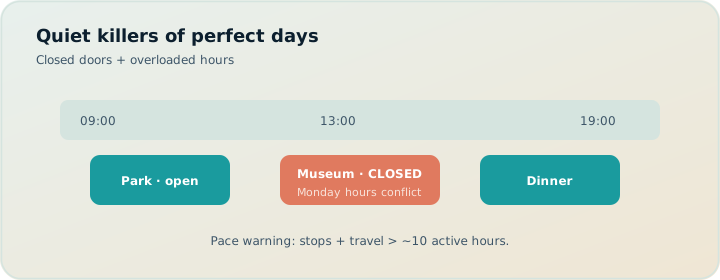
Failure mode 1: closed doors and bad arrivals
Opening hours break trips in four common patterns:
- Arriving before open. The day looked elegant on paper. The gallery opens at 10. You arrive at 9:20 with restless kids.
- Arriving after close. A late lunch and a long metro leg push you past the last entry.
- Visit spans closing. You planned a two-hour visit that starts at 16:30 for a place that closes at 17:00.
- Closed today. Monday museum closures are famous for a reason — and still catch people who planned by vibe.
Chatbots and “top 10” lists rarely bind a stop to a weekday. Maps apps show hours in another tab that does not update your day timeline when you reorder stops. The conflict only becomes real when you are standing outside.
Seasonal hours make this worse. Summer evening openings, winter early closes, and holiday exceptions will not match the generic “open 9–5” memory you carried from a blog post. Enrichment plus a final official-site check is the honest workflow; TripPapa handles the enrichment-and-conflict half so you are not doing weekday math by hand across seven days.
How TripPapa hours warnings work
In Research, you can fetch opening hours onto an attraction (Hours enrichment). Those hours become structured week data — open intervals or closed days — not a free-text note you forget to read.
In Day Planner, TripPapa chains arrival and departure times from your day start, visit durations, and travel legs. For each stop, it compares that window to hours for that calendar date via the same check used in Export:
arrives_before_open— you get there before the venue opensarrives_after_close— you arrive after closingvisit_spans_close— your planned stay runs past closeclosed_today— the place is closed on that weekdayunknown/ok— no hours data, or the visit fits
Warnings show on the day timeline so you can fix the plan before you commit emotionally (or financially) to a broken sequence. Export also prints hours warnings on day pages, so the PDF does not hide problems you ignored on screen — see print/PDF for families.
Hours data is still an estimate from enrichment — verify critical venues on official sites, especially holidays and seasonal schedules. The product’s job is to make conflicts visible early, not to replace the official calendar.
Failure mode 2: optimistic pace
Travelers underestimate transfers — especially with kids, luggage, heat, or unfamiliar transit. They also underestimate queues, security lines, and the emotional cost of “just one more stop.”
A day can look reasonable as a list of names and still be brutal as a timeline:
- Six attractions with short visits but long cross-town legs
- Back-to-back museums with no buffer for lunch
- A “free afternoon” that is actually a 90-minute commute home
Without summing visit minutes plus travel minutes, you cannot see overload. Reordering in a notes app does not recompute the day length.
Pace problems also hide inside “short” stops. Five 45-minute visits plus four 25-minute legs is already a long day before lunch. The planner’s total is the only honest scoreboard — not the number of pins on a map.
How TripPapa pace warnings work
Day Planner summarizes each day: attraction count, visit time, travel time, and total. When visits plus travel push past a long threshold — around 10 hours — the day is flagged as overloaded.
That threshold is intentionally blunt. Joyful trips leave slack for coffee, wrong turns, and the photo someone will insist on taking. A planner that never complains will happily let you schedule a marathon.
Pace warnings pair with travel modeling. Between stops, TripPapa inserts legs for transit, drive, walk, or cycle. If you ignore legs, pace math is fiction; if you keep legs, pace becomes a useful sensor.
Assign-to-day packedness: see overload before you commit
The dangerous moment is not always the finished day. It is the moment you assign one more wishlist item “somewhere.”
When you assign an attraction to a day, TripPapa’s assign flow previews each day’s existing stops and a packedness label based on visit + travel minutes:
| Label | Rough meaning |
|---|---|
| Empty day | No attractions yet |
| Light | Room to breathe |
| Moderate | Filling up, still workable |
| Busy | Past ~6 hours of visit + travel — getting full |
| Overloaded | Past ~10 hours — danger zone |
You see the mini-timeline and the tone before you drop another stop onto an already heavy day. That is cheaper than discovering overload after you have emotionally committed to “fitting it in.”
Packedness is especially useful late in planning, when the wishlist still has beloved leftovers. The question is not “is this place good?” — it is “which day can absorb it without becoming Overloaded?” Assign previews answer that without forcing you to mentally simulate every day.
Worked example: Prague Monday museum trap
You’re planning Prague: Castle morning, Charles Bridge wander, and a major museum “because it’s famous.” Research Hours enrichment flags the museum closed Monday. You had parked it on Monday anyway from a blog list. Day Planner shows closed_today. You open Month View, swap the museum onto Wednesday (rain window), Save & process, and re-check travel.
Separately, Tuesday’s assign preview shows Busy before you drop a fourth stop. You leave the leftover in Unassigned for the PDF appendix instead of forcing Overloaded. Pace warning never becomes a sidewalk meltdown. Party Pricing on the castle still sits in Research — cost and hours are different sensors, both required for families.
A practical triage loop
- Enrich hours on must-do attractions in Research.
- Place stops in Day Planner; set realistic durations.
- Refresh travel after reorders so legs are current.
- Read hours warnings — move the stop, shorten the visit, or change the day.
- Read pace flags — cut a stop, swap via Month View, or accept a deliberately long day with eyes open.
- Use assign packedness when adding from the wishlist so you do not create the problem in the first place.
- Export or share only after the red flags are gone (or consciously accepted).
Month View helps the balance problem: drag activities between days or swap entire days, then Save & process so travel recomputes. Hours and pace are day-local; Month View is how you redistribute pressure across the trip.
What to do when a warning fires
Hours: arrives before open
Delay the day start, insert a nearby café or park as a buffer, or swap with a later-opening stop. Do not “hope the doors open early.”
Hours: arrives after close / spans close
Shorten earlier visits, change transport mode if a faster leg is realistic, or move the stop to another day. Spanning close is especially common when default visit durations are optimistic.
Hours: closed today
Move the attraction in Month View or Day Planner. Check whether nearby days are also closed (many museums share Monday closures).
Pace: overloaded
Remove the lowest-priority stop, split a theme across two days, or accept a long day only if the group energy matches (solo power-tour vs family with toddlers are different sports).
Joyful trips leave slack. Warnings are how software defends your future self.
What warnings are not
- Not a guarantee against holiday exceptions or temporary closures
- Not a substitute for ticketed entry times you booked elsewhere
- Not a fitness coach — “overloaded” is time math, not heart rate
- Not an excuse to ignore Map geography — a light day can still be a zigzag
- Not a booking or flight-alert system — TripIt Pro (~$49/year — verify) owns alerts; TripPapa owns day feasibility
Use warnings as early sensors. Confirm critical hours on official sites. Use Map to catch geographic nonsense that time math alone will not fix.
Hours + pace + handoff
Warnings only help if they survive into the artifact other people follow. Export prints hours conflicts on day pages. Share recipients browsing Day Planner see the same structured plan you do (view-only). That means the trip lead is not the only person who can spot “we’re arriving at a closed door.” See view-only share.
Why “unknown hours” is still a signal
Not every attraction will have enrichment hours. When status is unknown, TripPapa does not invent a schedule. That silence is useful: it means you have not verified the constraint yet. For must-do stops, treat unknown as a to-do — fetch hours in Research, or paste the official schedule into attraction notes after you check the site. For optional stops, unknown may be acceptable until the week before departure.
The anti-pattern is pretending unknown equals fine. Closed-on-Monday disasters usually start as “we’ll check later.”
Common mistakes
- Never enriching Hours on must-dos. Warnings can’t fire on empty data.
- Treating unknown as okay. Especially before booking timed entry.
- Ignoring Busy/Overloaded assign previews. Then “just one more” becomes the whole failure.
- Fixing hours without refreshing travel. New order, old legs, new conflict.
- Exporting with warnings still red. Paper trains the group on a broken morning.
- Assuming AI auto-plan respects every closure. Review hours after Apply; Revert if needed.
When you do not need these warnings
- One loose afternoon with a single outdoor pin and no timed anything.
- You’re only organizing booked flights/hotels, not attraction days.
- You already maintain a meticulous personal spreadsheet of hours and refuse another system — fine, but most people don’t.
FAQ
Do hours warnings block scheduling?
No — they flag conflicts so you can fix or consciously accept them.
What does overloaded mean?
Visits plus travel roughly past ~10 active hours. Busy appears earlier (~6 hours) in assign previews.
Are enrichment hours guaranteed?
No. Verify official sites for holidays, seasons, and last-entry rules.
What if hours are unknown?
Fetch Hours in Research for must-dos, or note the official schedule yourself. Don’t pretend unknown equals open.
Do warnings appear on PDFs and shares?
Hours conflicts can print on Export day pages; share viewers see the same Day Planner structure (view-only).
How do I redistribute an overloaded week?
Use Month View to move/swap, Save & process, then re-check Day Planner warnings.
Can pace warnings replace Map checks?
No. A light day can still zigzag. Use Map day mode too.
Does TripPapa watch live closures?
No. It plans against enriched hours and your timeline — not a live facility feed.
Deeper how-to: warning triage under time pressure
When you are tired and the trip is next week, triage in this order: closed_today first, arrives_after_close / visit_spans_close second, arrives_before_open third, pace overloaded fourth, Busy assign previews fifth. Closed doors waste prepaid days. Spanning close wastes entries. Arriving early wastes kid patience but is often fixable with a café buffer. Overload is chronic damage — cut now while cuts are free.
Batch enrichment to make triage possible. In Research, fetch Hours on every must-do and every paid stop before you obsess over café pins. Unknown on a must-do is a to-do, not a vibe. Paste official holiday notes into attraction notes when enrichment cannot see an exception. Then return to Day Planner and let the structured check paint conflicts on the timeline.
Pace triage pairs with Month View. If three days are Overloaded, do not shave five minutes off every visit like a Spreadsheet martyr. Move entire stops to lighter days, Save & process, and re-check. Shaving without redistributing usually recreates the same ten-hour wall. Map day mode after redistribution — a newly “light” day can still be a zigzag that feels heavy in the legs.
AI auto-plan caveat: after Apply, run the same triage. Models draft; warnings adjudicate. If the draft stacks Monday-closed museums, Revert or move them immediately. Do not polish durations on a closed_today stop. Export and share only after you have either cleared red flags or written a day note that says you are accepting a long day on purpose.
Family-specific: Busy is often the right ceiling. Overloaded with toddlers is not ambition — it is a tantrum schedule. Use assign packedness when the wishlist still whispers “just one more.” The preview is cheaper than a sidewalk negotiation. Pair with honest travel legs so visit+travel totals mean something; pace without legs is theater.
Worked follow-up: fixing arrives_before_open without wrecking the day
Your Prague gallery opens at 10:00; chained arrival shows 09:25. Options: delay day start, insert a nearby café/park buffer stop with a short duration, or swap with a later-opening outdoor pin. You insert a 40-minute café buffer, refresh travel, and the gallery arrival lands at 10:05. Pace stays Moderate. No heroic hope that doors open early. Export now prints a morning that matches reality — which is the only morning relatives will follow.
A short before-you-book checklist
- Any stop still showing hours unknown that you cannot afford to miss?
- Any day flagged overloaded?
- Any assign preview showing Busy/Overloaded on the day you were about to pile onto?
- Did you recompute travel after the last big reorder?
- Would you still like this day if the longest leg ran 15 minutes late?
If the answer to the last question is no, cut something now — while it is free.
Ready to stress-test a real day? Open TripPapa, enrich hours on two attractions, drop them on a day, and fix whatever the planner flags.
Related reading and next steps
If this article matched the pain you actually have, keep going with the adjacent guides rather than bouncing between unrelated listicles. For the full product loop — Trips, Research, Day Planner, Month View, Map, Export, and share — read how TripPapa works. For competitive framing without forced winners, use the 2026 planner roundup, TripPapa vs Wanderlog, and TripPapa vs TripIt. For the movement and handoff details that usually decide whether a plan survives Thursday, see travel times between stops, opening hours and pace warnings, Month View, view-only share, and printable PDF itineraries.
When you are ready to test the claim instead of reading about it, create one real trip with your real party, add five places, schedule a single day with travel legs, glance at Map day mode, then Print/Save PDF or create a view-only share link. That one loop teaches more than another hour of feature comparison. TripPapa Pass framing is USD $35 for 6 months when you want a planning window; local-first planning still lets you start without turning sign-in into a gate. Keep TripIt or Google Travel for bookings if you need them. Keep Wanderlog if your friends need live map editing. Hire TripPapa when the job is research into feasible days with party-aware estimates, transit/drive/walk/cycle legs, Month View balance, and a handoff artifact someone can actually follow.
Serious planning is not about collecting more apps. It is about giving each job a clear owner and refusing to pretend a booking dashboard, a chat scroll, or a pin board alone is a finished itinerary. Use this article as the decision filter for that job — then go build one honest day.