Group trip planning dies in chat apps. Someone pastes a Google Maps screenshot. Someone else replies with a Notion link that needs an invite. A third person sends “final_final_v3.pdf” that is already wrong. By the time you land, half the party is working from a different plan — and the trip lead is still answering “what time do we leave?” in three threads.
That chaos is not a personality problem. It is a tooling problem. Chat is great for vibes and last-minute restaurant picks. It is terrible as a system of record for a multi-day itinerary with travel legs, opening hours, and party costs.
TripPapa’s answer is deliberately simple: a view-only share link. You keep the editable workspace. Co-travellers get a readable copy of the trip — Research, Day Planner, Month View, Map, and Export — without the ability to drag your Tuesday into chaos. For the full loop behind the handoff, see how TripPapa works.
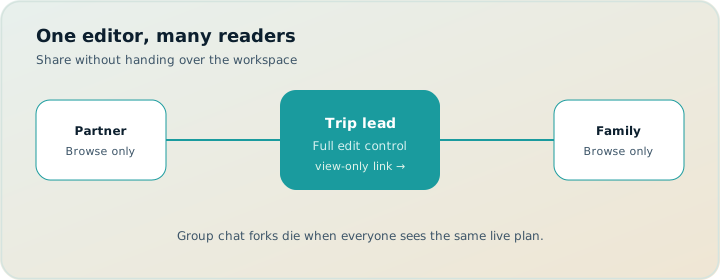
Why chat destroys itineraries
Chat apps optimize for speed and presence, not for structure. Every “update” is a new message. There is no single day timeline. Travel times live in someone’s head. Opening hours live in a tab that closed last week. Cost estimates get lost under memes.
Common failure modes look familiar:
- Screenshot drift. The map pin was correct when you sent it. The day order changed. The screenshot did not.
- Version wars. Two people edit two copies. Nobody knows which list is current.
- Permission friction. Shared docs need accounts, invites, and “can you see this?” loops.
- Edit free-for-all. Live multiplayer sounds collaborative until three people reorder the same morning.
If you are the trip lead — the person who actually researched museums, checked ferry times, and balanced kids’ nap windows — you need a handoff format that preserves your work without inviting accidental edits.
How TripPapa share links work
From Trips, open a trip and create a share. TripPapa generates a view-only URL under /share/…. Copy it into WhatsApp, email, or a family group. Recipients open it in a browser — no TripPapa account required to browse the shared trip.
What they see is the trip as a readable workspace:
- Research — the wishlist of places, with detail panels for overview, photos, reviews, duration, hours, and pricing context
- Day Planner — ordered stops, durations, chained times, and travel legs between them
- Month View — the bird’s-eye calendar of what sits on which day
- Map — wishlist pins or a day’s numbered route
- Export — the same print-optimized itinerary you use for PDF handoff
The share UI is labeled view-only. Edit controls, trip switching, Settings, Cloud Save, and floating post-it notes stay with you as the owner. Recipients can explore the plan; they cannot rewrite it.
What a share includes
Think of the link as a snapshot of the trip object — the structured plan you built — not a live mirror of every keystroke in your browser.
Included for recipients:
- Trip name, destination, and date range
- Party context that drives cost estimates (adults/children)
- Home base and day defaults when you set them
- Wishlist attractions and enrichment you already fetched (hours, durations, pricing estimates, notes)
- Day assignments, stop order, visit durations, and day notes
- Travel segments as computed for the plan (transit, drive, walk, or cycle)
- Export layout: cover, overview, per-day pages, cost summary, and unassigned “extra time” appendix
That is enough for a co-traveller to answer: Where are we going? In what order? How long? How do we get between stops? What might it cost for our party?
What a share excludes (on purpose)
View-only is not “almost edit.” It is a hard boundary. Recipients do not get:
- Ability to add, remove, or reorder stops
- Ability to change party, dates, or home base
- Access to your other trips
- Settings (units, FX rates, providers, JSON export, Cloud Save)
- Your floating post-it scratchpad
- Owner-only actions like creating or revoking shares
Also important: a share is not a continuous live sync. When you keep planning locally, recipients still see the last published snapshot until you refresh it. Creating or updating the share (and Cloud Save, which refreshes active share snapshots for your account) is how you push a newer version out. See local-first and Cloud Save.
Keeping edit control is a feature when you’re the trip lead. Chaos loves too many cooks.
Revoke when the plan changes — or when the trip ends
From Trips, you can revoke a share link at any time. After revoke, anyone with the old URL loses access. That matters for a few practical reasons:
- You shared too early. Draft days were messy; you do not want relatives booking around a half-baked Tuesday.
- The group changed. Someone dropped out; you do not need their old link floating forever.
- Privacy after the trip. Hotel addresses, day notes, and party details do not need to live on the open web indefinitely.
Revoke is confirmation-gated in the product for a reason: it is a hard cut. If you need to share again later, create a fresh link from Trips.
View-only vs live multiplayer editing
Some planners market real-time collaborative editing as the default. That model fits roommate trips where everyone is equally invested and equally careful. It fits less well when one person is the researcher and everyone else is a stakeholder.
| Need | View-only share (TripPapa) | Live multiplayer editing |
|---|---|---|
| One trip lead owns the plan | Strong fit | Easy to overwrite |
| Family just needs to read days | Strong fit | Overkill / risky |
| Everyone co-builds equally | Use chat + lead, or another tool | Stronger fit |
| Offline parents / no app login | Pair with PDF export | Often still needs accounts |
| Stop accidental day reshuffles | Built-in | Needs discipline |
TripPapa is honest about the trade-off. Share links are for readable handoff, not for five cursors fighting over the Louvre slot. If your group truly wants simultaneous editing, use a multiplayer-first tool for brainstorming — Wanderlog-style live map collab is a common pick (collaborative editing is generally on the free tier; Pro is $39.99/year for offline access, Pro AI assistant that suggests places, and route optimization — verify current pricing on their site) — then consolidate the final structure in TripPapa and share the clean version. Booking organizers like TripIt (Pro commonly $49/year — verify) still own flight/hotel timelines; they are not a sightseeing handoff document.
Worked example: Lisbon family handoff
You’re the trip lead for two adults, kids 6 and 10, plus grandparents meeting you for three days. You build Lisbon in TripPapa: Research wishlist with party-aware Pricing on paid sites, Day Planner with transit legs, Month View to keep castle day from stacking on tram-heavy day, Map day mode to kill zigzags.
You create a /share/… link for your partner and the grandparents. They browse Day Planner on phones, open Map for Saturday, and use Export to print one day at the hotel. They cannot reorder Tuesday. Feedback comes in chat as decisions (“move the afternoon garden?”), you edit locally, Cloud Save to refresh the snapshot, and they reload. After the trip you revoke. Nobody is still holding “final_v3” from a wrong week.
A practical share workflow
- Build the wishlist in Research and enrich hours, duration, and party-aware pricing where it matters.
- Shape days in Day Planner; use Month View for balance and swaps; Save & process.
- Check Map for geographic sanity; fix travel legs after reorders.
- Create the share from Trips and send the
/share/…link. - When you change the plan, publish an updated snapshot (re-share / Cloud Save refresh) so recipients are not stuck on last week’s draft.
- Before departure, also Print / Save PDF for offline travelers.
- After the trip — or if the link leaked — revoke.
Share + PDF: two handoffs, one plan
Digital co-travellers often prefer the interactive share: they can flip between Map and Day Planner, open attraction details, and print from Export themselves. Offline or low-tech travelers often prefer a single PDF. TripPapa supports both from the same itinerary — you are not maintaining a chat version and a doc version and a “real” version.
Use the share link when people will browse on phones with connectivity. Use Export when someone needs a document that works on a plane, in a tunnel, or printed at a hotel business center. Many trips need both.
What good feedback looks like after you share
Once the link is out, steer the conversation away from “here’s my competing list” and toward decisions:
- “Day 3 looks packed — can we move the afternoon stop?”
- “We care more about the garden than the second museum.”
- “Parents want a slower morning on Thursday.”
You take that feedback, edit in your workspace, and push an updated snapshot. The chat becomes a decision channel again — not a broken file system.
Common mistakes
- Sharing a half-built wishlist. Recipients will treat sparse days as final. Wait until Day Planner has real order and travel legs.
- Never refreshing the snapshot. You keep editing locally; they keep reading last week’s Tuesday. Cloud Save (or recreating/updating the share) pushes a newer copy.
- Expecting live cursors. If two people must co-edit simultaneously, brainstorm elsewhere, then consolidate in TripPapa.
- Forgetting revoke. Hotel addresses and party details do not need a permanent public URL after you are home.
- Skipping Export for offline people. A share link does not help someone without data. Pair with PDF when needed.
- Using chat as a second editor. Opinions in chat; structure in TripPapa.
When you do not need a view-only share
- Solo trip with no co-travellers to inform.
- Everyone must co-edit the map live as the primary workflow — pick a multiplayer tool first.
- You only need to forward flight confirmations — a booking organizer fits better.
- The plan changes every hour and nobody should read a snapshot yet — wait until a draft is stable enough to discuss.
FAQ
Do recipients need a TripPapa account?
No — they can browse the shared trip in a browser without signing up as editors.
Is the share live-updating every keystroke?
No. It is a snapshot. Refresh via share update / Cloud Save when you want them to see changes.
Can someone edit my days through the link?
No. View-only means browse Research, Day Planner, Month View, Map, and Export without write access.
How do I stop access?
Revoke from Trips. Old URLs stop working; create a new link if you need to share again.
Should I share and PDF?
Often yes — share for phones, PDF for offline/multi-gen. Both from the same plan.
Does share include pricing estimates?
Yes, enrichment you’ve fetched (party context included) — still estimates, still verify official sites before paying.
What about live multiplayer tools?
Use them when equal co-editing is the job. TripPapa share is for trip-lead handoff. Wanderlog Pro ($39.99/year — verify) is a common collab reference; TripPapa Pass framing is $35 / 6 months for the planning loop.
Will Settings or post-its leak?
No — Settings, Cloud Save controls, and floating post-its stay owner-side.
Deeper how-to: publish cadence and decision chat
Share links fail when you treat them like live Google Docs. They succeed when you treat them like intentional publishes. A good cadence for a two-week planning arc:
- First share only after at least one day has real order, durations, and travel legs.
- Announce in chat: “This is the current plan — comment with decisions, not competing lists.”
- Batch edits locally for a day or two, then Cloud Save / refresh the snapshot once.
- Near departure, freeze a PDF for offline people and one final share refresh for phones.
- Revoke when you are home or when the link leaked into a wider group than intended.
Decision chat is a skill. When someone pastes a new blog list into the thread, reply with the share link and a single question: “Which day should absorb this, and what do we cut?” That forces tradeoffs into the open instead of infinite additive optimism. You remain the editor; they remain stakeholders. View-only is what makes that social contract enforceable in software.
Multi-gen tactic: grandparents get PDF day pages; digital adults get the share; you keep Trips ownership. If a grandparent asks for a change, you edit — they do not. If a partner wants to co-build equally from day one, brainstorm pins in a multiplayer map tool first (Wanderlog Pro $39.99/year — verify), then consolidate the final week in TripPapa and share the clean version. Do not pretend view-only is live multi-edit.
Privacy checklist before first share: strip day notes that contain lockbox codes if you are uneasy; confirm home base address is something you are willing to show recipients; remember party ages travel with pricing context. Revoke is the backstop, not a substitute for thinking before you publish.
When the plan is still mush, do not share. A sparse Month View teaches relatives that empty days are final. Wait until Research has a real shortlist and Day Planner has at least a skeleton week. Early feedback is valuable; early screenshots of half-built work create booking pressure around fiction.
Worked follow-up: updating mid-trip without chaos
Day 2 in Lisbon went long. You cut an afternoon stop in Day Planner, Save & process was unnecessary for a same-day micro-edit, you refreshed travel, Cloud Saved, and pinged the group once: “Share updated — afternoon garden moved to Friday.” Grandparents still on yesterday’s PDF get a photo of the new Friday page or a reprinted sheet at dinner. Nobody invents a parallel plan in chat. Revoke still waits until you are home.
Who this is for
- Trip leads planning for partners, friends, or multi-generational families
- Anyone tired of screenshot archaeology
- Groups that want transparency without edit free-for-alls
- Planners who still need a printable artifact for offline days
If that sounds like your trips, stop pasting half-maps into chat. Build the plan once, share it view-only, and keep the authority where the research lives.
Ready to hand off a real itinerary? Open TripPapa, finish one day in the planner, and create a share link from Trips.
Related reading and next steps
If this article matched the pain you actually have, keep going with the adjacent guides rather than bouncing between unrelated listicles. For the full product loop — Trips, Research, Day Planner, Month View, Map, Export, and share — read how TripPapa works. For competitive framing without forced winners, use the 2026 planner roundup, TripPapa vs Wanderlog, and TripPapa vs TripIt. For the movement and handoff details that usually decide whether a plan survives Thursday, see travel times between stops, opening hours and pace warnings, Month View, view-only share, and printable PDF itineraries.
When you are ready to test the claim instead of reading about it, create one real trip with your real party, add five places, schedule a single day with travel legs, glance at Map day mode, then Print/Save PDF or create a view-only share link. That one loop teaches more than another hour of feature comparison. TripPapa Pass framing is USD $35 for 6 months when you want a planning window; local-first planning still lets you start without turning sign-in into a gate. Keep TripIt or Google Travel for bookings if you need them. Keep Wanderlog if your friends need live map editing. Hire TripPapa when the job is research into feasible days with party-aware estimates, transit/drive/walk/cycle legs, Month View balance, and a handoff artifact someone can actually follow.
Serious planning is not about collecting more apps. It is about giving each job a clear owner and refusing to pretend a booking dashboard, a chat scroll, or a pin board alone is a finished itinerary. Use this article as the decision filter for that job — then go build one honest day.