Trip plans are personal data: hotel addresses, kid ages in the party, day notes, half-finished wishlists, cost estimates you have not verified yet. They should not vanish when a tab crashes — and they should not require uploading every keystroke to a server you do not control.
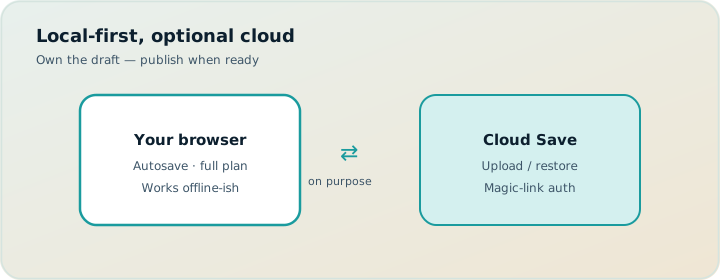
TripPapa is built local-first. Your trips live in the browser with autosave. Sign-in uses a passwordless email magic link. Cloud Save is optional and manual on purpose: you choose when a backup leaves the machine. Settings cover units, home currency and FX, JSON export, and cache controls — the boring levers that make a planner usable across countries and devices. Product loop context: how TripPapa works.
What local-first means in practice
Local-first is not a slogan. It is the default storage model:
- Trips, wishlist, day plans, and settings persist in the browser
- Editing stays fast — you are not waiting on a round trip for every drag
- You can keep working on a plan even when you are not thinking about “sync”
- Cloud is a backup and restore path, not the only source of truth while you type
That model fits how serious planning actually happens: long sessions, lots of micro-edits, occasional device switches, and a strong preference that a laptop death should not erase Kyoto.
Local-first also pairs cleanly with TripPapa’s product loop — Research → Day Planner → Month View → Map → Export / share. The itinerary is a first-class object on your machine first. Pass framing ($35 / 6 months) is about the planning window, not about forcing every keystroke through a forever-cloud collab model.
Magic-link sign-in (no password to forget)
TripPapa uses Firebase email link authentication. You enter your email, receive a sign-in link, and open it to authenticate. There is no password to reuse, reset, or leak from a sticky note.
Practical notes:
- Request the link from the login screen; check spam if it is slow
- Open the link on the same browser when possible (the flow stores the email locally to complete sign-in)
- Links can expire or become invalid — request a new one if needed
- Sign out from Settings when you are done on a shared computer
Magic link is how TripPapa ties Cloud Save and server-backed features (searches and AI through your signed-in account) to you — without inventing another password.
Cloud Save: optional, powerful, intentional
Cloud Save uploads your trips as a one-way backup. Restore downloads that backup onto the current browser. The Settings copy is explicit: local storage stays primary for speed; Cloud Save uploads on your command.
What Cloud Save is for:
- Moving to a new laptop without emailing yourself JSON files
- Recovering after a browser clear or device failure
- Refreshing active share link snapshots so co-travellers see a newer plan
What it is not:
- Not continuous multiplayer sync while five people edit
- Not an excuse to skip Export / PDF for offline family members
- Not automatic every keystroke — you click Cloud Save when you want a checkpoint
You can Cloud Save from the app chrome or from Settings. Restore asks for confirmation because it replaces local trips with the cloud copy — unsaved local-only changes would be lost. That warning is a feature.
Local-first means the plan stays fast and yours. Cloud Save means a laptop death doesn’t erase Kyoto.
How Cloud Save relates to share links
View-only /share links are snapshots recipients can browse (Research, Day Planner, Month View, Map, Export) without editing. When you Cloud Save, TripPapa also refreshes active share snapshots for trips you have shared. That is how digital co-travellers get an updated plan without you pasting a new chat essay.
Workflow that works well:
- Plan locally (autosave in the browser).
- Create a share from Trips when the draft is ready to show.
- Keep editing locally.
- Cloud Save when you want the share (and your backup) updated.
- Revoke the share when the trip ends or the link should die.
If your group needs live multiplayer map editing instead of snapshots, a collab-first tool may fit brainstorming better (Wanderlog Pro $39.99/year — verify). TripPapa’s model is trip-lead ownership with view-only handoff — then Cloud Save as the publish/backup button.
Post-it notes stay with the trip
TripPapa includes a floating per-trip scratchpad — post-it style notes for reminders that are not quite attraction notes and not quite day notes (“confirm rail pass,” “ask hotel about late checkout”). Those notes live on the active trip and sync via Cloud Save with the rest of the trip state. They are owner-side planning aids; view-only share mode does not expose your scratchpad as an edit surface for recipients.
Settings that matter on real trips
Units: metric or imperial
Distances on travel legs and maps should match how you think. Settings → Display lets you choose metric or imperial. Export respects the same preference, so the PDF your parents hold does not suddenly speak a different measurement system than the planner you used. See PDF export for families.
Home currency + exchange rates (FX)
Party-aware cost estimates often arrive in local currency. Settings lets you pick a home currency and fetch exchange rates stored in the browser. TripPapa can then show local + home amounts side by side in planning and in Export’s cost summary. Rates are fetched on demand and saved locally — refresh when you care about fresher conversion. No rates stored yet means home conversion will not be available until you fetch them. Pricing context: party-aware pricing.
JSON export
Under Settings → Data you can:
- Export all (JSON) — full app state backup as a downloadable file
- Export active trip — a single-trip JSON for archival or tooling
- Reset all data — clear local trips (confirmation required; cannot be undone)
JSON export is the belt to Cloud Save’s suspenders. Prefer Cloud Save for routine device moves; keep a JSON download before major browser resets or when you want an offline archive you control.
API cache controls
Identical provider responses can be reused from the browser cache for a configurable number of days. You can clear the cache from Settings when you want fresh fetches. This is a power-user lever for research sessions — not something recipients of a share link need to touch.
Worked example: Kyoto on two devices
You plan Kyoto on a desktop browser all weekend: party ages, Research enrichment, Day Planner legs, Month View balance. Local autosave catches every drag. Sunday night you Cloud Save, create a view-only share for your partner, and download JSON once for paranoia.
Monday you open a laptop in a café, magic-link sign-in with the same email, Restore from cloud (confirm replace), spot-check Day 2 travel and Map day mode, then Cloud Save again after a small reorder so the share snapshot updates. Grandparents still get a PDF from Export — Cloud Save does not replace paper for offline mornings. After the trip you revoke the share and keep the JSON if you want an archive.
A sensible data hygiene routine
- Sign in with magic link on your primary browser.
- Plan as usual; trust local autosave during the session.
- Cloud Save after major milestones (wishlist locked, days balanced, pre-flight freeze).
- Create or refresh share links when co-travellers need the current plan.
- Export PDF for offline / multi-gen handoff.
- Download JSON before wiping a browser profile.
- Revoke shares after the trip.
Privacy and control, without the lecture
Local-first does not mean “never use a server.” Searches, routing, and AI enrichment run through your signed-in TripPapa account. Cloud Save stores a backup you explicitly upload. Share links publish a trip snapshot you chose to share — and can revoke.
The design goal is clear ownership:
- You edit locally
- You decide when backups leave the device
- You decide who can view a share
- You decide when that view ends
That is a better fit for trip leads than an always-on collaborative document where every relative is also an editor. Booking inboxes (TripIt Pro commonly $49/year — verify) solve a different data problem: confirmations after purchase. TripPapa solves the plan object before the sidewalk week.
Local-first vs “everything in the cloud” planners
| Concern | TripPapa local-first + optional Cloud Save | Cloud-only collaborative docs |
|---|---|---|
| Edit latency | Local, snappy | Depends on network |
| Device move | Cloud Save / JSON restore | Usually automatic |
| Accidental edits by family | View-only shares | Often need permission discipline |
| Offline PDF handoff | First-class Export | Varies widely |
| Password fatigue | Magic link | Account-dependent |
Device switch playbook
Moving from desktop to laptop (or replacing a machine) is where local-first apps either shine or frustrate. TripPapa’s intended path:
- On the old device: Cloud Save (and optionally Export all JSON).
- On the new device: sign in with the same email magic link.
- Restore from cloud in Settings (confirm the replace warning).
- Spot-check the active trip: days, Map, Export.
- Recreate or verify share links if co-travellers still need access; Cloud Save refreshes snapshots for shares that still exist.
If restore finds no backup, you either never Cloud Saved or signed in as a different account — check the email, then fall back to a JSON import if you exported one.
Common mistakes
- Never Cloud Saving before a browser wipe. Local-first is not immortal.
- Restoring without reading the replace warning. Local-only edits can vanish.
- Expecting continuous multiplayer sync. Cloud Save is checkpoint + share refresh, not five cursors.
- Skipping JSON before a risky reset. Belt and suspenders.
- Assuming share recipients see every keystroke. Snapshot until you Cloud Save / refresh.
- Leaving shares active forever. Revoke after the trip.
When you do not need Cloud Save
- Single-device planning for a short trip you’re fine rebuilding.
- You only need flight/hotel timelines in a booking organizer.
- Your primary need is live co-editing — pick a multiplayer tool for that job.
What this stack is not
TripPapa is not a password manager, not a booking inbox, and not a fictional “Discovery” screener. It will not auto-sync every second like a multiplayer whiteboard. It will not replace verifying prices and hours on official sites. It will keep your itinerary structured, fast, and recoverable — then help you hand it off via share or PDF.
Own the plan on your machine. Back it up when you choose. Share a view, not your edit keys.
FAQ
Do I need to sign in to plan?
You can plan locally first. Magic link unlocks Cloud Save and account-backed search/AI features.
Is Cloud Save automatic?
No — you upload on purpose. Local autosave handles the working session.
What happens on Restore?
Cloud copy replaces local trips after confirmation. Export JSON first if you have unique local-only edits.
Does Cloud Save update share links?
Yes — it refreshes active share snapshots for shared trips on your account.
Where do post-it notes live?
On the active trip; they ride along with Cloud Save. Not an edit surface for share recipients.
Metric vs imperial?
Set in Settings → Display; Export follows the same choice.
JSON vs Cloud Save?
Cloud Save for routine device moves; JSON for offline archives and pre-reset insurance.
Is this like TripIt Pro or Wanderlog Pro storage?
Different jobs. TripIt Pro (~$49/year — verify) centers booked travel. Wanderlog Pro ($39.99/year — verify) centers map collab/offline packs. TripPapa centers local-first itinerary objects with optional Cloud Save checkpoints.
Deeper how-to: checkpoints tied to planning milestones
Cloud Save is most reliable when it is ritualized to milestones, not moods. Suggested checkpoints for a serious trip:
- After party + dates + home base are set and the first ten wishlist items exist.
- After Hours/Pricing enrichment on must-dos.
- After the first fully legged day survives Map day mode.
- After Month View balance + Save & process on the full week.
- Pre-flight freeze — then Export PDF and refresh share in the same sitting.
Between checkpoints, trust local autosave. Do not Cloud Save after every drag; you will train yourself to ignore the act. Do Cloud Save before browser experiments, extension cleanups, or OS updates. JSON export before “Reset all data” or before wiping a profile — that is the non-negotiable belt.
Multi-device households: pick one primary editing device. Use the laptop as read/spot-check if needed, but avoid divergent local edits on two machines without a Cloud Save bridge. Restore replaces; it does not merge like a multiplayer doc. If you accidentally edit on device B without restoring first, export JSON from B before restoring A’s cloud copy, or you may lose B’s unique notes.
Share refresh discipline belongs here even though the feature lives under Trips. Recipients see snapshots. Your local truth can be days ahead. After a meaningful publish-worthy change, Cloud Save so the view-only link catches up. Say “updated” once in chat. That is enough. Constant “I moved a pin” messages recreate tab chaos inside the handoff channel.
Security hygiene: sign out on shared computers; revoke shares after travel; remember hotel addresses and kid ages live in the trip object. Local-first reduces casual server exposure while you type; it does not make a published share private forever. TripPapa Pass framing ($35 / 6 months) funds the planning loop — it is not a password manager or a booking vault. Keep airline confirmations in their own tools (TripIt Pro ~$49/year — verify — if you want alerts).
Worked follow-up: surviving a browser profile reset
Chrome eats your profile. You still have last night’s Cloud Save and a JSON from Settings → Export all. New profile: magic-link sign-in, Restore from cloud, spot-check the active trip, Cloud Save once more, re-check that share snapshots refreshed. If Restore was empty because you used a different email, import the JSON. Fifteen minutes later the Kyoto week is back — which is the entire point of intentional backups over hoping “the cloud somehow had it.”
Start simple
If you are new: sign in with a magic link, create one trip, add a few Research places, shape a single day, Cloud Save once, and Export a PDF. That exercise teaches the whole data model better than any feature list.
Ready to keep a plan that survives tab crashes and laptop swaps? Open TripPapa, sign in with email, and Cloud Save after your first real day is built.
Related reading and next steps
If this article matched the pain you actually have, keep going with the adjacent guides rather than bouncing between unrelated listicles. For the full product loop — Trips, Research, Day Planner, Month View, Map, Export, and share — read how TripPapa works. For competitive framing without forced winners, use the 2026 planner roundup, TripPapa vs Wanderlog, and TripPapa vs TripIt. For the movement and handoff details that usually decide whether a plan survives Thursday, see travel times between stops, opening hours and pace warnings, Month View, view-only share, and printable PDF itineraries.
When you are ready to test the claim instead of reading about it, create one real trip with your real party, add five places, schedule a single day with travel legs, glance at Map day mode, then Print/Save PDF or create a view-only share link. That one loop teaches more than another hour of feature comparison. TripPapa Pass framing is USD $35 for 6 months when you want a planning window; local-first planning still lets you start without turning sign-in into a gate. Keep TripIt or Google Travel for bookings if you need them. Keep Wanderlog if your friends need live map editing. Hire TripPapa when the job is research into feasible days with party-aware estimates, transit/drive/walk/cycle legs, Month View balance, and a handoff artifact someone can actually follow.
Serious planning is not about collecting more apps. It is about giving each job a clear owner and refusing to pretend a booking dashboard, a chat scroll, or a pin board alone is a finished itinerary. Use this article as the decision filter for that job — then go build one honest day.