Wanderlog is one of the most popular map-first trip planners in 2026: pin places, drag them into days, collaborate live, and unlock Pro extras. TripPapa is a research-to-itinerary workspace: wishlist enrichment, party-aware estimates, travel legs between stops (including cycle), Month View balancing, then Print/Save PDF or a view-only share link. Both help you plan. They optimize for different jobs — and pretending otherwise is how comparison posts lose trust.
This is an honest side-by-side for people who already know they want a dedicated planner, not another Notes dump. If you want the wider field, see the 2026 planner roundup. If you want the product loop without competitor noise, read how TripPapa works. And if your current stack is still Excel plus TripIt — a pattern that shows up constantly on traveler forums, including Rick Steves threads — keep reading; that combo is common for a reason, and neither Wanderlog nor TripPapa has to erase it overnight.
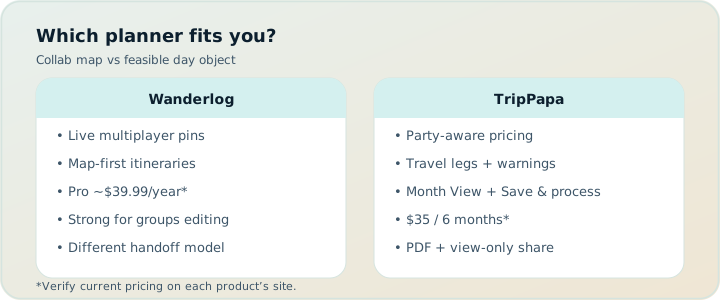
Quick comparison
| Need | Wanderlog | TripPapa |
|---|---|---|
| Map-first visual planning | Excellent — the product’s center of gravity | Strong — Research + Map + day journey maps |
| Real-time multi-editor collab | Excellent on free tier — friends edit the same trip live | View-only share links; you keep edit control |
| Free-tier depth | Map planning, manual budget, collaborative editing | Full planner loop in the browser (pass framing for optional Cloud Save window) |
| Party-aware attraction pricing | Limited / mostly manual | Built around adults & kids with ages |
| Travel modes between stops | Driving-oriented strengths; limited/no cycling transit option often cited | Transit / drive / walk / cycle legs in Day Planner |
| AI role | Pro AI assistant suggests places — not full-trip AI generation | Search + Add assist + AI auto-plan with Revert to pre-AI |
| Month-level day swapping | Day lists and map flow | Dedicated Month View + Save & process (recomputes travel) |
| Printable PDF-style handoff | Varies; Pro unlocks richer export/offline workflows | Export via Print / Save as PDF with day pages |
| Typical paid tier (verify on site) | Wanderlog Pro $39.99/year | Mock pass framing: USD $35 for 6 months |
Honest take: Wanderlog wins “plan together on a map.” TripPapa wins “turn research into a day that survives transit, opening hours, and a family ticket matrix.”
What Wanderlog optimizes for
Wanderlog’s strength is spatial collaboration. The map is not a side panel you open once — it is the planning surface. Groups drop pins, argue in the same canvas, and rearrange days without exporting a spreadsheet every time someone changes their mind. For road trips, friend groups, and anyone who thinks in geography first, that model is genuinely excellent. Traveler forums often split between people who stay on TripIt (or Excel + TripIt) out of habit and people who switch to Wanderlog because the map-plus-day list feels more intuitive for leisure trips.
The free tier already covers a lot: map planning, manual budget tracking, and collaborative editing. That is important. You do not need Pro to get value from Wanderlog as a shared pin board. Pro at $39.99/year (verify current pricing on Wanderlog’s site — promotions change) adds the upgrades frequent users cite: offline access, a Pro AI assistant that suggests places, route optimization, booking tools, and export to Google Maps. Those are real upgrades if you live in the product. They are not a different category of app.
Where map-first tools often stay lighter is enrichment depth for a specific travelling party. A pin with a note is not the same as hours that can warn you, durations that chain into a timeline, or ticket estimates that know you have two adults and a seven-year-old. You can approximate those things manually. Many people do. The question is whether you want the planner to carry that math or leave it in chat.
Wanderlog Pro vs free — what you actually unlock
Marketing blurbs blur free and Pro. Split them cleanly:
- Free: map-first planning, day lists, manual budget, collaborative editing with friends or family. Enough for many weekend and road-trip plans.
- Pro ($39.99/year — verify on site): offline access, Pro AI assistant (place suggestions), route optimization, booking tools, export to Google Maps, and the richer export/offline pack people usually mean when they say “I upgraded.”
What Pro does not claim — and what alternative roundups often overstate — is full-trip AI generation that invents a complete multi-day itinerary from a prompt. Wanderlog’s Pro AI is an assistant that helps suggest places inside a manual planning workflow. If you want an AI draft that lands inside a day graph you can revert, that is a different product shape (TripPapa’s AI auto-plan with Revert to pre-AI). Hire each AI for what it ships.
Known Wanderlog limits (cited often — still verify for your trip)
No tool is perfect. These limits show up repeatedly in traveler discussions and alternative roundups:
- No full-trip AI generation — planning stays largely manual even with Pro place suggestions.
- Mobile can get slow on large trips — big pin lists and long day stacks are heavier on phones.
- Lodging often pins to the top of a day — useful for anchors, awkward when you want a flatter sightseeing timeline.
- Limited calendar export — if your workflow is “push every stop into a calendar app,” expect friction.
- Limited or no cycling as a transit option — driving and walking dominate; TripPapa’s Day Planner includes cycle legs alongside transit, drive, and walk, which matters for bike-friendly cities and hotel-to-attraction hops.
None of these make Wanderlog “bad.” They define when you outgrow it or when you pair it with something else.
What TripPapa optimizes for
TripPapa’s loop is deliberate: Trips → Research → Day Planner / Month View → Map → Export / Share. You create a trip with dates and a travelling party. You research into a wishlist (Search + Add, or manual add). You open detail tabs for overview, photos, reviews, duration, hours, and party-aware pricing. Then you schedule days with travel legs, balance the month, check the map, and hand off a PDF or view-only link.
That loop exists because serious planning fails in predictable places: zigzag geography, closed museums, overloaded days, and “from $20” prices that ignore kids. TripPapa is opinionated about those failure modes. It is not trying to be the best live multiplayer map canvas. Share is view-only on purpose — one editor, many readers — so grandparents and partners can browse without forking conflicting versions.
Map still matters. Wishlist mode shows all pins so clusters are obvious before you overcommit. Day mode shows a numbered route for one day so “efficient” order doesn’t secretly become a star pattern across town. You can drop a pin to add a place spotted on the map. Map is a check, not the whole product.
Collaboration: live editors vs view-only share
This is the sharpest product difference. Wanderlog leans into simultaneous editing — including on the free tier. That is ideal when three friends are equally empowered to add restaurants and delete museums. It is less ideal when one person owns the plan and everyone else needs clarity without write access.
TripPapa’s share links (/share/…) let co-travellers browse Research, Day Planner, Month View, Map, and Export without editing your workspace. You revoke when the trip ends. Pair that with Print / Save as PDF for offline relatives. The trade-off is explicit: less “everyone poke the map,” more “one coherent itinerary.”
Neither model is morally superior. If your group thrives on chaos-as-collaboration, live editing wins. If your group thrives on a trip lead who then publishes a clean artifact, view-only wins. Many couples use both patterns across different trips.
Research depth and party-aware costs
TripPapa’s Research surface is built for decision quality, not just pin density. Photos keep temples from blurring together. Review summaries help you skim signal. Duration defaults feed the day timeline. Hours feed warnings when a planned arrival fights opening times. Pricing estimates break down for your party (adults and kids with ages) and can include add-ons and source/freshness cues where available.
Estimates are planning aids, not invoices — verify anything you’ll pay for on the official site. The point is that a family of four should not do ticket arithmetic in a group chat while staring at a map that only knows “attraction.” Wanderlog can hold notes and costs you type; TripPapa treats party composition as a first-class input to the plan.
Travel legs, pace, Month View, and cycle mode
Day Planner chains arrival and departure from day start, visit durations, and travel legs for transit, drive, walk, or cycle — with duration and distance. Transit steps and fare estimates appear when routing provides them; fallback legs are marked when a number is approximate. Pace warnings flag overloaded days (think: roughly ten or more active hours of stops plus travel). Hours warnings flag closed-door arrivals.
Month View answers a different question: is the week balanced? Drag unassigned wishlist items onto days, move stops between days, or swap entire days when weather flips Tuesday and Friday. Edits stay in draft until you Discard or Save & process, which commits order and recomputes travel so a bird’s-eye reshuffle doesn’t leave stale metro legs behind.
Map-first planners often excel at “does this day look geographically sane?” TripPapa adds “does this day survive the clock?” Those are related checks. They are not identical. If you bike between stops in Amsterdam, Copenhagen, or a compact resort town, cycle legs are not a niche detail — they are the difference between a plan that matches how you’ll actually move and a plan that only knows drive/walk.
Realistic scenario: four friends, two planners
Four friends plan a week in Lisbon. Three want to drop restaurant pins all week; one person (Alex) owns timed entries, transit math, and the PDF for a parent joining Friday. They open Wanderlog for the live map: free-tier collab, pins everywhere, lodging at the top of each day as the hotel anchor. That works for dinner discovery.
Alex also builds the sightseeing spine in TripPapa: party of four adults, Search + Add for Belém, Alfama, Sintra day-trip candidates, hours and pricing on paid museums, Day Planner with transit and walk legs (and a cycle hop near the waterfront when it fits). Month View swaps a rain day. Export PDF + view-only share for the parent. Wanderlog stays the social pin board; TripPapa becomes the feasibility document. Nobody pretends one app did both jobs perfectly.
Week-by-week workflow (Wanderlog-first vs TripPapa-first)
Week −6 (ideas): If the group needs a shared map immediately, start in Wanderlog and pin freely. If one person will own structure, start in TripPapa Research and invite readers later via share link. Either way, do not book every ticket yet.
Week −4 (shape days): In TripPapa, assign days, check travel legs, use Month View for balance, Save & process. In Wanderlog, drag pins into days and use route optimization if you are on Pro. Export or screenshot a draft for the group veto round.
Week −2 (book + organize): Book flights and hotels. Forward confirmations to TripIt if you like email organizers, or rely on Google Travel’s free Gmail dashboard. Keep day design in your planner of choice. Pro flight alerts ($49/year on TripIt — verify on site) are a separate purchase from Wanderlog Pro.
Travel week: Use the map app you trust for turn-by-turn. Use TripPapa PDF or share link for the day sequence; use Wanderlog if the group is still editing dinner pins live. Update once when plans break — not in three chats.
When Wanderlog is the better fit
- Your priority is a polished shared map canvas with friends editing live (free tier already helps).
- You want a mature consumer app with Pro at $39.99/year for offline, place-suggesting AI, route optimization, booking tools, and Google Maps export.
- The trip is pin-heavy and social — road-trip friends, “drop restaurants as we find them,” collaborative discovery.
- You are happy to keep party ticket math, deep hours checking, and cycle-leg timelines in notes — or in a second tool.
- You do not need a dedicated Month View that recomputes travel after day swaps.
When TripPapa is the better fit
- You need research depth: photos, reviews, hours, durations, and costs for your actual party.
- Honest travel times between stops matter — especially transit cities — and you want cycle as a first-class mode.
- You want Month View for balance and day swaps, then a document grandparents can follow without installing another app.
- You prefer one editor and view-only readers over multiplayer write access.
- Pace and hours warnings should live inside the planner, not in your memory.
- You want AI auto-plan as a reversible scaffold inside the same day graph, not only place suggestions on a map.
Can you use both?
Sometimes. A group might sketch geography in Wanderlog, then a trip lead rebuilds the final days in TripPapa for travel legs, party costs, and PDF handoff. Or a couple plans in TripPapa and keeps a lighter Wanderlog board for restaurant pins from friends. Complementary stacks beat forced monogamy with one logo.
What usually fails is expecting Wanderlog to be a party-aware research studio with full-trip AI generation, or expecting TripPapa to be a real-time multiplayer map. Hire each tool for the job it actually ships. Many travelers still keep Excel for money and TripIt for bookings beside either planner — that is not failure; that is a stack.
Mistakes to avoid
- Assuming Wanderlog Pro “AI” means one-click full itinerary generation — it suggests places; you still build days.
- Paying $39.99/year for offline when you only needed free collab on Wi‑Fi trips.
- Choosing TripPapa when the group’s only requirement is everyone editing pins at once.
- Ignoring cycle mode needs in bike cities and then blaming “the planner” for drive-only assumptions.
- Skipping official-site verification for tickets and hours in either tool.
- Treating Google Travel or TripIt as day designers because they also say “itinerary.”
Pricing honesty (2026)
Wanderlog Pro is $39.99/year as commonly listed — not a vague “about forty bucks.” Free tier already includes map planning, manual budget, and collaborative editing. Pro adds offline access, Pro AI place suggestions, route optimization, booking tools, and Google Maps export. TripPapa’s mock pass framing (USD $35 for 6 months) is a different shape: shorter window, planning-session oriented. Compare on the job, not on a single annual number. Free tiers and promotions change; always verify competitor pricing on their sites before you decide.
FAQ
Is Wanderlog free enough without Pro?
Often yes for map planning, manual budgets, and live collaborative editing. Upgrade when you need offline packs, Pro AI suggestions, route optimization, booking tools, or Google Maps export — and verify the current $39.99/year listing on Wanderlog’s site.
Does Wanderlog generate a full trip with AI?
No — not as a full-trip AI generation product. Pro’s AI assistant helps suggest places inside a largely manual workflow. TripPapa’s AI auto-plan drafts day assignments inside your wishlist/day graph and offers Revert to pre-AI.
Does TripPapa support live multiplayer editing?
No. Share links are view-only. If simultaneous editing is the job, Wanderlog fits better.
Can TripPapa do cycling between stops?
Yes. Day Planner travel legs include transit, drive, walk, and cycle. That is a practical edge in bike-friendly cities where Wanderlog users often note limited or missing cycling transit options.
Should I keep TripIt or Excel too?
Many travelers do. Excel for money/packing, TripIt for email-imported bookings, Wanderlog or TripPapa for days. Complementary stacks are normal — Rick Steves forum threads still show Excel + TripIt or Wanderlog as everyday answers.
Is TripPapa a booking engine?
No. It does not book flights or tickets. It plans research, days, legs, and handoff. Use TripIt, Google Travel, or airline/hotel sites for bookings.
What about offline?
Wanderlog Pro emphasizes offline access. TripPapa’s Export Print/Save PDF is the offline handoff; plans are local-first in the browser with optional Cloud Save. Different offline stories — pick the one that matches airplane mode vs downloaded app packs.
How do I decide in one evening?
Build one real day in each. If the artifact you’d follow is a shared live map, stay on Wanderlog. If it’s a party-aware timeline with legs and a PDF, stay on TripPapa. If you need both artifacts, use both.
Decision checklist
- Do you need live multi-editor maps, or one owner with view-only readers?
- Is the hard part geography consensus, or day feasibility (time, hours, party cost, cycle/transit legs)?
- Do you need full-trip AI drafting with revert, or place suggestions on a map?
- Who consumes the final plan — app-native friends, or PDF/offline family?
- Will you verify tickets and hours yourself either way? (Yes. Both tools still need that.)
- Have you checked current Wanderlog Pro pricing ($39.99/year as listed) and TripPapa’s pass framing on their sites?
If answers skew toward live map collab, start with Wanderlog. If they skew toward research → days → legs → handoff, start with TripPapa. If you are still unsure, build one real day in each and see which artifact you’d actually follow on Thursday morning.
Ready to try the TripPapa loop on a real destination? Open TripPapa and create a trip with your party — then schedule one day with travel legs (try cycle if that is how you move) before you judge the whole category.