Google Maps saved places are brilliant at one job: remembering where things are. They are mediocre at another job: turning those pins into a day that survives transit, opening hours, kids’ tickets, and a handoff to someone who is not you. Millions of trips still run on Maps lists plus a spreadsheet or group chat — and that stack is honest until it isn’t. This piece draws a clean line between pins and an itinerary object, explains when Maps is enough, and when a planner like TripPapa (our product) earns its keep.
Related reading: why TripPapa beats spreadsheets, how TripPapa works, travel times in Day Planner, tab chaos 2026.
Disclosure: TripPapa is our product. It does not replace turn-by-turn navigation. Keep Maps for walking directions; use a planner when the plan itself needs structure.
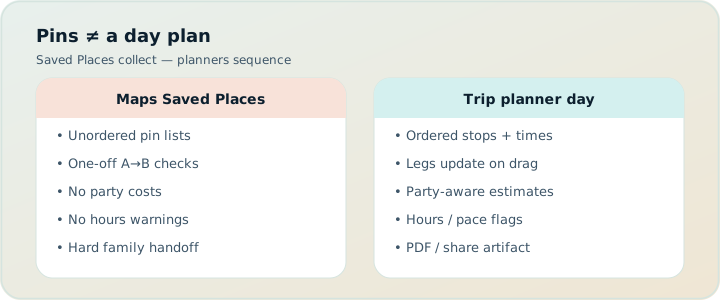
Quick answer
| Situation | Maps saved places | Dedicated planner (e.g. TripPapa) |
|---|---|---|
| Weekend with 6–8 pins | Usually enough | Optional |
| Multi-day ordered itinerary | Painful | Built for this |
| Transit legs between stops | Manual re-check | Day Planner legs |
| Adults + kids ticket estimates | Notes / memory | Party-aware Pricing tab |
| PDF for grandparents | Screenshots forever | Print/Save PDF |
| Live turn-by-turn on sidewalk | Best in class | Not the job |
What a saved place is
A saved place is a geographic bookmark with a label, maybe a note, maybe a list (“Lisbon food,” “Tokyo kids”). It answers “where is this?” It does not answer “when do we go, how long we stay, how we get there from the previous stop, whether it is open, what it costs for our party, or how we tell Grandma.” Those answers live in your head, a sheet, or a chat thread — which is why the stack sprawls.
Maps is also excellent at discovery while moving: nearby search, reviews, photos, transit layers. None of that stops being useful when you adopt a planner. The planner should reference real places; the navigator should still navigate.
What an itinerary object is
An itinerary object is a trip container with dates, a travelling party, a wishlist of structured places, days with ordered stops, travel legs, warnings, and export/share surfaces. In TripPapa that loop is Trips → Research → Day Planner / Month View → Map → Export / Share. Places have detail tabs: Overview, Photos, Reviews, Duration, Hours, Pricing. Days chain arrival/departure with transit, drive, walk, or cycle legs. Month View lets you drag/swap and Save & process to recompute travel. Map toggles wishlist pins vs day route; you can drop a pin. You hand off via Print/PDF or view-only /share/ links. Local-first; optional Cloud Save; magic-link auth. Pass: $35 for 6 months.
That object is why reordering Tuesday does not require retyping every “20 min” cell. Pins alone cannot offer that integrity.
When Google Maps saved places are enough
- One city, one or two days, light agenda.
- Everyone navigating is app-fluent and improvisational.
- No complex party ticket matrix.
- No need for a printable document for offline relatives.
- You accept that “the plan” lives in a list order you mentally translate each morning.
If that is your trip culture, do not buy a planner to feel productive. Maps + maybe a note is the correct minimal stack. Many excellent trips never need more.
When Maps quietly becomes a liability
- You maintain parallel lists that drift (“food” vs “day 3”).
- Someone asks for the plan and you send seven screenshots.
- You guess walking times and arrive late to timed entry.
- Kids’ tickets surprise you because “from $18” ignored ages.
- You reshuffle days after weather and nothing recomputes.
- ChatGPT pasted a day into chat that now conflicts with your starred list.
Those are itinerary-object problems. Starred places will not heal them.
The hybrid that actually works
Use Maps for navigation and serendipity. Use a planner for the system of record. In TripPapa, Search + Add or drop pin captures places; Day Planner owns order and legs; Map wishlist mode still shows geography like a starred list — but bound to the same wishlist as the days. On the sidewalk, open Maps for the next leg’s turn-by-turn. Do not try to make TripPapa a navigation app; do not try to make starred lists a Month View.
Spreadsheets as the fake itinerary object
Sheets feel like structure: columns for time, cost, notes. They lack a travel graph. Row order is not a route. Typed durations rot. Collaboration forks truth. Keep Sheets for packing and shared costs if you love them; move day design to a planner when movement and hours matter. Deep dive: purpose-built vs sheets.
Scenario: starred Lisbon vs planned Lisbon
Starred: 40 saved places across lists. Each morning the group argues which stars to attempt. Someone walks across town between two “nearby” pins. Dinner is excellent; the afternoon was a transit tax.
Planned: 40 places enter a TripPapa wishlist; only 18 get scheduled. Day Planner shows transit legs; hours warnings kill a Monday museum fantasy; Month View balances two heavy days; PDF goes to parents flying in later; view-only link keeps the group aligned without edit wars. Maps still opens for the walk from tram stop to door.
Same city. Different failure rates.
Collaboration: list sharing vs view-only itinerary
Shared Maps lists let friends add pins — useful and chaotic. TripPapa’s share links are view-only on purpose: one editor, many readers. Wanderlog offers live multiplayer if that is your culture (Pro $39.99/year — verify). Pick a collaboration model deliberately. See group planning without chaos and view-only share.
AI drafts and the pin pile
ChatGPT will happily generate days that ignore your existing starred lists, invent hours, and underprice fatigue. If you brainstorm in chat, reconcile into Maps or — better — into a planner wishlist, then verify. See ChatGPT vs trip planner and free AI travel planners.
Family and multi-city wrinkles
Families need party-aware estimates and printable handoff — family checklist, party-aware pricing, print/PDF. Multi-city Europe needs Month View and travel legs — multi-city Europe, Month View. Pins across cities without day containers become a museum of intentions.
When to choose what
- Light pin trip → Maps lists.
- Bookings-heavy, sightseeing-light → Google Travel / TripIt (~$49/yr Pro — verify) + light Maps.
- Live map collab with friends → Wanderlog.
- Feasibility, party costs, legs, Month View, PDF/share → TripPapa.
- Always → Maps for turn-by-turn on the ground.
FAQ
Can TripPapa replace Google Maps?
No. Use TripPapa for the itinerary object; use Maps for navigation and local search on the ground.
Should I delete my saved places if I adopt a planner?
No. Import or re-add keepers into the wishlist. Keep Maps lists as a scratchpad if you want.
Are shared Maps lists the same as trip collaboration?
They share pins, not a scheduled day with travel legs and warnings. Different job.
What about Google Travel?
Free Gmail reservation dashboard — organizer, not day designer. See TripPapa vs Google Travel.
Does TripPapa sync with Google Maps automatically?
Plan on Search + Add, manual add, or drop pin into the TripPapa wishlist rather than expecting silent full sync magic.
Is a spreadsheet enough between Maps and a planner?
Sometimes for budgets and packing. Rarely for recomputing transit when days shuffle.
When do stars become too many?
When you cannot narrate tomorrow’s plan without opening five lists and a chat. That is the graduation signal.
Does local-first matter here?
Yes — TripPapa keeps the plan in the browser with optional Cloud Save, so the itinerary object is not trapped in a chat scroll. See local-first Cloud Save.
Pins, lists, and the illusion of order
Saved places feel ordered because lists have tops and bottoms. That order is not a schedule. Nothing in Maps forces you to account for lunch, naps, ticket queues, or the fifteen silent minutes between “arrive at station” and “exit the correct door.” When travelers say “we planned in Maps,” they usually mean “we collected candidates.” Collection is research. Planning is sequencing under constraints.
A useful discipline: every starred place must earn a status — wishlist, scheduled, or rejected. TripPapa’s wishlist plus Day Planner makes those statuses explicit. Maps lists blur them until the morning of, when the blur becomes an argument.
Keeping Maps in its lane on trip day
On trip day, open the Day Planner or PDF for what happens next; open Maps for how to walk there. If you find yourself editing the plan inside Maps notes while also navigating, you have collapsed roles again. Collapse creates errors: a pinned “maybe” becomes an accidental must-see because it was nearest on the blue path.
Offline elders rarely want your starring taxonomy. They want a page that says morning museum, lunch, afternoon park, with enough address detail to move. That is Export’s job. Maps remains the best turn-by-turn engine; let it stay that.
Star inflation and how to deflate it
Star inflation happens when saving is cheaper than deciding. Deflate by batching: once a week during planning, move keepers into TripPapa Research and unstar or archive the rest in Maps. Your future self will thank you when the map stops looking like measles. Desire can stay large; the scheduled set must stay small enough for pace warnings to mean something.
If a companion keeps starring aggressively, channel them into a suggestion list rather than shared write access on the itinerary object. View-only share plus a suggestion thread preserves democracy without multiplying truths.
Pins remember places. Planners remember plans. Keep both roles clear and your trip gets quieter. Open TripPapa, create a trip with your party, and move ten Maps keepers into Research — then schedule one day with travel legs before you decide the category is unnecessary.
Pins, lists, and the illusion of order
Serious trip planning fails in predictable places: optimistic travel times, ignored opening hours, ticket prices that pretend every traveler is a solo adult, and handoff documents that are really chat screenshots. Whatever tool you evaluate — Maps lists, chat AI, Wanderlog, TripIt, Google Travel, or TripPapa — score it against those failure modes instead of against a generic “features” grid. A feature that does not prevent your actual failure is decoration.
TripPapa’s honest scope is the browser loop Trips → Research → Day Planner / Month View → Map → Export / Share. Party adults and kids with ages feed party-aware pricing estimates you must still verify on official sites. Search + Add is AI-assisted; detail tabs cover Overview, Photos, Reviews, Duration, Hours, and Pricing. Day Planner inserts transit, drive, walk, or cycle legs; pace and hours warnings surface overload and closed-door arrivals; AI auto-plan can draft assignments you may Revert. Month View supports drag and swap; Save & process recomputes travel. Map toggles wishlist versus day route and allows drop pin. Export uses Print/PDF; share links are view-only. Local-first storage pairs with optional Cloud Save and magic-link auth. TripPapa Pass is $35 for 6 months. It is not a booking engine, not a flight-alert product, not live multiplayer editing, and not a Discovery Yes/No screener.
Competitor context stays factual: Wanderlog Pro is $39.99/year for offline access, a Pro AI assistant (suggests places — not full-trip generation), and route optimization, while free tiers already include map, budget, and collaboration for many users — verify on Wanderlog’s site. TripIt Pro is $49/year as an email booking organizer with alerts — verify on TripIt’s site. Google Travel remains a free Gmail dashboard. Many travelers still succeed with Google Maps saved places plus spreadsheets for light trips; that stack deserves respect until days demand a real itinerary object. Tripsy around $59/year can matter for Apple-native users when relevant — verify pricing. Always confirm vendor prices before you buy.
Internal reading that supports better decisions includes how TripPapa works, TripPapa versus Wanderlog, TripPapa versus TripIt, TripPapa versus Google Travel, AI trip planning in 2026, day planner travel times, Month View, party-aware pricing, view-only share, print/PDF for families, local-first Cloud Save, and the 2026 planner roundup. Use those pages when you need depth; use this page when you need the job framing for google maps saved places vs planner.
Practical next step: build one real day with your actual party before you subscribe to anything. If Maps lists already produce a Thursday morning you trust, stay. If you need legs, warnings, Month View recomputation, and PDF or view-only handoff, open TripPapa at /app and test the loop on a destination you care about. Complementary stacks beat forced monogamy with one logo — bookings in TripIt or Google Travel, navigation in Maps, feasibility in a planner when the trip is heavy enough to deserve it.
Keeping Maps in its lane on trip day
Serious trip planning fails in predictable places: optimistic travel times, ignored opening hours, ticket prices that pretend every traveler is a solo adult, and handoff documents that are really chat screenshots. Whatever tool you evaluate — Maps lists, chat AI, Wanderlog, TripIt, Google Travel, or TripPapa — score it against those failure modes instead of against a generic “features” grid. A feature that does not prevent your actual failure is decoration.
TripPapa’s honest scope is the browser loop Trips → Research → Day Planner / Month View → Map → Export / Share. Party adults and kids with ages feed party-aware pricing estimates you must still verify on official sites. Search + Add is AI-assisted; detail tabs cover Overview, Photos, Reviews, Duration, Hours, and Pricing. Day Planner inserts transit, drive, walk, or cycle legs; pace and hours warnings surface overload and closed-door arrivals; AI auto-plan can draft assignments you may Revert. Month View supports drag and swap; Save & process recomputes travel. Map toggles wishlist versus day route and allows drop pin. Export uses Print/PDF; share links are view-only. Local-first storage pairs with optional Cloud Save and magic-link auth. TripPapa Pass is $35 for 6 months. It is not a booking engine, not a flight-alert product, not live multiplayer editing, and not a Discovery Yes/No screener.
Competitor context stays factual: Wanderlog Pro is $39.99/year for offline access, a Pro AI assistant (suggests places — not full-trip generation), and route optimization, while free tiers already include map, budget, and collaboration for many users — verify on Wanderlog’s site. TripIt Pro is $49/year as an email booking organizer with alerts — verify on TripIt’s site. Google Travel remains a free Gmail dashboard. Many travelers still succeed with Google Maps saved places plus spreadsheets for light trips; that stack deserves respect until days demand a real itinerary object. Tripsy around $59/year can matter for Apple-native users when relevant — verify pricing. Always confirm vendor prices before you buy.
Internal reading that supports better decisions includes how TripPapa works, TripPapa versus Wanderlog, TripPapa versus TripIt, TripPapa versus Google Travel, AI trip planning in 2026, day planner travel times, Month View, party-aware pricing, view-only share, print/PDF for families, local-first Cloud Save, and the 2026 planner roundup. Use those pages when you need depth; use this page when you need the job framing for google maps saved places vs planner.
Practical next step: build one real day with your actual party before you subscribe to anything. If Maps lists already produce a Thursday morning you trust, stay. If you need legs, warnings, Month View recomputation, and PDF or view-only handoff, open TripPapa at /app and test the loop on a destination you care about. Complementary stacks beat forced monogamy with one logo — bookings in TripIt or Google Travel, navigation in Maps, feasibility in a planner when the trip is heavy enough to deserve it.