A ChatGPT itinerary is a scroll of confident paragraphs. A trip planner itinerary is a durable object: places, days, travel legs, warnings, and a handoff link or PDF. Both can start a vacation. Only one survives contact with a closed museum and a group chat. This comparison is practical, not anti-AI.
See also AI trip planning 2026, free AI travel planners, and how TripPapa works.
Disclosure: TripPapa is our product. We use AI inside the planner (Search + Add, summaries, estimates, reversible auto-plan). We do not claim chat is useless — we claim chat is not a system of record.
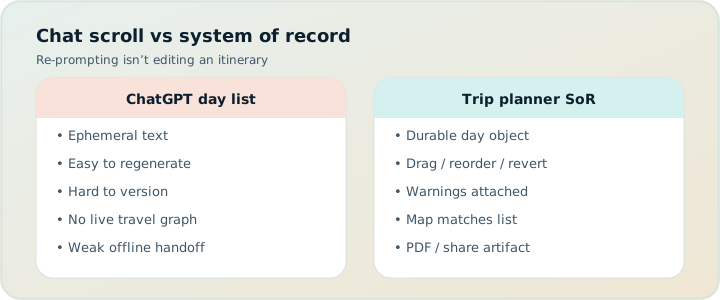
Quick comparison
| Capability | ChatGPT scroll | TripPapa planner |
|---|---|---|
| Brainstorming | Excellent | Use chat first if you want |
| Structured wishlist | Weak | Research + detail tabs |
| Party-aware pricing | Unreliable prose | Pricing tab + verify official |
| Travel legs | Guesses | Transit/drive/walk/cycle |
| Undo AI | Scroll history | Revert to pre-AI |
| Month reshuffle | Rewrite essay | Month View + Save & process |
| Handoff | Paste | PDF / view-only share |
Why scrolls feel complete
Formatting creates false finality: Day 1, Day 2, bold place names, cute food tips. Your brain files it under “planned.” Then someone asks for Tuesday’s transit and you re-read poetry. Completeness theater is the hazard.
What durability requires
Fields that software can recompute. When you swap days, travel must update. When party ages exist, estimates can reflect them. When hours exist, warnings can fire. Chat has tokens; planners have schema. TripPapa’s schema is the product loop you have seen across this blog.
A sane combined workflow
- Prompt ChatGPT/Gemini with constraints (party, pace, budget).
- Extract only places you might actually visit.
- Search + Add into TripPapa; enrich tabs.
- Schedule with legs; optional AI auto-plan + Revert.
- Verify official hours/tickets.
- Share view-only or Print/PDF; keep chat as archive of ideas, not canon.
Hallucination patterns unique to travel chat
Invented seasonal hours, wrong ticket age bands, attractions in the wrong neighborhood, “short walks” that are hills, restaurants booked out for months. Planner fields do not magically verify truth — you still check official sites — but they stop the plan from forgetting what you already checked.
Group dynamics
Chat itineraries invite drive-by edits (“swap day 3 and 4”) without anyone updating logistics. A trip lead with view-only share absorbs suggestions without forking. See group planning.
Pricing context
Chat may be free or part of an AI subscription. TripPapa Pass is $35/6 months. Wanderlog Pro AI assistant ($39.99/year — verify) lives in a map-collab tool. Different purchases. See Wanderlog pricing.
FAQ
Is ChatGPT free enough for trip planning?
For drafts, often yes. For durable days, no.
Does TripPapa’s AI replace ChatGPT?
No. It assists inside structured planning.
Can I paste a ChatGPT plan into TripPapa?
Translate places into wishlist items via Search + Add; do not expect magical full paste fidelity.
Why Revert matters
Because AI drafts should be provisional. Chat rewrites bury prior cuts.
What about Gemini?
Same category as ChatGPT for this comparison: draft engine, not itinerary object.
Should I stop using chat entirely?
No — stop using it as the final plan.
Where do bookings go?
TripIt/Google Travel — not the chat, not as TripPapa’s job.
Maps still needed?
Yes for navigation. See Maps vs planner.
From scroll confidence to schedule truth
Scroll confidence is typography plus completeness language. Schedule truth is arrival times that still work after you insert a bathroom break and a metro transfer. Moving from one to the other feels like loss at first — your beautiful essay becomes a shorter day. That loss is the point. Vacations are walked, not read.
Measure success by whether a non-planner can execute tomorrow without calling you. If they need you to interpret the chat, you still own a scroll, not a plan.
Paying for AI tokens vs paying for a planner
AI subscriptions buy more drafting power. Planner passes buy structured feasibility. Buying both can be rational for heavy travelers; buying only tokens and expecting sidewalk truth is not. TripPapa Pass ($35/6 months) and Wanderlog Pro ($39.99/year — verify) purchase different surfaces than ChatGPT Plus. Keep the receipts mentally separate.
When a vendor markets “AI itinerary,” ask whether Revert exists, whether travel recomputes, whether party ages matter, and whether share is durable. Those questions puncture hype faster than feature checklists.
Teaching your group the difference
Send the chat draft and the planner link side by side once. Ask which one they would follow if you lost signal. People learn fast when the contrast is concrete. After that, stop pasting full AI days into the chat as if they were updates to canon.
Keep the scroll for inspiration. Keep the planner for truth. Open TripPapa and convert one ChatGPT day into a scheduled day with travel legs — the difference is immediate.
From scroll confidence to schedule truth
Serious trip planning fails in predictable places: optimistic travel times, ignored opening hours, ticket prices that pretend every traveler is a solo adult, and handoff documents that are really chat screenshots. Whatever tool you evaluate — Maps lists, chat AI, Wanderlog, TripIt, Google Travel, or TripPapa — score it against those failure modes instead of against a generic “features” grid. A feature that does not prevent your actual failure is decoration.
TripPapa’s honest scope is the browser loop Trips → Research → Day Planner / Month View → Map → Export / Share. Party adults and kids with ages feed party-aware pricing estimates you must still verify on official sites. Search + Add is AI-assisted; detail tabs cover Overview, Photos, Reviews, Duration, Hours, and Pricing. Day Planner inserts transit, drive, walk, or cycle legs; pace and hours warnings surface overload and closed-door arrivals; AI auto-plan can draft assignments you may Revert. Month View supports drag and swap; Save & process recomputes travel. Map toggles wishlist versus day route and allows drop pin. Export uses Print/PDF; share links are view-only. Local-first storage pairs with optional Cloud Save and magic-link auth. TripPapa Pass is $35 for 6 months. It is not a booking engine, not a flight-alert product, not live multiplayer editing, and not a Discovery Yes/No screener.
Competitor context stays factual: Wanderlog Pro is $39.99/year for offline access, a Pro AI assistant (suggests places — not full-trip generation), and route optimization, while free tiers already include map, budget, and collaboration for many users — verify on Wanderlog’s site. TripIt Pro is $49/year as an email booking organizer with alerts — verify on TripIt’s site. Google Travel remains a free Gmail dashboard. Many travelers still succeed with Google Maps saved places plus spreadsheets for light trips; that stack deserves respect until days demand a real itinerary object. Tripsy around $59/year can matter for Apple-native users when relevant — verify pricing. Always confirm vendor prices before you buy.
Internal reading that supports better decisions includes how TripPapa works, TripPapa versus Wanderlog, TripPapa versus TripIt, TripPapa versus Google Travel, AI trip planning in 2026, day planner travel times, Month View, party-aware pricing, view-only share, print/PDF for families, local-first Cloud Save, and the 2026 planner roundup. Use those pages when you need depth; use this page when you need the job framing for chatgpt itinerary vs trip planner.
Practical next step: build one real day with your actual party before you subscribe to anything. If Maps lists already produce a Thursday morning you trust, stay. If you need legs, warnings, Month View recomputation, and PDF or view-only handoff, open TripPapa at /app and test the loop on a destination you care about. Complementary stacks beat forced monogamy with one logo — bookings in TripIt or Google Travel, navigation in Maps, feasibility in a planner when the trip is heavy enough to deserve it.
Paying for AI tokens vs paying for a planner
Serious trip planning fails in predictable places: optimistic travel times, ignored opening hours, ticket prices that pretend every traveler is a solo adult, and handoff documents that are really chat screenshots. Whatever tool you evaluate — Maps lists, chat AI, Wanderlog, TripIt, Google Travel, or TripPapa — score it against those failure modes instead of against a generic “features” grid. A feature that does not prevent your actual failure is decoration.
TripPapa’s honest scope is the browser loop Trips → Research → Day Planner / Month View → Map → Export / Share. Party adults and kids with ages feed party-aware pricing estimates you must still verify on official sites. Search + Add is AI-assisted; detail tabs cover Overview, Photos, Reviews, Duration, Hours, and Pricing. Day Planner inserts transit, drive, walk, or cycle legs; pace and hours warnings surface overload and closed-door arrivals; AI auto-plan can draft assignments you may Revert. Month View supports drag and swap; Save & process recomputes travel. Map toggles wishlist versus day route and allows drop pin. Export uses Print/PDF; share links are view-only. Local-first storage pairs with optional Cloud Save and magic-link auth. TripPapa Pass is $35 for 6 months. It is not a booking engine, not a flight-alert product, not live multiplayer editing, and not a Discovery Yes/No screener.
Competitor context stays factual: Wanderlog Pro is $39.99/year for offline access, a Pro AI assistant (suggests places — not full-trip generation), and route optimization, while free tiers already include map, budget, and collaboration for many users — verify on Wanderlog’s site. TripIt Pro is $49/year as an email booking organizer with alerts — verify on TripIt’s site. Google Travel remains a free Gmail dashboard. Many travelers still succeed with Google Maps saved places plus spreadsheets for light trips; that stack deserves respect until days demand a real itinerary object. Tripsy around $59/year can matter for Apple-native users when relevant — verify pricing. Always confirm vendor prices before you buy.
Internal reading that supports better decisions includes how TripPapa works, TripPapa versus Wanderlog, TripPapa versus TripIt, TripPapa versus Google Travel, AI trip planning in 2026, day planner travel times, Month View, party-aware pricing, view-only share, print/PDF for families, local-first Cloud Save, and the 2026 planner roundup. Use those pages when you need depth; use this page when you need the job framing for chatgpt itinerary vs trip planner.
Practical next step: build one real day with your actual party before you subscribe to anything. If Maps lists already produce a Thursday morning you trust, stay. If you need legs, warnings, Month View recomputation, and PDF or view-only handoff, open TripPapa at /app and test the loop on a destination you care about. Complementary stacks beat forced monogamy with one logo — bookings in TripIt or Google Travel, navigation in Maps, feasibility in a planner when the trip is heavy enough to deserve it.
Verify official hours and prices before you rely on any estimate, and treat complementary tools as complementary — not interchangeable logos.
Verify official hours and prices before you rely on any estimate, and treat complementary tools as complementary — not interchangeable logos.
Verify official hours and prices before you rely on any estimate, and treat complementary tools as complementary — not interchangeable logos.
Verify official hours and prices before you rely on any estimate, and treat complementary tools as complementary — not interchangeable logos.
Verify official hours and prices before you rely on any estimate, and treat complementary tools as complementary — not interchangeable logos.
Verify official hours and prices before you rely on any estimate, and treat complementary tools as complementary — not interchangeable logos.
Verify official hours and prices before you rely on any estimate, and treat complementary tools as complementary — not interchangeable logos.
Verify official hours and prices before you rely on any estimate, and treat complementary tools as complementary — not interchangeable logos.
Verify official hours and prices before you rely on any estimate, and treat complementary tools as complementary — not interchangeable logos.
Verify official hours and prices before you rely on any estimate, and treat complementary tools as complementary — not interchangeable logos.
Verify official hours and prices before you rely on any estimate, and treat complementary tools as complementary — not interchangeable logos.
Verify official hours and prices before you rely on any estimate, and treat complementary tools as complementary — not interchangeable logos.
Verify official hours and prices before you rely on any estimate, and treat complementary tools as complementary — not interchangeable logos.
Verify official hours and prices before you rely on any estimate, and treat complementary tools as complementary — not interchangeable logos.
Verify official hours and prices before you rely on any estimate, and treat complementary tools as complementary — not interchangeable logos.
Verify official hours and prices before you rely on any estimate, and treat complementary tools as complementary — not interchangeable logos.
Verify official hours and prices before you rely on any estimate, and treat complementary tools as complementary — not interchangeable logos.
Verify official hours and prices before you rely on any estimate, and treat complementary tools as complementary — not interchangeable logos.
Verify official hours and prices before you rely on any estimate, and treat complementary tools as complementary — not interchangeable logos.
Verify official hours and prices before you rely on any estimate, and treat complementary tools as complementary — not interchangeable logos.
Verify official hours and prices before you rely on any estimate, and treat complementary tools as complementary — not interchangeable logos.
Verify official hours and prices before you rely on any estimate, and treat complementary tools as complementary — not interchangeable logos.
Verify official hours and prices before you rely on any estimate, and treat complementary tools as complementary — not interchangeable logos.
Verify official hours and prices before you rely on any estimate, and treat complementary tools as complementary — not interchangeable logos.
Verify official hours and prices before you rely on any estimate, and treat complementary tools as complementary — not interchangeable logos.
Verify official hours and prices before you rely on any estimate, and treat complementary tools as complementary — not interchangeable logos.
Verify official hours and prices before you rely on any estimate, and treat complementary tools as complementary — not interchangeable logos.
Verify official hours and prices before you rely on any estimate, and treat complementary tools as complementary — not interchangeable logos.
Verify official hours and prices before you rely on any estimate, and treat complementary tools as complementary — not interchangeable logos.
Verify official hours and prices before you rely on any estimate, and treat complementary tools as complementary — not interchangeable logos.
Verify official hours and prices before you rely on any estimate, and treat complementary tools as complementary — not interchangeable logos.
If a ChatGPT day cannot survive the question “what is the travel mode between stop two and stop three,” it is still prose. Put the survivors into Day Planner and let legs make the answer explicit before you share anything as final.