Free AI travel planners in 2026 mostly means ChatGPT, Gemini, and a swarm of thin wrappers that paste the same chat into a prettier box. Purpose-built planners put AI inside a trip object: wishlist places, days, travel legs, and a handoff document. Confusing those categories is how you get a confident itinerary that collapses when the museum is closed and the metro takes forty minutes. This guide compares chat AI vs planner AI honestly — including TripPapa (our product) — and names pacing and hallucination issues by name.
Related: AI trip planning 2026, ChatGPT itinerary vs trip planner, how TripPapa works, opening hours and pace warnings.
Disclosure: TripPapa is our product. Its AI is Search + Add assistance, review summaries, pricing estimates, and reversible AI auto-plan — not a claim that the model verified official hours for you.
Quick answer
| Approach | Best for | Fails when |
|---|---|---|
| ChatGPT / Gemini free tiers | Brainstorming, packing lists, first drafts | You need durable days, recomputed travel, party ticket math |
| AI wrappers without a planner spine | Pretty exports of chat | Same hallucination surface, shinier PDF |
| Wanderlog Pro AI assistant | Help inside a map-first collab tool ($39.99/year Pro — verify) | You expected full-trip generation or party-aware research depth |
| TripPapa AI inside planner | Structured places + auto-plan you can Revert | You wanted live multiplayer edit or flight alerts |
What free chat AI actually does well
Large language models are strong at divergent thinking: ten neighborhoods to consider, three pacing philosophies, packing lists, cuisine primers, “what is a sensible first evening after a long-haul flight.” They are also strong at rewriting tone — turning a chaotic notes dump into a readable outline. Used that way, free ChatGPT or Gemini is genuinely useful and often enough for a short trip where you will verify everything in Maps anyway.
Chat AI is also a decent rubber duck. Explain your constraints (kids’ nap windows, hard museum reservations, no early mornings) and ask it to critique a draft day. The model can spot obvious overload even when it cannot reliably know whether a specific ticket tier applies to your seven-year-old next Tuesday.
Where chat itineraries hallucinate
- Hours: Invented or outdated opening times, holiday exceptions ignored.
- Geography: Days that zigzag because the model optimizes for “famous names,” not street distance.
- Transit: Walking times that assume tourist teleportation; missing transfer penalties.
- Pricing: “About $20” that ignores local/adult/child matrices.
- Availability: Suggesting timed-entry sights as if walk-up were guaranteed.
- Memory: Party size and constraints drift across a long scroll.
Hallucination is not a moral failing of the model; it is a category limit. A chat thread is not a database of places with hours fields that can warn you. Purpose-built planners exist because structured fields beat prose confidence.
Pacing issues: the polite overload
AI days love density. Five “must-sees,” a food hall, a sunset viewpoint, and a “quick” museum — all before dinner. Humans tire. Kids melt. Transit steals hours. Pace warnings in a planner exist because optimism is free in text. TripPapa flags overloaded days when stops plus travel push past a sane active-hours budget. Chat will cheerfully keep adding if you say “make it fuller.”
A practical rule: if a free AI day lists more than you could explain to a tired friend in one breath, cut a third before you paste it anywhere. Then put the survivors into a planner that models travel. See decision fatigue and choice overload for the human side of too many options.
Purpose-built AI: what “inside the planner” means
TripPapa’s AI is not a separate chatbot that owns the trip. It assists inside the loop Trips → Research → Day Planner / Month View → Map → Export / Share:
- Search + Add — AI-assisted web search into real wishlist places you select.
- Detail tabs — Overview, Photos, Reviews (including AI-assisted summaries), Duration, Hours, Pricing.
- Party-aware pricing estimates — adults + kids with ages; verify official prices.
- AI auto-plan — draft assignments across days using party, hours, home base, rest, and typical durations; Apply is atomic; Revert to pre-AI restores the prior plan.
That is scaffolding. You still drag, delete, and verify. Local-first storage keeps the plan as an object; Cloud Save and magic-link auth are optional backup — not a chat history you hope to find later.
ChatGPT vs Gemini vs planner AI
| Need | Free chat | TripPapa |
|---|---|---|
| Idea generation | Excellent | Use chat first if you want; Search + Add to capture winners |
| Durable stop objects | Weak (prose) | Wishlist with tabs |
| Travel legs | Guesses in text | Transit/drive/walk/cycle legs in Day Planner |
| Hours/pace warnings | Unreliable | Built-in warnings |
| Undo AI draft | Scroll archaeology | Revert to pre-AI |
| Handoff | Paste into chat | Print/PDF or view-only share |
Wanderlog’s Pro AI assistant in this landscape
Wanderlog Pro ($39.99/year — verify) includes a Pro AI assistant (suggests places — not full-trip generation), offline access, and route optimization. It lives inside a map-first collab product. That can be the right AI surface if your job is shared geography. It is a different hire than TripPapa’s research-to-day feasibility loop. See Wanderlog pricing explained and TripPapa vs Wanderlog.
The Maps + spreadsheet + ChatGPT stack
Many people still do this: ask ChatGPT for a list, save places in Google Maps, track order in a sheet. Acknowledge it — it works until travel times go stale and party costs live in a cell formula nobody trusts. When the stack grows louder than the trip, move the day graph into a planner. See Maps vs planner and TripPapa vs spreadsheets.
Scenario: free AI plans Rome in 90 seconds
You get a beautiful five-day outline. Day 2 includes the Vatican, Trastevere lunch, a “quick” museum, and a night view — with walking times that assume empty sidewalks. You send it to the group. Someone books a wrong-timed entry. The free AI did its job: draft. Your job starts now: create a TripPapa trip with party ages, Search + Add the keepers, check Hours and Pricing, build Day Planner with transit legs, run AI auto-plan only if you want a scaffold you can Revert, balance in Month View, export PDF. The chat scroll becomes research input, not the plan of record.
Safety habits for any AI travel workflow
- Verify hours and tickets on official sites before you pay or walk.
- Never treat model prices as invoices.
- Cut density before you fall in love with the prose.
- Put survivors into a structured planner before sharing with the group.
- Prefer reversible AI (Revert) over overwrite-only chats.
- Keep bookings in TripIt/Google Travel if that is your organizer — AI chat is not an inbox parser.
When free chat is enough
- Single weekend, two adults, light agenda.
- You enjoy improvisation and only need vibe research.
- You will live in Maps turn-by-turn and accept loose days.
When purpose-built planner AI is worth it
- Families, multi-city trips, transit-heavy cities.
- You need PDF/view-only handoff.
- You reshuffle days and need travel recomputed (Month View Save & process).
- You want pace/hours warnings inside the same object as the wishlist.
TripPapa product truth (AI-related)
TripPapa Pass is $35 for 6 months. Local-first; Cloud Save; magic-link auth. Not a booking engine, not flight alerts, not live multiplayer edit, not Discovery Yes/No. Map shows wishlist vs day route; drop pin supported. Print/PDF and view-only /share/ links for handoff. Deep features: travel times, Month View, party-aware pricing.
FAQ
Are ChatGPT itineraries free?
Free tiers exist with limits; paid AI plans add capacity. Either way, free prose is not a free Day Planner with legs and warnings.
Does TripPapa replace ChatGPT?
No. Use chat to brainstorm; use TripPapa to structure, schedule, and hand off.
Can AI auto-plan ruin my trip?
Only if you apply blindly. Use Revert. Treat drafts as suggestions.
Why do AI days feel exhausting?
Models underprice fatigue and transfer time. Pace warnings and human cuts fix that.
Is Gemini better than ChatGPT for travel?
Both draft; neither is a travel graph. Pick the chat you like; invest in the planner spine.
Do AI wrappers solve hallucination?
Usually not — they re-skin the same uncertainty unless they bind to structured verified fields and still require your checks.
How do reviews tabs use AI?
TripPapa can assist with review summaries to skim signal; you still decide fit for your party.
Should kids use AI itineraries?
Adults should verify. Party ages belong in the planner so estimates reflect who travels.
Free AI is a draft machine. A trip planner is a feasibility machine. Use both with clear roles. Open TripPapa and run one auto-plan you immediately inspect and edit — Revert if it is geographically drunk. For free planners beyond AI chat, see best free trip planners 2026.
Extended: prompts that help vs prompts that hurt
Helpful prompts constrain: party ages, nap windows, “max three paid attractions,” “prefer transit,” “one empty afternoon.” Hurtful prompts maximize: “best possible,” “don’t miss anything,” “pack the day.” Maximizing language invites hallucinated completeness. Satisficing language invites usable days. See maximizers vs satisficers.
After the model answers, run a manual audit: open each place in Search + Add or Maps; check official hours; remove one stop per day; only then schedule. The audit is the product. The prompt is just the funnel. Travelers who skip the audit blame “AI” when they really skipped the planner.
If you share AI output with a group, label it “draft — not final.” Otherwise someone will screenshot a hallucinated hour and treat it as a reservation. View-only share links from a planner reduce that class of error because the artifact is clearly the working plan, not a poem about a plan.
Finally, remember organizers: TripIt Pro (~$49/year — verify) and Google Travel still own booking timelines. AI chat will invent flight advice; it will not reliably replace email-forward organizers. Keep categories clean and your AI use gets saner overnight. Tab chaos is often AI chaos plus Maps chaos plus chat chaos — consolidation beats another wrapper. See tab chaos 2026 and replace five apps.
When you evaluate any “free AI travel planner” landing page, look for the itinerary object: Can you define adults and kids with ages? Are there travel modes between stops? Are there hours and pace warnings? Is there Month View with recomputation? Is share view-only or live edit? Is there Print/PDF? If the page only shows a chat window and a sample paragraph itinerary, you are buying prose. Prose is fine. Prose is not a sidewalk plan. TripPapa’s bet is that structured feasibility is the missing layer between inspiration and a day you can actually walk.
Measuring AI output like an adult
Score any AI itinerary on five binary checks before you share it: (1) Does every stop exist as a place you can open on a map? (2) Did you verify today’s hours on an official page for anything timed? (3) Did you subtract transfer time you can believe? (4) Do costs reflect adults and kids who are actually coming? (5) Could a tired non-planner follow the day from a PDF or share link? If any answer is no, the artifact is still a draft. ChatGPT can help you reach yes on (1) sometimes; it rarely finishes (2)–(5) without a planner spine and your verification work.
Teams that skip scoring argue about prose quality (“it sounds amazing”) instead of sidewalk feasibility. Sounding amazing is how hallucinated hours survive. Scoring is how they die in the hotel room before they die at the entrance.
AI auto-plan: a concrete TripPapa workflow
Fill the wishlist first. Set party ages, home base, preferred mode, day start, and typical durations. Only then run AI auto-plan. Read the draft geographically: are clusters respected or did the model spray famous names across town? Check pace warnings and hours warnings. Delete or move offenders. If the draft is mostly noise, Revert to pre-AI and assign manually with Search + Add survivors. The feature’s value is speed to a mediocre scaffold you can edit — not prophecy.
Compare that to a chat rewrite loop where each “make it better” regenerates prose and loses your prior cuts. Revert is an product admission that AI is provisional. Chat UIs often bury provisionality under confident formatting.
Free AI and paid AI plans: what changes
Paid ChatGPT/Gemini plans usually buy higher limits, better models, and convenience — not a travel graph. You may get fewer refusals and longer contexts, which helps multi-city brainstorming. You still lack Month View Save & process, party-aware Pricing tabs, and view-only share as itinerary infrastructure. Do not confuse a higher monthly AI subscription with a trip planner purchase. TripPapa Pass ($35/6 months) and Wanderlog Pro ($39.99/year — verify) buy planner surfaces; AI subscriptions buy tokens.
Research tabs vs chatbot paragraphs
When TripPapa stores Photos, Reviews, Duration, Hours, and Pricing on a place, those fields can participate in scheduling and warnings. A chatbot paragraph that mentions “open daily” cannot warn Day Planner when your arrival fights reality. That is the architectural gap behind every “AI planned my trip” disappointment thread. Structure is not bureaucracy; structure is what lets software help after the draft.
Use chat to decide which places deserve a wishlist row. Use detail tabs to enrich those rows. Use Day Planner to make time true. Use Export/Share to make the plan social. That pipeline is how free AI stops being a trap.
Group messaging amplifies AI errors
One hallucinated closing time in a group chat becomes five people rearranging dinner. Prefer publishing from a planner after verification. View-only share gives a single URL; Print/PDF gives airplane-mode truth. If someone wants to suggest a new bar, they suggest — you add via Search + Add or drop pin — you do not let the chat become a second itinerary database. See group trip planning without chaos.
Closing filter
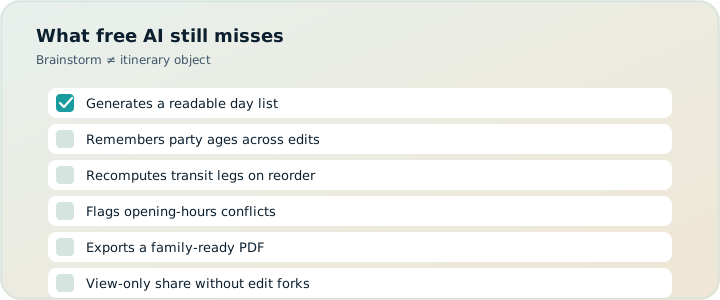
If a free AI tool cannot show travel legs between stops, cannot warn on hours and pace, cannot express your party’s ages in pricing estimates, and cannot hand off a PDF or view-only link, it is a drafting aid — valuable, incomplete. Use it. Do not worship it. Move the keepers into TripPapa when the trip is heavy enough to deserve a sidewalk-true plan, and verify official sources before you spend money or count on a door being open. That habit — draft in chat, structure in a planner, verify on the vendor site — is the whole free-AI travel playbook that still works in 2026. Everything else is packaging.
One more operational rule: never forward an AI itinerary to a group until you have either verified the day’s hours on official sites or clearly labeled the message as an unverified draft. Most AI travel fights are really about false finality. Slow the handoff and the tools get safer regardless of which logo produced the paragraphs.