Attraction pages love a clean headline: from $20. Families do not travel as a clean headline. Two adults, a seven-year-old, and a toddler are not “one adult ticket times vibes.” They’re a matrix of age brackets, free-under rules, weekend surcharges, and optional add-ons that turn a “cheap” morning into a budget-shaped afternoon.
TripPapa treats cost as a party problem, not a marketing problem. You define who’s going on the trip. On each attraction’s Pricing tab, you can fetch a party-aware estimate with breakdowns — then you still verify on the official site before you pay. That combination — honest modeling plus an explicit “don’t trust us blindly” stance — is how serious planners actually budget.
If you’re still collecting prices in a Notes app while Maps lives in another tab, you’re doing the hard version of this job. See also how TripPapa’s full loop works and why tab chaos makes budget math the first thing to die.
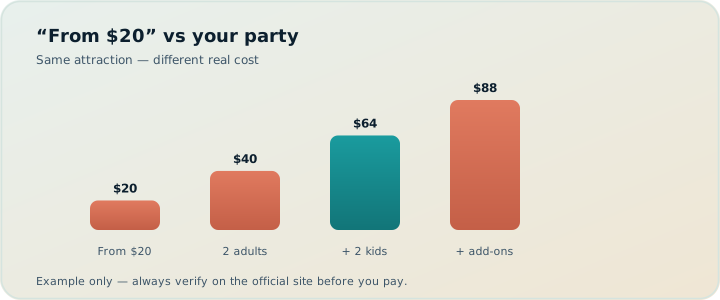
Why “from $X” fails families
Headline prices are optimized for conversion, not for your household. Common traps:
- Solo-adult assumption. The number assumes one paying adult. Your party is not one paying adult.
- Hidden brackets. Child tickets may start at age 4, 6, or 12 depending on the venue. “Kids free” often means under 3 — not under 10.
- Peak vs off-peak. Weekends, holidays, and school breaks quietly change the total.
- Foreign-visitor rates. Some destinations price residents differently; blogs copy the wrong number.
- Add-ons. Audio guides, ride wristbands, timed-entry upgrades, locker fees — optional until the kids insist.
- Currency and rounding. A pretty USD conversion of a local price can be stale by the time you land.
Spreadsheets can model this — if you enjoy maintaining age columns and never forgetting to update them when Uncle joins the trip. Most people don’t. They eyeball “about $20 each,” multiply by four, and discover the real total at the ticket window with a queue behind them.
A “from $20” price is a marketing sentence. A party total is a planning number. Only one of those belongs next to your day plan.
The party model: adults, children, ages
In TripPapa, party lives on the trip, not on a sticky note. You add adults and children with ages. That composition travels with every Pricing fetch for attractions in that trip. Change the party once — when a grandparent joins for three days, or when you realize the “child” is now priced as a youth — and subsequent estimates can reflect the new reality instead of a ghost roster from last month’s draft.
Why ages matter more than a simple kid count: venues don’t agree on childhood. One museum is free under 18. One theme park charges from age 3. One boat tour has a youth tier at 12–17. Without ages, “2 kids” is a coin flip. With ages, the estimate can attempt the brackets that actually exist.
Party also shows up in the broader planning vibe: kid-heavy days need different duration assumptions and more buffer in travel. Pricing is the sharpest edge of that truth, but it’s not the only one. Duration and hours still decide whether the expensive park day is even feasible — see hours and pace warnings.
What party-aware is not
It is not live booking. TripPapa does not sell tickets or hold inventory. It is not a guarantee. Rates change, promotions appear, and official sites win arguments. Party-aware pricing is a planning aid so you can compare options while the itinerary is still soft clay — not a receipt. It is also not a flight-alert product (that’s TripIt territory; Pro commonly $49/year — verify on their site) and not a live collab map (Wanderlog Pro $39.99/year — verify).
The Pricing tab: breakdowns, add-ons, running totals
Open an attraction in Research, then open the Pricing tab. Fetch an estimate keyed to your trip’s party. What you want to see — and what TripPapa aims to surface — is not a single heroic number. It’s structure:
- Base total for the party as configured
- Breakdown lines (who, quantity, each) so you can spot a wrong age bracket
- Optional add-ons you can mentally include or skip
- Currency matching the source context where possible
- Sources / freshness cues so you know whether you’re looking at something recent or something that smells like a blog from 2019
- Disclaimer that this is an AI/search estimate — verify officially
That structure changes behavior. When you see “2 × adult + 1 × child 7 + 1 × under 3 free,” you can argue with the plan. When you only see “from $20,” you argue with hope.
How to use Pricing in a real research pass
- Define party on the trip before you fetch anything.
- Search + Add the shortlist you actually care about — not every “top 50” listicle item.
- Open Pricing on the expensive candidates first (theme parks, towers, paid observatories, guided experiences).
- Skim free/cheap outdoor stops lightly; don’t burn attention on zero-cost parks.
- Note add-ons you’d actually buy (wristbands, audio guides) so the day total isn’t a surprise.
- Verify the keepers on the official site before you prepay or promise the kids.
Verify official: the non-negotiable step
Every serious planner needs a verification habit. TripPapa makes estimates easy so comparison is cheap; it does not replace the supplier. Before money moves:
- Open the official ticketing or venue page from the source link when available.
- Confirm date-specific prices if the attraction uses dynamic or calendar pricing.
- Check age rules on the day you’ll visit — policies change quietly.
- Watch for city taxes, booking fees, and “ticket + attraction” bundles that blogs flatten into one number.
Think of TripPapa’s Pricing tab as a filter, not a checkout. Filter out the days that blow the budget. Then lock the survivors with official confirmation. That two-step process is faster than verifying everything in the wild and slower than believing a headline — which is exactly the speed you want.
Estimates help you decide what belongs on the itinerary. Official sites decide what you pay. Confuse those jobs and you’ll either over-research or overpay.
Tradeoffs: when cost sits beside duration and hours
Budget planning fails when cost is a separate spreadsheet from the day plan. The expensive theme park might be worth it if you drop a low-joy paid museum the same day and keep travel short. The “cheap” attraction across town might be expensive in taxi time and nap-ruined kids. Party-aware numbers only shine when they sit next to:
- Duration — a $200 morning that needs five hours is a different product than a $200 hour-long tower visit.
- Hours — a deal that requires a Monday visit is useless if Monday is your travel day.
- Travel legs — transit fares and time are part of the real cost of a stop, even when admission is free. See travel times in Day Planner.
TripPapa’s Research detail tabs keep those facts on the same attraction. Day Planner then tests whether the day still closes before bedtime. Month View shows whether you stacked three paid heavy days back-to-back. That’s tradeoff quality: not “is this place cool?” but “is this place cool for our people, on this day, at this total?”
| Approach | What you see | Failure mode |
|---|---|---|
| Headline “from $X” | One marketing number | Wrong by a factor of your party size |
| Manual spreadsheet | Whatever columns you remember | Ages drift; never tied to the day plan |
| Chatbot quote | A confident paragraph | No durable breakdown next to the stop |
| TripPapa Pricing tab | Party breakdown + add-ons + cues | Still must verify official (by design) |
Worked example: Prague for five people
Two adults, kids aged 11, 8, and 4. Seven nights. Prague Castle complex, a paid tower, a river option, and free Old Town wandering.
Setup. Trip party with exact ages. Home base in Nové Město. Transit default. Home currency set in Settings so Export can show local + home totals later.
Research pass (20 minutes). Search + Add the paid shortlist first. Fetch Pricing on the castle tickets and tower. Breakdown shows the 4-year-old free or reduced, the 8- and 11-year-olds in child/youth bands, adults full price, plus optional audio guides. A blog’s “about €12” becomes a structured party table — maybe mid‑€40s base plus add-ons, or higher on a peak day. You compare that to the free Old Town loop and decide the tower is optional.
Day Planner. Castle morning with honest duration. Hours check avoids a closed wing day. Pace warning fires if you also jammed the tower and a museum into the same afternoon — you keep the castle, move the museum in Month View, Save & process.
Verify. Official castle ticketing page confirms age rules for your dates. You book only the keepers. PDF for grandparents; view-only share for your partner. Chat never becomes the budget spreadsheet.
How-to: a 20-minute family budget pass
- Open Trips → confirm adults/children/ages.
- In Research, filter to the paid shortlist (theme parks, museums with tickets, experiences).
- Fetch Pricing on each; skim breakdowns for age mistakes.
- Mark mental yes/no/maybe based on party total — not headline.
- Drag maybes into Day Planner only if duration + hours still fit.
- Official-verify the yeses before payment.
- Export or share so co-travellers see the same numbers you used.
Twenty minutes of structured work beats three nights of vague anxiety about “whether we can afford the fun parts.”
What to do with the totals once you have them
Party-aware pricing is most useful when it changes the itinerary, not when it decorates it. Drop a low-joy paid stop. Upgrade a free morning so the paid afternoon feels earned. Move a pricey day next to a cheap recovery day in Month View. Print a PDF so the non-planner adult in the group can see the same math without opening your laptop archaeology. Cloud Save keeps that researched state from vanishing when a browser profile eats itself.
Common mistakes
- Fetching prices before setting ages. You’ll compare fiction to fiction.
- Trusting the headline total without reading breakdown lines. Wrong brackets hide there.
- Ignoring add-ons the kids will demand. Wristbands are “optional” until the entrance.
- Verifying nothing. Estimates are filters; official sites are payment truth.
- Keeping cost in a separate Sheet. It drifts from Day Planner and Month View.
- Stacking three paid heavy days. Budget and energy both break — space them on the calendar.
When you do not need party-aware pricing
- Solo adult trip where every ticket is one line — a sticky note may suffice.
- All-free outdoor weekend with no paid attractions.
- You’re only organizing already-booked flights/hotels — a booking organizer owns that job.
- You refuse to verify anything and want one magical guaranteed price — no honest planner can sell that.
FAQ
Does TripPapa sell tickets?
No. Pricing is a planning estimate with breakdowns and verify cues — not checkout.
Why do I need child ages, not just a kid count?
Venues disagree on childhood. Ages let estimates attempt the real brackets.
What if the estimate is wrong?
Use the breakdown and sources to spot the error, then confirm on the official site. Structured wrong is easier to fix than vibes.
Can I change the party mid-trip?
Yes — update adults/children/ages on the trip, then re-fetch Pricing on the attractions that matter.
Do free attractions need Pricing?
Usually no. Spend enrichment attention on paid keepers.
How does this relate to Export totals?
Fetched party costs roll into Export’s cost summary (with home currency when FX is set). Still labeled as estimates.
Is this the same as TripIt or Wanderlog pricing features?
No. TripIt focuses on booked travel (Pro ~$49/year — verify). Wanderlog is map/collab-first (Pro $39.99/year — verify). TripPapa’s Pricing tab is party-aware attraction estimates inside Research next to duration and hours.
What’s TripPapa’s own pass?
Mock pass framing: $35 / 6 months. Compare on the planning job you need, and verify current offers in-product.
Deeper how-to: pricing next to the day, not beside it
Party-aware totals change behavior only when they sit inside the same loop as scheduling. After you fetch Pricing on the paid shortlist, open Day Planner and ask a harder question than “can we afford this?” Ask “can we afford this on this day given duration, hours, and travel?” A €90 party total for a two-hour tower after an already paid morning is a different decision than the same €90 as the day’s only ticketed block.
Practical sequence that families actually finish:
- Mark each paid attraction yes / maybe / no from the breakdown alone.
- For each yes, check Duration and Hours on the same detail panel.
- Only then drag onto a day — and watch assign packedness if the day is already Busy.
- If two yeses collide on energy or clock, keep the higher-joy one and park the other in Unassigned or a recovery day via Month View.
- Official-verify the survivors the same evening you emotionally commit — not the morning of.
That sequence prevents the classic family failure: loving the brochure price, locking the day, then discovering at verify-time that the real party total forces a painful cancel. Filtering with TripPapa’s Pricing tab is cheap. Canceling a promised theme-park day is not.
Also use Export’s cost summary as a second opinion. When home currency and FX are set in Settings, the PDF shows local + home amounts with the party context repeated. Hand that page to the non-planner adult before anyone prepay-clicks. Shared understanding beats a surprise total in a foreign ticket queue. Pair with PDF handoff and view-only share so the whole group sees the same math.
If you use AI auto-plan, treat pricing as a review lens after Apply: the draft may place three paid heavies on consecutive days. Month View spacing is often the fix — not deleting the experiences. Revert remains available if the geographic draft is wrong; pricing review is a separate pass after the map makes sense.
The point
Families don’t fail trips because they can’t read a price. They fail because the price they read wasn’t for them, wasn’t next to time and hours, and wasn’t verified when it counted. TripPapa’s party model and Pricing tab fix the first two. You still own the third — on purpose.
Build the party once, fetch the breakdowns, verify the keepers, and plan like the ticket window already happened. Open TripPapa and price one real attraction for your actual people — not for the imaginary solo adult on the brochure.
Related reading and next steps
If this article matched the pain you actually have, keep going with the adjacent guides rather than bouncing between unrelated listicles. For the full product loop — Trips, Research, Day Planner, Month View, Map, Export, and share — read how TripPapa works. For competitive framing without forced winners, use the 2026 planner roundup, TripPapa vs Wanderlog, and TripPapa vs TripIt. For the movement and handoff details that usually decide whether a plan survives Thursday, see travel times between stops, opening hours and pace warnings, Month View, view-only share, and printable PDF itineraries.
When you are ready to test the claim instead of reading about it, create one real trip with your real party, add five places, schedule a single day with travel legs, glance at Map day mode, then Print/Save PDF or create a view-only share link. That one loop teaches more than another hour of feature comparison. TripPapa Pass framing is USD $35 for 6 months when you want a planning window; local-first planning still lets you start without turning sign-in into a gate. Keep TripIt or Google Travel for bookings if you need them. Keep Wanderlog if your friends need live map editing. Hire TripPapa when the job is research into feasible days with party-aware estimates, transit/drive/walk/cycle legs, Month View balance, and a handoff artifact someone can actually follow.
Serious planning is not about collecting more apps. It is about giving each job a clear owner and refusing to pretend a booking dashboard, a chat scroll, or a pin board alone is a finished itinerary. Use this article as the decision filter for that job — then go build one honest day.