If planning a trip feels like a second job, you’re not imagining it. Industry research has tracked a steady rise in how much digital wandering happens before anyone clicks “book.” By 2025–2026 the problem isn’t only more websites — it’s more kinds of surfaces: OTAs, maps, review dumps, social saves, chat threads, and AI chat scrolls that never become a durable plan.
This piece names the tab chaos problem with real framing numbers, shows what it costs in time and decision quality, walks through how the sprawl shows up in a real trip, and explains how TripPapa collapses research, days, routes, and handoff into one workspace. No invented Discovery Yes/No screener. Just the loop that ships.
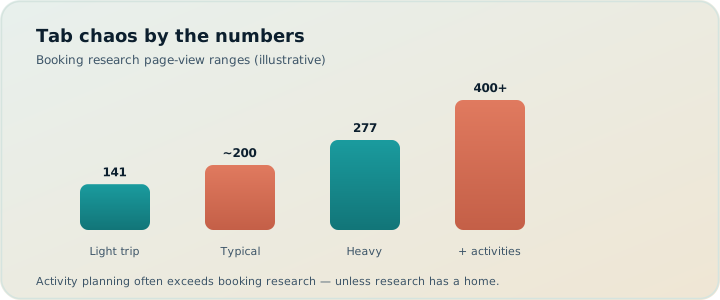
From dozens of sites to hundreds of page views
A decade ago, Expedia-linked research famously found travelers visited on the order of 38 websites before booking. Later clickstream work reported U.S. travelers viewing on the order of 277 web pages in the 45 days before purchase — with page views spiking sharply on booking day. Skift’s coverage of related multi-country data put the average closer to 141 pages globally, with the U.S. at the high end.
Those numbers measure booking research: flights, hotels, OTAs, comparison loops. Activity planning is often worse. You open Google Maps for pins, three review sites for “is it worth it,” a blog for a “perfect day,” TikTok for a queue tip that may already be stale, Notes for the list, Sheets for the schedule, and a group chat that never agrees on lunch. None of those tools share a system of record. Every context switch reopens yesterday’s decisions.
So when someone says “I spent all weekend planning,” they usually mean they spent all weekend re-finding information they already saw. The page-view stats explain the booking half. Tab chaos explains the itinerary half.
The fix isn’t “research less.” It’s giving research a home — a wishlist that becomes days, with travel times and a plan you can share.
Why the sprawl keeps growing in 2026
Supply exploded. Metasearch, OTAs, and supplier sites bounce travelers between each other. Inspiration never ends: social feeds keep adding “must-sees” after the itinerary was supposedly done. AI entered the stack — helpful for drafts, weak as a durable itinerary database — which can add another copy-paste layer. Roughly 40%+ of travelers already use AI for some planning; many still paste the output into Notes and start the tab circus again.
- More supply, more comparison. Every “best hotel near X” list sends you to five booking pages that disagree on cancellation rules.
- Inspiration without commitment. Saves and screenshots feel like progress. They aren’t a day plan.
- No single system of record. The map lives in one app, the day list in another, the budget in a spreadsheet, the “final” version in chat.
- AI without structure. A chatbot can invent a charming Tuesday. It won’t recompute metro legs when you swap Tuesday and Thursday.
Serious planners don’t fail because they care too much. They fail because caring is distributed across tools that don’t talk. Complementary tools still matter — book on OTAs, keep flight alerts in TripIt Pro (~$49/yr) if you want them, use a map-collab app like Wanderlog Pro ($39.99/year) when friends must edit pins live — but activity design still needs a hub where order, duration, travel, and hours meet. Chatbots miss durable itinerary objects; that gap is exactly what tab chaos fills with paste jobs.
What the chaos costs (beyond hours)
Time is obvious — evenings of “travel snacking.” Less obvious is decision fatigue: every new tab reopens whether yesterday’s choices were wrong. Choice overload delays commitment; maximizers feel it hardest when the next tab promises a slightly better museum or cheaper ticket. (For the psychology of those loops, see decision fatigue in travel planning and choice overload on vacation.)
Then the sidewalk collects its tax. Three “nearby” pins without travel legs. A museum arrival before opening because hours lived elsewhere. An overstuffed Thursday because only a Notes list existed — no month-level balance. Co-travellers ask for the plan; you send screenshots; they ask again. When truth lives in chat, nobody knows the current version. When it’s a Sheet, travel times die on reorder. When it’s a chatbot scroll, your dad can’t follow it on a plane.
There is also a quieter cost: trust in your own plan. After enough context switches, even a decent shortlist feels provisional. You stop defending Thursday and start renegotiating it at breakfast. Tab chaos doesn’t just waste evenings — it trains you to treat every day as unfinished.
A concrete scenario: Lisbon in twelve tabs
Two adults, one child (age 7), five days in Lisbon. Maps pins for Belém, Alfama, LX Factory, Oceanário. Notes says “Day 1 Belém.” Partner drops restaurants into WhatsApp. You check transit once, reorder in Notes, never re-check. By Thursday: a Maps list without order, a Notes day without travel time, a Sheet with party costs that don’t match ages, and a chat arguing Day 2 vs Day 4 for Oceanário. You’ve burned far more than 141 pages counting review scrolls. You still don’t have a printable day parents could follow.
That’s not a research failure. That’s an architecture failure — information with nowhere to become wishlist → days → routes → handoff.
| Fragment | Where it usually lives | What breaks |
|---|---|---|
| Pins / geography | Maps | No durable day order |
| “Is it worth it?” | Reviews / blogs / social | Signal without structure |
| Day list | Notes / Sheets | No travel legs or hours checks |
| Party costs | Mental math / Sheet | “From $20” lies for families |
| “Final” plan | Group chat | Version chaos, no PDF |
A second scenario: Tokyo weekend for maximizers
Three friends, Friday–Sunday in Tokyo. One person is the maximizer: every evening they open five more “hidden gem” tabs and paste new candidates into a shared Sheet. The Sheet grows to 40 rows. Nobody wants to cut. Saturday’s draft zigzags Shibuya → Asakusa → Shimokitazawa because row order became “priority,” not geography. Transit times were estimated once on Thursday night and never refreshed. Sunday morning, the maximizer is still comparing café reviews while the group is already late for a timed entry.
The failure mode is familiar: research kept expanding because nothing forced reduction into days with travel legs. A chatbot “optimal weekend” draft landed in the Sheet as row 41–50 and made it worse. Chatbots miss durable itinerary objects — they cannot be the system of record when order, party ages, and metro legs must update together. For the maximizing habit itself, see maximizers vs satisficers.
Objections people use to keep the circus
“I like having specialized apps.” Fine for booking flights and hotels. Activity planning still needs one place where order, duration, travel, and hours meet. Specialization without a hub is how you get five half-truths. Keep TripIt for confirmations (~$49/yr Pro if alerts matter) and Wanderlog ($39.99/year Pro) if live multi-edit is the group’s real need — then still put days somewhere that recomputes legs.
“I’ll just be more disciplined.” Discipline doesn’t recompute a metro leg when you drag a stop. Tools should make the honest plan the easy plan.
“AI will replace all of this.” AI drafts help. Roughly four in ten travelers already use them. Chat scrolls still aren’t a Day Planner with travel segments, pace warnings, and a view-only share link. See AI trip planning in 2026 for what chatbots miss.
“Spreadsheets are enough.” Sheets are flexible. They don’t know opening hours, party-aware ticket breakdowns, or transit steps between stops. Flexibility without domain logic is how optimistic walking survives until lunch collapses. Deeper take: why TripPapa beats spreadsheets.
How TripPapa collapses the tabs (real features only)
TripPapa is a browser trip planner built around one loop: Trips → Research → Day Planner / Month View → Map → Export / Share, with optional Cloud Save and passwordless magic-link auth when you want a backup. It is not a booking engine. It does not invent a swipe Discovery quiz. You search, add, and decide. Pricing is framed as a $35 / 6 months planning pass — oriented to a trip window, not a forever flight-alert subscription.
Research becomes a wishlist, not a pile of tabs
In Research, use Search + Add (AI-assisted web search) or add manually. The wishlist is filterable and sortable. Detail tabs cover Overview, Photos, Reviews, Duration, Hours, and Pricing — party-aware estimates for your adults and kids, with the disclaimer that you verify on the official site before you pay. Pin, summary, visit time, and family cost sit on one attraction record instead of Maps + three review tabs + Notes. That is how TripPapa operationalizes the psychology of tab chaos: one object absorbs the fragments that used to reopen every decision.
Days get travel legs, not vibes
Day Planner turns the wishlist into a schedule: drag stops, reorder, edit durations. Arrival and departure times chain; travel legs cover transit, drive, walk, or cycle — with duration, distance, and transit steps/fares when routing provides them. Fallback legs are marked when approximate. Pace warnings fire when stops plus travel push past roughly ten active hours; hours warnings fire when arrival fights opening times. Warnings don’t block you — they stop paper-perfect plans that collapse on the sidewalk. See Day Planner and travel times and hours and pace warnings.
Prefer a draft? AI auto-plan assigns unassigned items with party, hours, home base, rest, and typical durations in mind. Apply is atomic; Revert to pre-AI if you hate it. That’s AI inside a planner — not a chat you can’t undo.
Month View, Map, and handoff
Month View balances the week: drag, move, swap days in draft, then Discard or Save & process so travel recomputes. Map wishlist mode shows clusters; day mode shows a numbered route — same data as the list. Export Print/Save as PDF covers trip details, days, costs, and leftovers. A view-only share link lets co-travellers browse without editing. Local-first autosave holds the plan; Cloud Save backs up on purpose. For families who need a paper artifact, see print/PDF itineraries; for the share model, view-only share.
For a concrete before/after of killing the five-app stack, read Stop Opening Five Apps to Plan One Trip.
How-to: escape tab chaos in one evening
- Create a trip with dates, party (ages matter), home base, and preferred transport mode.
- Add eight to twelve places via Search + Add — not fifty. Enrich Hours and Pricing on the ones you’ll actually book.
- Schedule one real day in Day Planner. Watch travel legs appear. Fix anything that triggers hours or pace warnings.
- Open Map day mode. If the route is a star across town, reorder or split the day.
- Glance at Month View. Move one overloaded afternoon. Save & process.
- Export a PDF or send a view-only link. Close the other tabs on purpose.
That single loop teaches more than another weekend of “research.” You’re not trying to eliminate curiosity. You’re trying to stop curiosity from living in twelve places that can’t recompute a transfer.
A longer framework: the three-night reset
If one evening isn’t enough — family trip, multi-city, or chronic tab sprawl — use a staged reset:
- Night 1 — Capture. Create the trip. Dump every pin, chat link, and Notes bullet into Research as wishlist items. Cap at a rough ceiling (for example 15–20 for a week). Tag must / want / maybe. Do not schedule.
- Night 2 — Commit. Assign musts only. Fix hours and pace warnings. Refresh travel. Cut or park anything that only looked good as a tab title.
- Night 3 — Handoff. Balance in Month View, Save & process, check Map, export PDF, create view-only share. Tell the group the link is the working plan. Book flights/hotels elsewhere; keep alerts in TripIt if you use them.
Three short sessions beat one exhausted marathon because each night has a finish line. Tab chaos thrives when “done” is undefined.
Common mistakes that recreate the circus
- Treating Maps pins as a day plan. Pins are geography. Days need order, duration, and travel.
- Pasting chatbot days into Notes as “the itinerary.” Chatbots miss durable itinerary objects — reordering does not recompute legs or hours conflicts.
- Maintaining a parallel Sheet “for costs.” Party-aware pricing in Research is meant to kill the second truth source; verify tickets officially, but don’t rebuild the party math elsewhere.
- Screenshot handoffs. Screenshots age instantly. Use PDF or view-only share so co-travellers see the current plan.
- Adding fifty wishlist items on night one. Expansion without a ceiling recreates choice overload inside the hub you meant to simplify.
- Skipping Month View. Locally perfect days still produce feast-and-famine weeks.
Complementary tools — keep them, stop duplicating them
TripPapa is deliberately not booking, flight alerts, or live multi-edit. That is a feature of scope, not a gap to paper over with more tabs inside the planner.
- OTAs and airline sites — book flights and lodging where you already trust checkout.
- TripIt Pro (~$49/yr) — hire for booking timelines and flight alerts after confirmations exist.
- Wanderlog Pro ($39.99/year) — hire when the group’s core need is everyone editing the same map live; TripPapa share is view-only by design.
- Google Maps — navigate on the sidewalk; plan the sequence in TripPapa so Map day mode and the list agree before you leave.
- ChatGPT-class tools — brainstorm themes; land candidates in Research, not in a chat scroll as the final artifact. See AI trip planning in 2026.
For the broader stack, the Wanderlog / TripIt / Notion roundup maps jobs to tools without forcing one logo to do everything.
What TripPapa deliberately does not do
It doesn’t book tickets or hotels. It doesn’t promise live transit departures. It doesn’t guarantee prices or hours — estimates include sources and freshness cues where available; official sites win. It doesn’t replace your judgment with a gamified Discovery screener. It doesn’t offer live multi-editor collab. Those non-goals matter: tab chaos often comes from tools pretending to be everything. TripPapa pretends to be a planner.
FAQ
Are the 141–277 page figures about itineraries?
No — they’re booking-research framing (Expedia-era and Skift-covered clickstream ranges). Activity planning usually adds more surfaces on top. The point is the same: sprawl is normal, and it needs a hub.
Can I still use Maps and OTAs?
Yes. Book where you book. Use TripPapa so pins, days, travel, and handoff stop living in five half-connected apps.
Will AI alone fix tab chaos?
Not if the output is a chat scroll. You need structured wishlist vs scheduled stops, travel legs, warnings, and export/share. Roughly 40%+ of travelers already use AI; the ones who still drown in tabs are usually missing the itinerary object.
Do I need an account to start?
Plan locally first. Magic-link auth and Cloud Save are for backup or another device — not a gate before the first wishlist item. See local-first and Cloud Save.
How does TripPapa pricing compare to Wanderlog or TripIt?
Different jobs. Wanderlog Pro is $39.99/year for offline access, Pro AI place suggestions, and route optimization (collab is generally on free); TripIt Pro ~$49/yr for flight-centric tools. TripPapa’s $35 / 6 months framing matches a planning window. Pay for the job you hire — stacking complementary tools is fine; duplicating the same day list in three apps is not.
What if my friends need to edit the plan live?
TripPapa share links are view-only. If live multi-edit is non-negotiable, use a collab map tool for that job and keep TripPapa for feasibility — or pick the collab tool as primary. Don’t force view-only into a multiplayer workflow.
Close the tabs on purpose
By 2026, travelers can burn through hundreds of page views before a booking and still not know whether Thursday is feasible. The chaos isn’t a character flaw. It’s what happens when research has nowhere to land. Give it a wishlist, turn that into days with travel legs, balance the month, hand off a PDF or view-only link — then stop reopening the same question in a new tab.
Ready when you are: open TripPapa and build one day end-to-end. If the plan survives Map day mode and an hours warning check, you’ve already beaten the twelve-tab circus.