Not everyone on your trip wants another app login. Parents may prefer paper. Kids may lose phones. Grandparents may want a clear day list they can hold. Even tech-comfortable travelers hit dead zones: planes, rural trains, museum basements, roaming caps.
The best itinerary for those moments is paper-adjacent: a clear PDF (or printed pages) that opens without accounts, sync, or “can you see my link?” TripPapa’s Export view is built for that handoff. You plan in Research, Day Planner, Month View, and Map. When the plan is ready, you print or save as PDF through the browser — with a layout designed for days, not for dashboards. For the product loop, see how TripPapa works.
Why multi-generational trips need a document
App-first planning assumes everyone will open the same tool, stay logged in, and trust the latest sync. Multi-gen trips break that assumption in predictable ways:
- Different comfort levels. One person lives in maps apps; another wants a printed morning list.
- Shared devices. A tablet at the Airbnb is easier than five logins.
- Offline mornings. Hotel Wi‑Fi fails; the PDF still works.
- Authority without editing. Relatives should follow the plan, not accidentally delete Tuesday.
- Language and UI fatigue. A dense travel app UI is harder to skim at breakfast than a day page with leave time at the top.
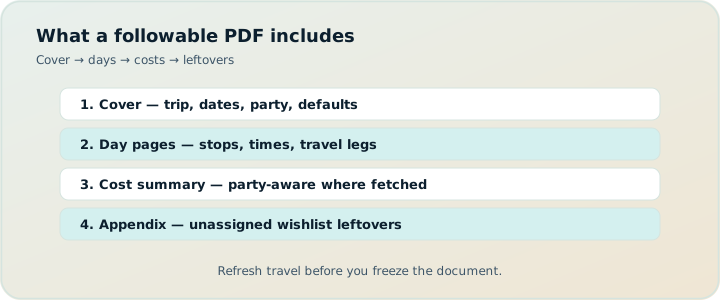
A good PDF is not a dump of screenshots. It is a structured document: cover identity, day pages with times and travel, costs in context, and a short appendix for “if we have extra time.”
That structure also reduces decision fatigue on the ground. When the morning question is only “what’s first and how do we get there?”, families move. When the morning question is “which chat thread had the latest list?”, they stall.
How TripPapa export works
Open Export on your active trip. TripPapa builds a print-optimized itinerary and uses your browser’s Print / Save as PDF flow. Page breaks are set per day so each day can stand alone when printed. You do not need a separate desktop publisher or a fragile “export to Word” pipeline.
Before you print, Export loads travel segments for each day so legs and distances match the plan. That matters: a PDF without travel times is just a wishlist with dates. Refresh travel in Day Planner (and Save & process after Month View reshuffles) before you freeze the document — see travel times and Month View.
What the PDF includes (section by section)
Cover
The cover establishes the trip at a glance:
- Trip name and destination
- Date range
- Party summary (who the cost estimates are for)
- Default transport mode (transit, drive, walk, or cycle)
- Generation date and a reminder that costs are estimates — verify on official sites
That cover page is what you email ahead of time or leave on the kitchen table the night before departure.
Trip overview
Overview stats ground the document:
- Number of days
- Wishlist size
- Estimated trip total in your home currency (when pricing enrichment exists)
- Default home base when you set one
Party-aware estimates matter here. A “€18 adult / €9 child” attraction is not a single number — TripPapa rolls costs for the travelling party so the overview reflects your group, not a solo tourist brochure. Details: party-aware pricing.
Per-day pages
Each day gets its own section with:
- Day heading and date
- Start and end anchors (home base or day-specific places)
- Leave time (day start or trip default)
- Day notes when you wrote them
- Ordered stops with address, arrival–departure window, visit duration, and party cost when available
- Travel legs between stops: mode, duration, distance (metric or imperial from Settings), approximate flags, fare estimates and transit steps when routing provides them
- Hours warnings when a stop conflicts with opening times
- Attraction notes and website when present
This is the page families actually use at 8:40 a.m.: leave time, first stop, how you get there, and whether the museum is even open. Hours/pace context: warnings guide.
If a day has no stops yet, Export still prints the day shell with anchors and leave time — useful when you intentionally left a rest day blank but want the date present in the packet.
Cost summary
After the days, Export rolls a cost summary: trip total plus per-day itemization. Amounts can show local and home currency side by side when exchange rates are set in Settings. The summary repeats the party context and the verify-on-official-sites caveat — because enrichment is a planning aid, not a booking confirmation.
“If you have extra time” appendix
Unassigned wishlist places appear in an appendix. That is intentional. Not everything belongs on a day. Keeping overflow visible prevents the classic family fight: “Why didn’t we go to X?” when X was never scheduled — it was a spare.
When PDF beats apps
| Situation | Why PDF wins |
|---|---|
| Parents / grandparents offline | No login, no app install, works on paper |
| Flights and tunnels | Document opens without network |
| Hotel front desk / rental car desk | Easy to show dates and day structure |
| Split groups for a morning | Print two copies; annotate with a pen |
| Low-battery day | Paper still has the leave times |
| View-only digital readers | Share link is better — see below |
Apps win when the plan is still changing hourly and everyone is online. PDFs win when the plan is stable enough to execute and the audience includes people who should not be editing.
There is a third case: mixed groups. Digital adults follow the view-only share link; offline relatives follow the PDF; you remain the only editor. That split is healthier than forcing everyone into the same interaction model. Live multiplayer map tools (e.g. Wanderlog: collab generally on free; Pro $39.99/year for offline, Pro AI place suggestions, route optimization — verify) optimize for co-editing, not for a breakfast printout. Booking organizers (TripIt Pro $49/year — verify) print confirmations, not sightseeing days with transit legs.
PDF vs view-only share links
Use both deliberately:
- Share link — interactive browse of Research, days, Map, and Export for co-travellers with phones and connectivity
- PDF — fixed artifact for offline, print, and low-tech handoff
A common pattern: send the share link to the group chat for visibility, and email the PDF to parents who asked for “just the schedule.” Both come from the same Day Planner — you are not maintaining parallel documents.
Worked example: Kyoto packet for grandparents
Four-day Kyoto trip, two adults + child age 8, grandparents joining days 2–3. You finalize days with transit legs, clear hours warnings, and party Pricing on paid temples. Month View balances a heavy Day 1. Export produces: cover with party and dates; overview with estimated totals; Day 2–3 pages grandparents will actually hold; appendix with unassigned rainy-day options.
You email the PDF and also send a view-only share to your partner. At breakfast, grandparents use the printed leave time and first transit leg. When rain forces a pivot, they check the appendix instead of inventing a new plan in chat. You re-export only if the structure changes materially after Save & process.
A family export checklist
- Confirm party members under Trips so cost estimates match who is actually going.
- Set home base and day start times so cover and day headers are honest.
- Fetch opening hours on key attractions; fix any hours warnings in Day Planner before printing.
- Refresh travel after reorders so legs are not stale.
- Skim Month View for overloaded days; move something before you freeze the PDF.
- Open Export, wait for segments to load, then Print / Save as PDF.
- Spot-check one day: leave time, first travel leg, first stop hours.
- Optionally create a share link for digital family members.
Print tips that actually help on the ground
- Print day pages, not only the cover. The cover is identity; the days are the plan.
- One day per sheet when possible. TripPapa’s page breaks support that habit.
- Highlight leave times with a pen the night before — especially with kids.
- Keep the appendix. Rainy-day swaps are easier when unassigned options are listed.
- Re-export after big changes. A PDF is a snapshot. If you reshuffle Friday in Month View, print again.
What Export is not
Export is not a booking engine. It will not email tickets or sync airline PNRs. It is not a live multiplayer canvas. It will not invent a “Discovery” swipe feed of places you never researched. It prints the itinerary you built: wishlist → days → travel → costs → handoff. TripPapa Pass framing ($35 / 6 months) is for the planning window that produces that document — not for flight alerts.
Plan in the app. Hand off a document. Let relatives follow the day without fighting your workspace.
What families usually annotate on paper
Once the PDF exists, real groups still write on it — and that is fine. Common pen marks:
- Confirmed reservation times next to a stop
- Which adult is carrying tickets
- A backup café if the first lunch spot is full
- Crossed-out stops after a rainy morning pivot (use the appendix)
Paper annotation is not a failure of the tool. It is how multi-gen groups absorb a plan. Your job in TripPapa is to give them a clean baseline: times, legs, hours flags, and costs that match the party.
Common mistakes
- Printing before fixing hours warnings. The PDF then teaches the wrong morning.
- Stale travel legs. Reorder, forget refresh, export confident fiction.
- Cover-only print. Relatives need day pages.
- Never re-exporting after Month View swaps. Paper lags reality.
- Omitting the appendix. Extra-time fights start there.
- Treating cost totals as booked tickets. Verify official sites before payment.
When you do not need a PDF
- Solo traveler who only uses a phone share link and always has data.
- Plan still changing every hour — wait until a draft is stable.
- You only need boarding passes and hotel vouchers — print those from the booking tools.
FAQ
Do I need special software to export?
No — Export uses the browser Print / Save as PDF flow.
Are travel legs included?
Yes, after segments load. Refresh Day Planner travel first if you reordered.
Do hours warnings print?
Yes — day pages can show hours conflicts so the paper doesn’t hide them.
Can costs show in my home currency?
When you set home currency and FX rates in Settings, Export can show local + home amounts.
What about unassigned places?
They appear in the “extra time” appendix — intentionally not forced onto days.
Should I also create a share link?
Usually yes for digital co-travellers; PDF for offline/multi-gen. Same plan, two handoffs.
Is Export a booking confirmation packet?
No. It is the sightseeing/day plan document. Keep airline/hotel PDFs separate.
How often should I re-print?
After material day changes (especially Month View Save & process). Minor note tweaks may not need a new packet.
Deeper how-to: freeze, annotate, and re-print rules
Treat the PDF like a release, not a diary. A workable freeze rule: re-export when (a) day order changes, (b) a travel mode on a critical hop changes, (c) an hours conflict is fixed, or (d) Month View Save & process reshapes the week. Do not re-export for every attraction note typo. Families drown in “final_final” filenames when every micro-edit becomes a new packet.
Night-before ritual that actually works:
- Open Export; confirm segments loaded.
- Spot-check tomorrow’s leave time, first leg, and first stop hours warning status.
- Print tomorrow’s day page (and maybe the appendix if weather looks ugly).
- Highlight leave time; jot who carries tickets.
- Keep the share link in chat for digital adults who prefer phones.
Split-group mornings are where paper shines. Print two copies of the same day. Group A annotates museum timed entry; Group B annotates playground backup. Reconvene note goes at the bottom in pen. The planner did not need live multiplayer for that — it needed a clear baseline document. Live collab tools optimize a different job; booking organizers print vouchers, not sightseeing chains with transit steps.
Cost pages deserve a spoken disclaimer at the family meeting: “These are planning estimates for our party — we verify before we pay.” That one sentence prevents grandparents from treating Export totals as prepaid tickets. Party-aware Pricing belongs in Research first; Export only rolls what you fetched. If a big ticket is still unverified, say so in a day note before you print.
Storage tip: keep one dated PDF in a shared album or email thread labeled with the generation date from the cover. When you re-export, replace the file and say so in chat once. The share link remains the interactive copy; the PDF remains the offline copy. Two handoffs, one plan — the whole point of collapsing the five-app stack into TripPapa.
Worked follow-up: rain day reprint
Kyoto Day 3 outdoor plan dies to rain. You swap via Month View, Save & process, fix one hours warning on the indoor museum now on Day 3, refresh travel, and Export again. Print only Day 3 plus the appendix. Tell grandparents to discard yesterday’s Day 3 sheet. Cover and other days stay. That selective reprint habit beats regenerating a twelve-page packet for every weather ping — and still keeps paper aligned with Day Planner truth.
Settings that affect the printed page
Before a family freeze, check Settings: metric vs imperial for leg distances, home currency and fetched FX rates for cost summary dual amounts, and party composition on the trip so cover and totals match who is actually traveling. Those boring levers are why Export can look like a document instead of a screenshot of your laptop chaos.
Who gets the most value
- Multi-generational trips with mixed tech comfort
- Trip leads who need offline-proof mornings
- Anyone pairing a digital share with a printed backup
- Planners who care that travel legs and hours warnings survive into the handoff
If your current “family itinerary” is a chat scroll and a half-updated Notes app, you already know the failure mode. Build the days once in TripPapa, then Export.
Ready to print a plan people can follow? Open TripPapa, finish a day with travel legs, and hit Print / Save PDF in Export.
Related reading and next steps
If this article matched the pain you actually have, keep going with the adjacent guides rather than bouncing between unrelated listicles. For the full product loop — Trips, Research, Day Planner, Month View, Map, Export, and share — read how TripPapa works. For competitive framing without forced winners, use the 2026 planner roundup, TripPapa vs Wanderlog, and TripPapa vs TripIt. For the movement and handoff details that usually decide whether a plan survives Thursday, see travel times between stops, opening hours and pace warnings, Month View, view-only share, and printable PDF itineraries.
When you are ready to test the claim instead of reading about it, create one real trip with your real party, add five places, schedule a single day with travel legs, glance at Map day mode, then Print/Save PDF or create a view-only share link. That one loop teaches more than another hour of feature comparison. TripPapa Pass framing is USD $35 for 6 months when you want a planning window; local-first planning still lets you start without turning sign-in into a gate. Keep TripIt or Google Travel for bookings if you need them. Keep Wanderlog if your friends need live map editing. Hire TripPapa when the job is research into feasible days with party-aware estimates, transit/drive/walk/cycle legs, Month View balance, and a handoff artifact someone can actually follow.
Serious planning is not about collecting more apps. It is about giving each job a clear owner and refusing to pretend a booking dashboard, a chat scroll, or a pin board alone is a finished itinerary. Use this article as the decision filter for that job — then go build one honest day.