Apps are great until they aren’t. Airplane mode, rural trains, museum basements, hotel Wi‑Fi that only works in the lobby, a parent who never installed your planner, a battery that dies at 11%, a roaming package that quietly ran out — all of those moments share one requirement: a readable itinerary that does not depend on sync, accounts, or “can you open the link?”
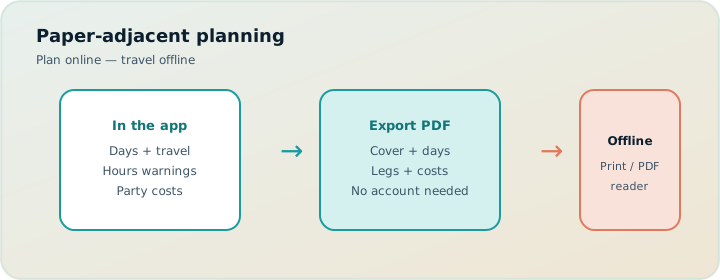
That is why PDF still matters in 2026. Not as nostalgia for paper. As a deliberate handoff format. TripPapa’s Export view turns the same plan you built in Research, Day Planner, Month View, and Map into a print-optimized itinerary you save through the browser’s Print / Save as PDF flow. One plan. One document. No parallel spreadsheet that drifts out of date the night before departure.
This guide covers why offline documents still win for multi-generational travel, what TripPapa’s Print/Save flow includes, how to prepare a PDF that families actually use, when to pair it with a view-only share link, and how Export fits the wider product loop described in How TripPapa Works.
Why PDF still beats “just use the app” on real trips
Travel software marketing loves the always-online fantasy: everyone has a phone, everyone is logged in, everyone trusts the latest cloud version. Real trips do not look like that. Multi-gen groups especially do not.
Common failure modes of app-only itineraries:
- Login friction. A grandparent will not create an account to read Tuesday’s museum order.
- Connectivity gaps. Subways, countryside drives, and international roaming are not “always online.”
- Edit anxiety. Shared editable plans invite accidental deletes. Viewers need a followable artifact, not write access.
- Battery and device split. Kids lose phones. Tablets stay at the Airbnb. Paper still works at breakfast.
- UI fatigue. Dense planner interfaces are harder to skim at 8:40 a.m. than a day page with leave time at the top.
- Authority mismatch. The trip lead needs control; relatives need clarity. Those are different jobs.
A PDF is not anti-technology. It is the right format when the plan is stable enough to execute and the audience includes people who should not be editing. Apps still win for live reshuffles. Documents win for mornings, flights, and handoffs. Serious planners use both — see also our family-focused export notes in print PDF itineraries for families.
Plan in the browser. Freeze a document when the day needs to be followed, not debated.
What “offline-ready” actually means
Offline-ready is not a screenshot dump of your planner UI. Screenshots crop badly, hide travel legs, and age poorly when you reorder Friday. Offline-ready means:
- A cover that identifies the trip without opening any app.
- Day pages with leave times, ordered stops, durations, and travel legs.
- Cost context that matches the travelling party — estimates, not invoices.
- Hours warnings already resolved or clearly visible so you do not arrive at a closed door.
- An appendix of unassigned wishlist items for rainy-day swaps.
- A generation date so everyone knows which version they are holding.
TripPapa Export is built around that structure. Before you print, Export loads travel segments for each day so legs and distances match the plan. A PDF without travel times is just a wishlist with dates — the same problem we cover in why travel time between stops matters.
TripPapa Print / Save as PDF flow
Open Export on your active trip. TripPapa builds a print-optimized itinerary and uses your browser’s native Print dialog. From there you choose Save as PDF (or print to paper). Page breaks are set per day so each day can stand alone when printed. You do not need a desktop publisher, a “export to Word” pipeline, or a third-party PDF SaaS.
Suggested sequence before you freeze the document:
- Confirm party members under Trips so cost estimates match who is going.
- Set home base and day start times so cover and day headers are honest.
- Fetch opening hours on key attractions; fix hours warnings in Day Planner.
- Refresh travel after reorders so legs are not stale.
- Skim Month View for overloaded days; move something before you freeze.
- Open Export, wait for segments to load, then Print / Save as PDF.
- Spot-check one day: leave time, first travel leg, first stop hours.
- Optionally create a view-only share link for digital family members.
That checklist is boring on purpose. The expensive mistakes happen in the last 10% of planning: stale legs, closed Mondays, and PDFs printed from an unfinished draft.
What the PDF includes, section by section
Cover
The cover establishes the trip at a glance: trip name, destination, date range, party summary, default transport mode (transit, drive, walk, or cycle), generation date, and a reminder that costs are estimates — verify on official sites. This is the page you email ahead of time or leave on the kitchen table the night before departure.
Trip overview
Overview stats ground the document: number of days, wishlist size, estimated trip total in home currency when pricing enrichment exists, and default home base when set. Party-aware estimates matter here. A “€18 adult / €9 child” attraction is not a single number — TripPapa rolls costs for the travelling party so the overview reflects your group, not a solo tourist brochure. Deeper on that math: family party-aware pricing.
Per-day pages
Each day gets its own section with day heading and date; start and end anchors (home base or day-specific places); leave time; day notes; ordered stops with address, arrival–departure window, visit duration, and party cost when available; travel legs between stops (mode, duration, distance, approximate flags, fare estimates and transit steps when routing provides them); hours warnings when a stop conflicts with opening times; attraction notes and website when present.
This is the page families actually use at breakfast: leave time, first stop, how you get there, and whether the museum is open. If a day has no stops yet, Export still prints the day shell with anchors and leave time — useful for intentional rest days that still need a date in the packet.
Cost summary
After the days, Export rolls a cost summary: trip total plus per-day itemization. Amounts can show local and home currency side by side when exchange rates are set in Settings. The summary repeats party context and the verify-on-official-sites caveat — enrichment is a planning aid, not a booking confirmation. TripPapa does not book tickets.
“If you have extra time” appendix
Unassigned wishlist places appear in an appendix. That is intentional. Not everything belongs on a day. Keeping overflow visible prevents the classic family fight: “Why didn’t we go to X?” when X was never scheduled — it was a spare for weather or energy crashes.
| PDF section | Job on the ground | What to verify before printing |
|---|---|---|
| Cover | Identity + party + dates | Party roster, transport default |
| Overview | Trip-scale sanity check | Home base, currency settings |
| Day pages | Execute the morning | Leave times, legs, hours |
| Cost summary | Budget conversation | Official ticket sites |
| Appendix | Rainy-day swaps | Wishlist still relevant |
Multi-generational travel: who needs which format
Multi-gen trips fail less from “bad research” and more from mismatched handoff formats. A useful split:
- Trip lead — edits in TripPapa (Day Planner, Month View, Map). Owns Cloud Save and magic-link auth when using backup.
- Digital co-travellers — browse the view-only share link for Research, days, Map, and Export without editing.
- Offline / low-tech relatives — receive the PDF or printed day pages.
- Kids / shared tablet — often better with a printed morning strip than a full planner UI.
You are not maintaining three plans. You are exporting and sharing the same Day Planner. When Tuesday changes, re-export and optionally refresh the share link audience. Revoke the share when the trip ends.
For the parent/senior-specific angle — PDF plus view-only as a deliberate stack — see trip planning for parents and seniors.
Scenario: three generations in Kyoto
Two adults, one child (age 9), and two grandparents. Home base near Kyoto Station. Transit default. Research wishlist includes Fushimi Inari, Kiyomizu-dera, Arashiyama, Nishiki Market, and a quieter temple. Day Planner builds Day 1 with leave time 08:30, transit legs, and hours checks. Month View shows Day 1 heavy and Day 3 thin; you swap a soft afternoon activity, Save & process so travel recomputes, then Export.
Handoff: email PDF to grandparents with Day 1–4 pages; send share link to the partner who wants Map; keep editing rights only on the trip lead’s browser. On the train to Fushimi, grandparents read leave time and the transit leg from the PDF. Nobody needs an account. Nobody accidentally deletes Tuesday.
That is the product truth: Trips → Research → Day Planner / Month View → Map → Export / Share. Not booking. Not flight alerts. Not live multi-edit. Not a Discovery quiz.
Scenario: rural Portugal with patchy data
A couple driving between small towns. Maps works offline in limited ways; group chat does not. They plan days in TripPapa with drive-mode legs, set home bases per lodging night when helpful, and Export each region packet before leaving Wi‑Fi. When a vineyard day collapses into rain, they use the appendix for indoor options and annotate the printed page with a pen. Later, back online, they reshuffle Month View and re-export. The PDF is a snapshot; the planner remains the source of truth.
PDF vs view-only share vs Cloud Save
| Tool | Best for | Not for |
|---|---|---|
| PDF / print | Offline, paper, low-tech handoff | Hourly live edits |
| View-only share | Phone browsing of the live plan | Co-editing (links are view-only) |
| Cloud Save | Backup / another device for the editor | Silent multiplayer sync |
TripPapa is local-first with autosave in the browser. Cloud Save is intentional upload/restore, not a surprise overwrite. Sign-in uses passwordless magic link when you need auth for backup. None of that replaces Export when grandma needs Tuesday on paper. More on the storage model: local-first Cloud Save planning.
Print tips that survive contact with reality
- Print day pages, not only the cover. The cover is identity; the days are the plan.
- One day per sheet when possible. TripPapa’s page breaks support that habit.
- Highlight leave times with a pen the night before — especially with kids or early trains.
- Keep the appendix. Rainy-day swaps are easier when unassigned options are listed.
- Re-export after big changes. If you reshuffle Friday in Month View, print again.
- Carry one spare printed day for the highest-stakes morning (airport transfers, timed entries).
- Do not treat estimates as invoices. Verify tickets on official sites before you pay.
Paper annotation is not a failure of the tool. It is how multi-gen groups absorb a plan. Confirmed reservation times, who carries tickets, a backup café — all fine as pen marks on a clean baseline of times, legs, hours flags, and party costs.
What Export is not
Export is not a booking engine. It will not email tickets or sync airline PNRs. It is not a live multiplayer canvas. It will not invent a Discovery swipe feed of places you never researched. It does not replace TripIt-style flight alerts — if you need real-time disruption tools after you book, TripIt Pro (commonly $49/year; verify current pricing) can sit beside your planner as an organizer. TripPapa prints the itinerary you built: wishlist → days → travel → costs → handoff.
Pricing context for planners who compare stacks: Wanderlog Pro is $39.99/year; TripPapa Pass is $35 for 6 months. Google Travel remains a free dashboard for bookings and destinations. Spreadsheets plus Maps are still common — and still fail at chained travel legs. Honest comparisons: TripPapa vs Wanderlog, TripPapa vs TripIt, TripPapa vs Google Travel.
FAQ
Do I need Cloud Save to export a PDF?
No. Export works from your local plan. Cloud Save is optional backup for the editor.
Can co-travellers edit via the PDF?
No. PDF is a snapshot. Editing stays with the trip lead in TripPapa. Share links are view-only.
Will the PDF update automatically?
No. Re-export after material changes. Treat each file as a dated version.
Are travel legs guaranteed accurate?
Routing estimates can include approximate fallbacks. Refresh after reorders; verify critical transfers on the ground.
Can I export only one day?
The Export view is trip-scoped with per-day page breaks. You can print selected pages from the browser print dialog if you only need one day on paper.
Is PDF better than a share link?
Different jobs. PDF for offline and low-tech; share link for interactive browse when phones and connectivity work.
Does TripPapa book attractions?
No. Estimates help planning; booking happens on official sites and OTAs.
What about Pass pricing?
TripPapa Pass is $35 for 6 months. Confirm the current offer in-app.
A practical export cadence for a two-week trip
Week −3: research and first Day Planner drafts; no PDF yet. Week −2: Month View balance; first PDF draft for internal review only. Week −1: fix hours and legs; PDF to parents; share link to digital travellers. Departure week: final re-export after any lodging change; print Day 1–3 as a pocket pack; keep later days digital until closer. Mid-trip: if you reshuffle, re-export only the affected days’ packet when Wi‑Fi appears. That cadence keeps documents useful without printing every draft.
If you are still deciding when planning should stop and booking should start, read when to book vs when to plan. If your research pile is not scheduled yet, start with wishlist before you book.
Version control habits for printed itineraries
Multi-gen groups often end up with three PDFs in three inboxes and no agreement about which is current. Solve that with lightweight version habits — not with another SaaS. When you Export, include the trip name and dates on the cover (TripPapa already does). In the email subject, write the destination plus a simple version label such as “Kyoto packet v3 — after Friday rain swap.” Ask relatives to delete prior attachments. If someone prints at home, ask them to recycle yesterday’s pages when v4 arrives.
On the road, designate one “packet owner” — usually the trip lead or the most organized parent — who carries the latest printed set. Digital siblings can rely on the view-only share for the live browse and treat PDF as backup. When Wi‑Fi appears after a Month View reshuffle, re-export only if leave times, stop order, or travel legs changed materially. Cosmetic note edits do not always deserve a new family-wide print run.
Hotel business centers and airport lounges can print emergency copies. Keep a cloud copy of the latest PDF in an email thread to yourself so you are not dependent on the TripPapa tab being open when a printer appears. Cloud Save backs the editable plan; the emailed PDF backs the handoff artifact. Those are different insurance policies.
Start with one day on paper
Create a trip, add five places, schedule one day with travel legs, open Export, Save as PDF, and hand that single page to someone who did not help plan. If they can answer “what time do we leave, where first, and how do we get there?”, the format is working. Then scale to the full trip.
Ready when you are: open TripPapa, build one real day, and Print / Save as PDF before the next group-chat screenshot war.