Travelers confuse two clocks: the planning clock (can this day exist for our party?) and the organizing clock (what did we already buy, and is the flight still on time?). Tools specialize. Using a booking inbox to design museum days — or a day planner to chase gate changes — creates pain.
This article draws a clean timeline: when to plan in TripPapa, when to book on OTAs/official sites/Google Travel, and when to lean on organizers like TripIt. Product truth for TripPapa: browser loop Trips → Research → Day Planner / Month View → Map → Export / Share; party-aware pricing; Search + Add; detail tabs; travel legs transit/drive/walk/cycle; pace + hours warnings; AI auto-plan + Revert; Month View Save & process; Map modes; PDF export; view-only share; Cloud Save; magic-link; Pass $35/6 months. Not booking, flight alerts, live multi-edit, Discovery quiz.
Price signals to verify: TripIt Pro $49/year; Wanderlog Pro $39.99/year; Google Travel free; spreadsheets + Maps still common. Guides: How TripPapa Works, TripPapa vs TripIt, TripPapa vs Google Travel, wishlist before you book.
Planner vs organizer vs booking dashboard
| Role | Job | Example tools |
|---|---|---|
| Feasibility planner | Wishlist, days, legs, hours, party estimates, handoff | TripPapa (also Wanderlog as alt planner) |
| Booking dashboard | Search/buy flights, hotels, some activities; trip folders | Google Travel, OTAs, airline sites |
| Organizer / alerts | Confirmation aggregation, flight alerts, travel-day ops | TripIt (+ Pro features) |
| Ledger | Actuals, splits, points | Spreadsheets |
TripPapa does not try to be TripIt. TripIt does not try to be a transit-feasibility Day Planner with Month View Save & process. Google Travel does not replace PDF family handoff from a researched wishlist. Honest stacks beat fantasy suites.
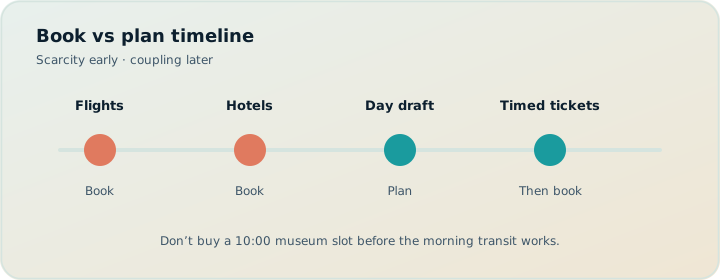
Plan until Tuesday is possible. Book what scarcity requires. Organize what you bought.
A practical timeline
Phase A — Dream and constrain (planning-heavy)
Pick rough dates and party. Create a TripPapa trip. Search + Add without buying. Map clusters. Decide whether the date range even fits the wishlist density. Output: a sober sense of trip length and home-base neighborhood.
Phase B — Feasibility draft (planning-heavy)
Schedule proof days with travel legs. Fix hours/pace warnings. Month View balance; Save & process. Optional AI auto-plan + Revert for a first distribution. Output: days that could work. Handoff draft PDF/share for alignment — not final.
Phase C — Scarcity booking (booking-heavy)
Buy what the market punishes you for delaying: long-haul flights, peak lodging in the right cluster, scarce timed entries for days that already survived feasibility. Use official sites/OTAs/Google Travel. Record confirmations in email; let TripIt parse them if you use it.
Phase D — Fill-in booking (mixed)
Restaurants, flexible museums, transit passes — book as confidence rises. Keep reshuffling in TripPapa when weather or energy demands; re-export. Shoulder flexibility: shoulder season.
Phase E — Travel ops (organizer-heavy)
Flight changes, gate alerts, document wallets: TripIt Pro territory if you want those features ($49/year commonly; verify). TripPapa remains the on-the-ground day plan via PDF/share. Navigation apps do turn-by-turn.
Phase F — After-action (ledger)
Sheets for actuals if you care. Revoke share links. Keep Cloud Save archive if you want.
When planning should continue (don’t book yet)
- You cannot explain leave time and first transit leg for Day 1.
- Map wishlist mode shows random scatter and lodging is still undecided.
- Hours warnings still litter the plan.
- Party ticket math was never opened on major paid stops.
- The group has not seen a view-only or PDF draft for buy-in.
Exceptions: truly scarce peak flights/hotels may need early deposits — still spend one evening on cluster geography first so you do not buy the wrong neighborhood. Wishlist before you book.
When booking should dominate (stop endlessly optimizing)
- Proof days work; Month View is balanced enough.
- Timed must-dos have stable day slots.
- Further research is mostly anxiety — decision fatigue, maximizers vs satisficers.
- Market risk on flights/lodging exceeds itinerary risk.
Maximizers often plan forever. Satisficers book too early. The stack above is the middle path.
TripPapa + TripIt + Google Travel stack
TripPapa: feasibility and handoff. Party, legs, hours, Month View, PDF, view-only.
Google Travel: free dashboard for exploring deals and keeping booking links; not a replacement for Day Planner math.
TripIt: forward confirmations; Pro for real-time flight alerts and related premium ops features. TripPapa will not alert you that your plane is late — by design.
Wanderlog: optional alternate planner if you need live collab; TripPapa share is view-only. vs Wanderlog, roundup.
Sheets: money actuals. Excel planning.
Roadtrippers: if the trip is corridor-shaped. road vs city.
| Moment | Primary tool | TripPapa still? |
|---|---|---|
| Building wishlist | TripPapa Research | Yes |
| Choosing hotel neighborhood | TripPapa Map + Research | Yes — then book on OTA |
| Buying flights | Airline / OTA / Google Travel | Dates only |
| Timed museum ticket | Official site | After day feasibility |
| Gate change day-of | TripIt Pro / airline app | PDF for city plan after landing |
| Family breakfast briefing | TripPapa PDF | Yes |
Scenario: two-week Europe
Weeks −10 to −8: TripPapa wishlist + clusters; provisional lodging areas. Week −7: book long-haul and first/last night hotels in the right clusters via OTA/Google Travel. Weeks −6 to −4: deepen Day Planner; buy major timed entries. Week −2: TripIt inbox clean; PDF to parents; view-only to partner. Travel week: TripIt for flight ops; TripPapa PDF for city days; Month View swaps if weather hits mid-trip (Save & process when online).
Scenario: weekend city break
Compressed timeline: one night Research + proof day in TripPapa; book train + one timed show the same evening if feasible; skip TripIt Pro if you do not need alerts; still Export a one-pager. Pass math ($35/6 months) may or may not matter for a single weekend — judge by how often you travel.
Scenario: multi-gen with limited Wi‑Fi
Plan in TripPapa; hand off PDF early; book on desktop at home; use TripIt for flights; do not expect seniors to live in three apps. parents and seniors, offline PDF.
Money and estimates across the timeline
Phase A–B: party-aware estimates for planning conversations. Phase C–D: official prices at checkout. Phase F: Sheet actuals. Never treat Export totals as invoices. party-aware pricing, budget party costs.
FAQ
Can TripPapa replace TripIt?
No. Different jobs. Use TripIt after bookings if you want confirmation ops and Pro alerts.
Can TripIt replace TripPapa?
No. TripIt does not run your research→legs→hours feasibility loop.
Is Google Travel enough alone?
For light trips, maybe. For party/hours/legs/PDF structure, add a planner.
Do I need all three?
No. Minimum viable: TripPapa + booking sites. Add TripIt when confirmation/alert pain appears.
When do I enable Cloud Save?
Whenever losing the plan would hurt — often before Phase C bookings.
Live multi-edit with co-planners?
Not in TripPapa; view-only share. Choose another planner if simultaneous editing is mandatory.
Flight alerts in TripPapa?
No — use TripIt Pro or airline apps.
Pass price?
$35 for 6 months — confirm in-app.
Decision tree
- If you lack a feasible Day 1, plan more in TripPapa.
- If Day 1 works and scarcity is real, book that scarce item.
- If you are booking to relieve anxiety without feasibility, stop and schedule.
- If confirmations are scattering across email, add TripIt.
- If relatives need offline clarity, Export PDF.
- If weather reshuffles the week, Month View → Save & process → re-export.
Criteria checklist: good trip planner 2026. Serious planner stance: why TripPapa for serious planners.
Calendar templates for three trip lengths
Long weekend: Plan and book can sit within 48 hours. Still sequence them: proof the days in TripPapa before nonrefundable tickets. Organizer tools optional.
One-week city trip: Roughly follow Phases A–F over 3–6 weeks. Book flights/lodging after clusters; book timed entries after proof days; TripIt when confirmations multiply; PDF one week out; weather swaps in shoulder seasons via Month View.
Two-plus weeks / multi-city: Stretch Phase A–B so wishlist density informs how many cities you can honestly do. Multi-city trips die when each city inherits a Maximizer list. Use Month View across the date range to see transit days and rest days. Book intercity transport only after city day shapes exist — otherwise you buy train times that fight museum hours. Japan example discipline: Japan transit planning.
Conflict resolution when partners disagree on timing
One partner wants every ticket bought now; the other wants to keep planning. Use the scarcity/coupling matrix from research-first thinking. Buy high-scarcity low-coupling items (peak flights) earlier. Block high-coupling items (timed museums) until Day Planner shows a green slot. Write the agreement down in a trip note. View-only share makes the feasibility state visible so “we’ll figure it out” cannot hide. If disagreement is actually about money, switch to party-aware Export summaries and a Sheet envelope — different argument, different tool.
Work travel and personal time on the same ticket
Bleisure trips mix organizer urgency with planner hope. Corporate flights and hotels may be booked by a travel desk before sightseeing exists. Set home base to the work hotel, then build personal days in TripPapa around work hours with ruthless pace limits. Do not let AI auto-plan fill every free evening. Export a personal PDF separate from the corporate itinerary if that reduces confusion. TripIt may already hold the work bookings; let it. TripPapa holds the optional city life.
Metrics that tell you the stack is healthy
- Zero parallel “real plan” living only in chat screenshots.
- PDF leave times match Day Planner after the last Save & process.
- Booked timed entries sit on days without hours warnings.
- TripIt (if used) contains confirmations, not a second stop order.
- Google Travel folders do not replace Research wishlist.
- Sheet contains money, not metro minutes.
If a metric fails, repair the lane — do not add another app. Buyer criteria: good trip planner 2026.
Cost of switching lanes mid-trip
Mid-trip you will be tempted to abandon the planner for pure improvisation. Sometimes improvisation is right. When you improvise, still update Day Planner when connectivity returns if the next day depends on it — especially with multi-gen PDF followers. A stack fails when the editor improvises silently and relatives follow yesterday’s packet. Re-export is cheaper than a fight at breakfast. Offline realities: offline PDF, parents and seniors.
Pass pricing ($35/6 months) should be judged across a planning season, not a single checkout. TripIt Pro ($49/year commonly) across a flying year. Wanderlog Pro ($39.99/year) if that is your planner lane instead. Verify prices before renewing anything that no longer matches your trip geometries.
Post-booking planning is still planning
Booking does not end the planning clock; it changes what the planning clock is allowed to move. After flights and hotels exist, TripPapa work shifts to attraction sequencing, weather twins, and handoff packets. People mistakenly switch entirely into TripIt/Google Travel mode and stop updating days — then act surprised when the city plan is stale. Keep editing the feasibility plan until travel day, with tighter rules about what can still move.
Hardening rule examples: after nonrefundable timed tickets, those stops become fixed anchors; flexible stops still swap in Month View; leave times may adjust; home base changes are expensive and rare. Save & process after late reshuffles; re-export for anyone on PDF. Organizer alerts handle the flight; they do not rewrite museum order.
If you arrive to a disruption (late flight, missed rail), use Day Planner to rebuild the next day quickly rather than living in pure chat improvisation — especially with seniors following paper. That is the stack working under stress: TripIt explains the disruption; TripPapa repairs the city day; Maps walks you there.
Scarcity vs coupling: a booking priority matrix
Every purchase has two scores. Scarcity is how badly the market punishes delay (peak flights, sold-out timed entries, limited lodge inventory). Itinerary coupling is how badly a wrong day ruins the week (a museum ticket glued to an impossible transfer chain). Book high-scarcity, low-coupling items earlier once dates are stable. Hold high-coupling items until Day Planner shows a feasible slot — even if scarcity anxiety is loud. Low-scarcity, low-coupling items can wait until travel week without drama.
| Purchase type | Scarcity | Coupling | When to buy |
|---|---|---|---|
| Long-haul peak flight | High | Low (dates only) | After Phase A date confidence |
| Hotel in right cluster | Medium–high | Medium (geography) | After Map clusters |
| Timed mega-museum | High | High (day slot) | After proof day + hours clear |
| Flexible city museum | Low | Medium | Late / walk-up OK often |
| Dinner reservation | Medium | High (evening neighborhood) | After that evening’s cluster exists |
TripPapa reveals coupling. OTAs and Google Travel reveal scarcity and refund rules. TripIt organizes what you already bought. Confusing those information types produces nonrefundable tickets for impossible Tuesdays — the failure mode wishlist before you book exists to prevent.
Common mistakes on the planning/booking boundary
- Booking to quiet anxiety. Checkout dopamine is not feasibility. If you cannot state Day 1 leave time and first leg, you are still in Phase B.
- Planning forever past scarcity. Maximizers polish Month View while peak lodging disappears. When proof days work, buy the scarce survivors.
- Using TripIt as a sightseeing studio. Confirmation timelines are not transit chains. Keep days in TripPapa.
- Using TripPapa as a flight-alert app. It will not ping gate changes — by design. That is TripIt Pro or airline apps ($49/year commonly for Pro; verify).
- Live multi-edit to “speed booking.” Five editors create five carts. One editor + view-only share is faster than forks. If simultaneous editing is mandatory, choose a collab planner like Wanderlog (Pro $39.99/year; verify) consciously.
- Freezing a draft PDF as final. Re-export after bookings change times; relatives follow paper.
Step-by-step: one evening to cross from plan to book
- Open the trip in TripPapa; confirm party and home base.
- Ensure at least one proof day has refreshed transit/drive/walk/cycle legs.
- Clear hours warnings on any stop you might prepay tonight.
- Glance at Month View; Save & process if you still have draft moves.
- Export draft PDF / refresh view-only share for a five-minute partner check.
- Write a scarcity-ordered checkout list (flights → lodging cluster → timed entries).
- Buy on official sites / OTAs / Google Travel in that order.
- Return to TripPapa: note reservation times, tweak durations, refresh travel.
- Forward confirmations to TripIt if you use it; do not rebuild the day order there.
- Optional Cloud Save so the post-booking plan survives a laptop swap.
That evening has a beginning (feasibility) and an end (receipts attached to a living plan). Without the bookends, you get either endless research or receipt-driven chaos.
Scenario: shoulder-season city week
Weather coupling is high; ticket scarcity may be lower than peak summer. Lean longer on Phase B flexibility: indoor/outdoor twins in Research, Month View swaps with Save & process, later booking of flexible museums. Still buy scarce timed must-dos once their day slots are stable. Deep dive: shoulder season trip planning, Month View calendar.
Scenario: points hotel already locked
Lodging scarcity was handled by points — coupling remains. Set home base to the known hotel, rebuild attraction feasibility around it, and only then buy timed entries. The points win does not excuse an OTA-first sightseeing cart. AI auto-plan can draft around the fixed home base; Revert and protect rest if the draft is a marathon.
FAQ add-ons
What if a deal expires tonight?
Ask whether the deal is low-coupling (refundable hotel in a known-good cluster) or high-coupling (timed ticket for an unscheduled day). Buy the former if dates are stable; walk away from the latter until a proof day exists — another deal will appear; another Tuesday will not.
Should kids’ tickets be bought with adult tickets?
Usually yes once the day is feasible — party-aware estimates informed the budget earlier; checkout still happens on official sites. See party-aware pricing.
Do I need Wanderlog and TripPapa?
No. Pick one primary feasibility planner. Paying both Pros plus TripIt Pro is how subscription creep happens.
Children, school calendars, and forced booking windows
Families often face forced date windows from school holidays — which pushes lodging scarcity earlier. That does not erase the planning clock; it compresses Phase A–B into fewer evenings. Do a ruthless wishlist with hard kills, prove days quickly, book lodging in the right cluster as soon as proof exists, then continue attraction sequencing. Do not let the school calendar become an excuse for random neighborhood booking. TripPapa still earns its keep in the compressed window because mistakes are costlier when dates cannot move.
Share the compressed plan early via view-only and PDF so grandparents buying their own trains align to the same week structure. Misaligned relative bookings are a classic organizer problem that starts as a planner communication problem.
Use both clocks on purpose
Planning time and booking time are both real. Organizing time starts when receipts exist. Put TripPapa on the planning clock, OTAs/Google Travel on the booking clock, TripIt on the organizing clock, and stop asking one app to be all three. Your itinerary gets calmer when tools keep their lanes.
Ready when you are: open TripPapa, prove one day with travel legs, and only then open the booking tab that used to come first.