Shoulder season is when good planners outperform brochure itineraries. Crowds thin, prices often soften, and weather becomes a daily character: rain that kills a coastal walk, wind that cancels a viewpoint, heat that still surprises in “cool” months, early sunsets that shrink evening plans. The travelers who thrive are not the ones with more pins — they are the ones who can swap days, protect pace, and keep travel legs honest after the reshuffle.
TripPapa’s Month View is built for that bird’s-eye flexibility: drag unassigned wishlist items, move stops between days, swap entire days, then Save & process so Day Planner travel recomputes. Pair it with hours warnings, pace warnings, Map modes, and Export/Share when the plan stabilizes. Full loop: Trips → Research → Day Planner / Month View → Map → Export / Share. Party-aware pricing, Search + Add, AI auto-plan + Revert, Cloud Save, magic link. Pass $35/6 months. Not booking, flight alerts, live multi-edit, Discovery quiz.
Deep dives: Month View trip calendar, hours and pace warnings, How TripPapa Works.
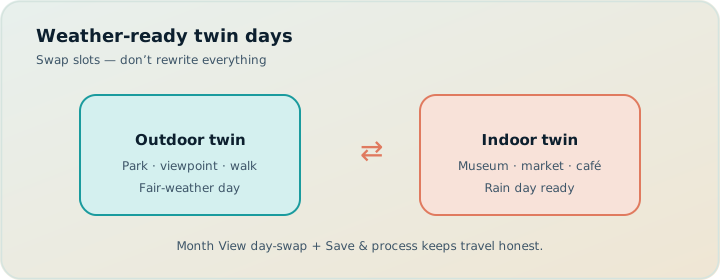
What shoulder season changes in planning
- Weather volatility — outdoor and indoor days should be swappable units.
- Hours and seasonal closures — attractions may run reduced schedules; ferry and trail seasons matter.
- Light — shorter days compress evening itineraries.
- Energy — cooler rain can be more tiring than midsummer heat for some groups.
- Booking posture — some tickets stay timed; others can wait. Feasibility still comes first.
A static spreadsheet week cannot absorb a forecast flip without breaking travel times. Month View + Save & process exists so a swap is not cosmetic.
Shoulder season rewards itineraries that can trade days without orphaning metro legs.
Build a swap-ready wishlist
In Research, Search + Add both outdoor-leaning and indoor-leaning places. Use Hours and Duration tabs. Tag in notes: “rain OK,” “view/weather dependent,” “timed entry.” Map wishlist mode to confirm indoor options exist near the same clusters — a rain day that forces a cross-town museum after a coastal morning is not a real swap.
Party roster still matters: wet-day museums have ticket math for families. Party-aware pricing, budget planning.
Day Planner: keep legs and warnings truthful
Schedule first drafts with realistic leave times and modes (transit/drive/walk/cycle). Refresh travel. Fix hours conflicts before you fall in love with an order. Pace warnings tell you when shoulder-season ambition (more museums because they’re empty) becomes exhaustion. Empty attractions still take walking and decisions.
AI auto-plan can distribute unassigned items; Revert if it stacks three outdoor days with no indoor backup. Human owns the weather strategy.
Month View workflow for weather weeks
- Draft days in Day Planner or by dropping wishlist items onto the month grid.
- Identify outdoor-heavy vs indoor-heavy days as swappable blocks.
- When a forecast flips, drag one day onto another to swap, or move individual stops.
- Review the draft grid — do not assume travel is current yet.
- Save & process to commit and recompute travel for Day Planner.
- Open Day Planner; spot-check leave times and first legs.
- Re-check hours warnings after moves (Monday closures love to bite).
- Map day mode for the reshuffled days.
- Re-export PDF / refresh share audience if handoff already happened.
Discard if the draft is a mess — drafts exist so experiments are cheap.
| Shoulder problem | Month View move | After Save & process |
|---|---|---|
| Rain on coastal day | Swap with museum day | Recomputed transit legs |
| Wind kills viewpoint | Move viewpoint to appendix; pull indoor stop | New chain + durations |
| Two heavy days stacked | Insert rest / light day between | Pace reality check |
| Seasonal early close | Shorten evening; shift stop earlier | Hours warning clearance |
Scenario: Scotland in May
Shoulder weather is a personality. Wishlist includes coastal walks, a castle cluster, distillery tour, and city museums. Home base in Edinburgh with a day-trip day. Forecast shows rain on the coastal day; Month View swaps with museum day; Save & process; Day Planner shows new transit timing from home base; hours still fine. PDF re-exported for parents joining midweek. Timed distillery slot stays put — only flexible blocks swap. Booking remains on official sites; TripPapa does not sell tickets.
Scenario: Japan rainy season adjacent travel
Transit-heavy days already tax attention. Keep Arashiyama-type outdoor blocks swappable with indoor/market days. After swaps, recompute legs — Kyoto transfers are not optional trivia. Dedicated guide: Japan transit planning. Pace warnings matter when humidity makes “easy” days hard.
Scenario: shoulder safari-adjacent city + nature hybrid
Even if nature days are booked lodges (outside TripPapa), city buffer days before/after benefit from Month View flexibility when jet lag and weather hit. Keep city wishlist rich; do not over-schedule the first 24 hours. Export a simple PDF for the arrival day.
Pacing philosophy for shoulder travel
Shoulder season tempts maximizers: “fewer crowds means we can do more.” Often the opposite is true operationally — transport frequency may drop, daylight shrinks, and rain adds friction. Use pace warnings as a governor. Prefer one deep cluster over three thin ones. Map wishlist mode before you commit. Related psychology: maximizers vs satisficers, decision fatigue.
Hours: the shoulder-season silent killer
Reduced opening hours and weekday closures show up more when you travel outside peak staffing seasons. Fetch Hours on key stops. Treat warnings seriously before you prepay. If you swap days, re-validate — moving a museum to Monday is a classic self-own. Guide: opening hours and pace.
Handoff when plans flex
Tell relatives: “Days may swap for weather; I’ll send an updated PDF.” View-only share helps digital travellers see the live plan; PDF helps offline parents. Do not give edit access. Guides: view-only share, PDF families, parents and seniors, offline PDF.
Cloud Save helps the editor after late-night forecast checks on another device. Magic link auth when needed. Local-first still autosaves the browser plan.
What TripPapa won’t do for shoulder season
No live weather API that auto-swaps your days. No flight alerts when storms rebook planes — TripIt Pro (commonly $49/year; verify) is the organizer/alert tool after booking. No OTA weather deals. Google Travel stays a free booking dashboard. Wanderlog (Pro $39.99/year; verify) is another planner option if you want different collab tradeoffs. TripPapa’s job is making your manual weather strategy computationally honest after you move days.
FAQ
Should I plan two full itineraries?
Usually no — one wishlist with indoor/outdoor tags plus Month View swaps is enough.
Do I Save & process after every tiny drag?
Batch edits in draft, then Save & process when the grid looks right.
What if a timed ticket blocks a swap?
Keep timed stops fixed; swap only flexible blocks around them.
Can AI handle weather?
No weather brain. Use auto-plan for first distribution only; you own swaps.
Are shoulder prices in Pricing tabs?
Estimates may not reflect every seasonal promo — verify official sites.
Drive mode for rainy day trips?
Yes when that is the real plan; refresh legs after changes.
Pass cost?
$35 / 6 months — confirm in-app.
When should I stop reshuffling?
When further swaps don’t improve feasibility — then book remaining must-haves. See when to book vs plan.
Shoulder-season checklist
- Wishlist with indoor and outdoor coverage in the same clusters.
- Fetch hours; note seasonal risks.
- Draft days with buffers; watch pace.
- Treat days as swappable blocks in Month View.
- Save & process after swaps; re-check legs and hours.
- Map-check reshuffled days.
- Update PDF/share for the group.
- Book timed essentials once their day is stable enough.
- Keep appendix stocked for same-day pivots.
Research posture before OTAs: wishlist before you book. Buyer framing: good trip planner 2026.
Building indoor/outdoor twin days on purpose
The strongest shoulder-season pattern is twinning: for each ambitious outdoor day, maintain a ready indoor twin that uses a similar home-base departure direction when possible. Example: coastal walk day twins with a cluster of galleries on the same transit line; hill viewpoint day twins with a covered market plus museum nearby. In Research, capture both twins. In Month View, keep them on different dates so a swap is a drag away. After Save & process, confirm the indoor twin’s hours — Monday museum twins fail if you did not check.
Twinning beats maintaining two entire itineraries. It also beats “we’ll figure it out in the rain,” which usually becomes an expensive taxi to the first crowded mall. Export’s appendix can hold third-string options; twins deserve real day slots or clearly labeled swap partners in day notes.
Light, temperature, and leave-time physics
Shoulder seasons change daylight. Golden-hour plans from summer blogs do not port to October without earlier starts — or they become dinner-dark walks. Adjust day start defaults in Trips and per-day leave times. Cold rain slows families; hot shoulder weeks in southern destinations still demand midday shade blocks. Pace warnings capture overload but not thermal comfort — add buffers yourself. Travel legs in walk mode look short on paper and long in wind. Prefer transit between clusters when weather is unstable even if summer-you would walk.
Photography-driven itineraries are especially brittle in shoulder weather. If a viewpoint is the point of the day, it is not a twin candidate for a random indoor museum across town. Either protect it with a flexible date window or accept missing it. Month View helps you slide that viewpoint across candidate days without rebuilding the week from scratch.
Seasonal operations outside the planner
Ferries, mountain railways, and national park shuttles may run reduced shoulder timetables. TripPapa will not scrape every seasonal PDF for you. When a day depends on a seasonal operator, put the constraint in day notes and verify on the operator site after the day shape exists. Then lock fewer swaps around that constraint — same idea as timed tickets. Weather can move the surrounding flexible blocks; the ferry still leaves when it leaves.
Packing lists belong in Sheets or notes apps: layers, packable rain shells, battery packs for colder shorter days. The planner should stay about places and times. Mixing packing into stop rows recreates spreadsheet itinerary mush.
Group psychology when forecasts flip
Forecast anxiety creates premature swaps and late-night arguments. Process rule: no Month View swap until a threshold you define (for example, morning-of or evening-before when confidence is higher). Draft freely; Save & process when you commit. Tell the group the rule so every drizzle does not trigger a democracy. View-only share lets people see the current plan without forcing a vote on every drag.
Maximizers will want to rebuild the week at each model update. Satisficers will ignore forecasts and march into sideways rain. Use the twin-day system as a precommitment: you already know what the alternate day is, so you are not inventing under stress. Psychology reads: maximizers vs satisficers, decision fatigue.
Re-export discipline after weather edits
Parents with printed packets will follow yesterday’s coastal day if you forget to re-export. After Save & process and a Day Planner spot-check, Export again and label the message “updated for weather.” If only one day changed, say which day. Offline PDF habits: offline PDF guide, parents and seniors. Cloud Save the edited plan so your phone and laptop agree before you walk into the rain without the indoor twin.
Booking posture unique to shoulder travel
Shoulder season can mean more refundable flexibility — or weirdly less, when operators run fewer slots. Read cancellation policies at booking time. In TripPapa terms: keep more stops in flexible status; lock timed entries only when their twin-day strategy is clear. If a coastal operator cancels for weather, your indoor twin should already exist so you are not researching under adrenaline.
Airfare and lodging in shoulder windows sometimes reward waiting — sometimes not. Separate that market judgment from day feasibility. You can book a refundable hotel near the right cluster early while still research-first on attractions. Google Travel remains a free dashboard for watching options; TripPapa remains where Tuesday becomes possible. TripIt gathers the confirmations afterward (Pro $49/year commonly if you want alert features; verify).
Pack-out tip tied to planning: if Month View shows three potential outdoor days, pack for the worst weather twin even if the forecast looks friendly at departure. The planner cannot fold a rain jacket; it can make sure the indoor day is ready when you need it.
Micro-swaps vs day swaps
Not every forecast needs a full day swap. Sometimes you micro-swap: move a viewpoint to the morning, pull a café indoor block into the afternoon, shorten a walk duration, change one leg from walk to transit. Do those in Day Planner when the day identity remains intact. Reserve Month View day swaps for when the outdoor/indoor character of the day must flip. Overusing full swaps creates churn; underusing them leaves you stubbornly hiking in sideways rain. Skill is matching the edit scale to the weather scale — then Save & process only when Month View drafts are involved, and refresh travel after Day Planner reorders.
Document the decision in a day note (“micro-swap for wind”) so view-only readers understand why the PDF changed without a dramatic story.
Common shoulder-season mistakes
- Cosmetic calendar swaps. Dragging days in a spreadsheet or notes app without recomputing travel. In TripPapa, draft freely, then Save & process so Day Planner legs update.
- Twin days in distant clusters. An “indoor backup” across town is not a twin — it is a new trip. Map wishlist mode should show twins near the same corridors.
- Timed tickets on the most weather-fragile day. Lock scarce timed entries onto indoor or weather-robust blocks when you can.
- Shoulder maximizer spiral. Empty attractions tempt longer days; pace warnings and shorter daylight disagree. Believe the governor.
- Stale PDF after a midnight swap. Parents will walk to the coastal bus stop you abandoned. Re-export and say which day changed.
- Expecting the planner to auto-weather. TripPapa does not auto-swap for forecasts. You own the strategy; Month View makes it computable.
Step-by-step: practice swap before you travel
- Build two days: one outdoor-leaning, one indoor-leaning, same home base.
- Enrich Hours on both; note Monday risks on the indoor twin.
- In Month View, swap the two days as a drill.
- Save & process; open Day Planner; verify first legs and leave times.
- Clear any new hours warnings the swap created.
- Map day mode on both days; confirm geography still clusters.
- Export PDF once; then swap back or keep — either way you proved the muscle.
- Optional Cloud Save so laptop and phone share the drill result.
Doing this at home is cheaper than learning Save & process in a hotel lobby while relatives wait. Product mechanics: Month View trip calendar, travel times.
| Forecast trigger | Keep fixed | Swap / move |
|---|---|---|
| Morning rain, afternoon clear | Timed indoor entry | Move outdoor block later or to twin day |
| All-day wind advisory | Home base; dinner near hotel | Viewpoint → appendix; pull indoor twin |
| Heat spike shoulder week | Early leave time | Insert shade/museum midday; shorten walk legs |
| Clear surprise day | Already-paid timed stops | Pull outdoor from appendix if pace allows |
Scenario: Pacific Northwest city + coast
Home base in the city; one coastal day; museums and markets as twins. Party includes kids — wet days need indoor ticket math via party-aware Pricing before you promise the science center. Forecast flips coastal day to rain; Month View swaps with museum day; Save & process; transit legs from home base recompute; hours still fine because you avoided Monday. View-only share updates for the partner; PDF re-export for grandparents. Coastal timed park entry — if any — stayed on a flexible date window you noted, not glued to the original calendar cell. Booking stayed on official sites; TripPapa never sold tickets. Stack reminder: Google Travel for deals, TripIt after confirmations if you want alerts (Pro commonly $49/year; verify), Wanderlog only if you need live collab instead of view-only (Pro $39.99/year; verify).
Scenario: European shoulder with early sunsets
October in a museum city: daylight ends mid-evening plans. Lower day-start defaults? Usually raise morning ambition and cut night pins. Use Duration honesty on outdoor squares. Month View keeps one recovery afternoon visible so pace warnings do not become a lifestyle. AI auto-plan may stack romantic evening walks every night — Revert and protect sleep. Multi-gen handoff: parents and seniors.
Booking posture in shoulder vs peak
Shoulder often means you can hold flexible museum tickets longer — but ferry seasons, limited mountain shuttles, and still-popular timed exhibitions can be scarce. Run the scarcity/coupling test from when to book vs when to plan. Feasibility still comes before carts. Wishlist discipline: wishlist before you book. Pass pricing for TripPapa remains $35/6 months — confirm in-app; judge it across the planning season you actually use Month View heavily.
What “good enough” looks like in unstable weather
Good enough is not a perfect forecast match. Good enough is a week that still has rhythm after two swaps: sleep protected, one highlight preserved, indoor twins ready, travel legs recomputed, family packet updated. If you achieve that with TripPapa’s Month View and Day Planner, you are doing shoulder season correctly. If you chase optimal outdoor light across five rebuilds and never Export, you are maximizing the wrong variable. Stop when the next edit no longer improves feasibility — then go enjoy the trip you made flexible on purpose.
Make flexibility computable
Shoulder season is not “wing it.” It is structured flexibility: a rich wishlist, swappable days, recomputed travel, honest pace, and a handoff format that can be updated. Build that system once in TripPapa and forecasts become inputs — not trip-ending crises.
Ready when you are: open TripPapa, draft two swappable days, practice one Month View swap with Save & process, and see the legs update before you trust the week.