Japan rewards planners who respect transit — and punishes those who treat pins like a scavenger hunt. Tokyo, Osaka, and Kyoto are not “walk everywhere” cities once you leave a single neighborhood. Transfers, station complexity, timed entries, and temple hours turn optimistic lists into 14-hour days before lunch finishes. If your planner cannot speak travel legs, you do not have a Japan itinerary. You have a wishlist with dates.
TripPapa’s city-feasibility loop fits transit-heavy Japan days: Trips → Research → Day Planner / Month View → Map → Export / Share. You set a home base near a station, Search + Add real places, schedule with transit (or walk/cycle/drive where it fits), watch pace and hours warnings, sanity-check geography on Map, then hand off a PDF or view-only link. No booking engine. No flight alerts. No live multi-edit. No Discovery quiz.
This guide is practical: home-base strategy, how travel legs change Japan days, sample Tokyo/Kyoto scenarios, Month View weather swaps, and how to export for multi-gen groups. Start with How TripPapa Works and Day Planner travel times if you want the product mechanics first.
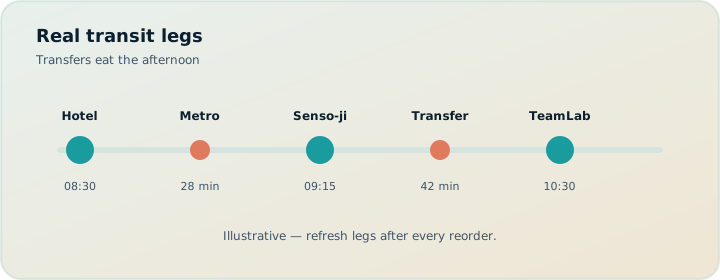
Why Japan itineraries fail without travel legs
Classic failure modes on Japan trips:
- Neighborhood blindness. Asakusa morning, Shibuya lunch, Odaiba afternoon looks fine as names and catastrophic as a chain.
- Station tax. “15 minutes by train” ignores walking to the correct exit, IC card taps, and platform changes with luggage or kids.
- Hours collisions. Museums closed Mondays; temples with last entry earlier than closing; teamLabs with timed slots.
- Pace denial. More than about ten active hours of stops plus travel is a warning for a reason — Japan days feel longer because navigation is cognitive work.
- Home base far from rails. A cute Airbnb two bus transfers from the useful line taxes every morning.
Maps apps answer point-to-point questions. They do not own your day database. Spreadsheets store times as text. Group chats store screenshots. TripPapa keeps stop order and travel segments in one place so a reorder refreshes the chain. Modes: transit, drive, walk, cycle. Transit steps and fare estimates appear when routing provides them; fallbacks are marked approximate.
In Japan, the itinerary is the transfers. Attractions are what happens between them.
Home base near a station is a planning decision
Under Trips, set destination, dates, party, and home base. For Tokyo, “near a Yamanote or useful hub” beats “near a quiet residential pocket” for first-time visitors who will do many day patterns. For Kyoto, proximity to Kyoto Station or a corridor with easy bus/subway access changes every leave time. Day Planner can anchor start/end legs from accommodation → first stop and last stop → back. That kills the spreadsheet lie where Day 1 begins inside the first temple as if you woke up there.
Party matters too. Two adults move differently than two adults plus a child plus grandparents. Party-aware pricing estimates attractions for who is actually going; ages also change how aggressive your day lengths should be. See party-aware pricing and planning for parents and seniors.
Research that survives contact with Japan
Use Search + Add for real places — shrines, museums, neighborhoods, markets — then open detail tabs:
- Overview / Photos / Reviews — separate lookalike temples and towers.
- Duration — override defaults; Fushimi Inari is not a 45-minute stop if you climb.
- Hours — fetch patterns; Day Planner warns on conflicts.
- Pricing — party estimates; verify official sites before buying timed tickets.
Tag candidates by neighborhood cluster (Asakusa, Shinjuku, Arashiyama, Uji) before you commit days. Map wishlist mode shows pins so you see clusters. Do not schedule a zigzag day because a blog listed “top ten” in random order.
Day Planner: transit legs, chained times, warnings
Drag stops onto days. Set leave time. TripPapa chains arrivals and departures and inserts travel legs. Refresh after reorders. Watch:
- Pace warnings when the day is overloaded.
- Hours warnings when arrival fights opening times.
Neither blocks you; both stop silent failure. AI auto-plan can draft assignments from unassigned wishlist items with party, hours, home base, rest, and durations in mind. Apply is atomic; Revert to pre-AI if the draft is a subway marathon. That is the right AI relationship for Japan: scaffold, then human-edit transfers.
Per-leg mode overrides help: walk within a dense core, transit between wards, rare drive for day trips where trains are awkward. Cycle when shared bikes are the real plan — not as a fantasy glue across Tokyo wards.
| Japan day pattern | Default mode | Watch for |
|---|---|---|
| Single-neighborhood deep dive | Walk + short transit | Underestimating temple durations |
| Cross-town highlights | Transit | Transfer tax, pace warnings |
| Kyoto west (Arashiyama) | Transit | Half-day minimum; don’t stack east after |
| Day trip (Nikko / Nara / Hakone) | Transit (or drive) | Last train reality; thin evening plans |
Month View for weather, rest, and closed Mondays
Japan trips are famous for packing. Month View shows whether the week is balanced. Drag unassigned items onto days, reorder, or swap entire days when Tuesday’s outdoor cluster and Friday’s museum cluster should trade for rain. Edits stay draft until Discard or Save & process — which commits order and recomputes travel for Day Planner. That matters in Japan: a bird’s-eye swap without recomputing legs leaves stale transfer times behind.
Shoulder-season and rainy-season planning uses the same muscle: shoulder season trip planning.
Map modes: cluster first, route second
Wishlist mode — see all pins; notice that your “one day” spans three distant clusters. Day mode — numbered route for one day; catch the star-pattern itinerary before you live it. Drop a pin to add a place you spotted spatially. Map is not a separate product; pins match Research, routes match Day Planner.
Scenario: four days Kyoto with transit defaults
Party: two adults, child age 8. Home base near Kyoto Station. Research: Fushimi Inari, Kiyomizu-dera, Arashiyama, Nishiki, a quieter temple, one museum with Monday closure risk.
Day 1: Fushimi early (leave 08:00), lunch, east-side temple cluster — Map confirms geography. Day 2: Arashiyama as a dedicated west day — do not append a far-east stop after. Day 3: downtown market + optional museum; hours check. Day 4: lighter; appendix holds overflow. Month View swaps an outdoor block for a forecasted rain day; Save & process. Export PDF for grandparents; share link for partner. Pricing estimates checked; tickets verified on official sites for any timed entry.
Scenario: Tokyo highlights without the death march
Five nights, first visit. Temptation: Asakusa, teamLab, Shibuya, Harajuku, Shinjuku, Akihabara, Tokyo Tower, a day trip to Kamakura — all “must.” Reality: pick clusters. TripPapa wishlist holds everything; Day Planner only accepts what fits with transit legs and pace. Kamakura becomes its own day with an honest end-of-day return leg to home base. AI auto-plan drafts a spread; you Revert and manually protect one recovery evening. Pace warnings on the “everything downtown” draft are a gift — believe them.
Export and share for Japan logistics
Japan mornings start early. A PDF with leave times and transit legs beats a chat thread. Use Export’s Print / Save as PDF flow; page breaks per day. Pair with view-only share for phone users. Details: print PDF for families, offline PDF itinerary guide, view-only share.
Cloud Save + magic-link auth help when you switch devices mid-trip planning. Local-first autosave still protects the browser tab. TripPapa does not replace IC card apps, Google Maps turn-by-turn, or station wayfinding — it keeps the day plan coherent so those tools have a sane sequence to follow.
What not to expect
TripPapa will not sell JR Pass products, book shinkansen seats, or alert you that your flight is delayed. After you book transport, an organizer like TripIt (Pro commonly $49/year; verify) can hold confirmations. Wanderlog (Pro $39.99/year; verify) is another planning option with different collaboration strengths. Google Travel remains a free booking/destination dashboard. For city feasibility with party, hours, legs, and PDF handoff, TripPapa’s loop is the point — compare vs Wanderlog, vs TripIt, road trip vs city trip planners.
FAQ
Should every Japan leg be transit mode?
Default transit for inter-neighborhood hops; walk inside dense areas; override per leg when needed.
How do I plan a shinkansen day?
Treat long rail as a travel reality around stops — keep Day Planner honest about arrive/leave windows; book seats on official channels.
Can TripPapa optimize a JR Pass?
No pass optimizer. Use party and day structure to decide whether a pass even fits your pattern; verify official pass rules.
What about luggage forward (takkyubin)?
Note it in day notes; the planner won’t ship bags. Lighter same-day movement improves walk/transit accuracy.
How do timed entries fit?
Put the timed stop on the day with correct duration; let chained times show whether the prior leg arrives early enough; verify tickets officially.
Is AI auto-plan safe for Japan?
Use as a draft only. Revert freely. Always re-check transfers and hours.
Do fare estimates include IC discounts?
When routing provides fares, treat them as approximate. City passes and IC quirks need local verification.
Pass pricing for TripPapa?
$35 for 6 months — confirm in-app.
Japan planning checklist
- Pick home base for rail access, not only aesthetics.
- Build wishlist with neighborhood tags; Map clusters first.
- Schedule one neighborhood-deep day before one cross-town day.
- Refresh transit legs after every reorder.
- Respect pace and hours warnings — especially Mondays.
- Use Month View to swap rain/outdoor days; Save & process.
- Verify paid timed entries on official sites after the day is feasible.
- Export PDF + share link for the group.
- Optional Cloud Save before you fly.
If you are still collecting ideas without booking, keep going with wishlist before you book. When you are ready to commit money vs keep planning, read when to book vs when to plan.
IC cards, day passes, and what the planner should not pretend to know
Japan’s local transport products — IC cards, city subway passes, limited express surcharges, airport express tickets — change by region and traveler type. TripPapa may show fare estimates on transit legs when routing provides them, but those estimates are not a pass optimizer and not a substitute for official fare charts. Use them to compare “this hop is cheap vs annoying,” then decide pass strategy on operator sites. A planner that pretended to sell you the perfect JR product would be lying more helpfully — which is worse.
Practical approach: plan days in TripPapa with transit mode defaults and honest leave times; note in day notes whether you expect to use IC taps vs a tourist pass; verify the pass against your actual hop pattern after Month View stabilizes. If your pattern is mostly one neighborhood per day, an unlimited city pass might be wasted. If you zigzag wards because the wishlist won, fix the zigzag first — a pass does not heal bad geography.
Luggage, hotels, and the morning leave-time lie
Checkout mornings are where Japan plans go to die. If Day Planner assumes you leave home base at 09:00 for a temple across town while you still have two suitcases and a 11:00 luggage drop appointment, the chain is fiction. Put luggage logistics in day notes. Shorten the morning attraction list on checkout days. Use Map day mode to keep the morning cluster near the hotel or station. Export the checkout day as its own highlighted PDF page so grandparents are not surprised by an early leave that conflicts with elevator queues.
Hotel proximity to stations is not snobbery — it is schedule integrity. A “quieter” property with a long bus ride attaches a tax to every day. If you knowingly choose that trade for sleep quality, lower your daily stop count and believe pace warnings earlier.
Food streets, markets, and duration honesty
Nishiki-style markets and night alleys break duration defaults. “One hour” becomes three when every stall is a photo and a snack. Set Duration deliberately on market stops. Place them where chained times still leave margin for the next timed entry. Hours warnings matter for markets with early closes. Party Pricing may be irrelevant for free-entry markets, but food spend still hits the family envelope — track that in your ledger, not as fake attraction tickets.
AI auto-plan will not know your snacking personality. Revert drafts that treat a market like a museum with a neat rectangular duration. Japan days feel better when one block is intentionally unstructured — and still anchored with a leave time and a way home.
Evening plans and last-train reality
Last-train constraints are real even if TripPapa is not a timetable app. Keep evening stops close to home base after ambitious days. If you schedule a far evening activity, make the travel leg visible and end the day early enough that approximate legs do not strand you. Refresh travel after dinner-location reorders. When in doubt, move the ambitious evening to the appendix and protect sleep — especially with kids or seniors. Multi-gen PDF handoff should show an end-of-day intent, not an open-ended list that invites “one more stop” debates on the platform.
Shrine etiquette time is still time on the clock
Guidebooks mention etiquette; planners forget duration. Purification stops, waiting for quiet moments, and one-way path flows on famous shrines add minutes that Maps understates. Increase Duration on major shrine/temple stops when traveling with mixed ages. Chained arrivals then tell you whether the next café reservation is fantasy. Hours warnings still apply where closing or last-entry rules exist. Export those durations so grandparents are not rushed by an invisible assumption in your head.
Same logic for team-lab-style venues and observatories with security lines. If you bought a timed entry after feasibility, put the ticket time into notes and protect the prior travel leg with margin. Feasibility before purchase remains the rule — wishlist before you book.
Rain, humidity, and Month View without drama
Japan itineraries meet weather often enough that Month View should be part of your default skill set, not an emergency skill. Keep at least one indoor-leaning day available to swap. Save & process after the swap so transit legs match the new order. Re-export the PDF if parents are already holding paper. Treat humidity like terrain: it slows walking and shortens patience, which means pace warnings arrive earlier for families than solo speedrunners expect.
Common Japan planning mistakes
- Top-ten scavenger days. Names across three wards without transit legs. Fix with Map clusters and refreshed transit chains.
- Cute hotel, painful every morning. Home base far from useful rail taxes the whole trip — set home base honestly under Trips.
- JR Pass optimism before day shapes exist. Passes do not heal zigzags; plan hops first, then verify official pass rules.
- Ignoring Monday closures. Hours warnings are not optional flavor text.
- AI subway marathon. Auto-plan + Revert; human protects recovery evenings.
- Chat as the morning briefing. Export PDF leave times for multi-gen groups — parents and seniors.
| Pattern | Do | Don’t |
|---|---|---|
| First Tokyo visit | One cluster per day + transit | Asakusa + Shibuya + Odaiba same day |
| Kyoto west day | Arashiyama as dedicated block | Append far-east temple after |
| Rain day | Month View swap + Save & process | Cosmetic calendar move without recompute |
| Checkout morning | Short list near hotel/station | Assume 09:00 cross-town with luggage |
| Timed teamLab-style entry | Feasible prior leg first | Buy slot before chain exists |
Step-by-step: Osaka day with transit honesty
- Set home base near a hub that matches your actual lodging.
- Search + Add four places from at most two clusters (e.g. Dotonbori/Namba core + one castle/park block).
- Fetch Hours and Duration; open Pricing if party tickets apply.
- Schedule with transit between clusters, walk inside the core; set a sober leave time.
- Refresh legs; fix hours/pace warnings.
- Map day mode — if the route stars, cut a stop to the appendix.
- Optional AI auto-plan for leftovers; Revert if it adds a third ward.
- Export PDF; share view-only; book timed entries only after the chain works.
Same discipline scales to multi-city Japan: prove each city day before you buy intercity times that fight museum hours — when to book vs plan, wishlist before you book. Stack: Google Travel free for booking folders; TripIt after confirmations (Pro $49/year commonly for alerts; verify); Wanderlog only if you need live collab (Pro $39.99/year; verify). TripPapa Pass $35/6 months — confirm in-app. Cloud Save and magic link for the editor; PDF for everyone else.
Build one honest Tokyo day
Create a trip, set home base near a major station, add four places from two neighborhoods only, schedule with transit legs, open Map day mode, and Export a one-page PDF. If the chain looks ugly, fix it now — Japan will not flatten itself for your wishlist.
Ready when you are: open TripPapa and plan one transit-honest day before you add a tenth pin.