Not every trip is the same shape. A California highway week is a chain of roadside stops, fuel math, and scenic pullouts. A Lisbon long weekend is timed entries, metro transfers, and walking hills with a stroller. Using a road-trip app for a transit city — or a city feasibility planner for a 2,000-mile drive — creates the wrong kind of “smart” itinerary.
This article compares strengths honestly: Roadtrippers for road-shaped trips, Wanderlog as a popular general planner with collaboration, and TripPapa for city feasibility — party-aware pricing, Search + Add research, Day Planner travel legs (transit/drive/walk/cycle), pace and hours warnings, AI auto-plan with Revert, Month View Save & process, Map modes, PDF export, view-only share, Cloud Save, magic-link auth. Pass $35/6 months. Not booking, not flight alerts, not live multi-edit, not a Discovery quiz.
Prices to verify at purchase time: Wanderlog Pro $39.99/year; Roadtrippers Pro commonly ~$49.99/year (Basic/Premium tiers also exist); TripIt Pro commonly $49/year if you need post-booking alerts; Google Travel free as a dashboard. Spreadsheets + Maps remain common. Product loop context: How TripPapa Works.
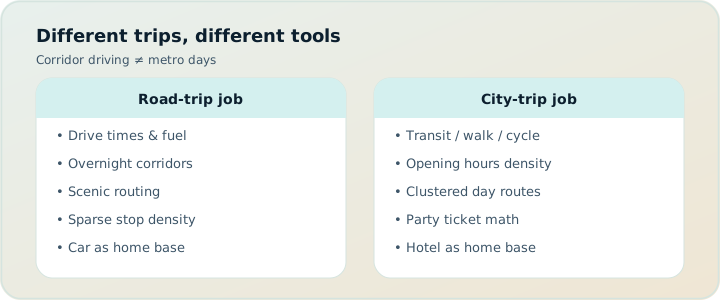
Two trip geometries
Road-trip geometry optimizes a corridor: ordered stops along driving routes, points of interest near the highway, camping or hotel nights as waypoints, offline maps for dead zones, sometimes RV constraints. Success looks like “we didn’t backtrack 90 minutes for a diner we already passed.”
City-trip geometry optimizes a graph: clusters of pins, transit transfers, opening hours, visit durations, party ticket totals, leave times from a home base. Success looks like “Tuesday was feasible for our family, not just pretty on a map.”
Tools specialize. Borrowing the wrong specialty is how you get a city day that assumes car speeds between metro stations — or a road week that cannot express a temple’s last-entry rule.
| Need | Road-forward tools | City-feasibility (TripPapa) |
|---|---|---|
| Corridor routing / roadside POIs | Strong (e.g. Roadtrippers) | Not the primary design |
| Transit legs + chained day times | Limited / not the focus | Core Day Planner job |
| Party-aware attraction estimates | Varies / often manual | Pricing tabs + party roster |
| Hours + pace warnings | Often manual | Built into Day Planner |
| PDF / view-only handoff | Varies by product | Export + /share links |
| Live multiplayer editing | Some planners yes | No — view-only share |
Roadtrippers: where it shines
Roadtrippers is built around driving trips: plotting routes, discovering stops along the way, and membership tiers that raise stop limits (Pro commonly listed around $49.99/year; Basic and Premium tiers also appear in store listings — verify current pricing and stop caps). If your vacation is “drive the coast and see what is near the route,” that product language matches the job.
Strengths travelers cite:
- Road-trip mental model (stops along a drive, not only a city wishlist).
- Discovery of roadside attractions and trip-shaped browsing.
- Membership features aimed at longer driving itineraries (offline-oriented needs depending on tier — confirm in-product).
Limits for city feasibility:
- Transit-heavy days are not the native object.
- Party ticket math and museum hours warnings are not TripPapa’s specialty set.
- Multi-gen PDF handoff from a research→day→travel loop is a different product bet.
Use Roadtrippers when the car is the protagonist. Use a city planner when the metro is.
Wanderlog: strong generalist planning
Wanderlog is a widely used trip planner with a generous free tier and Pro $39.99/year (verify). It earns praise for itinerary + map views, collaboration, and practical planning features. For many travelers it is the default “put the trip somewhere.”
Compared with TripPapa’s deliberate stance:
- Collaboration: Wanderlog emphasizes live collaboration; TripPapa share links are view-only so the trip lead keeps a single editorial source of truth.
- Offline: Wanderlog Pro marketing often includes offline access; TripPapa’s offline handoff bet is Print/Save PDF (plus whatever the browser caches), not a native offline app package.
- Feasibility emphasis: TripPapa centers party-aware pricing, travel legs with mode, pace/hours warnings, Month View Save & process, AI auto-plan with Revert.
- Booking: neither should be confused with a full OTA; TripPapa explicitly does not book.
Deeper comparison: TripPapa vs Wanderlog and the broader roundup Wanderlog, TripIt, Notion.
TripPapa: city feasibility as the product
TripPapa assumes you are building days that can fail silently without structure. The loop:
- Trips — dates, party, home base, default mode.
- Research — Search + Add; detail tabs (Overview, Photos, Reviews, Duration, Hours, Pricing).
- Day Planner — order, durations, travel legs, pace/hours warnings; optional AI auto-plan + Revert.
- Month View — balance and day swaps; Save & process recomputes travel.
- Map — wishlist pins vs day route.
- Export / Share — PDF via browser print; view-only links.
Drive mode exists for day trips and car-shaped hops inside a mostly urban trip. That is not the same as a national road-trip product. If you need RV routing and roadside trip length caps, Roadtrippers is the clearer fit. If you need Kyoto transit honesty and family ticket estimates, TripPapa is the clearer fit.
Pick the tool that matches the geometry of the trip — corridor vs city graph — not the tool with the prettiest screenshots.
Scenario: Pacific Coast Highway vs Barcelona
PCH week: Roadtrippers (or Maps + a stops list) for corridor order, fuel and lodging nights as waypoints, scenic pullouts. TripPapa is optional if you also spend three nights in a city and want museum days with hours and party pricing — you can keep tools split by phase.
Barcelona long weekend: TripPapa home base near a metro, Search + Add Sagrada / Gothic / beach / Park Güell, Day Planner transit/walk legs, Map day mode to avoid star-pattern routing, Month View if rain swaps outdoor blocks, Export PDF for parents. Roadtrippers adds little for metro days.
Scenario: mixed trip — fly in, city, then rent a car
A common hybrid: three nights Tokyo (transit), then a Hokkaido drive. Honest stack: TripPapa for Tokyo feasibility and PDF handoff; Roadtrippers or Maps for the drive segment; TripIt after bookings for confirmations and (with Pro) flight alerts. Do not force one app to pretend it is best at both geometries. Cloud Save your Tokyo plan; keep the drive plan where corridor tools shine.
When spreadsheets still appear
Road or city, some people keep Sheets for budgets and packing. That is fine for actuals. Sheets fail when they try to be Day Planner: stale walk times, no hours warnings, no Save & process after a calendar swap. See Excel spreadsheet trip planning and why TripPapa beats spreadsheets.
Buyer checklist: road vs city planner
- Is the primary move driving a corridor or navigating a city graph?
- Do you need transit steps and chained leave times?
- Is party ticket math material (kids, seniors)?
- Do opening hours kill days if wrong?
- Do you need PDF for offline relatives?
- Do you want live multi-edit or a single editor + view-only?
- After booking, do you need flight alerts (TripIt Pro territory)?
- What is the annual or Pass cost vs how many trips you take?
For a broader 2026 criteria list, see what makes a good trip planner in 2026.
Pricing snapshot (verify before you buy)
| Product | Common price signal | Primary job |
|---|---|---|
| TripPapa Pass | $35 / 6 months | City feasibility planner |
| Wanderlog Pro | $39.99/year | General planning + collab |
| Roadtrippers Pro | ~$49.99 / year | Road-trip planning tiers |
| TripIt Pro | $49 / year | Post-booking organizer + alerts |
| Google Travel | Free | Bookings / destinations dashboard |
App stores show regional variants and promotions. Always confirm in-product.
FAQ
Can TripPapa plan a pure road trip?
You can use drive-mode legs and days, but corridor roadside discovery is not the core design. Prefer road-specialized tools for long highway itineraries.
Can Roadtrippers replace TripPapa in Tokyo?
You can list stops anywhere, but transit chaining, hours warnings, and party pricing are TripPapa’s emphasis.
Is Wanderlog “worse”?
No — different bets. Choose based on collaboration style and feasibility features you need.
Does TripPapa have live collaboration?
No. View-only share. One editor.
Does TripPapa book hotels along a route?
No booking engine. Plan places and days; book elsewhere.
What about Google Maps alone?
Excellent navigation; weak durable day database with party/hours/export structure.
Should I subscribe to all of them?
Usually no. Match one planner to trip geometry; add TripIt after you book if alerts matter.
Practical recommendation
If this year’s big trip is road-shaped, start with Roadtrippers (verify tiers). If it is city-shaped with a family party and museums, start with TripPapa. If your group demands simultaneous editing, evaluate Wanderlog’s collab model and decide whether view-only discipline is a cost or a feature. Keep Google Travel free for booking dashboards. Keep spreadsheets for money actuals if you love them.
Related reading: Japan transit planning, travel times, TripPapa vs TripIt.
How to evaluate tools in a single evening
Pick your next real trip — not a hypothetical. Write one sentence: “This trip’s protagonist is the car / the metro / both in phases.” Then score three must-have failure modes you hit last time (backtracking on the highway, closed museum, party price shock, chat screenshot chaos, no offline packet). Match tools only to those failure modes. If your sentence says metro and your failure modes are hours and family handoff, Roadtrippers Pro at roughly $49.99/year is the wrong spend even if the app is excellent at roads. If your sentence says car corridor and your failure mode is missing roadside stops, TripPapa’s city loop will feel like overhead.
Install or open at most two planners for a bakeoff. Recreate the same four stops in each. In TripPapa, force yourself through travel legs, a Map day-mode check, and an Export PDF. In Roadtrippers, force a route-shaped sequence and membership-limit reality check. In Wanderlog, test whether live collaboration helps or harms your group. Pay only after the bakeoff — Wanderlog Pro $39.99/year, TripPapa Pass $35/6 months, Roadtrippers tiers as listed — and verify current store pricing because promotions and regional SKUs vary.
Hybrid itineraries without tool guilt
Many annual vacations are hybrids: fly into a city, spend four transit days, then rent a car for a loop. Tool guilt — “I should do everything in one app” — creates bad data models. Prefer phase-based stacks. City phase lives in TripPapa with home base, party, hours, PDF for parents. Road phase lives in a road-forward tool or careful Maps lists. Shared constants (dates, party size, budget envelope) can sit in a one-page Sheet. TripIt collects bookings across both phases. Nobody wins a prize for monopod software purity.
When phases meet — pickup day at the rental counter — schedule a light TripPapa day with buffers and a clear PDF. Do not plan a museum masterwork on the afternoon you also learn a new car in a new country. Pace warnings are trying to help.
Collaboration politics on the road vs in the city
Road trips often have one driver and one navigator — natural single-editor dynamics. City trips with friend groups often produce five editors and zero drivers of consensus. TripPapa’s view-only share matches the driver/navigator pattern and the family pattern. Wanderlog’s live collab matches peer groups who insist on simultaneous editing. Neither is morally superior. Misalignment is what hurts: five people editing a Kyoto transit day usually yields a star-pattern route and a deleted lunch.
Set roles explicitly before choosing software. If you cannot agree on roles, software will not save you. If you can agree that one person owns feasibility, TripPapa + PDF + view-only is enough regardless of how many strong opinions exist in the chat.
Offline needs differ by geometry
Highway dead zones make offline map packages and downloaded road itineraries valuable — a reason people pay for road-trip memberships. City trips often have underground connectivity gaps instead: metro tunnels, museum basements. PDF day pages address that city failure mode without requiring a native offline planner app. Do not buy the wrong offline bet. Ask “where does signal die on this vacation?” and pick the artifact that still works there.
Maps is not neutral in this comparison
Google Maps (and siblings) sit under almost every stack. That ubiquity tricks people into thinking Maps is already a planner. It is a navigator and local search surface. It does not own party-aware pricing, Month View Save & process, Export PDF structure, or view-only trip sharing of a researched wishlist. Roadtrippers layers road-trip semantics on geographic exploration. Wanderlog layers itinerary collaboration. TripPapa layers city feasibility objects. Maps remains for turn-by-turn after the day exists.
If your current “planner” is a saved Maps list plus a chat thread, you are in the common baseline — and you are exposed to every silent failure mode this article describes. Moving to any real planner is progress; moving to the planner that matches trip geometry is competence. Price-check before stacking Pros: Wanderlog $39.99/year, Roadtrippers Pro ~$49.99/year, TripPapa Pass $35/6 months, TripIt Pro $49/year if you also need alerts, Google Travel free.
One more bakeoff drill: take a single city day you already lived and reconstruct it from memory in TripPapa with real legs. If the reconstruction shows why you were late to dinner, you have felt the product. Then reconstruct a highway day you already lived in a road tool. Whichever reconstruction teaches you more about your next trip wins your next subscription dollar.
Stop counts, membership tiers, and honesty
Roadtrippers memberships often gate how many stops you can build — Basic, Pro, Premium style tiers with annual prices commonly seen around $35.99 / $49.99 / $59.99 in store listings (verify current). That metering matches corridor trip scope. TripPapa’s Pass ($35/6 months) meters product access differently; it is not a stop-cap road membership. Wanderlog’s Pro ($39.99/year) meters a different bundle again (often offline/AI-related per their marketing). Comparing sticker prices without comparing metered jobs is how people feel overcharged by every tool. Match meters to geometry first, then compare dollars.
If a free tier already solves your corridor or city need for a single trip, use it. Paid tiers should buy relief from a failure mode you actually hit — not anxiety about leaving value on the table.
Bottom line: geometry first, subscription second. A city week with museums and a family party should not inherit a road-trip membership by default, and a Pacific Coast drive should not inherit a transit-feasibility workflow by guilt. Keep Maps for navigation, keep TripIt for post-booking ops if needed, and put the planner dollars where your failure modes actually live.
Common geometry mistakes
- Forcing Kyoto into a road-trip product. Transit chaining, hours, and party ticket math will feel bolted on.
- Forcing PCH into a city feasibility planner. Roadside discovery and corridor order are not TripPapa’s primary design.
- One subscription for a hybrid year. Pay for phases: city Pass window + road membership year if both shapes are real.
- Choosing collab software before agreeing on an editor. Live multi-edit on a transit day often deletes lunch.
- Buying offline road packages for metro basements. City offline failure mode is often PDF pages, not highway map packs.
- Letting Google Travel decide geometry. Free dashboards book well; they do not replace Day Planner legs.
| Trip sentence | Primary planner bet | Secondary tools |
|---|---|---|
| “We drive the coast and stop when it looks good.” | Roadtrippers (verify tiers) | Maps nav; TripIt after booking |
| “We base in one city and ride transit.” | TripPapa | Google Travel free; PDF handoff |
| “Friends all edit the map at once.” | Wanderlog-style collab | Or appoint one TripPapa editor |
| “City four nights, then a car loop.” | Split by phase | TripPapa → road tool; TripIt inbox |
Step-by-step: geometry decision in 20 minutes
- Write the protagonist sentence: car, metro, or phased both.
- List top ten stops; sort by highway sequence vs neighborhood clusters.
- If highway sequence wins, open a road-forward tool and test four stops on a route.
- If clusters win, open TripPapa: party, home base, Search + Add, one day with transit/walk/drive legs, Map day mode, Export PDF.
- If phased both, do not merge databases — plan phases separately.
- Check collab needs: view-only vs live edit; do not assume.
- Price only the winner: TripPapa Pass $35/6 months, Wanderlog Pro $39.99/year, Roadtrippers Pro ~$49.99/year, TripIt Pro $49/year if alerts matter — verify all.
- Book only after the winning tool proves a day or a corridor segment.
Feasibility before carts still applies in cities: wishlist before you book, when to book vs plan. Buyer checklist depth: good trip planner 2026. Japan as the transit stress case: Japan transit planning.
Try the geometry test on your next itinerary
List your top ten stops. If ordering them is mostly about highway sequence, use a road tool. If ordering them is mostly about neighborhoods, hours, and transfers, open TripPapa and build one day with travel legs before you buy another annual subscription.