A beautiful list of places is not a schedule. The hidden variable is movement. Travelers plan museum → lunch → viewpoint as if the city will politely teleport them between pins. Then the sidewalk collects its tax: stairs, transfers, heat, strollers, wrong metro exits, and the optimistic “it’s only a 15-minute walk” that was measured by a person without luggage or children.
TripPapa’s Day Planner treats travel as a first-class object. Stops get durations. Arrivals and departures chain. Between stops, you get travel legs for transit, drive, walk, or cycle — with duration and distance — plus journey context and a way to refresh when the order changes. If your planner can’t speak “22 minutes by metro,” it’s a wishlist with dates, not a day plan.
This piece is about why optimistic walking kills itineraries, how TripPapa models modes and chained times, what the journey map is for, and when to refresh after edits. For the wider product loop, start with how TripPapa works. For reshuffling whole days without wrecking legs, see Month View.
Optimistic walking is a silent itinerary killer
Maps apps are excellent at point-to-point answers and terrible as a durable day database. You check A→B, feel reassured, then reorder B and C in a Notes app and never re-check. Classic failure modes:
- As-the-crow-flies brain. Two pins look close. The walk includes a hill, a river bridge, or a station labyrinth.
- Adult pace assumption. Your phone’s walk time assumes a brisk solo adult, not a family negotiating snacks.
- Transfer blindness. “25 minutes transit” might be 12 + wait + 8 + walk to the entrance.
- Context switch loss. The travel time lived in another tab. The day list didn’t update when you dragged stops around.
- Lunch fiction. You scheduled arrival at 12:05 for a 12:00 booking because the walk “should be fine.”
Tab chaos makes this worse. In 2026 you can still lose an evening to Maps screenshots pasted into a chat that nobody trusts. The fix isn’t “research less.” It’s keeping travel legs inside the same system that owns stop order. That’s what Day Planner is for — and why the tab chaos problem keeps producing pretty plans that fail before dinner.
If reordering stops doesn’t recompute how you move, you don’t have a planner. You have a labeled wishlist.
How TripPapa models movement
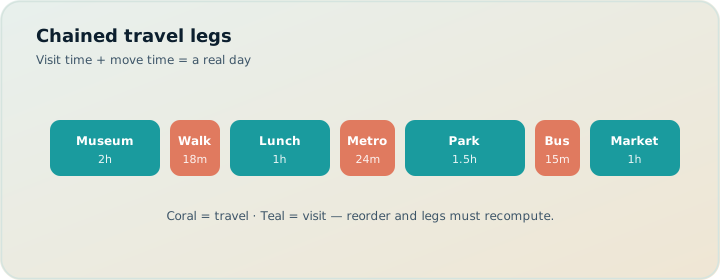
In Day Planner, each stop has a planned duration. The day has a start time (from trip defaults or your edits). TripPapa chains arrival and departure times down the list: you leave stop one, travel, arrive at stop two, stay for the duration, leave again. Between consecutive stops, it inserts a segment — a travel leg with a mode, estimated duration, and distance.
Modes you can plan with:
- Transit — often the default for city trips; steps and fare estimates appear when routing provides them
- Drive — useful for day trips, suburbs, or places where transit is awkward
- Walk — honest for dense cores; dangerous when used as a fantasy glue between far pins
- Cycle — when bikes or shared cycles are the real plan, not a vibe
Trip defaults set a preferred mode so you’re not clicking the same choice twenty times. Per-leg overrides exist when one hop is obviously a walk and the next is a metro. Fallback legs are marked when the number is approximate — so you don’t treat a guess like a guarantee.
Home base as start and end anchor
Set a home base (hotel or Airbnb) on the trip and days can resolve start/end legs from accommodation → first stop and last stop → back. That alone kills a common spreadsheet lie: itineraries that begin at the first attraction as if you woke up inside it. Real days have a commute.
Chained times: why order is math, not aesthetics
People reorder stops for “flow” and forget that flow has a clock. Chained arrivals make the cost of a bad order visible:
- Day starts at 09:00 at home base.
- Transit 28 minutes → arrive museum 09:28, stay 120 minutes → depart 11:28.
- Walk 18 minutes → arrive market 11:46, stay 75 minutes → depart 13:01.
- Transit 35 minutes → arrive viewpoint 13:36… and suddenly the “golden hour” plan is a mid-afternoon plan.
Without chaining, that day still looks like three nice pins. With chaining, you see the viewpoint arrival and decide to swap order, cut a duration, or change mode. Pace warnings fire when stops plus travel push past a heavy active-hours threshold (on the order of ten hours). Hours warnings fire when a stop’s planned window fights opening times. Neither blocks you; both stop the silent failure. More on warnings: opening hours and pace.
| Without travel legs | With TripPapa legs |
|---|---|
| Ordered list of names | Ordered stops + timed segments |
| Walk times live in Maps tabs | Mode/duration/distance sit between stops |
| Reorder = hope | Reorder → refresh → new chain |
| Overstuffed days look ambitious | Pace warnings look honest |
Journey map: see the day as a path, not a pile
Per-day journey maps show start → stops → end. That’s the visual twin of the list. Use it when the list looks efficient but the path looks like a star: across town, back, across town again. Wishlist map mode is for geographic clustering before you commit; day mode is for validating one day’s route after you commit.
Drop-pin on the broader Map view still helps when you discover a place spatially. But the journey map’s job is narrower and meaner: tell you whether today’s order is a route or a scavenger hunt.
Worked example: Tokyo day that almost failed
Family of four near Shinjuku. Wishlist: Meiji Jingu, Shibuya scramble wander, teamLab-style timed experience, and a ramen stop “nearby.” In Notes you ordered by Instagram energy. In Day Planner with transit defaults, the chain exposes the problem: the timed experience after a west-to-east zigzag leaves no buffer, and a walk leg marked approximate is really a fantasy hop.
You put the timed experience first after a short home-base transit, shorten the scramble wander duration, move ramen next to Shibuya, and leave Meiji for a lighter morning later in the week via Month View + Save & process. Map day mode finally shows a coherent arc instead of a star. Same four pins. Completely different day. The difference was never “research.” It was movement math living next to the list.
Party-aware Pricing on the timed experience (see family pricing) happens in Research; travel legs decide whether that expensive slot is reachable without sprinting kids through a transfer.
Refresh travel when reality changes
Legs go stale when you:
- Reorder stops
- Change a mode on one hop
- Move a stop from one day to another
- Reshape the trip in Month View
Day Planner lets you refresh travel so segments match the current order. After big bird’s-eye edits, Month View’s Save & process recomputes legs so Day Planner doesn’t inherit yesterday’s metro times for today’s sequence. Skipping refresh is how people “fix” a plan that still believes stop two is next to stop one when you’ve already swapped them.
Practical rule: if you changed order, refresh before you trust arrival times. If you changed the whole week’s structure, Save & process, then spot-check the heavy days in Day Planner.
Stale travel times are worse than no travel times — they create false confidence.
AI auto-plan and travel: draft, then verify on the ground graph
AI auto-plan can assign unassigned wishlist items across days with party, hours, home base, rest, and typical durations in mind. That’s useful scaffolding. It is not a substitute for reading the legs. Apply the plan, scan travel segments on the densest days, refresh if you tweak order, and use Revert to pre-AI if the draft is geographically drunk. AI proposes; the travel graph disposes.
How-to: build one trustworthy day
- Set trip defaults: day start time, preferred mode, home base.
- Drag 3–5 stops onto one day (not 12).
- Set realistic durations — crowd-heavy places need more than the brochure.
- Confirm travel legs; switch modes where walk is fantasy.
- Read the chained arrivals; fix the first conflict you see.
- Check pace and hours warnings.
- Open day journey / map mode; kill any star-pattern routing.
- Refresh travel after the last reorder.
- Only then duplicate the pattern to other days.
One solid day teaches the system. Ten fantasy days teach you nothing except how to ignore warnings.
Comparisons: what other tools quietly skip
Spreadsheets / Notion. Rows don’t compute metro legs when you drag a row up. You can type “20 min,” and then never update it. See why purpose-built planners beat sheets.
Chatbots. They’ll invent a charming day and round every transfer to a neat 15 minutes. Charming is not chained.
Map-first collab apps. Pins are necessary and not sufficient. A map without durable per-leg modes inside the day list still pushes you back into tab-checking. Wanderlog-style live collab (Pro $39.99/year — verify) wins when everyone edits pins together; TripPapa wins when chained legs and warnings are the deliverable.
Booking organizers. Great after you buy flights and hotels. TripIt Pro (commonly $49/year — verify) does alerts; it doesn’t design the sidewalk hours between attractions.
Export and share the times, not just the names
When you Print/Save PDF or send a view-only share link, co-travellers inherit a day that includes movement context — not a mysterious list of proper nouns. That’s how you stop arguing in the hotel lobby about whether “we have time for one more.” The plan already showed the leg. See PDF export and view-only share.
Common mistakes
- Leaving every hop on Walk. Walk is a mode, not a personality.
- Never refreshing after reorder. Confident wrong arrivals.
- Ignoring approximate/fallback flags. Treat them as buffers, not gospel.
- Skipping home base. Days pretend you spawn at stop one.
- Building twelve-stop days. Pace warnings exist because ambition lies.
- Trusting AI auto-plan without reading legs. Always scan; Revert is free.
When you do not need travel legs
- One attraction day with lunch next door — mental math is enough.
- You’re only tracking booked flights/hotels, not sightseeing order.
- A pure road trip where you navigate live and never care about a precomputed chain — keep Maps for driving; TripPapa only if you still want a day document.
FAQ
Are travel times live departures?
No. They’re planning estimates. Add buffer; use your phone for live navigation on the day.
Which modes does Day Planner support?
Transit, drive, walk, and cycle — with per-leg overrides from trip defaults.
What are fallback / approximate legs?
Marked segments when routing can’t give a full answer. Useful, not guaranteed.
Do I refresh after Month View edits?
Use Save & process in Month View, then spot-check heavy days and refresh if you micro-reorder further.
Can AI auto-plan set travel for me?
It drafts stop assignments with durations and context; you still verify legs, modes, and geography.
Do PDF and share include legs?
Yes — Export loads segments; share recipients browsing Day Planner see the structured day including travel context.
Will kids make all times wrong anyway?
Often. That’s an argument for fewer stops and more buffer — which honest legs encourage — not for hiding travel.
Does TripPapa replace Google Maps?
No. Keep Maps for live walking. Use TripPapa so planned order and travel stop living in separate brains.
Deeper how-to: buffers, modes, and family pace
Honest legs still need human buffers. Planning estimates are not live departures. After the chain looks clean, add slack where your party actually burns time: stroller folds, ticket QR fumbles, toilet stops, and the wrong metro exit. A useful rule: if a leg is marked approximate/fallback, treat the printed duration as a floor and protect the next timed entry with fifteen extra minutes. If every leg is “exact” on paper, still protect the first timed stop of the day — morning optimism is expensive.
Mode choice is where many days are won. Default transit for city cores. Override to walk only when the hop is truly short and flat. Use drive when luggage or suburbs make transit a punishment. Use cycle only when you will actually rent or unlock bikes — not because a blog called the city “bikeable.” Per-leg overrides exist so one day can mix modes without changing trip defaults twenty times.
Family-specific tactic: schedule the longest transit hop earlier, when patience is higher, and keep late-afternoon hops short. Chained arrivals make that visible; Notes lists do not. After any Month View Save & process, open the two densest days and refresh if you micro-reorder. Then Export or share so co-travellers inherit movement context, not just place names. That is how “do we have time for one more?” dies in the hotel lobby — the leg already answered.
AI auto-plan can place stops with durations in mind; it cannot feel your toddler’s nap window. After Apply, scan the longest travel segments first. If two long hops sandwich a short joy stop, reorder or Revert. The travel graph is the adult in the room; the model is the intern with a fast draft.
Cross-check geography in Map day mode every time the list “looks efficient.” Star patterns survive in text. They die on a numbered route. Wishlist map mode remains the earlier filter: cluster candidates before you commit them to a day that cannot absorb the distance.
Quick reference: refresh triggers
- Any stop reorder on a day → refresh travel before trusting arrivals.
- Any mode change on a hop → refresh that day’s segments.
- Any Month View Save & process → spot-check heavy days; refresh if you micro-edit further.
- Any home-base change → expect start/end legs to change; verify morning commute.
- Before Export / share publish → one last refresh on days you touched this session.
The point
Optimistic walking flatters the itinerary and punishes the traveler. TripPapa’s Day Planner makes movement visible: modes, chained times, journey context, refresh after change, warnings when ambition outruns the clock. Use AI for a draft if you want — then trust the legs.
Put three pins on a day and make the travel honest. Open TripPapa and watch what your “simple” morning does to lunch.
Related reading and next steps
If this article matched the pain you actually have, keep going with the adjacent guides rather than bouncing between unrelated listicles. For the full product loop — Trips, Research, Day Planner, Month View, Map, Export, and share — read how TripPapa works. For competitive framing without forced winners, use the 2026 planner roundup, TripPapa vs Wanderlog, and TripPapa vs TripIt. For the movement and handoff details that usually decide whether a plan survives Thursday, see travel times between stops, opening hours and pace warnings, Month View, view-only share, and printable PDF itineraries.
When you are ready to test the claim instead of reading about it, create one real trip with your real party, add five places, schedule a single day with travel legs, glance at Map day mode, then Print/Save PDF or create a view-only share link. That one loop teaches more than another hour of feature comparison. TripPapa Pass framing is USD $35 for 6 months when you want a planning window; local-first planning still lets you start without turning sign-in into a gate. Keep TripIt or Google Travel for bookings if you need them. Keep Wanderlog if your friends need live map editing. Hire TripPapa when the job is research into feasible days with party-aware estimates, transit/drive/walk/cycle legs, Month View balance, and a handoff artifact someone can actually follow.
Serious planning is not about collecting more apps. It is about giving each job a clear owner and refusing to pretend a booking dashboard, a chat scroll, or a pin board alone is a finished itinerary. Use this article as the decision filter for that job — then go build one honest day.