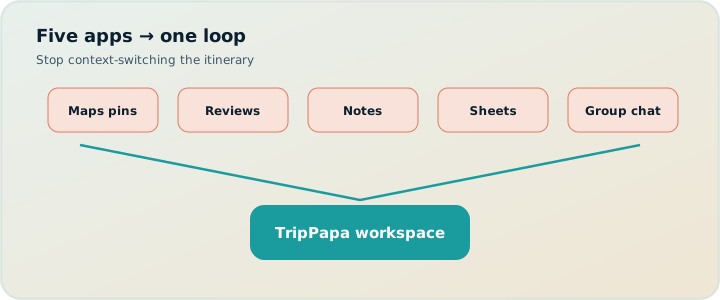
Here’s the default stack many people still use in 2026:
- Google Maps (pins and one-off route checks)
- A review site or three (plus blogs and social saves)
- Notes / Keep (the “real” list)
- Sheets or Notion (the schedule that never updates travel times)
- WhatsApp / iMessage (where “final” decisions go to die)
None of those tools are bad at their job. Together they’re a fragile Rube Goldberg machine for one itinerary. Expedia-era and Skift-covered research already showed booking alone can mean on the order of 141–277 page views before purchase. Activity planning multiplies the mess: every pin, review, and chat screenshot is another fragment that doesn’t know your day order, party ages, or whether the museum is open when you arrive.
This is a concrete before/after of consolidating research, days, routes, and handoff into TripPapa — real product surfaces only. No invented Discovery Yes/No screener. If you’re living in tab chaos, this is the consolidation map. Full product walkthrough: how TripPapa works.
What goes wrong in the five-app stack
Pins don’t know your day order. Notes don’t know travel time. Sheets don’t know opening hours. Chat never converges. You check A→B in Maps, feel smart, reorder B and C in Notes, and never re-check. You type “20 min walk” in a Sheet cell and treat it as law for a week. Partner drops three restaurants into the group thread; you screenshot a day; someone books a ticket for the wrong date because the Sheet and the chat disagreed.
Classic failure modes:
- Split brain. Geography in Maps, narrative in Notes, budget in Sheets, politics in chat.
- Stale movement math. Travel times live in another app and die when order changes.
- Party fiction. “From $20” tickets ignore two kids’ age bands.
- Hours blindness. Closed Mondays hide in a tab you closed Tuesday.
- Handoff theater. Screenshots and PDFs exported from nowhere coherent.
By 2025–2026, AI chatbots joined the stack for roughly 40%+ of travelers. They draft charming days fast — then you paste the draft into Notes and restart the five-app problem with prettier prose. See also AI trip planning in 2026.
You might still book on airline and hotel sites. You shouldn’t need five apps to decide lunch.
The TripPapa consolidation (feature for feature)
TripPapa is a browser planner with one stubborn loop: Trips → Research → Day Planner / Month View → Map → Export / Share. Optional Cloud Save and passwordless magic-link auth when you want backup or another device. Local-first autosave so a crashed tab doesn’t erase Kyoto. Pass framing: $35 / 6 months.
| Old stack job | TripPapa surface | What you gain |
|---|---|---|
| Maps pins + route checks | Map (wishlist / day) + travel legs | Pins and day order stay one dataset |
| Reviews / blogs / saves | Research detail tabs | Summaries, hours, duration, pricing on the place |
| Notes list | Wishlist + Day Planner stops | Candidates vs scheduled without two databases |
| Sheets / Notion columns | Day Planner + Month View | Chained times, warnings, Save & process |
| Chat handoff | View-only share + Print/PDF | One current plan, no edit wars |
Maps + reviews + notes → Research wishlist + detail tabs
Open Research. Use Search + Add (AI-assisted web search) or add a place manually. The wishlist is filterable and sortable by name, category, and tags. Select a place: Overview, Photos, Reviews, Duration, Hours, Pricing. Reviews get AI-assisted summaries so you skim signal. Duration gives a typical visit you can override. Hours feed conflict warnings later. Pricing estimates are party-aware for your actual adults and children — still verify on the official site before you pay. Deeper: party-aware pricing.
You’re not maintaining a Maps list and a Notes list that drift apart. The attraction record is the home for “what is this, is it worth it, how long, when open, what does it cost for us.”
Sheet columns → Day Planner + Month View
Day Planner turns wishlist items into ordered stops with durations. Arrival and departure times chain. Between stops, TripPapa inserts travel legs for transit, drive, walk, or cycle — duration, distance, and transit steps/fares when routing provides them. Fallback legs are marked when approximate. Pace warnings fire when stops plus travel push past a heavy active-hours threshold (around ten hours). Hours warnings fire when planned arrival fights opening times. Guides: travel times, hours & pace.
Month View is the bird’s-eye your Sheet never had: drag unassigned items onto days, move stops between days, swap entire days. Edits stay in draft until Discard or Save & process, which commits order and recomputes travel so Day Planner doesn’t keep yesterday’s metro times for today’s sequence. See Month View calendar.
AI auto-plan can draft assignments across days with party, hours, home base, rest, and typical durations in mind. Apply is atomic; Revert to pre-AI if the draft is geographically drunk. That’s scaffolding inside a planner — not a chat you can’t undo.
Cross-checking Maps routes → travel legs + Map day mode
The old habit: open Maps, check one hop, screenshot, forget. In TripPapa, legs live between stops. Reorder, then refresh travel. Map wishlist mode shows all pins for clustering; day mode shows the numbered route so an “efficient” list can’t hide a star pattern across town. Home base anchors start/end legs from the hotel so days don’t pretend you woke up inside the first museum.
Chat handoff → share link or PDF
Export uses Print / Save as PDF: trip cover (name, destination, dates, party, transport defaults), day-by-day stops, costs where fetched, unassigned appendix. Create a view-only share link (/share/…) so co-travellers browse Research, Day Planner, Month View, Map, and Export without editing. You keep control; they stop asking for screenshots. Revoke when the trip is over. See view-only share and PDF for families.
Where other “trip apps” still fit (honest stack)
Consolidation does not mean pretending TripPapa is every adjacent product:
- Wanderlog — hire for live map collab / multiplayer pin editing. Pro $39.99/year (offline packs, Pro AI assistant — not full-trip generation as TripPapa’s day loop; route optimization features vary). Verify current pricing on their site. Keep it if equal co-editing is the job; use TripPapa when party-aware research, chained legs, Month View Save & process, and PDF/view-only handoff are the job.
- TripIt — hire after booking. Pro commonly $49/year for flight alerts and traveler tools — verify. Complements TripPapa; does not replace Day Planner.
- Google Travel / Maps — free dashboard and live navigation. Keep for walking directions and booking mirrors.
- Notion / Sheets — keep for packing lists and money pools if you want; stop using them as a travel graph.
Promotions change. Always verify competitor pricing before you buy. Compare on the job, not on a single “cheapest annual” cell. Broader roundup: Wanderlog / TripIt / Notion roundup.
Worked example: Tokyo weekend for a family of four
Before. Maps pins for Senso-ji, teamLab, a ramen alley, Meiji Jingu, Shibuya scramble. Notes says “Day 1 east, Day 2 west” with no times. Sheet has adult ticket prices only. WhatsApp argues about whether kids need timed entry. You check transit once on Friday night. Saturday morning the plan still assumes a 12-minute hop that became 35 after you swapped order in Notes.
After in TripPapa. Trip with dates, party (two adults, kids aged 6 and 9), home base near the hotel, transit default. Research: Search + Add the five places; Pricing on teamLab for the real party total; Hours on anything with weird weekday patterns. Day Planner: Senso-ji morning, transit leg visible, lunch duration honest, teamLab with a duration that doesn’t pretend it’s a 40-minute pop-in. Pace warning if you also jammed Meiji into the same day — you move Meiji in Month View, Save & process, refresh. Map day mode confirms east-side clustering. PDF for grandparents; view-only link for your partner. Optional Cloud Save before switching devices. Chat becomes “looks good” instead of a second database.
What you still keep outside TripPapa
Honesty matters. Keep airline and hotel booking where you already book. Keep live navigation on your phone while walking. Keep restaurant reservation apps if that’s how you lock a table. TripPapa’s job is the planning system of record: wishlist, feasibility, days, routes, handoff. Collapsing five planning apps does not mean pretending one app books the flight.
Also keep verifying: prices and hours are estimates with sources/freshness cues where available — not invoices or guarantees. No live transit tracking. No Discovery swipe quiz inventing preferences you didn’t research. No live multi-edit (view-only share by design). Data model: local-first + Cloud Save.
How-to: migrate one trip this week
- Inventory. Open your Maps list, Notes, and Sheet. Pick one upcoming trip — not all of them.
- Create the container. In TripPapa Trips: name, destination, dates, party with ages, home base, preferred mode, day start time.
- Port candidates. Search + Add the places you’d actually visit. Skip the aspirational pile of forty pins. Enrich Hours/Pricing on ticketed stops.
- Build one day fully. Day Planner with real durations and travel legs. Fix warnings. Check Map day mode.
- Balance. Month View for the rest of the week. Save & process after reshuffles.
- Retire the old stack on purpose. Export PDF or share view-only. Archive the Sheet. Mute the chat thread as the “plan.” Use chat for vibes only.
- Optional backup. Cloud Save + magic link if you need another device. Local-first still holds the working copy.
Don’t migrate by copying every abandoned pin from 2019. Migrate by proving one day works end-to-end. That proof kills the five-app habit faster than a feature tour.
Common mistakes
- Porting forty aspirational pins. Migrate keepers only.
- Leaving Sheets as a second schedule. One system of record or none.
- Using chat as a co-editor. Send the share link; keep opinions in chat.
- Skipping travel refresh. You’ll recreate the Maps-screenshot lie inside TripPapa.
- Expecting booking alerts. Keep TripIt/Google Travel for that job.
- Expecting live multiplayer. View-only is intentional; use Wanderlog if co-edit is the job.
When you do not need to replace the five apps
- One-night stop with a single dinner reservation — overkill.
- Your only pain is flight alerts — TripIt Pro (~$49/year — verify) or Google Travel.
- Your group’s core need is everyone editing pins live — start with a collab map tool (Wanderlog Pro $39.99/year — verify), optionally consolidate later in TripPapa.
- You’re unwilling to set a party or look at travel legs — constraints are the product.
FAQ
Do I have to abandon Google Maps?
No. Use it for live walking directions. Use TripPapa so the planned day and the pins stop living in separate brains.
Can co-travellers edit?
Share links are view-only. One editor avoids version wars. That’s a feature when chat used to be a second editor with no schema.
Is there a swipe Discovery flow?
No. You search, add, and decide with detail tabs.
What if AI auto-plan makes a mess?
Revert to pre-AI, then fix in Day Planner or Month View.
Will my data vanish?
Local autosave is the default. Cloud Save is optional, intentional backup — not a silent sync surprise.
How does TripPapa pricing compare?
TripPapa Pass framing is $35 / 6 months. Wanderlog Pro is $39.99/year; TripIt Pro is $49/year. Verify on each site — promotions change. Pay for the job you hire.
Does this replace TripIt?
No. Keep TripIt (or Google Travel) for booked flights/hotels and alerts. Use TripPapa for unbooked days and sightseeing feasibility.
Can I keep Notion for packing?
Yes. Retire Notion as the day timeline; keep it for lists that aren’t a travel graph.
Deeper how-to: a seven-day consolidation sprint
If “migrate someday” never happens, run a seven-day sprint on one real trip:
- Day 1 — Inventory. Export or screenshot your Maps list, Notes, and Sheet. Circle only the places you would defend at breakfast.
- Day 2 — Container. Create the TripPapa trip with party ages, home base, mode, day start.
- Day 3 — Research port. Search + Add circled places. Enrich Hours/Pricing on ticketed stops. Tag indoor/outdoor.
- Day 4 — One honest day. Build a single day with legs, warnings, Map day mode. Do not touch the rest yet.
- Day 5 — Balance. Month View for remaining days. Save & process. Spot-check two heavy days.
- Day 6 — Handoff. Share view-only + Export PDF. Archive the Sheet. Tell chat the link is canonical.
- Day 7 — Backup. Cloud Save + optional JSON. Decide what still lives outside (Maps live nav, TripIt alerts, restaurant apps).
Success metric: you open one workspace to answer “what’s Tuesday?” without checking three other apps. If you still peek at the Sheet, delete Tuesday from the Sheet on purpose. Partial migration is how the five-app stack regenerates.
Pricing honesty during the sprint: TripPapa Pass framing is $35 / 6 months. If you still need live multiplayer brainstorming, Wanderlog Pro at $39.99/year (verify) can sit beside — not inside — the final handoff. If you still need flight alerts, TripIt Pro at $49/year (verify) stays. The sprint is about retiring redundant planning surfaces, not about pretending adjacent jobs disappear.
AI chatbots can help on Day 3 as a brainstorm input — paste candidates into Search + Add rather than into Notes. Auto-plan can help on Day 5 as a draft — then Month View + Revert discipline. AI inside the loop beats AI as a sixth app that restarts the fragmentation.
Stop opening five apps to plan one lunch
The five-app stack feels productive because each app is familiar. It’s expensive because nothing owns the whole truth. TripPapa doesn’t ask you to research less. It asks you to research into a wishlist, schedule with travel legs, balance in Month View, sanity-check on Map, and hand off with PDF or a view-only link.
Ready when you are: open TripPapa, port five places from your current Notes list, and build one day until the travel legs look honest. If that day survives Map mode and an hours check, you can close the other four apps without guilt.
Related reading and next steps
If this article matched the pain you actually have, keep going with the adjacent guides rather than bouncing between unrelated listicles. For the full product loop — Trips, Research, Day Planner, Month View, Map, Export, and share — read how TripPapa works. For competitive framing without forced winners, use the 2026 planner roundup, TripPapa vs Wanderlog, and TripPapa vs TripIt. For the movement and handoff details that usually decide whether a plan survives Thursday, see travel times between stops, opening hours and pace warnings, Month View, view-only share, and printable PDF itineraries.
When you are ready to test the claim instead of reading about it, create one real trip with your real party, add five places, schedule a single day with travel legs, glance at Map day mode, then Print/Save PDF or create a view-only share link. That one loop teaches more than another hour of feature comparison. TripPapa Pass framing is USD $35 for 6 months when you want a planning window; local-first planning still lets you start without turning sign-in into a gate. Keep TripIt or Google Travel for bookings if you need them. Keep Wanderlog if your friends need live map editing. Hire TripPapa when the job is research into feasible days with party-aware estimates, transit/drive/walk/cycle legs, Month View balance, and a handoff artifact someone can actually follow.
Serious planning is not about collecting more apps. It is about giving each job a clear owner and refusing to pretend a booking dashboard, a chat scroll, or a pin board alone is a finished itinerary. Use this article as the decision filter for that job — then go build one honest day.