By 2025–2026, multiple surveys put AI assistant usage for travel planning in the ballpark of ~40%+ of travelers, with higher interest among younger cohorts. ChatGPT-class tools are excellent at first drafts. They are weak as systems of record. Meanwhile booking research still sprawls: Expedia-era and Skift-covered clickstream work puts travelers in the range of roughly 141–277 page views before purchase. AI didn’t erase that sprawl — it often added a chat tab to the pile.
This piece separates what chatbots do well from what they routinely miss, then shows where TripPapa puts AI inside a real planner: Search + Add, review summaries, hours/duration/pricing enrichment, and auto-plan with revert — next to Day Planner travel legs, Month View, Map, Export, and view-only share. No fake Discovery Yes/No screener. No “AI booked my whole trip” mythology.
In 2026, “AI planned my trip” should mean “AI helped me fill a real itinerary” — not “I have a chat scroll I can’t share with my dad.”
What AI chatbots do well
Use them for speed and breadth when you’re still fuzzy:
- Destination brainstorming and “is shoulder season sane?”
- Rough day themes (“art morning, food night,” “east side vs west side”)
- Packing lists, phrasebooks, etiquette reminders
- First-pass shortlists when you don’t know neighborhood names yet
That’s real value. A blank page is expensive. A draft theme is cheap. The mistake is treating the chat as the itinerary database — especially once co-travellers, kids’ ages, opening hours, and metro transfers enter the chat.
What chatbots routinely miss
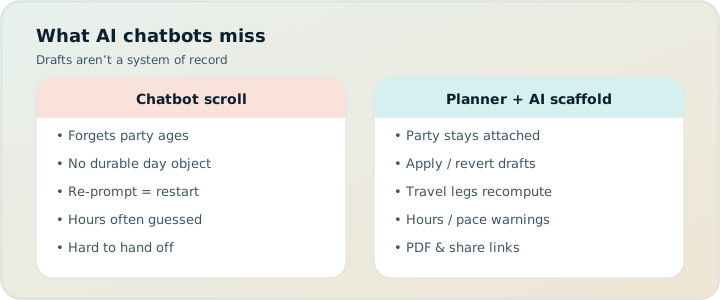
Chatbots miss durable itinerary objects. That single gap explains most “AI planned my trip” disappointments. Concretely, they routinely miss:
- Durable structured data — wishlist vs scheduled stops that survive a reorder
- Travel times for your mode — transit, drive, walk, or cycle legs that update when order changes
- Party-specific pricing context — totals for your adults and children, not a generic “from $20”
- Opening-hours conflict detection across a week, not a one-line “check hours”
- Pace realism — warnings when stops plus travel blow past a heavy day
- A shareable/printable artifact that updates when the plan changes
- Undo after a bad bulk suggestion — chats don’t offer Revert to pre-AI on your day grid
Chatbots also hallucinate confidently: closed days, transfer times rounded to neat fifteens, attractions that moved, ticket rules that ignore age bands. Even when the prose is charming, charming is not chained arrival math.
| Job | Chatbot | TripPapa |
|---|---|---|
| Brainstorm themes | Strong | Optional (you can start from Search + Add) |
| Save candidates | Paste into Notes | Wishlist with detail tabs |
| Build feasible days | Prose list | Day Planner + travel legs + warnings |
| Balance the week | Another prompt | Month View + Save & process |
| Handoff | Screenshot the chat | PDF or view-only share link |
Where TripPapa fits: AI as helper, itinerary as object
TripPapa is a browser trip planner. The product loop is Trips → Research → Day Planner / Month View → Map → Export / Share. AI shows up as assistance inside that loop — not as a replacement for it. Local-first autosave keeps the plan in your browser; optional Cloud Save and passwordless magic-link auth back it up when you want another device. Pricing is framed as a $35 / 6 months planning pass — a trip-window product, not a flight-alert subscription.
Create a trip with dates, destination, travelling party (adults and children with ages), home base, preferred transport mode, and day start time. That party and those defaults follow you into pricing estimates and day construction. Skip party setup and every cost estimate becomes a solo-adult fantasy.
Search + Add and detail enrichment
In Research, Search + Add uses AI-assisted web search to find real places; tick what fits and add to the wishlist — or add manually when you already know the name. Open detail tabs: Overview, Photos, Reviews, Duration, Hours, Pricing. AI helps summarize reviews and enrich typical duration, opening patterns, and party-aware pricing breakdowns (with optional add-ons and source/freshness cues where available). Estimates are planning aids. Verify anything you’ll pay for on the official site.
That’s the difference between “AI told me about a museum” and “the museum is a structured attraction I can schedule.” For the family-budget angle, see party-aware pricing.
AI auto-plan with revert
Unassigned wishlist items can be drafted across days with AI auto-plan, considering party, hours, home base, rest, and typical durations. Apply is atomic. Don’t like the draft? Revert to pre-AI and you’re back to the snapshot before the model touched your grid. That relationship is intentional: AI proposes a scaffold; you keep ownership.
After apply, do the human jobs chatbots skip: read travel legs on the densest days, check Map day mode for geographic drunkenness, respect pace and hours warnings, refresh travel after tweaks. Auto-plan is not a substitute for movement math.
The non-AI spine that makes AI useful
Day Planner chains arrivals/departures and inserts travel legs for transit, drive, walk, or cycle. Pace warnings and hours warnings surface overload and closed-door arrivals. Month View lets you drag, move, and swap days in draft, then Save & process to recompute travel. Map shows wishlist pins or a day’s numbered route. Export Print/Save as PDF and view-only share links hand the plan to people who will never open your chat history.
Without that spine, AI output decays into another Notes paste. With it, AI fills a structure that can survive reordering. If you’re still living across Maps + Notes + Sheets + chat, read Stop Opening Five Apps to Plan One Trip and tab chaos in 2026.
Scenario: chatbot draft vs TripPapa day
You ask a chatbot for “three perfect days in Prague for two adults and a 5-year-old.” It returns charming mornings at the castle, afternoon Old Town wandering, and an evening river scene — every transfer a tidy 15 minutes, every museum mysteriously open, kid energy assumed infinite.
In TripPapa you Search + Add the real places, set party ages, fetch Hours and Pricing on ticketed stops, and drop a first day into Day Planner with transit defaults and home base. The chain shows the castle-to-bridge hop isn’t a neat fifteen with a stroller. An hours warning catches a Monday-closed interior you almost scheduled. Pace warning clears its throat if you also stacked a long museum. You shorten a duration, move one stop in Month View, Save & process, glance at Map day mode, export a PDF for grandparents, share a view-only link with your partner.
Same destination. Same AI-era year. Completely different artifact: a feasible itinerary object instead of a persuasive paragraph.
Scenario: AI + family week in Singapore
Two adults, kids aged 4 and 9, five days. A chatbot produces a denser “best of Singapore” list than any human would walk. The trip lead pastes it into Notes, then into a Sheet with columns for tickets. Party prices are guessed. Zoo + museum + Gardens by the Bay land on the same day because the chat ordered them by popularity, not geography or nap windows.
In TripPapa the same candidates become wishlist items. Party-aware pricing shows child tickets honestly (still verify officially). Auto-plan proposes a scaffold; the lead reverts once, then keeps two days and rebuilds one manually. Hours warnings catch a late arrival. Pace warnings force a cut. Month View spreads the heavy outdoor day away from the long indoor day. The PDF goes to grandparents; the partner gets a view-only link. Flights and hotel stay on the OTA / TripIt side — TripPapa never pretended to book them.
That is AI operationalized as psychology-aware planning help: it accelerates expansion and first drafts, while constraints and handoff do the reduction work that protects decision quality. For overload and maximizing habits that AI can worsen, see choice overload and maximizers vs satisficers.
Objections from the “just use ChatGPT” camp
“I can ask the bot to include travel times.” You can ask. You won’t get legs that recompute when you swap day two and day four, or fallback markers when a number is approximate, or Save & process after a week reshuffle.
“I’ll paste the plan into a doc.” Congrats — you’re rebuilding Notes. Docs don’t warn when you arrive before opening, and they don’t offer view-only trip browsing with map and days. Chatbots miss durable itinerary objects; pasting does not create one.
“AI will get better next year.” Models improve. The product problem remains: travelers need a system of record with party, hours, modes, and handoff. Better prose doesn’t replace that object.
“Planners that use AI will hallucinate too.” TripPapa treats enrichment and auto-plan as assistive and reversible. You still verify tickets officially. Warnings and travel legs exist specifically because optimism — human or model — wrecks sidewalks.
“I don’t want another account.” Plan locally first. Magic-link auth is passwordless and optional for Cloud Save — not a wall before the first wishlist item. See local-first and Cloud Save.
“I already pay for Wanderlog / TripIt.” Fine — complementary jobs. Wanderlog Pro ($39.99/year) shines at live map collab; TripIt Pro (~$49/yr) at booking timelines and flight alerts. Neither replaces AI-assisted research that lands in days with party-aware estimates, pace warnings, and a PDF handoff. Stack them; don’t paste chatbot days into all three.
How-to: use AI the 2026 way (inside a planner)
- Optional: brainstorm themes in any chatbot. Keep it thematic — neighborhoods, pace, must-vs-nice.
- Create the TripPapa trip: dates, party with ages, home base, transport default, day start.
- Search + Add candidates (or add manually). Cap the first pass at a sane wishlist, not fifty maybes.
- Enrich Hours and Pricing on anything you’ll book. Read review summaries; still skim official pages for rules.
- Try AI auto-plan for a scaffold — or drag manually if you already know the shape.
- Inspect Day Planner legs. Fix hours/pace warnings. Refresh travel after reorders. Details: travel times, hours and pace.
- Balance in Month View; Save & process. Check Map day mode on heavy days — Month View.
- Export PDF and/or create a view-only share link. If auto-plan disappointed you, Revert and iterate — don’t start a new chat thread as the source of truth. See PDF export and view-only share.
That workflow keeps the ~40%+ AI adoption trend useful without surrendering the itinerary to a scrollback.
Step framework: the AI boundary rules
Write these on a sticky note if you are the trip lead:
- Chat is for themes, not truth. No chat scroll is the system of record.
- Wishlist is for candidates. Every keeper from a chat lands in Research as a structured place.
- Days are for commitment. Assignment happens in Day Planner, with legs and warnings.
- Auto-plan is a scaffold. Apply once, edit, or Revert — do not re-prompt forever.
- Export is the handoff. PDF or view-only link ends the “forward me the chat” loop.
Those five rules are how TripPapa operationalizes AI psychology: use the model’s speed without inheriting the model’s amnesia about structure.
Common AI planning mistakes
- Treating the first charming draft as feasible. Always run hours and pace checks.
- Ignoring party ages. Child tickets and nap windows are not “optional flavor text.”
- Screenshotting the chat for grandparents. Export a PDF instead.
- Running auto-plan, then also maintaining a parallel Sheet. One itinerary object.
- Asking AI to “include travel times” and skipping Map day mode. Geographic nonsense survives neat numbers.
- Re-prompting instead of Revert + edit. Maximizer trap — see maximizers vs satisficers.
- Expecting AI to book or watch flights. TripPapa does not book; TripIt Pro (~$49/yr) is the alerts job if you want it.
Complementary tools in an AI-era stack
TripPapa deliberately is not booking, flight alerts, or live multi-edit. Keep specialists:
- ChatGPT-class tools — inspiration and themes only.
- OTAs / airlines — checkout for flights and lodging.
- TripIt Pro (~$49/yr) — confirmations and flight alerts after booking.
- Wanderlog Pro ($39.99/year) — live multi-edit maps when that is the group’s core need; TripPapa share is view-only.
- Google Maps — sidewalk navigation after the sequence is honest in TripPapa.
Full job map: Wanderlog / TripIt / Notion roundup. Decision-fatigue angle for AI thrash: decision fatigue.
How TripPapa’s AI maps to the psychology articles
AI without structure can worsen the same failure modes this blog series names. Tab chaos grows when a chat becomes another surface to reconcile with Maps and Notes. Decision fatigue grows when every re-prompt feels like a new round of choosing. Choice overload grows when the model keeps expanding the set. Maximizers re-prompt forever looking for a global best. TripPapa’s answer is the same staged loop across those pieces: expand into a wishlist, commit under hours and pace, lock a handoff. AI accelerates the first two steps; it does not replace the object.
What TripPapa’s AI deliberately is not
Not a booking engine. Not live transit. Not a guarantee of prices or hours. Not a Discovery swipe quiz that pretends preference elicitation is the product. Not an irreversible overwrite of your days. Not live multi-editor collab. Those boundaries are why AI inside TripPapa stays trustworthy enough to use on a real family week.
FAQ
Can I plan without using AI features?
Yes. Add places manually, build days by dragging, export and share. AI is acceleration, not a requirement.
Does auto-plan lock me in?
No. Revert to pre-AI restores the snapshot from before apply.
Are AI prices and hours final?
No. They’re estimates with cues where available — verify official sources before you spend.
Can my co-travellers edit via AI somehow?
Share links are view-only. You remain the editor; they browse the current plan without forking chat versions.
Will AI replace Maps and OTAs?
No — and it shouldn’t. Book and navigate where you already do. Use TripPapa so AI-assisted research lands in days with travel legs and a handoff document.
How does this compare to paying for Wanderlog or TripIt?
Different jobs. Wanderlog Pro ($39.99/year) for live map collab; TripIt Pro (~$49/yr) for flight-centric tools; TripPapa ($35 / 6 months framing) for research → days → legs → export with AI helpers inside. Chatbots still miss durable itinerary objects regardless of which subscription you already have.
Do I need Cloud Save to use AI features?
No. Plan locally first. Cloud Save and magic-link auth are optional backup — not a gate before Search + Add or auto-plan.
Make “AI planned my trip” mean something
Adoption is already mainstream: roughly four in ten travelers lean on AI for planning help, while booking research still burns through hundreds of page views for many people. The winners in 2026 won’t be the longest chat logs. They’ll be the travelers whose AI output became a wishlist, whose days have travel legs and warnings, and whose co-travellers got a PDF or view-only link instead of a screenshot of a paragraph.
Ready when you are: open TripPapa, Search + Add five places, run or skip auto-plan, and make one day honest with travel legs. If you can export it and share it, you didn’t just chat a trip — you built one. For the full product loop, read How TripPapa Works.