“Best free trip planner” lists often hide paid upsells and category errors. This 2026 roundup is honest about free tiers: Google Maps saved places, Google Travel, free chat AI, Wanderlog’s free map/budget/collab story, spreadsheets, and TripPapa’s local-first start (our product) with a $35/6 months pass when you need the full planning window. Verify every vendor’s current free limits before you commit your group.
Also read 2026 roundup, Wanderlog alternatives, Wanderlog pricing, how TripPapa works.
Disclosure: TripPapa is our product. Local-first means you can begin planning in the browser; Pass pricing is $35 for 6 months. We will not claim “forever free Pro.”
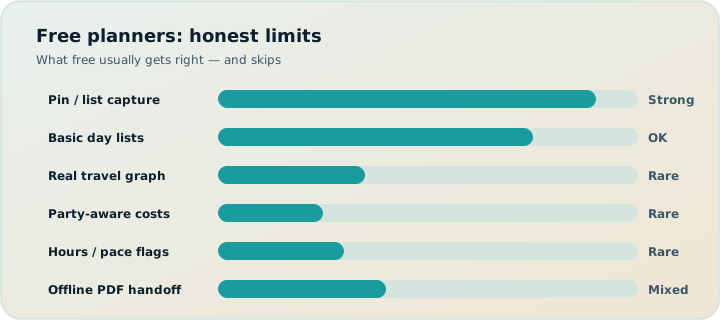
Quick free-tier table
| Option | Free strength | Gap |
|---|---|---|
| Google Maps saved places | Pins, navigation | Not an itinerary object |
| Google Travel | Gmail bookings dashboard | Weak day design |
| ChatGPT/Gemini free | Drafts | Hallucinations; no durable legs |
| Wanderlog Free | Map + budget + collab (typical free story) | Pro $39.99/year — verify |
| Sheets/Notion | Custom trackers | No travel graph |
| TripPapa local-first | Start research→days loop in browser | Pass $35/6mo for planning window |
| TripIt free vs Pro | Basic organizing | Pro alerts ~$49/yr — verify; not day design |
Google Maps + spreadsheet: the true free default
Still wins for light trips. Acknowledge it in every honest roundup. Graduate when days need legs, warnings, and PDF handoff. See Maps vs planner.
Google Travel free
Best free organizer mirror for Gmail users. Not a sightseeing studio. Pair with a planner when needed. TripPapa vs Google Travel.
Free AI chat
Best free brainstorming. Worst free system of record. free AI planners.
Wanderlog Free
Strong free map-first collab for many groups. Collaborative editing is generally on the free tier. Upgrade to Pro ($39.99/year — verify) for offline access, Pro AI assistant (suggests places — not full-trip generation), and route optimization. Stay free if Wi‑Fi collab is enough.
TripPapa local-first start
Begin the feasibility loop without pretending pins are days: party, Research, Day Planner, Month View, Map, Export/Share. Local-first autosave in browser; Cloud Save and magic link when you want backup. Pass: $35/6 months. Not live multiplayer; not flight alerts; not booking engine.
When free is enough vs when paying is kinder
Free enough: short trips, app-fluent friends, improvisation welcome. Paying kinder: family ticket matrices, multi-city arcs, offline elders needing PDF, or year-round map collab offline (Wanderlog Pro). Compare jobs, not logos.
FAQ
Is TripPapa free?
Local-first starting is part of the product posture; Pass is $35/6 months. Check in-product details for what the pass covers at purchase time.
Is Wanderlog Free really usable?
For many map-collab trips, yes. Verify current limits on their site.
What is the best free organizer?
Google Travel for many Gmail users; TripIt free may suffice until you need Pro alerts.
Best free AI planner?
Chat drafts + manual verification — not a single magic app.
Do I need Tripsy?
Only if Apple-native ~$59/yr (verify) matches your phone-first lifestyle.
Can I mix free tools?
Yes: Google Travel + Maps + TripPapa local-first is a coherent free-leaning stack until you buy a pass/Pro.
Why do free lists disagree?
They optimize different jobs and affiliate incentives. Hire by failure mode.
Should students pay?
Often not at first. Start free; pay when failure modes repeat.
How to read free-tier marketing
Free tiers recruit you into a workflow. Paid tiers tax the workflow once it becomes infrastructure. Read free marketing as “what job can I finish without a card?” not “what logos are virtuous.” Wanderlog Free finishing map collab is impressive. Free chat finishing a durable multi-city family plan is not a real claim even when the landing page implies it.
Watch for disappearing free features and soft limits. Verify on vendor sites the week you start a group plan — policies move.
Building a free-leaning stack that still works
A strong free-leaning stack: Google Travel for bookings, Maps for pins and navigation, ChatGPT for brainstorming, TripPapa local-first for structuring days, Sheets only for money splits. Add Wanderlog Free if the group must co-edit pins. Pay later for Pass or Pro when offline, planning-season intensity, or repeated failure modes justify it.
The stack fails when every layer thinks it is canon. Write the canon sentence once. Free software plus clear roles beats paid software plus four competing truths.
Students, one-trip households, and frequent planners
Students: stay free until a specific failure repeats twice. One-trip households: a planning-window pass can beat annual Pro. Frequent map collaborators: annual Wanderlog Pro may be the clean tax. Match cadence to cadence; ignore blog annualization that ignores your calendar.
Free tools are abundant. Free feasibility is rarer. Start in TripPapa locally, keep Maps for navigation, and only pay when the planning season deserves it.
How to read free-tier marketing
Serious trip planning fails in predictable places: optimistic travel times, ignored opening hours, ticket prices that pretend every traveler is a solo adult, and handoff documents that are really chat screenshots. Whatever tool you evaluate — Maps lists, chat AI, Wanderlog, TripIt, Google Travel, or TripPapa — score it against those failure modes instead of against a generic “features” grid. A feature that does not prevent your actual failure is decoration.
TripPapa’s honest scope is the browser loop Trips → Research → Day Planner / Month View → Map → Export / Share. Party adults and kids with ages feed party-aware pricing estimates you must still verify on official sites. Search + Add is AI-assisted; detail tabs cover Overview, Photos, Reviews, Duration, Hours, and Pricing. Day Planner inserts transit, drive, walk, or cycle legs; pace and hours warnings surface overload and closed-door arrivals; AI auto-plan can draft assignments you may Revert. Month View supports drag and swap; Save & process recomputes travel. Map toggles wishlist versus day route and allows drop pin. Export uses Print/PDF; share links are view-only. Local-first storage pairs with optional Cloud Save and magic-link auth. TripPapa Pass is $35 for 6 months. It is not a booking engine, not a flight-alert product, not live multiplayer editing, and not a Discovery Yes/No screener.
Competitor context stays factual: Wanderlog Pro is $39.99/year for offline access, a Pro AI assistant (suggests places — not full-trip generation), and route optimization, while free tiers already include map, budget, and collaboration for many users — verify on Wanderlog’s site. TripIt Pro is $49/year as an email booking organizer with alerts — verify on TripIt’s site. Google Travel remains a free Gmail dashboard. Many travelers still succeed with Google Maps saved places plus spreadsheets for light trips; that stack deserves respect until days demand a real itinerary object. Tripsy around $59/year can matter for Apple-native users when relevant — verify pricing. Always confirm vendor prices before you buy.
Internal reading that supports better decisions includes how TripPapa works, TripPapa versus Wanderlog, TripPapa versus TripIt, TripPapa versus Google Travel, AI trip planning in 2026, day planner travel times, Month View, party-aware pricing, view-only share, print/PDF for families, local-first Cloud Save, and the 2026 planner roundup. Use those pages when you need depth; use this page when you need the job framing for best free trip planners 2026.
Practical next step: build one real day with your actual party before you subscribe to anything. If Maps lists already produce a Thursday morning you trust, stay. If you need legs, warnings, Month View recomputation, and PDF or view-only handoff, open TripPapa at /app and test the loop on a destination you care about. Complementary stacks beat forced monogamy with one logo — bookings in TripIt or Google Travel, navigation in Maps, feasibility in a planner when the trip is heavy enough to deserve it.
Building a free-leaning stack that still works
Serious trip planning fails in predictable places: optimistic travel times, ignored opening hours, ticket prices that pretend every traveler is a solo adult, and handoff documents that are really chat screenshots. Whatever tool you evaluate — Maps lists, chat AI, Wanderlog, TripIt, Google Travel, or TripPapa — score it against those failure modes instead of against a generic “features” grid. A feature that does not prevent your actual failure is decoration.
TripPapa’s honest scope is the browser loop Trips → Research → Day Planner / Month View → Map → Export / Share. Party adults and kids with ages feed party-aware pricing estimates you must still verify on official sites. Search + Add is AI-assisted; detail tabs cover Overview, Photos, Reviews, Duration, Hours, and Pricing. Day Planner inserts transit, drive, walk, or cycle legs; pace and hours warnings surface overload and closed-door arrivals; AI auto-plan can draft assignments you may Revert. Month View supports drag and swap; Save & process recomputes travel. Map toggles wishlist versus day route and allows drop pin. Export uses Print/PDF; share links are view-only. Local-first storage pairs with optional Cloud Save and magic-link auth. TripPapa Pass is $35 for 6 months. It is not a booking engine, not a flight-alert product, not live multiplayer editing, and not a Discovery Yes/No screener.
Competitor context stays factual: Wanderlog Pro is $39.99/year for offline access, a Pro AI assistant (suggests places — not full-trip generation), and route optimization, while free tiers already include map, budget, and collaboration for many users — verify on Wanderlog’s site. TripIt Pro is $49/year as an email booking organizer with alerts — verify on TripIt’s site. Google Travel remains a free Gmail dashboard. Many travelers still succeed with Google Maps saved places plus spreadsheets for light trips; that stack deserves respect until days demand a real itinerary object. Tripsy around $59/year can matter for Apple-native users when relevant — verify pricing. Always confirm vendor prices before you buy.
Internal reading that supports better decisions includes how TripPapa works, TripPapa versus Wanderlog, TripPapa versus TripIt, TripPapa versus Google Travel, AI trip planning in 2026, day planner travel times, Month View, party-aware pricing, view-only share, print/PDF for families, local-first Cloud Save, and the 2026 planner roundup. Use those pages when you need depth; use this page when you need the job framing for best free trip planners 2026.
Practical next step: build one real day with your actual party before you subscribe to anything. If Maps lists already produce a Thursday morning you trust, stay. If you need legs, warnings, Month View recomputation, and PDF or view-only handoff, open TripPapa at /app and test the loop on a destination you care about. Complementary stacks beat forced monogamy with one logo — bookings in TripIt or Google Travel, navigation in Maps, feasibility in a planner when the trip is heavy enough to deserve it.
Verify official hours and prices before you rely on any estimate, and treat complementary tools as complementary — not interchangeable logos.
Verify official hours and prices before you rely on any estimate, and treat complementary tools as complementary — not interchangeable logos.
Verify official hours and prices before you rely on any estimate, and treat complementary tools as complementary — not interchangeable logos.
Verify official hours and prices before you rely on any estimate, and treat complementary tools as complementary — not interchangeable logos.
Verify official hours and prices before you rely on any estimate, and treat complementary tools as complementary — not interchangeable logos.
Verify official hours and prices before you rely on any estimate, and treat complementary tools as complementary — not interchangeable logos.
Verify official hours and prices before you rely on any estimate, and treat complementary tools as complementary — not interchangeable logos.
Verify official hours and prices before you rely on any estimate, and treat complementary tools as complementary — not interchangeable logos.
Verify official hours and prices before you rely on any estimate, and treat complementary tools as complementary — not interchangeable logos.
Verify official hours and prices before you rely on any estimate, and treat complementary tools as complementary — not interchangeable logos.
Verify official hours and prices before you rely on any estimate, and treat complementary tools as complementary — not interchangeable logos.
Verify official hours and prices before you rely on any estimate, and treat complementary tools as complementary — not interchangeable logos.
Verify official hours and prices before you rely on any estimate, and treat complementary tools as complementary — not interchangeable logos.
Verify official hours and prices before you rely on any estimate, and treat complementary tools as complementary — not interchangeable logos.
Verify official hours and prices before you rely on any estimate, and treat complementary tools as complementary — not interchangeable logos.
Verify official hours and prices before you rely on any estimate, and treat complementary tools as complementary — not interchangeable logos.
Verify official hours and prices before you rely on any estimate, and treat complementary tools as complementary — not interchangeable logos.
Verify official hours and prices before you rely on any estimate, and treat complementary tools as complementary — not interchangeable logos.
Verify official hours and prices before you rely on any estimate, and treat complementary tools as complementary — not interchangeable logos.
Verify official hours and prices before you rely on any estimate, and treat complementary tools as complementary — not interchangeable logos.
Verify official hours and prices before you rely on any estimate, and treat complementary tools as complementary — not interchangeable logos.
Verify official hours and prices before you rely on any estimate, and treat complementary tools as complementary — not interchangeable logos.
Verify official hours and prices before you rely on any estimate, and treat complementary tools as complementary — not interchangeable logos.
Verify official hours and prices before you rely on any estimate, and treat complementary tools as complementary — not interchangeable logos.
Verify official hours and prices before you rely on any estimate, and treat complementary tools as complementary — not interchangeable logos.
Verify official hours and prices before you rely on any estimate, and treat complementary tools as complementary — not interchangeable logos.
Verify official hours and prices before you rely on any estimate, and treat complementary tools as complementary — not interchangeable logos.
Verify official hours and prices before you rely on any estimate, and treat complementary tools as complementary — not interchangeable logos.
Verify official hours and prices before you rely on any estimate, and treat complementary tools as complementary — not interchangeable logos.
Verify official hours and prices before you rely on any estimate, and treat complementary tools as complementary — not interchangeable logos.
Verify official hours and prices before you rely on any estimate, and treat complementary tools as complementary — not interchangeable logos.
Verify official hours and prices before you rely on any estimate, and treat complementary tools as complementary — not interchangeable logos.
Free is a starting posture, not a personality. Start free, measure repeated failures, then pay for the specific surface that removes those failures — offline collab, planning-season feasibility, or flight alerts — after you verify vendor pricing on the day you buy.