“Best Wanderlog alternative” usually means one of three jobs: you want a free-ish map planner, you want a booking organizer, or you want a day that survives transit, opening hours, and a family ticket matrix. Those are different products. This guide ranks alternatives by job — not by who wins a fake feature checklist — and includes TripPapa with a clear disclosure: TripPapa is our product. We will not invent Discovery Yes/No screens, live multiplayer editing, or flight alerts we do not ship.
For a wider 2026 field map, see the Wanderlog / TripIt / Notion roundup. For a direct head-to-head, read TripPapa vs Wanderlog. For the TripPapa loop itself, start with how TripPapa works.
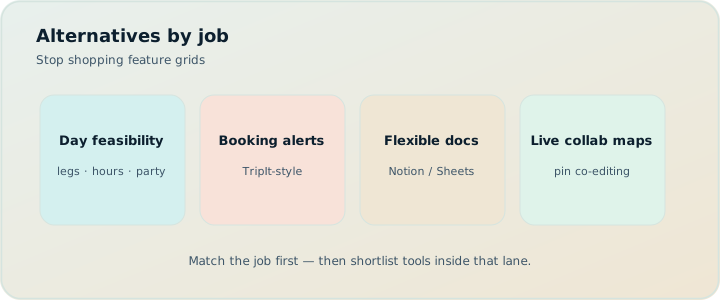
Quick answer: hire by job
| Job | Strong options | Skip if… |
|---|---|---|
| Live map collab with friends | Stay on Wanderlog (or Ellipsis-style free planners) | You need one editor + PDF handoff |
| Email booking timeline + flight alerts | TripIt Pro (~$49/year — verify) | You still need to design unbooked sightseeing days |
| Free reservation dashboard from Gmail | Google Travel | You confuse “bookings exist” with “Thursday is planned” |
| Pins + notes without a planner | Google Maps saved places + a spreadsheet | Travel legs and party ticket math matter |
| Chat draft of a trip | ChatGPT / Gemini | You need a durable Day Planner object |
| Feasibility: research → days → legs → PDF/share | TripPapa (our product) | You require live multiplayer write access |
Disclosure: TripPapa is built by us. We recommend it when the job is day feasibility — party-aware estimates, travel legs, pace/hours warnings, Month View, Print/PDF, view-only share. We do not claim it replaces Wanderlog’s live collab model or TripIt’s inbox organizer.
What people usually mean by “Wanderlog alternative”
Wanderlog’s center of gravity is map-first planning with collaboration. Free tiers already cover a lot of leisure planning (collaborative editing is generally on free); Pro is $39.99/year for offline access, a Pro AI assistant (suggests places — not full-trip generation), and route optimization — always verify current pricing on Wanderlog’s site. People shop for alternatives when one of these is true:
- They want something cheaper or free for a single trip window.
- They want deeper research enrichment (hours, durations, party pricing) than pins + notes.
- They want a booking organizer, not a sightseeing designer (wrong category, but common).
- They tried chat AI and thought an “itinerary” meant a scroll of paragraphs.
- They need printable handoff for grandparents who will not install another app.
Notice how few of those complaints are “the map is bad.” Most are category mismatches. The honest alternative list starts by naming the job you are actually hiring for.
1. Stay on Wanderlog (sometimes the best alternative is none)
If your failure mode is “friends cannot see the same pins,” Wanderlog is still the default answer. Live multiplayer editing is a real product advantage. TripPapa’s share model is deliberately view-only: one editor, many readers. That is better for trip leads and worse for groups that co-author restaurants in real time.
Keep Wanderlog when:
- Road-trip friends drop places as they find them.
- You already live in the free tier and only need Pro for offline or richer AI assist.
- Geography consensus is harder than clock feasibility.
Leave Wanderlog (or add a second tool) when party ticket math, transit legs between stops, Month View day swaps with recomputed travel, or PDF handoff are the actual pain. Complementary stacks beat forced monogamy with one logo. See also Wanderlog pricing explained if cost is the trigger.
2. Ellipsis-style free planners and lightweight map tools
“Ellipsis-style” here means free or freemium browser planners that emphasize lists, maps, and simple day buckets without charging for basic collaboration. They are useful when you need a shared board more than a feasibility engine. Strengths: low friction, often generous free tiers, social pin dumping. Weaknesses: uneven travel-mode modeling, thin party-aware pricing, limited warning systems for pace and opening hours, export quality that varies wildly.
Use a free map planner when the trip is short, the group is tech-comfortable, and you can tolerate manual notes for tickets and hours. Graduate when you start lying to yourself about metro times (“it’s only 20 minutes” typed into a cell that never updates).
Many travelers still do better with Google Maps saved places + a spreadsheet than with a half-adopted planner. Acknowledge that: if your “plan” is eight pins and two dinners, Maps may be enough. The moment you need ordered days with travel between stops, you have outgrown pins. That bridge is exactly why dedicated planners exist — see Google Maps saved places vs a real planner.
3. TripIt: the booking organizer alternative (different job)
TripIt is not a Wanderlog clone. It is an email-forward booking organizer. Forward confirmations; get a timeline of flights, hotels, and rentals. Pro is commonly cited around $49/year for alerts and traveler tools — verify on TripIt’s site. Hire TripIt when scattered vouchers are the pain. Do not hire it to design unbooked sightseeing days; temples and markets rarely email you a PNR.
If your Wanderlog dissatisfaction is really “my flights are a mess,” TripIt (or free Google Travel from Gmail) is the category fix. If your dissatisfaction is “Thursday still isn’t a day,” you need a day planner, not an inbox parser. TripPapa and TripIt are complementary for many people: design days in TripPapa, keep bookings tidy in TripIt. Full contrast: TripPapa vs TripIt and TripIt alternatives 2026.
4. Google Travel: free Gmail dashboard
Google Travel surfaces reservations it can detect from your account. Free, low friction, strong as a logistics mirror. Weak as a research-to-day studio. Unbooked activities never appear. Travel times live in Maps separately. Party-aware attraction pricing and Month View day swaps are not the product. Use it beside a planner, not instead of one. Deeper take: TripPapa vs Google Travel.
5. ChatGPT and Gemini: drafts, not durable plans
Chat models are excellent at producing a first draft of “five days in Lisbon.” They are terrible as systems of record. The scroll forgets your kid’s age, invents hours, and cannot recompute a metro leg when you swap Tuesday and Friday. AI trip planning in 2026 is real — and still incomplete without a planner spine. See AI trip planning in 2026 and ChatGPT itinerary vs trip planner.
TripPapa’s relationship with AI is narrower on purpose: Search + Add is AI-assisted research into structured places; detail tabs cover Overview, Photos, Reviews, Duration, Hours, and Pricing; AI auto-plan can draft day assignments with party, hours, home base, rest, and typical durations in mind; Apply is atomic; Revert to pre-AI restores the pre-draft plan. That is scaffolding inside a planner — not a chatbot that owns your trip.
6. TripPapa: the feasibility alternative (our product)
TripPapa’s loop is Trips → Research → Day Planner / Month View → Map → Export / Share. You create a trip with dates and a travelling party (adults and kids with ages). You research into a wishlist. You schedule days with transit/drive/walk/cycle travel legs, pace warnings, and hours warnings. You balance the week in Month View (drag/swap; Save & process recomputes travel). You check wishlist pins vs day route on the Map (and drop a pin when needed). You hand off via Print/PDF or a view-only /share/ link. Local-first by default; optional Cloud Save; magic-link auth. TripPapa Pass is framed at $35 for 6 months.
What TripPapa is not: a booking engine, a flight-alert product, live multiplayer edit, or a Discovery Yes/No screener. Hire it when the hard part is whether the day survives the clock, the kids’ tickets, and the handoff document.
Where TripPapa is honestly stronger than “just leave Wanderlog”
- Party-aware pricing estimates — adults + kids with ages; verify official prices before you pay.
- Travel legs in Day Planner — transit, drive, walk, cycle with duration and distance.
- Pace and hours warnings — overloaded days and closed-door arrivals flagged inside the plan.
- Month View + Save & process — bird’s-eye reshuffles that recompute travel instead of leaving stale legs.
- Export and share — Print/PDF for offline families; view-only share for digital co-travellers.
- Local-first — plan lives in the browser; Cloud Save is intentional backup, not silent surprise sync.
Where Wanderlog (or free map planners) still win
- Live multiplayer writing on the same trip.
- Mature free-tier habits for pin-heavy social trips.
- Annual Pro pricing ($39.99/year) if you want a full-year consumer subscription shape rather than a six-month planning pass.
Scenario: three friends, one Lisbon week
Alex wants everyone editing pins live. Jordan wants a PDF for parents meeting them mid-trip. Sam wants honest transit times and adult/child ticket estimates. One tool rarely satisfies all three.
Stack A (map-collab first): Plan geography in Wanderlog together. After the group freezes restaurants, one person rebuilds final days in TripPapa for legs, party costs, Month View balance, and PDF. Share a view-only link for digital adults; print for parents.
Stack B (feasibility first): Trip lead owns TripPapa. Friends suggest places in chat; lead adds via Search + Add or drop pin. View-only share keeps everyone informed without forking conflicting edits. Wanderlog is optional if someone insists on a shared scratch map.
Stack C (bookings-heavy): TripIt or Google Travel for flights/hotels; TripPapa or Wanderlog only for the sightseeing block. Do not buy TripIt Pro expecting it to replace day design.
The “best alternative” is the stack that matches your group’s power dynamics. Live collab assumes equal editors. View-only assumes a trip lead. Both are valid cultures.
Pricing honesty (2026 reference points)
| Product | Common 2026 cue | What you’re buying |
|---|---|---|
| Wanderlog Pro | $39.99/year (verify) | Offline, Pro AI assistant, route optimization extras on top of a strong free map planner |
| TripIt Pro | ~$49/year (verify) | Organizer polish + flight-centric alerts |
| Google Travel | Free | Gmail reservation dashboard |
| ChatGPT / Gemini | Free–paid AI plans | Drafts and research chat, not a Day Planner object |
| TripPapa Pass | $35 / 6 months | Planning-window pass for the research → days → export loop |
Compare on the job for this trip, not a single “cheapest annual” cell. Promotions change. Always verify pricing on vendor sites before you buy.
When to choose what
- Need friends editing the same map live → Wanderlog (or a free map planner).
- Need flights/hotels organized from email → TripIt; free mirror → Google Travel.
- Need a first draft essay → ChatGPT/Gemini, then move structure into a planner.
- Need pins only → Google Maps saved places (+ spreadsheet if you must).
- Need party costs, travel legs, Month View, PDF, view-only share → TripPapa.
- Need Apple-native polish as a primary phone app → Tripsy (~$59/yr is a common cue — verify) may be relevant; it is not a substitute for every job above.
Common mistakes when shopping Wanderlog alternatives
- Buying TripIt Pro to “plan activities” that never email confirmations.
- Assuming any AI chat equals an itinerary system.
- Expecting TripPapa to offer live multiplayer edit because competitors do.
- Leaving Maps saved places forever after the trip grew into multi-city days.
- Comparing annual Pro prices to a six-month pass without asking which months you actually plan.
- Ignoring complementary stacks: organizer + day planner is often the adult answer.
How TripPapa fits the research → handoff loop
Create the trip and party. Research with Search + Add; open detail tabs (Overview, Photos, Reviews, Duration, Hours, Pricing). Drag into Day Planner; watch travel legs and warnings. Use AI auto-plan only as a scaffold you can Revert. Balance in Month View; Save & process. Check Map modes. Export PDF or share view-only. Cloud Save if you want another device. That is the whole honest pitch. Deeper walkthrough: How TripPapa works. Related product notes: travel times, Month View, party-aware pricing, view-only share, print/PDF for families.
FAQ
Is TripPapa a free Wanderlog alternative?
TripPapa is local-first and you can start planning in the browser; TripPapa Pass is $35 for 6 months. Wanderlog’s free tier is map-and-collab oriented; Pro is $39.99/year. They are different shapes. TripPapa is not “Wanderlog free forever.” It is a feasibility planner with a planning-window pass. Verify both before you decide.
Does TripPapa replace Wanderlog’s collaboration?
No. TripPapa share links are view-only. If live multiplayer editing is non-negotiable, stay on Wanderlog or a collab-first free planner. Use TripPapa when one person owns the plan and others need a clean read-only artifact.
Can I use TripPapa with TripIt?
Yes. Many travelers design days in TripPapa and keep bookings in TripIt or Google Travel. They solve different failures.
What about ChatGPT as the only planner?
Fine for brainstorming. Weak for durable schedules, travel recomputation, party pricing, and handoff. Paste a draft into a planner if the trip matters.
Is Google Maps enough?
For a light pin list, yes. For ordered multi-day itineraries with transit legs and family costs, usually no. See the Maps vs planner piece linked above.
Does TripPapa book tickets or flights?
No. It is not a booking engine and not a flight-alert product. Verify hours and prices on official sites; book where you normally book.
What is AI auto-plan in TripPapa?
A draft assignment of unassigned wishlist items across days, considering party, hours, home base, rest, and durations. You can Revert to pre-AI. It is not irreversible full-trip magic.
How does Month View differ from Wanderlog day lists?
TripPapa’s Month View supports drag/swap with draft state; Save & process commits and recomputes travel for Day Planner so bird’s-eye edits don’t leave stale legs.
Should I pay annual Pro or a six-month pass?
If you plan lightly all year and live in map collab, annual Wanderlog Pro may fit. If you plan intensively for a season of trips and care about feasibility tooling, TripPapa’s $35/6 months can make more sense. Compare jobs, not vanity annualization.
How to read “alternative” lists without getting played
Affiliate-heavy roundups often force every logo into the same table: offline, collab, AI, price. That table hides category errors. Offline matters for road trips; it does not fix party ticket math. Collab matters for friend groups; it does not fix PDF handoff for grandparents. AI matters for drafting; it does not fix Save & process after a month-level swap. When you read any alternatives list — including this one — score rows by your failure modes, then ignore columns that do not map to those failures.
Also watch for invented feature parity. If a post claims TripPapa does live multiplayer editing or that Wanderlog is a flight-alert inbox, discard the post. Accurate competition writing names absences. TripPapa is not a booking engine. Wanderlog is not TripIt. ChatGPT is not a Day Planner. Google Maps saved places are not an itinerary object. Those sentences are the difference between help and SEO sludge.
A practical 30-minute evaluation
Pick one real day you already halfway know. Build it in your current tool and in the alternative you are considering. Check four things only: (1) Can you see travel between stops without opening a second app? (2) Can you express adults and kids in cost estimates? (3) Can you hand the day to a non-planner as PDF or a share link? (4) If you swap two stops, do times update or do you retype lies? Whichever artifact you would actually follow on Thursday morning is your answer — logos are secondary.
Ready to test feasibility on a real destination? Open TripPapa, create a trip with your party, and schedule one day with travel legs before you judge the whole category. For free-tier honesty across tools, see best free trip planners 2026.