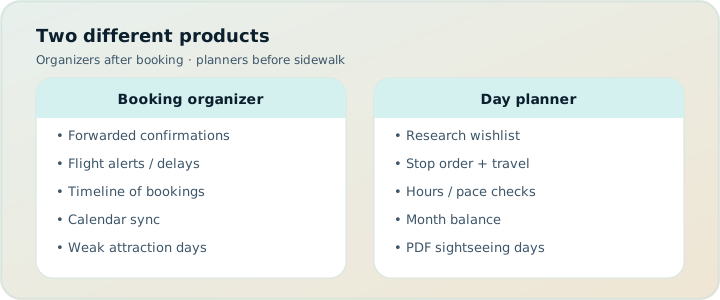
People search “TripIt alternatives” for two opposite reasons. Some need a better booking organizer than forwarding emails. Others discover TripIt never designed their sightseeing days — and they actually need a day planner. Mixing those jobs creates false winners. This guide separates organizer alternatives from day-planner alternatives, includes Google Travel’s free Gmail dashboard, and explains when TripPapa (our product) is the right hire for research → days → travel legs → export/share.
Related reading: TripPapa vs TripIt, 2026 planner roundup, how TripPapa works, and TripPapa vs Google Travel.
Disclosure: TripPapa is our product. It is not a TripIt clone. It does not parse your inbox for flight alerts. Hire TripPapa when unbooked days need feasibility — not when your pain is boarding-pass archaeology.
Quick answer
| If you need… | Start with | Watch-outs |
|---|---|---|
| Email booking timeline + Pro alerts | TripIt Pro (~$49/year — verify) | Weak as a sightseeing designer |
| Free reservation cards from Gmail | Google Travel | Read-oriented; no day design studio |
| Map-first live collab for activities | Wanderlog (Pro $39.99/year — verify) | Not an inbox organizer |
| Pins + spreadsheet logistics | Google Maps saved places + Sheets | No native travel graph |
| Research → Day Planner → PDF/share | TripPapa (Pass $35 / 6 months) | View-only share; not flight alerts |
What TripIt actually optimizes for
TripIt lives after you book. Forward confirmations or sync the inbox; get a timeline of flights, hotels, cars, and other reservations. That is a genuine job. Pro pricing is commonly discussed around $49/year for flight alerts and traveler tools — always verify on TripIt’s site before you buy. The product shines for road warriors and multi-leg booking stacks where vouchers scatter across airlines and hotels.
What TripIt does not optimize for: designing unbooked museum mornings, chaining transit legs between attractions, party-aware ticket estimates for two adults and a seven-year-old, Month View day swaps, or a printable sightseeing PDF for grandparents. If you bought Pro hoping it would become your Kyoto day designer, the disappointment is a category error — not a bug report.
Organizer alternatives (when the job is still “bookings”)
Google Travel
Free Gmail-connected dashboard. Surfaces reservations Google can detect. Low friction, strong as a logistics mirror, weak as a planning studio. Unbooked activities never appear. Use it when you want a free organizer and already live in Google’s account graph. Pair it with a day planner when Thursday still needs designing.
Airline / hotel apps and inbox search
Sometimes the alternative is not another SaaS planner. Search your email for confirmation numbers, pin boarding passes in Wallet, and keep a simple note of hotel addresses. That works for simple trips. It fails when companions ask “what’s the plan?” and you only have PNR soup.
Stay on TripIt
If alerts and a clean booking timeline are the pain, staying on TripIt Pro is often smarter than migrating. Alternatives matter when the product category is wrong for the remaining work — sightseeing design — not when TripIt is merely imperfect.
Day-planner alternatives (when you outgrew the organizer)
This is the fork most “TripIt alternative” posts bury. Once flights and hotels are settled, the remaining work is research, days, routes, and handoff. Organizers stop helping. You need a planner.
Wanderlog
Map-first planning with live collaboration. Free tier covers a lot (including collaborative editing for many users); Pro is $39.99/year for offline access, Pro AI assistant (suggests places — not full-trip generation), and route optimization — verify current pricing. Choose Wanderlog when friends co-edit pins. It is not a TripIt replacement for inbox parsing; it is an activities planner.
Google Maps saved places + spreadsheets
Still the default for millions of trips. Honest and limited. Pins are not an itinerary object. Typed “20 min” never recomputes when you reorder. Party ticket formulas rot. Acknowledge the stack; graduate when days get dense. See Maps vs planner and why purpose-built planners beat sheets.
ChatGPT / Gemini
Great for a first draft essay. Weak as a system of record. Hallucinated hours, forgotten party sizes, and no Save & process when you swap days. Use chat to brainstorm; move structure into a planner. See ChatGPT itinerary vs trip planner and free AI travel planners 2026.
TripPapa (our product)
Browser planner built around feasibility: Trips → Research → Day Planner / Month View → Map → Export / Share. Party adults + kids with ages; party-aware pricing estimates (verify official). Search + Add AI-assisted; detail tabs Overview/Photos/Reviews/Duration/Hours/Pricing. Day Planner travel legs for transit/drive/walk/cycle; pace warnings; hours warnings; AI auto-plan + Revert. Month View drag/swap; Save & process recomputes travel. Map wishlist vs day route; drop pin. Print/PDF export; view-only /share/ links. Local-first; Cloud Save; magic-link auth. Pass: $35 for 6 months.
Not a booking engine. Not flight alerts. Not live multiplayer edit. Not Discovery Yes/No. Hire TripPapa when the organizer finished and the day still isn’t real.
Scenario: Tokyo with flights booked, days empty
You have TripIt (or Google Travel) showing Narita arrival, hotel, and return. The group chat asks for a plan. You paste a ChatGPT list. Someone adds a restaurant. Nobody knows if Tuesday is geographically sane or whether the kids’ tickets blow the budget.
Organizer path (incomplete): Keep polishing booking cards. The chat remains the “plan.”
Planner path: Create a TripPapa trip with dates and party. Search + Add temples, museums, parks. Open Pricing for party estimates; verify official sites for anything you’ll buy. Drag a first day; watch transit legs and hours warnings. Use Month View to balance dense and light days; Save & process. Share a view-only link; Print/PDF for offline adults. Leave TripIt for the flight timeline. Complementary, not competitive.
When TripIt Pro still wins
- You fly constantly and alerts matter more than attraction pacing.
- Sightseeing is light — one free afternoon, not a research project.
- Your company or personal workflow already depends on email-forward parsing.
When a day planner (TripPapa or Wanderlog) wins
- Bookings are done (or simple) and days still need design.
- Transit cities, family ticket matrices, or PDF handoff dominate the pain.
- You are tired of chat scrolls pretending to be itineraries.
When Google Travel is enough organizer
If Gmail already captures your reservations and you do not need Pro-style alerts, Google Travel can be the free organizer while a planner handles days. Do not expect Google Travel to become Day Planner. See TripPapa vs Google Travel.
Collaboration patterns: trip lead vs live editors
TripIt’s share model is about itinerary visibility for bookings. Wanderlog leans live multiplayer for pins. TripPapa uses view-only share so co-travellers browse Research, Day Planner, Month View, Map, and Export without forking edits. Choose the culture that matches your group. Deep dive: group trip planning without chaos and view-only share.
Pricing honesty
| Tool | 2026 cue | Job |
|---|---|---|
| TripIt Pro | ~$49/year (verify) | Organizer + alerts |
| Wanderlog Pro | $39.99/year (verify) | Map planner extras |
| Google Travel | Free | Gmail dashboard |
| TripPapa Pass | $35 / 6 months | Feasibility planning window |
Annual organizer Pro vs six-month planning pass are different shapes. If you fly weekly, TripIt’s year may be obvious. If you plan two intensive leisure trips in a season, a planning pass can be the clearer buy. Always verify vendor pricing.
How to migrate without losing your mind
- Keep TripIt/Google Travel as the booking source of truth.
- Create a trip in the day planner with correct dates and party.
- Move only places you might actually visit — not every pin ever saved.
- Build one real day with travel legs before importing the whole wishlist.
- Export or share only after pace and hours warnings look sane.
- Do not delete the organizer until the trip ends; complementary stacks are fine.
Product truth checklist for TripPapa
When evaluating TripPapa as a TripIt “alternative,” verify you actually need these surfaces: Trips with party; Research with Search + Add and detail tabs; Day Planner legs and warnings; AI auto-plan with Revert; Month View Save & process; Map modes; Print/PDF; view-only share; local-first + Cloud Save + magic link. If you need inbox parsing and flight alerts instead, you are still in TripIt’s category. Product walkthrough: How TripPapa works.
Multi-city and family wrinkles
Organizers handle segments well: flight A, hotel B, flight C. Day planners handle what happens between check-in and check-out. Multi-city Europe trips especially need Month View balance and travel legs — see plan a multi-city Europe itinerary. Families need party-aware estimates — see family vacation planning checklist and party-aware pricing.
FAQ
Is TripPapa a TripIt alternative?
Only if your remaining job is day planning. It is not an email booking organizer and does not offer TripIt-style flight alerts.
Can Google Travel replace TripIt Pro?
Sometimes for basic reservation visibility. If you rely on Pro alerts and traveler tools, verify whether Google Travel covers your needs before canceling.
Should I cancel TripIt if I adopt TripPapa?
Not necessarily. Many people keep both: bookings in TripIt, days in TripPapa.
Does Wanderlog organize email bookings?
That is not its core job. Hire Wanderlog for map planning; hire TripIt/Google Travel for booking timelines.
What about Tripsy?
Tripsy is often discussed around ~$59/year as an Apple-native itinerary app — verify pricing. Relevant if you want a polished iPhone-first organizer/planner hybrid; not automatically the best for browser feasibility planning with party-aware research depth.
Will TripPapa import my TripIt trips?
Plan on rebuilding sightseeing structure in Research/Day Planner. Keep TripIt for the booking spine rather than expecting a perfect one-click clone of every confirmation.
Is ChatGPT enough once TripIt has my flights?
Enough for ideas. Not enough for durable days with recomputed travel and party costs.
What does view-only share mean?
Recipients can browse the plan surfaces without editing. You remain the trip lead. See the share guide linked above.
How does AI auto-plan differ from TripIt?
It drafts day assignments from your wishlist inside TripPapa. It does not read airline emails. You can Revert to pre-AI.
If your bookings are tidy and your days are not, stop shopping for a better inbox and open a planner. Start in TripPapa with your party and one destination day. For Wanderlog-oriented shopping, see best Wanderlog alternatives 2026.
Organizer vs planner: a sharper diagnostic
Write down the last five messages in your trip chat that caused stress. If three or more mention confirmation numbers, terminals, seat assignments, or hotel check-in times, you are still in organizer pain — TripIt Pro or Google Travel remain on-category. If three or more mention “what do we do after lunch,” “is it open,” “how long to get there,” “kids tickets,” or “send me the plan,” you have crossed into planner pain. Buying a better organizer for planner pain feels productive and changes nothing on the sidewalk.
The diagnostic also works in reverse. People sometimes abandon TripIt because “it doesn’t help me plan,” then bounce through five map apps without admitting they still need an inbox timeline for a multi-airline itinerary. Keep the organizer. Add the planner. Cancel only what is redundant after the trip, not before.
What “good enough” looks like for each job
Good enough organizer: Every paid reservation is findable in under thirty seconds, timezone-aware enough that you do not miss a train, shareable enough that a partner can find the hotel address without waking you. Google Travel often clears that bar for Gmail-centric travelers. TripIt Pro clears it harder when alerts matter.
Good enough day planner: Each day has an ordered list of stops, honest travel between them, awareness of opening hours, costs that reflect who is actually going, and a handoff artifact someone else can follow. TripPapa is built for that bar. Wanderlog clears a related bar when live map consensus is the missing piece. ChatGPT alone rarely clears it for more than a weekend fantasy.
Edge cases: cruises, conferences, and “one museum afternoon”
Cruise days and conference trips often need organizers more than sightseeing designers. A single museum afternoon after meetings does not justify a full Research → Month View campaign. Use TripIt/Google Travel, drop one pin in Maps, and move on. Conversely, a fourteen-day multi-city leisure trip with kids makes the organizer a small fraction of the work. Match tool weight to itinerary weight.
Business-heavy travelers who occasionally add leisure days can keep TripIt Pro as the spine and open TripPapa only for the leisure block — create a short date range, party of one or two, and a tight wishlist. You do not need to migrate your entire travel life to a leisure planner to get value from feasibility tooling on the days that deserve it.
Sharing politics after bookings exist
Once flights are booked, group power dynamics shift. The person who holds the TripIt itinerary often becomes the de facto lead even if they never wanted to design days. View-only share in TripPapa lets that person publish a sightseeing plan without opening write access to every restaurant opinion in the group. Wanderlog live edit keeps power distributed. Neither is morally better; both should be chosen deliberately. If your group already fights in shared docs, do not add a second live canvas and hope manners appear.
Working example: weekend plus week
Suppose you book a Friday-to-Monday city break, then later extend into a full week. TripIt happily grows the booking timeline. Your day design should grow in a planner with Month View, not in the notes field of a hotel confirmation. Extend the TripPapa date range, return orphaned stops to Unassigned if days disappear, and rebalance. That workflow is why date-aware trip containers beat chat threads that cannot recompute travel.
When companions ask for “the latest plan,” send a refreshed view-only link or a new PDF rather than a screenshot of TripIt’s booking cards. Booking cards answer “where do we sleep.” Day pages answer “what do we do.” Mixing them in one screenshot is how elders end up at the wrong museum entrance with the right boarding-pass confidence.
Bottom line
TripIt alternatives split cleanly: better organizers (often Google Travel or staying put) versus actual day planners (Wanderlog, Maps+Sheets, TripPapa). TripPapa wins the second fork when feasibility — legs, hours, party pricing, Month View, PDF/share — is the job. It does not win the first fork, and we will not pretend otherwise. Hire tools by failure mode, and your stack gets quieter overnight.
One more practical filter: if your last three frustrations were “boarding pass,” “gate change,” or “which confirmation has the hotel Wi‑Fi,” you are still in organizer territory. If your last three frustrations were “we zigzagged across town,” “it was closed,” “the kids’ tickets shocked us,” or “nobody could read the plan,” you are in planner territory. Buy the second category of tool for the second category of pain — and keep the first tool for the first pain instead of forcing a single logo to lie about what it ships.