Multi-city Europe itineraries fail for boring reasons: too many city hops, days that ignore train time, attraction clusters that zigzag, and budgets that forget kids pay different prices. This how-to uses TripPapa’s real surfaces — Month View, travel legs, party-aware costs — to build a plan you can actually walk. No invented booking engine. No live multiplayer fantasy. Just feasibility.
Start with how TripPapa works. Pair with Month View, travel times, and party-aware pricing.
Disclosure: TripPapa is our product. Keep train tickets and hotels in TripIt or Google Travel if that is your organizer; design sightseeing days here.
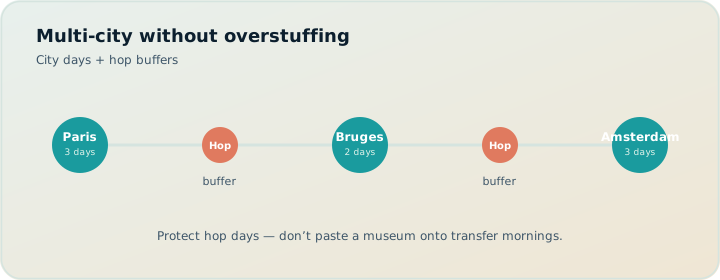
Quick answer: the multi-city loop
- Create one trip (or clear city segments) with real dates and party ages.
- Research wishlists per city without scheduling everything famous.
- Block travel days between cities as light or transit-primary.
- Build days with transit/drive/walk/cycle legs; heed pace and hours warnings.
- Balance in Month View; Save & process after swaps.
- Check Map wishlist vs day route; drop pin for gaps.
- Verify official tickets/hours; Export PDF or view-only share.
Step 1 — Trips container and party
Create the trip with the full date range. Add adults and children with ages so Pricing estimates later are not solo-adult fiction. Set home base per city phase when you can (hotel as anchor). Prefer transit as default mode for most European city centers; switch to train/drive logic on hop days. Defaults save you from re-answering the same questions every morning.
Step 2 — Research without greed
Use Search + Add to build a wishlist. Open detail tabs: Overview, Photos, Reviews, Duration, Hours, Pricing. Fetch party-aware estimates; verify anything you will buy on official sites. Cap the wishlist: multi-city greed is how you book four cities and enjoy none. Unassigned leftovers are fine — they belong in an appendix, not jammed into Tuesday.
Step 3 — Respect intercity travel as a day type
A Paris→Amsterdam morning train is not a hidden free sightseeing slot. In Day Planner, keep hop days sparse: station transfers, one easy near-hotel walk, early night. Month View should show hop days visually lighter. If you pretend the train is “just three hours” and also schedule a major museum, pace warnings should bother you — listen.
Step 4 — Day Planner legs inside each city
Order stops by geography, not Instagram rank. Let travel legs show transit reality. Hours warnings catch Monday closures common in parts of Europe. AI auto-plan can scaffold assignments; Revert if the draft ignores clusters. Manual craft still wins for dense historic cores.
Step 5 — Month View across the arc
Look at the whole trip grid. Swap a museum-heavy day away from a late arrival. Drag an unassigned park onto a recovery day. Save & process so Day Planner does not keep stale metro legs after a bird’s-eye edit. Multi-city planning is mostly calendar truth plus humility.
Step 6 — Map checks
Wishlist mode reveals whether you over-collected across a city. Day mode shows whether today’s order is a star pattern. Drop pin when you notice a market the search missed. Map is a check, not a second unrelated product.
Step 7 — Party costs across cities
Sum estimates by day and by city phase. Expensive museum cities need cheap adjacent days. Kids’ age thresholds differ by venue — estimates help; official sites decide. See the family checklist companion for packing the human process around the tool.
Step 8 — Handoff
Print/PDF for offline trains and elders. View-only /share/ for digital companions. Cloud Save before you switch devices. Keep booking confirmations in Google Travel or TripIt (~$49/yr Pro — verify) so the sightseeing PDF is not also trying to be your boarding pass archive.
Sample skeleton: 10 days, three cities
| Days | Focus | Planner note |
|---|---|---|
| 1–3 | City A | Dense transit days; one recovery evening |
| 4 | Hop | Train primary; light wishlist only |
| 5–7 | City B | Cluster neighborhoods; watch hours |
| 8 | Hop | Again: protect the calendar |
| 9–10 | City C | Fewer stops; buffer before departure flight |
When not to multi-city
If your party melts after two museum days, one city with depth beats three cities with photos. ChatGPT will happily propose five capitals; Month View will show the human cost. Satisficing wins. See maximizers vs satisficers.
FAQ
One trip or multiple trips in TripPapa?
One trip with a continuous date range is simplest for Month View. Some people split trips per city; then you lose one-grid balance. Prefer one container unless permissions differ.
Does TripPapa book Eurail or flights?
No. Not a booking engine. Organize tickets in TripIt/Google Travel/vendor sites.
How do I handle luggage days?
Treat them like hop days: few stops, short walks, early end.
Can AI auto-plan a whole Europe tour?
It can draft assignments; you must constrain cities and Revert garbage. It is not full-trip prophecy.
What about driving countryside segments?
Set drive mode for those days; still verify parking and hours manually.
How do share links help multi-city groups?
View-only readers see the arc without forking edits. Trip lead remains editor.
Should I use Wanderlog instead?
If live multiplayer map collab is the priority, Wanderlog may fit (Pro $39.99/year — verify). For party costs, legs, Month View processing, PDF handoff, TripPapa is the feasibility hire.
Are Maps saved places enough for Europe hops?
Rarely for 10+ day arcs. See Maps vs planner.
Multi-city pacing and recovery days
Europe multi-city trips punish ego. Each hop taxes attention, luggage, and patience. Build recovery into Month View on purpose: a market morning, a long lunch, a single viewpoint. If every day looks equally dense on the calendar, you have designed burnout. Pace warnings inside a city are not enough if the arc between cities never breathes.
Families should be harsher: after a night train or early flight, schedule almost nothing. Party-aware pricing can wait; sleep cannot. The checklist instinct to “make the hop useful” is how kids learn to hate travel.
Tool stack for Europe hops
A coherent stack looks like this: TripIt or Google Travel for trains/flights/hotels; TripPapa for sightseeing feasibility; Maps for sidewalk navigation; official venue sites for tickets. Wanderlog can replace TripPapa if live collab matters more than party-aware depth. ChatGPT can help you choose between cities before you lock dates — then get out of the system-of-record seat.
Do not add a fifth app for “AI itinerary” that cannot recompute travel after a Month View swap. The hop already adds complexity; your software should subtract it.
Border cases: shoulder seasons and Mondays
Shoulder season hours change; Monday closures cluster. Hours tabs and warnings help, but official sites remain the authority — especially around holidays. When you Save & process after moving a museum day, re-check the official page for the new date. Software reduces mistakes; it does not absorb responsibility.
Ready to sketch the arc? Open TripPapa, enter dates and party, and build City A’s first day with transit legs before you add City C’s wishlist greed.
Multi-city pacing and recovery days
Serious trip planning fails in predictable places: optimistic travel times, ignored opening hours, ticket prices that pretend every traveler is a solo adult, and handoff documents that are really chat screenshots. Whatever tool you evaluate — Maps lists, chat AI, Wanderlog, TripIt, Google Travel, or TripPapa — score it against those failure modes instead of against a generic “features” grid. A feature that does not prevent your actual failure is decoration.
TripPapa’s honest scope is the browser loop Trips → Research → Day Planner / Month View → Map → Export / Share. Party adults and kids with ages feed party-aware pricing estimates you must still verify on official sites. Search + Add is AI-assisted; detail tabs cover Overview, Photos, Reviews, Duration, Hours, and Pricing. Day Planner inserts transit, drive, walk, or cycle legs; pace and hours warnings surface overload and closed-door arrivals; AI auto-plan can draft assignments you may Revert. Month View supports drag and swap; Save & process recomputes travel. Map toggles wishlist versus day route and allows drop pin. Export uses Print/PDF; share links are view-only. Local-first storage pairs with optional Cloud Save and magic-link auth. TripPapa Pass is $35 for 6 months. It is not a booking engine, not a flight-alert product, not live multiplayer editing, and not a Discovery Yes/No screener.
Competitor context stays factual: Wanderlog Pro is $39.99/year for offline access, a Pro AI assistant (suggests places — not full-trip generation), and route optimization, while free tiers already include map, budget, and collaboration for many users — verify on Wanderlog’s site. TripIt Pro is $49/year as an email booking organizer with alerts — verify on TripIt’s site. Google Travel remains a free Gmail dashboard. Many travelers still succeed with Google Maps saved places plus spreadsheets for light trips; that stack deserves respect until days demand a real itinerary object. Tripsy around $59/year can matter for Apple-native users when relevant — verify pricing. Always confirm vendor prices before you buy.
Internal reading that supports better decisions includes how TripPapa works, TripPapa versus Wanderlog, TripPapa versus TripIt, TripPapa versus Google Travel, AI trip planning in 2026, day planner travel times, Month View, party-aware pricing, view-only share, print/PDF for families, local-first Cloud Save, and the 2026 planner roundup. Use those pages when you need depth; use this page when you need the job framing for plan multi city europe itinerary.
Practical next step: build one real day with your actual party before you subscribe to anything. If Maps lists already produce a Thursday morning you trust, stay. If you need legs, warnings, Month View recomputation, and PDF or view-only handoff, open TripPapa at /app and test the loop on a destination you care about. Complementary stacks beat forced monogamy with one logo — bookings in TripIt or Google Travel, navigation in Maps, feasibility in a planner when the trip is heavy enough to deserve it.
Tool stack for Europe hops
Serious trip planning fails in predictable places: optimistic travel times, ignored opening hours, ticket prices that pretend every traveler is a solo adult, and handoff documents that are really chat screenshots. Whatever tool you evaluate — Maps lists, chat AI, Wanderlog, TripIt, Google Travel, or TripPapa — score it against those failure modes instead of against a generic “features” grid. A feature that does not prevent your actual failure is decoration.
TripPapa’s honest scope is the browser loop Trips → Research → Day Planner / Month View → Map → Export / Share. Party adults and kids with ages feed party-aware pricing estimates you must still verify on official sites. Search + Add is AI-assisted; detail tabs cover Overview, Photos, Reviews, Duration, Hours, and Pricing. Day Planner inserts transit, drive, walk, or cycle legs; pace and hours warnings surface overload and closed-door arrivals; AI auto-plan can draft assignments you may Revert. Month View supports drag and swap; Save & process recomputes travel. Map toggles wishlist versus day route and allows drop pin. Export uses Print/PDF; share links are view-only. Local-first storage pairs with optional Cloud Save and magic-link auth. TripPapa Pass is $35 for 6 months. It is not a booking engine, not a flight-alert product, not live multiplayer editing, and not a Discovery Yes/No screener.
Competitor context stays factual: Wanderlog Pro is $39.99/year for offline access, a Pro AI assistant (suggests places — not full-trip generation), and route optimization, while free tiers already include map, budget, and collaboration for many users — verify on Wanderlog’s site. TripIt Pro is $49/year as an email booking organizer with alerts — verify on TripIt’s site. Google Travel remains a free Gmail dashboard. Many travelers still succeed with Google Maps saved places plus spreadsheets for light trips; that stack deserves respect until days demand a real itinerary object. Tripsy around $59/year can matter for Apple-native users when relevant — verify pricing. Always confirm vendor prices before you buy.
Internal reading that supports better decisions includes how TripPapa works, TripPapa versus Wanderlog, TripPapa versus TripIt, TripPapa versus Google Travel, AI trip planning in 2026, day planner travel times, Month View, party-aware pricing, view-only share, print/PDF for families, local-first Cloud Save, and the 2026 planner roundup. Use those pages when you need depth; use this page when you need the job framing for plan multi city europe itinerary.
Practical next step: build one real day with your actual party before you subscribe to anything. If Maps lists already produce a Thursday morning you trust, stay. If you need legs, warnings, Month View recomputation, and PDF or view-only handoff, open TripPapa at /app and test the loop on a destination you care about. Complementary stacks beat forced monogamy with one logo — bookings in TripIt or Google Travel, navigation in Maps, feasibility in a planner when the trip is heavy enough to deserve it.
Verify official hours and prices before you rely on any estimate, and treat complementary tools as complementary — not interchangeable logos.
Verify official hours and prices before you rely on any estimate, and treat complementary tools as complementary — not interchangeable logos.
Verify official hours and prices before you rely on any estimate, and treat complementary tools as complementary — not interchangeable logos.
Verify official hours and prices before you rely on any estimate, and treat complementary tools as complementary — not interchangeable logos.
Verify official hours and prices before you rely on any estimate, and treat complementary tools as complementary — not interchangeable logos.
Verify official hours and prices before you rely on any estimate, and treat complementary tools as complementary — not interchangeable logos.
Verify official hours and prices before you rely on any estimate, and treat complementary tools as complementary — not interchangeable logos.
Verify official hours and prices before you rely on any estimate, and treat complementary tools as complementary — not interchangeable logos.
Verify official hours and prices before you rely on any estimate, and treat complementary tools as complementary — not interchangeable logos.
Verify official hours and prices before you rely on any estimate, and treat complementary tools as complementary — not interchangeable logos.
Verify official hours and prices before you rely on any estimate, and treat complementary tools as complementary — not interchangeable logos.
Verify official hours and prices before you rely on any estimate, and treat complementary tools as complementary — not interchangeable logos.
Verify official hours and prices before you rely on any estimate, and treat complementary tools as complementary — not interchangeable logos.
Verify official hours and prices before you rely on any estimate, and treat complementary tools as complementary — not interchangeable logos.
Before you lock City C, force a Month View review of the full arc with your party ages visible and at least one recovery day protected. If the calendar only looks good when you squint, cut a hop — depth beats a third airport transfer every time.