Family vacation planning fails when the plan assumes every traveler is a free adult with infinite stamina and identical ticket prices. This checklist is practical: party-aware planning first, then research, days, warnings, handoff. It uses TripPapa’s real features — adults + kids with ages, Pricing estimates, Day Planner legs, Month View, Print/PDF, view-only share — without pretending we are a booking engine.
Companions: party-aware pricing, print/PDF for families, pace and hours warnings, how TripPapa works.
Disclosure: TripPapa is our product. Verify hours and ticket rules on official sites; kids’ age bands change.
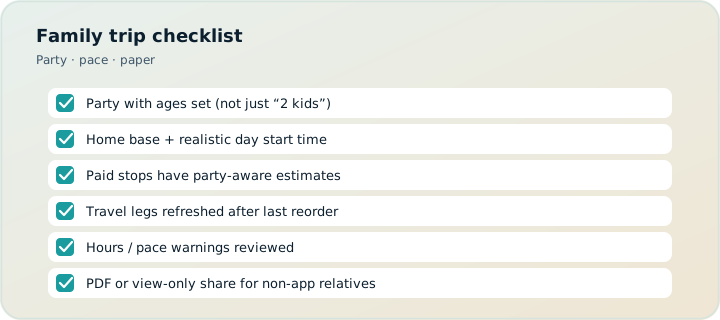
Quick checklist
- Define party ages and non-negotiable constraints (naps, accessibility, budget ceiling).
- Create trip dates; set home base and default transport mode.
- Build a capped wishlist via Search + Add; enrich Duration/Hours/Pricing.
- Schedule fewer stops than you think; watch pace and hours warnings.
- Balance heavy/paid days in Month View; Save & process.
- Verify official tickets; Export PDF; send view-only share to adults who need read access.
- Keep bookings in Google Travel/TripIt; keep Maps for turn-by-turn.
1. Party truth before destination fantasy
List every traveler with ages. Note who needs quieter afternoons, who refuses early starts, who cannot do stairs. Enter adults and kids in TripPapa so estimates reflect the matrix. A “family ticket” on a blog is not your matrix.
2. Constraints beat bucket lists
Write five constraints before twenty desires. Examples: max one paid attraction per day; always back at home base by 16:00; no museum Mondays; gluten-free dinners near the hotel. Constraints make AI auto-plan and manual planning saner.
3. Research with kids in mind
Photos and review summaries help skip places that are adult-only in practice. Duration defaults should be shortened for toddler attention or lengthened for teen hobby deep-dives. Hours matter more with bedtime physics. Pricing tabs should be fetched, then verified officially for age cutoffs.
4. Day Planner: energy is a resource
Alternate demanding and easy days. Insert travel legs honestly — strollers and transit transfers are not free. Pace warnings are your friend; ignore them and you will negotiate meltdowns in a plaza. Hours warnings prevent the classic “closed for renovation” walk of shame.
5. Month View for family politics
Grandparents joining mid-trip? Keep their days lighter. Swap outdoor days onto better weather. Save & process after structural edits. The calendar is where family fairness becomes visible.
6. Money conversations without chat archaeology
Use party-aware estimates to decide which paid stops deserve slots. Cut low-joy expensive items early. Track that estimates are not invoices. Spreadsheet the shared adult costs if needed; do not rebuild the day graph in Sheets.
7. Handoff to non-planners
Print/PDF for airplanes and offline elders. View-only share for the other parent. Do not require everyone to edit live — TripPapa share is view-only on purpose. If your family culture demands live multiplayer pin editing, Wanderlog may fit better for that phase.
8. What not to outsource to AI chat
ChatGPT will propose magical days that skip naps and invent hours. Use chat for ideas; structure in TripPapa; verify officially. See free AI planners and ChatGPT vs planner.
Day-before and day-of mini checklist
- Confirm timed entries on official accounts.
- Re-open Day Planner for tomorrow; glance at legs.
- Export fresh PDF if elders need paper.
- Cloud Save if devices will change.
- Pack the boring stuff the plan assumes (water, transit cards, backup snacks).
FAQ
What ages should I enter?
Actual ages at time of visit when possible — ticket bands care.
Can kids edit the plan?
Prefer suggestions to the trip lead; view-only for browsing.
How many stops per day with kids?
Often two primary stops plus food softens failure. Let pace warnings push back on greed.
Do we need TripIt too?
If bookings are complex, yes as organizer (~$49/yr Pro — verify) or free Google Travel.
Is TripPapa Pass required to start?
TripPapa is local-first so you can start planning in the browser; Pass is $35 for 6 months — check current pass details in-product.
What if grandparents disagree?
Publish a view-only plan after decisions; avoid live edit wars.
How do we handle different kid stamina?
Split party for a few hours if needed; keep a shared evening meetup in the plan.
Are theme parks special?
Yes — fewer other stops that day; verify official priced add-ons; treat as heavy in Month View.
Family planning failure modes to expect
Expect at least one timed entry to move, one kid to get sick of walking, and one adult to underestimate transit with a stroller. Design slack: empty late afternoons, snack anchors near home base, and a pre-agreed “abort to playground” option. TripPapa can show the skeleton; the family still needs social contracts.
Another failure mode is secret maximizing — one adult keeps adding “just one more” stop after the PDF is printed. Freeze the plan with a published view-only link and treat post-freeze adds as optional only. Pace warnings support the freeze with evidence.
Where TripPapa fits the family stack
TripPapa holds who is traveling, what you might do, what fits the clock, and how you hand off. It does not book flights, babysit, or mediate every preference. Use party-aware estimates to kill budget landmines early. Use Print/PDF so grandparents are not dependent on group chat. Use Cloud Save before airport security steals your tablet battery narrative.
If two households co-travel and both demand edit rights, either appoint one lead or use a live collab map for ideas and a TripPapa finalize pass. Two editors without a lead is how families invent two Tuesdays.
After the trip: reuse the checklist
Keep a short post-mortem: which days were overloaded, which tickets surprised you, which handoff failed. Adjust constraints for next time before you chase a new destination fantasy. Tools improve; constraints compound.
Print this checklist mentally, then execute in software. Open TripPapa with your real party ages tonight — the plan gets kinder when the tool knows who is coming.
Family planning failure modes to expect
Serious trip planning fails in predictable places: optimistic travel times, ignored opening hours, ticket prices that pretend every traveler is a solo adult, and handoff documents that are really chat screenshots. Whatever tool you evaluate — Maps lists, chat AI, Wanderlog, TripIt, Google Travel, or TripPapa — score it against those failure modes instead of against a generic “features” grid. A feature that does not prevent your actual failure is decoration.
TripPapa’s honest scope is the browser loop Trips → Research → Day Planner / Month View → Map → Export / Share. Party adults and kids with ages feed party-aware pricing estimates you must still verify on official sites. Search + Add is AI-assisted; detail tabs cover Overview, Photos, Reviews, Duration, Hours, and Pricing. Day Planner inserts transit, drive, walk, or cycle legs; pace and hours warnings surface overload and closed-door arrivals; AI auto-plan can draft assignments you may Revert. Month View supports drag and swap; Save & process recomputes travel. Map toggles wishlist versus day route and allows drop pin. Export uses Print/PDF; share links are view-only. Local-first storage pairs with optional Cloud Save and magic-link auth. TripPapa Pass is $35 for 6 months. It is not a booking engine, not a flight-alert product, not live multiplayer editing, and not a Discovery Yes/No screener.
Competitor context stays factual: Wanderlog Pro is $39.99/year for offline access, a Pro AI assistant (suggests places — not full-trip generation), and route optimization, while free tiers already include map, budget, and collaboration for many users — verify on Wanderlog’s site. TripIt Pro is $49/year as an email booking organizer with alerts — verify on TripIt’s site. Google Travel remains a free Gmail dashboard. Many travelers still succeed with Google Maps saved places plus spreadsheets for light trips; that stack deserves respect until days demand a real itinerary object. Tripsy around $59/year can matter for Apple-native users when relevant — verify pricing. Always confirm vendor prices before you buy.
Internal reading that supports better decisions includes how TripPapa works, TripPapa versus Wanderlog, TripPapa versus TripIt, TripPapa versus Google Travel, AI trip planning in 2026, day planner travel times, Month View, party-aware pricing, view-only share, print/PDF for families, local-first Cloud Save, and the 2026 planner roundup. Use those pages when you need depth; use this page when you need the job framing for family vacation planning checklist.
Practical next step: build one real day with your actual party before you subscribe to anything. If Maps lists already produce a Thursday morning you trust, stay. If you need legs, warnings, Month View recomputation, and PDF or view-only handoff, open TripPapa at /app and test the loop on a destination you care about. Complementary stacks beat forced monogamy with one logo — bookings in TripIt or Google Travel, navigation in Maps, feasibility in a planner when the trip is heavy enough to deserve it.
Where TripPapa fits the family stack
Serious trip planning fails in predictable places: optimistic travel times, ignored opening hours, ticket prices that pretend every traveler is a solo adult, and handoff documents that are really chat screenshots. Whatever tool you evaluate — Maps lists, chat AI, Wanderlog, TripIt, Google Travel, or TripPapa — score it against those failure modes instead of against a generic “features” grid. A feature that does not prevent your actual failure is decoration.
TripPapa’s honest scope is the browser loop Trips → Research → Day Planner / Month View → Map → Export / Share. Party adults and kids with ages feed party-aware pricing estimates you must still verify on official sites. Search + Add is AI-assisted; detail tabs cover Overview, Photos, Reviews, Duration, Hours, and Pricing. Day Planner inserts transit, drive, walk, or cycle legs; pace and hours warnings surface overload and closed-door arrivals; AI auto-plan can draft assignments you may Revert. Month View supports drag and swap; Save & process recomputes travel. Map toggles wishlist versus day route and allows drop pin. Export uses Print/PDF; share links are view-only. Local-first storage pairs with optional Cloud Save and magic-link auth. TripPapa Pass is $35 for 6 months. It is not a booking engine, not a flight-alert product, not live multiplayer editing, and not a Discovery Yes/No screener.
Competitor context stays factual: Wanderlog Pro is $39.99/year for offline access, a Pro AI assistant (suggests places — not full-trip generation), and route optimization, while free tiers already include map, budget, and collaboration for many users — verify on Wanderlog’s site. TripIt Pro is $49/year as an email booking organizer with alerts — verify on TripIt’s site. Google Travel remains a free Gmail dashboard. Many travelers still succeed with Google Maps saved places plus spreadsheets for light trips; that stack deserves respect until days demand a real itinerary object. Tripsy around $59/year can matter for Apple-native users when relevant — verify pricing. Always confirm vendor prices before you buy.
Internal reading that supports better decisions includes how TripPapa works, TripPapa versus Wanderlog, TripPapa versus TripIt, TripPapa versus Google Travel, AI trip planning in 2026, day planner travel times, Month View, party-aware pricing, view-only share, print/PDF for families, local-first Cloud Save, and the 2026 planner roundup. Use those pages when you need depth; use this page when you need the job framing for family vacation planning checklist.
Practical next step: build one real day with your actual party before you subscribe to anything. If Maps lists already produce a Thursday morning you trust, stay. If you need legs, warnings, Month View recomputation, and PDF or view-only handoff, open TripPapa at /app and test the loop on a destination you care about. Complementary stacks beat forced monogamy with one logo — bookings in TripIt or Google Travel, navigation in Maps, feasibility in a planner when the trip is heavy enough to deserve it.
Verify official hours and prices before you rely on any estimate, and treat complementary tools as complementary — not interchangeable logos.
Verify official hours and prices before you rely on any estimate, and treat complementary tools as complementary — not interchangeable logos.
Verify official hours and prices before you rely on any estimate, and treat complementary tools as complementary — not interchangeable logos.
Verify official hours and prices before you rely on any estimate, and treat complementary tools as complementary — not interchangeable logos.
Verify official hours and prices before you rely on any estimate, and treat complementary tools as complementary — not interchangeable logos.
Verify official hours and prices before you rely on any estimate, and treat complementary tools as complementary — not interchangeable logos.
Verify official hours and prices before you rely on any estimate, and treat complementary tools as complementary — not interchangeable logos.
Verify official hours and prices before you rely on any estimate, and treat complementary tools as complementary — not interchangeable logos.
Verify official hours and prices before you rely on any estimate, and treat complementary tools as complementary — not interchangeable logos.
Verify official hours and prices before you rely on any estimate, and treat complementary tools as complementary — not interchangeable logos.
Verify official hours and prices before you rely on any estimate, and treat complementary tools as complementary — not interchangeable logos.
Verify official hours and prices before you rely on any estimate, and treat complementary tools as complementary — not interchangeable logos.
Verify official hours and prices before you rely on any estimate, and treat complementary tools as complementary — not interchangeable logos.
Verify official hours and prices before you rely on any estimate, and treat complementary tools as complementary — not interchangeable logos.
Verify official hours and prices before you rely on any estimate, and treat complementary tools as complementary — not interchangeable logos.
Verify official hours and prices before you rely on any estimate, and treat complementary tools as complementary — not interchangeable logos.
Verify official hours and prices before you rely on any estimate, and treat complementary tools as complementary — not interchangeable logos.
Verify official hours and prices before you rely on any estimate, and treat complementary tools as complementary — not interchangeable logos.
Verify official hours and prices before you rely on any estimate, and treat complementary tools as complementary — not interchangeable logos.
Verify official hours and prices before you rely on any estimate, and treat complementary tools as complementary — not interchangeable logos.
Verify official hours and prices before you rely on any estimate, and treat complementary tools as complementary — not interchangeable logos.
Verify official hours and prices before you rely on any estimate, and treat complementary tools as complementary — not interchangeable logos.