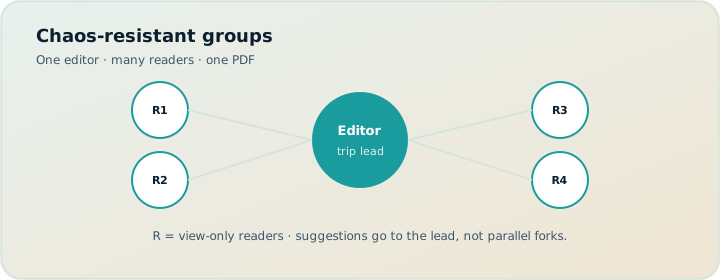
Group trips do not explode because people hate each other. They explode because too many writers share one plan without a defined trip lead — or because the lead hoards the plan in screenshots nobody can trust. This guide contrasts view-only share with live collaboration, and shows TripPapa’s trip-lead pattern: one editor, many readers, PDF when needed.
Read with view-only share, TripPapa vs Wanderlog, and decision fatigue.
Disclosure: TripPapa is our product. Share links are view-only by design — not live multiplayer edit. If your group requires simultaneous editing, Wanderlog is often the better collab fit.
Quick answer
| Group culture | Better default |
|---|---|
| Equal friends co-authoring restaurants live | Wanderlog-style live collab |
| One organizer, many opinions | TripPapa view-only share + suggestion channel |
| Family with offline elders | TripPapa + Print/PDF |
| Bookings-heavy road warriors | TripIt/Google Travel + light planner |
Why live collab feels good and fails
Live multiplayer maps feel democratic. They also create silent deletes, duplicate pins, and three conflicting “final” days. Without norms, the loudest editor wins. Wanderlog shines when the group truly wants shared write access and map consensus — collaborative editing is generally on the free tier. Pro ($39.99/year — verify) is the upgrade for offline access, Pro AI place suggestions, and route optimization.
Why view-only feels strict and works
TripPapa /share/ links let co-travellers browse Research, Day Planner, Month View, Map, and Export without editing. The trip lead gathers suggestions in chat, then adds via Search + Add or drop pin. Conflict moves to conversation; the itinerary object stays coherent. Revoke when the trip ends.
The trip-lead pattern (step by step)
- Announce who edits and where suggestions go.
- Create trip with dates and party (include guests’ kids’ ages if tickets matter).
- Collect wishlist; enrich Hours/Pricing; verify official sources for paid stops.
- Build days with legs; publish view-only link v1 labeled draft.
- Take feedback for 48 hours; edit once; publish v2.
- Freeze major changes 3–5 days out except weather swaps in Month View.
- Export PDF for offline members; Cloud Save before travel.
Suggestion hygiene
Require suggestions to include: place name, why, estimated time cost, who cares. Vague “we should do something fun” is not actionable. The lead is allowed to say no to protect pace. Pace warnings back the no with something other than personality.
Money and fairness
Party-aware estimates make unequal ticket loads visible — adults hosting friends’ kids, seniors’ discounts, etc. Discuss openly before locking days. Estimates are not invoices; verify official pricing.
When to split the group for a day
Put a shared morning and optional afternoon forks in notes. Do not maintain five conflicting Day Planners. One object; optional branches described simply.
ChatGPT in groups
AI drafts shared into chat become false canon. Label drafts; move keepers into the planner; never let the scroll outrank the share link. See ChatGPT vs planner.
FAQ
Can multiple people edit in TripPapa?
Share is view-only. One planning workspace editor at a time is the model.
Is that worse than Wanderlog?
Worse for live co-authoring; better for coherent handoff. Different jobs.
How do we vote on attractions?
Vote in chat or a poll; execute in the planner after votes close.
What about Tripsy?
Apple-native option often cited near ~$59/yr — verify; relevant for iPhone-centric groups, not required reading for every browser-led trip lead.
Should the lead also own TripIt?
Often yes for bookings (~$49/yr Pro — verify) or free Google Travel, separate from sightseeing.
How often should the share link update?
After meaningful edits; Cloud Save refreshes active share snapshots for shared trips.
What if someone hates the lead model?
Then choose live collab tools and accept fork risk — or rotate lead by city.
Can we print different PDFs for subgroups?
Export after filtering your published plan; keep one source of truth, not five sheets.
Permissions before restaurants
Groups love debating restaurants because it feels concrete. The higher-leverage debate is who can change the plan. Settle permissions on day zero: trip lead, suggestion channel, freeze date, and whether share is view-only or live edit. Restaurant debates then happen inside a container that will not fork.
If someone refuses a lead model, admit you are choosing chaos-as-process and pick Wanderlog-style collab deliberately. Ambivalence — “sort of everyone edits” — is the worst mode.
Competing tools without competing truths
It is fine to scout in Maps, book in TripIt, and finalize in TripPapa. It is not fine for each tool to host a different final Tuesday. Declare the canon: “TripPapa share link is the plan; Maps is navigation; TripIt is bookings.” Pin that sentence in the chat. Chaos is often just undeclared canon.
When AI enters the group chat, label drafts. The lead alone promotes text into the itinerary object. That single norm prevents hallucinated hours from becoming boarding-pass-level certainty.
Conflict scripts for trip leads
Useful lines: “Logged — I’ll evaluate against pace and geography tonight.” “That breaks the hours warning; here’s the trade.” “We’re frozen except weather swaps.” Scripts reduce emotional load. Software supports scripts; scripts make software usable.
Chaos is usually a permissions problem. Fix permissions before you fix restaurants. Open TripPapa, build the plan as lead, and share view-only before the next opinion storm.
Permissions before restaurants
Serious trip planning fails in predictable places: optimistic travel times, ignored opening hours, ticket prices that pretend every traveler is a solo adult, and handoff documents that are really chat screenshots. Whatever tool you evaluate — Maps lists, chat AI, Wanderlog, TripIt, Google Travel, or TripPapa — score it against those failure modes instead of against a generic “features” grid. A feature that does not prevent your actual failure is decoration.
TripPapa’s honest scope is the browser loop Trips → Research → Day Planner / Month View → Map → Export / Share. Party adults and kids with ages feed party-aware pricing estimates you must still verify on official sites. Search + Add is AI-assisted; detail tabs cover Overview, Photos, Reviews, Duration, Hours, and Pricing. Day Planner inserts transit, drive, walk, or cycle legs; pace and hours warnings surface overload and closed-door arrivals; AI auto-plan can draft assignments you may Revert. Month View supports drag and swap; Save & process recomputes travel. Map toggles wishlist versus day route and allows drop pin. Export uses Print/PDF; share links are view-only. Local-first storage pairs with optional Cloud Save and magic-link auth. TripPapa Pass is $35 for 6 months. It is not a booking engine, not a flight-alert product, not live multiplayer editing, and not a Discovery Yes/No screener.
Competitor context stays factual: Wanderlog Pro is $39.99/year for offline access, a Pro AI assistant (suggests places — not full-trip generation), and route optimization, while free tiers already include map, budget, and collaboration for many users — verify on Wanderlog’s site. TripIt Pro is $49/year as an email booking organizer with alerts — verify on TripIt’s site. Google Travel remains a free Gmail dashboard. Many travelers still succeed with Google Maps saved places plus spreadsheets for light trips; that stack deserves respect until days demand a real itinerary object. Tripsy around $59/year can matter for Apple-native users when relevant — verify pricing. Always confirm vendor prices before you buy.
Internal reading that supports better decisions includes how TripPapa works, TripPapa versus Wanderlog, TripPapa versus TripIt, TripPapa versus Google Travel, AI trip planning in 2026, day planner travel times, Month View, party-aware pricing, view-only share, print/PDF for families, local-first Cloud Save, and the 2026 planner roundup. Use those pages when you need depth; use this page when you need the job framing for group trip planning without chaos.
Practical next step: build one real day with your actual party before you subscribe to anything. If Maps lists already produce a Thursday morning you trust, stay. If you need legs, warnings, Month View recomputation, and PDF or view-only handoff, open TripPapa at /app and test the loop on a destination you care about. Complementary stacks beat forced monogamy with one logo — bookings in TripIt or Google Travel, navigation in Maps, feasibility in a planner when the trip is heavy enough to deserve it.
Competing tools without competing truths
Serious trip planning fails in predictable places: optimistic travel times, ignored opening hours, ticket prices that pretend every traveler is a solo adult, and handoff documents that are really chat screenshots. Whatever tool you evaluate — Maps lists, chat AI, Wanderlog, TripIt, Google Travel, or TripPapa — score it against those failure modes instead of against a generic “features” grid. A feature that does not prevent your actual failure is decoration.
TripPapa’s honest scope is the browser loop Trips → Research → Day Planner / Month View → Map → Export / Share. Party adults and kids with ages feed party-aware pricing estimates you must still verify on official sites. Search + Add is AI-assisted; detail tabs cover Overview, Photos, Reviews, Duration, Hours, and Pricing. Day Planner inserts transit, drive, walk, or cycle legs; pace and hours warnings surface overload and closed-door arrivals; AI auto-plan can draft assignments you may Revert. Month View supports drag and swap; Save & process recomputes travel. Map toggles wishlist versus day route and allows drop pin. Export uses Print/PDF; share links are view-only. Local-first storage pairs with optional Cloud Save and magic-link auth. TripPapa Pass is $35 for 6 months. It is not a booking engine, not a flight-alert product, not live multiplayer editing, and not a Discovery Yes/No screener.
Competitor context stays factual: Wanderlog Pro is $39.99/year for offline access, a Pro AI assistant (suggests places — not full-trip generation), and route optimization, while free tiers already include map, budget, and collaboration for many users — verify on Wanderlog’s site. TripIt Pro is $49/year as an email booking organizer with alerts — verify on TripIt’s site. Google Travel remains a free Gmail dashboard. Many travelers still succeed with Google Maps saved places plus spreadsheets for light trips; that stack deserves respect until days demand a real itinerary object. Tripsy around $59/year can matter for Apple-native users when relevant — verify pricing. Always confirm vendor prices before you buy.
Internal reading that supports better decisions includes how TripPapa works, TripPapa versus Wanderlog, TripPapa versus TripIt, TripPapa versus Google Travel, AI trip planning in 2026, day planner travel times, Month View, party-aware pricing, view-only share, print/PDF for families, local-first Cloud Save, and the 2026 planner roundup. Use those pages when you need depth; use this page when you need the job framing for group trip planning without chaos.
Practical next step: build one real day with your actual party before you subscribe to anything. If Maps lists already produce a Thursday morning you trust, stay. If you need legs, warnings, Month View recomputation, and PDF or view-only handoff, open TripPapa at /app and test the loop on a destination you care about. Complementary stacks beat forced monogamy with one logo — bookings in TripIt or Google Travel, navigation in Maps, feasibility in a planner when the trip is heavy enough to deserve it.
Verify official hours and prices before you rely on any estimate, and treat complementary tools as complementary — not interchangeable logos.
Verify official hours and prices before you rely on any estimate, and treat complementary tools as complementary — not interchangeable logos.
Verify official hours and prices before you rely on any estimate, and treat complementary tools as complementary — not interchangeable logos.
Verify official hours and prices before you rely on any estimate, and treat complementary tools as complementary — not interchangeable logos.
Verify official hours and prices before you rely on any estimate, and treat complementary tools as complementary — not interchangeable logos.
Verify official hours and prices before you rely on any estimate, and treat complementary tools as complementary — not interchangeable logos.
Verify official hours and prices before you rely on any estimate, and treat complementary tools as complementary — not interchangeable logos.
Verify official hours and prices before you rely on any estimate, and treat complementary tools as complementary — not interchangeable logos.
Verify official hours and prices before you rely on any estimate, and treat complementary tools as complementary — not interchangeable logos.
Verify official hours and prices before you rely on any estimate, and treat complementary tools as complementary — not interchangeable logos.
Verify official hours and prices before you rely on any estimate, and treat complementary tools as complementary — not interchangeable logos.
Verify official hours and prices before you rely on any estimate, and treat complementary tools as complementary — not interchangeable logos.
Verify official hours and prices before you rely on any estimate, and treat complementary tools as complementary — not interchangeable logos.
Verify official hours and prices before you rely on any estimate, and treat complementary tools as complementary — not interchangeable logos.
Verify official hours and prices before you rely on any estimate, and treat complementary tools as complementary — not interchangeable logos.
Verify official hours and prices before you rely on any estimate, and treat complementary tools as complementary — not interchangeable logos.
Verify official hours and prices before you rely on any estimate, and treat complementary tools as complementary — not interchangeable logos.
Verify official hours and prices before you rely on any estimate, and treat complementary tools as complementary — not interchangeable logos.
Verify official hours and prices before you rely on any estimate, and treat complementary tools as complementary — not interchangeable logos.
Verify official hours and prices before you rely on any estimate, and treat complementary tools as complementary — not interchangeable logos.
Verify official hours and prices before you rely on any estimate, and treat complementary tools as complementary — not interchangeable logos.
Verify official hours and prices before you rely on any estimate, and treat complementary tools as complementary — not interchangeable logos.
Verify official hours and prices before you rely on any estimate, and treat complementary tools as complementary — not interchangeable logos.
Verify official hours and prices before you rely on any estimate, and treat complementary tools as complementary — not interchangeable logos.
Verify official hours and prices before you rely on any estimate, and treat complementary tools as complementary — not interchangeable logos.
Verify official hours and prices before you rely on any estimate, and treat complementary tools as complementary — not interchangeable logos.
Verify official hours and prices before you rely on any estimate, and treat complementary tools as complementary — not interchangeable logos.
Verify official hours and prices before you rely on any estimate, and treat complementary tools as complementary — not interchangeable logos.
Publish the permissions rule in the same message as the first view-only share link so newcomers never assume they can edit. Clear norms at link-drop time prevent half the chaos that tools alone cannot fix.